


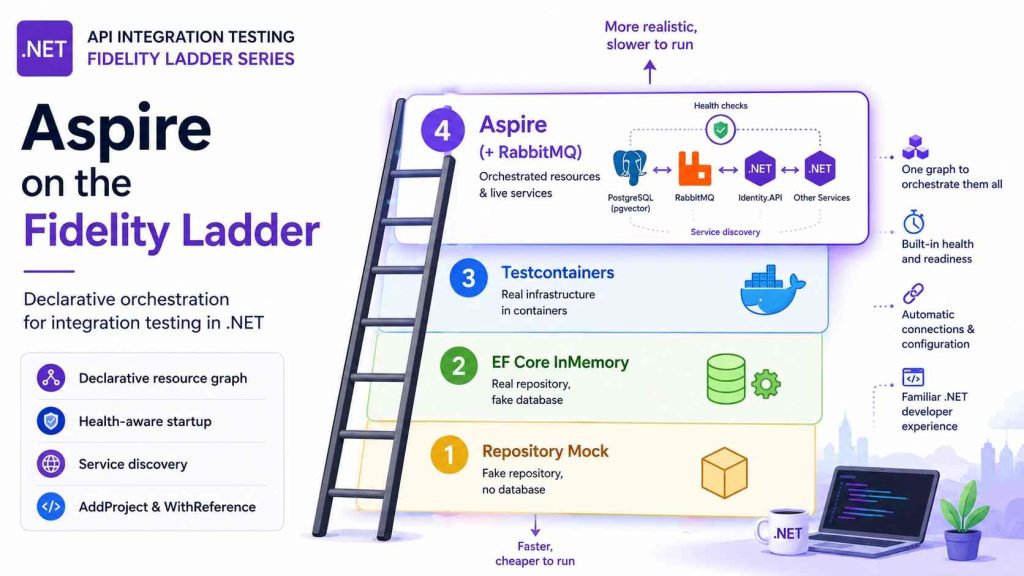
Building API Integration Tests in .NET #4: Aspire on the Fidelity Ladder
1. Introduction
In the previous article, we climbed the ladder to Testcontainers rung — imperative Docker containers you start and wire yourself. That works well for one or two dependencies but it gets repetitive when your test topology mirrors a development AppHost: multiple databases, a message broker, and a sibling .NET service like Identity.API.
The fourth rung adds Aspire orchestration inside the test fixture — declarative resources, built-in health notifications, and connection strings from the hosting layer.
| Rung | What you gain | What you still defer |
|---|---|---|
| Aspire (in tests) | Resource graph, health waits, AddProject for live services | Full closed-box AppHost testing (optional separate style) |
| Testcontainers | Direct control per container | Manual orchestration for multi-service graphs |
Prerequisites: Docker running. Section 3 summarizes Aspire for readers new to the topic; deeper introductions are in References.
2. A quick review — Testcontainers’ place on the ladder
| Concept | Summary |
|---|---|
WebApplicationFactory | Hosts the API under test in-process — ConfigureTestServices remains the side door for test doubles |
| Testcontainers | Start containers imperatively; you inject connection strings |
| Why Aspire next | Several wired dependencies + health coordination; optional live .NET sibling services (Identity.API) |
eShop keeps the same HTTP tests across rungs. Aspire mode changes how dependencies are provisioned, not the test methods themselves.
3. What is Aspire?
.NET Aspire is Microsoft’s local orchestration layer for cloud-native .NET apps. You describe your system in an AppHost project — databases, caches, message brokers, and .NET services — as a graph of resources (AddPostgres, AddRabbitMQ, AddProject, WithReference). Running the AppHost starts those resources (typically in Docker), wires connection strings and endpoints between services, and exposes a dashboard for logs and health.
Think of it as: docker-compose-like ergonomics, but modeled in C# with first-class .NET service references — aimed at how you develop and test distributed applications, not at replacing your production deploy target (Kubernetes, Azure Container Apps, etc.).
This series uses Aspire inside test fixtures for the same reason teams use it in development: less manual glue when several dependencies must start in the right order and talk to each other.
Below are some of the pros and cons when we adopt Aspire
Benefits
| Benefit | What it means in practice |
|---|---|
| Declarative topology | Dependencies and references live in code beside your solution — reviewable, refactorable |
| Service discovery | Connection strings and URLs flow to projects without hard-coding localhost ports |
| Health and observability | Dashboard and resource notifications show what is running and what failed |
| Aligned dev and test vocabulary | The same AddPostgres / AddProject patterns can appear in AppHost and test hosts |
| Testing support | Aspire.Hosting.Testing can launch and manipulate the AppHost for integration tests |
Limitations
| Limitation | What to watch for |
|---|---|
| Docker-heavy | Most resources run as containers — same machine requirements as Testcontainers |
| Heavier than one container | A single Postgres in Testcontainers is simpler than pulling in Aspire hosting packages |
| Another abstraction | Teams must learn AppHost, resources, and how references map to configuration |
| Not a deploy button | Aspire orchestrates local/dev/test workflows; production pipelines still need their own story |
| Graph drift | Test-side DistributedApplication graphs (eShop hybrid) can diverge from production AppHost without discipline |
For full Aspire primers — getting started, dashboard, cloud-native positioning — see the articles in References. The rest of this post assumes that context and focuses on testing on the fidelity ladder.
4. Two ways to use Aspire in tests
Microsoft documents Aspire testing in the Testing overview. There are two distinct shapes worth separating before you copy a sample from the wrong blog post.
A — Closed-box: DistributedApplicationTestingBuilder (full AppHost)
This is Microsoft’s documented Aspire testing model — the path described in the Testing overview, the write your first test tutorial, and the Aspire solution test-project template. The Aspire.Hosting.Testing package launches your real AppHost project in a background thread. Tests send HTTP to services running as separate processes — Frontend → API → Database, matching full distributed topology.
Test project → AppHost process → Database, API, Frontend (all separate processes)Typical setup:
var appHost = await DistributedApplicationTestingBuilder
    .CreateAsync<Projects.MyAppHost>();

await using var app = await appHost.BuildAsync();
await app.StartAsync();

var httpClient = app.CreateHttpClient("api");
var response = await httpClient.GetAsync("/health");
Strengths: End-to-end verification across the full distributed application. Realistic networking and service discovery. Resource manipulation before startup (Section 8) is designed for this model.
Limits: No ConfigureTestServices on individual APIs — tests run out-of-process. Microsoft documents that mocking or replacing DI registrations is not supported here. You influence behavior through environment variables, AppHost arguments, and changes on the testing builder.
Use when: You want to prove the whole AppHost graph works together — the scenario Aspire’s testing docs and templates target.
B — Open-box hybrid: WebApplicationFactory + DistributedApplication (eShop)
eShop uses a hybrid aligned with Posts 1–3:
Test project → WebApplicationFactory (Catalog.API / Ordering.API in-process)
→ DistributedApplication in fixture (Postgres, RabbitMQ, Identity.API only)WebApplicationFactory<Program>still hosts the system under test in-process — sameConfigureTestServices, same test doubles, same debugger experience as Mock and Testcontainers modes.CatalogAspireTestHost/OrderingAspireTestHostspin up a minimalDistributedApplicationthat provisions dependencies only — not Catalog.API or Ordering.API as Aspire projects.
Strengths: Same test class and DI swapping as lower rungs. Aspire handles Postgres (+ optional RabbitMQ), health waits, and Ordering’s live Identity.API via AddProject.
Limits: You maintain a test-side resource graph that should stay aligned with AppHost — not automatic parity with production AppHost unless you discipline it.
Use when: API integration tests are the focus and you need orchestration without giving up WebApplicationFactory.
This series implements B in the demo repo. A is the path to grow toward for full-stack closed-box suites — and it is where Microsoft’s resource-manipulation APIs in Section 8 are most fully documented.
5. When to climb to this rung
When to use it
- Multiple dependencies wired together — Ordering needs Postgres and a live Identity token endpoint.
- Health coordination — wait until resources are healthy before HTTP assertions, without hand-written retry loops on every container.
- Team already uses Aspire in development — test fixtures reuse familiar
AddPostgres,AddRabbitMQ,AddProject,WithReferencevocabulary. - Messaging tests — RabbitMQ alongside Postgres in the same Aspire host.
Blind spots
- Slower cold start than Testcontainers-only (order of magnitude: tens of seconds vs a slightly lighter Docker-backed start).
- More packages —
Aspire.Hosting, hosting integrations, RabbitMQ hosting modules in test projects. - Two Aspire stories — readers may conflate full AppHost testing (A) with the eShop hybrid (B). Pick deliberately.
Aspire vs Testcontainers (this series)
| Question | Testcontainers | Aspire in tests |
|---|---|---|
| Who wires multiple deps? | Your code / shared helper | Aspire hosting APIs |
| Live .NET sibling API | You host it yourself | AddProject<Identity_API>() |
| API under test | WebApplicationFactory | WebApplicationFactory (eShop) |
| Health waits | Custom | WaitForResourceHealthyAsync |
6. The eShop hybrid model
End-to-end flow for Catalog Aspire mode:
1. CatalogApiFixture constructed (mode = Aspire)
2. InitializeAsync:
     CatalogAspireTestHost.StartAsync()
       → DistributedApplication starts Postgres (pgvector image)
       → WaitForResourceHealthyAsync("CatalogDB")
       → return connection string
3. WebApplicationFactory boots with connection string in IConfiguration
4. EnsurePostgresSeededAsync (migrations + seed)
5. Tests send HTTP via logged HttpClient
6. DisposeAsync stops DistributedApplication
Ordering adds IdentityDB + Identity.API as Aspire projects; the fixture injects Identity:Url from the running Identity endpoint.
The API under test never runs as an Aspire AddProject — that is intentional (see hybrid rationale in the introduction): keep ConfigureTestServices and in-process debugging.
7. In Action: Catalog and Ordering Aspire hosts
Catalog — Postgres (+ optional RabbitMQ for Post 5)
public CatalogAspireTestHost(Assembly testAssembly, bool includeRabbitMq = false)
{
    var options = new DistributedApplicationOptions
    {
        AssemblyName = testAssembly.FullName,
        DisableDashboard = true
    };

    var appBuilder = DistributedApplication.CreateBuilder(options);
    Postgres = appBuilder.AddPostgres("CatalogDB")
        .WithImage("ankane/pgvector")
        .WithImageTag("latest");

    if (includeRabbitMq)
        EventBus = appBuilder.AddRabbitMQ("eventbus");

    _app = appBuilder.Build();
}
Start and wait for health:
await _app.StartAsync(cancellationToken);

var resourceNotifications = _app.Services.GetRequiredService<ResourceNotificationService>();
await resourceNotifications.WaitForResourceHealthyAsync(Postgres.Resource.Name, timeout.Token);

return new CatalogAspireEndpoints(
    await Postgres.Resource.GetConnectionStringAsync(cancellationToken),
    eventBusConnectionString);
Connection string injection uses the Aspire resource name as the configuration key:
settings[$"ConnectionStrings:{options.PostgresResourceName}"] = options.PostgresConnectionString;Testcontainers mode used ConnectionStrings:catalogdb instead — same database, different wiring convention.
Ordering — Postgres + Identity.API
var appBuilder = DistributedApplication.CreateBuilder(options);
Postgres = appBuilder.AddPostgres("OrderingDB");
IdentityDB = appBuilder.AddPostgres("IdentityDB");
IdentityApi = appBuilder.AddProject<Projects.Identity_API>("identity-api")
    .WithReference(IdentityDB);
The fixture reads the live Identity endpoint:
public string IdentityApiUrl => IdentityApi.GetEndpoint("http").Url;

// OrderingTestHostConfiguration:
settings["Identity:Url"] = options.IdentityApiUrl ?? "http://localhost/identity";
Testcontainers can provide the same fidelity by running an Identity.API container image next to Postgres. The difference is the setup: you must build or obtain the image, start it, wait for readiness, and inject its endpoint yourself. Aspire’s AddProject<Projects.Identity_API>() starts the .NET project directly and wires its database reference and endpoint through the resource graph. The distinction is therefore who owns the service orchestration, not whether Testcontainers can run the service.
Fixture switch — same tests
[CatalogFunctionalTestMode(CatalogFunctionalTestMode.Aspire)]
public sealed class CatalogApiTests(CatalogApiTestSession session) { ... }

[OrderingFunctionalTestMode(OrderingFunctionalTestMode.Aspire)]
public sealed class OrderingApiTests(OrderingApiTestSession session) { ... }
CatalogApiTestSession lazily creates one fixture per mode — Aspire cold start is paid once per test run, not per test method.
In my eShop demo, Aspire mode still uses ConfigureSharedExternalDependencies for Catalog/Ordering API tests — fake AI, no-op messaging — unless you switch to messaging modes
8. Managing resources before startup
Aspire’s testing docs also emphasize something interesting: you can shape the resource graph before the app fully starts — skipping dependencies, simulating failure, or overriding configuration. That is how you move from “happy path only” toward resilience and chaos-style integration tests.
Microsoft covers this in Testing overview and Advanced testing scenarios. Patterns fall into two buckets depending on which Aspire testing shape you use.
Full AppHost testing (DistributedApplicationTestingBuilder)
After CreateAsync<Projects.MyAppHost>() and before BuildAsync() / StartAsync(), the testing builder exposes the AppHost’s resources for mutation:
| Technique | Purpose | Example |
|---|---|---|
WithExplicitStart in AppHost | Resource exists but does not start until a test starts it | Run API tests without Grafana/monitoring sidecars |
| AppHost arguments | Conditionally skip resources | CreateAsync(["AddDatabase=false"]) — assert postgres absent |
CreateResourceBuilder<T>(name) | Mutate a named resource before start | WithEnvironment(...) for feature flags on the API project |
Remove WaitAnnotation | Start without waiting for dependencies | Test behavior when startup order is wrong or a dep is down |
| Break a container entrypoint | Simulate unavailable infrastructure | CreateResourceBuilder<ContainerResource>("cache").WithEntrypoint("sleep 1d") — health checks fail while Redis is “unavailable” (API reference example) |
Example — API healthy without optional monitoring (Advanced scenarios):
var appHost = await DistributedApplicationTestingBuilder
    .CreateAsync<Projects.MyAppHost>();

await using var app = await appHost.BuildAsync();
await app.StartAsync();

// "monitoring" marked WithExplicitStart in AppHost — not started
await app.ResourceNotifications.WaitForResourceHealthyAsync("api", cts.Token);
Example — simulate Redis unavailable for health-check testing:
var appHost = await DistributedApplicationTestingBuilder.CreateAsync<Projects.MyAppHost>();

appHost.CreateResourceBuilder<ContainerResource>("cache")
    .WithEntrypoint("sleep 1d");  // container runs but does not serve Redis

await using var app = await appHost.BuildAsync();
await app.StartAsync();

var response = await httpClient.GetAsync("/health");
Assert.Equal(HttpStatusCode.ServiceUnavailable, response.StatusCode);
Caution from the docs: removing wait annotations or starting resources without dependencies is intentional chaos — use it to assert degraded behavior (timeouts, 503s, retry policies), not as the default happy-path setup.
For lifecycle hooks before any resource is created, see Manage the AppHost in tests (DistributedApplicationFactory, OnBuilderCreating).
eShop hybrid — mutate the inline DistributedApplication builder
eShop does not launch the full eShop AppHost in tests. Instead, CatalogAspireTestHost / OrderingAspireTestHost call DistributedApplication.CreateBuilder inside the test assembly. The same ideas apply on appBuilder before Build():
| Technique | How in eShop hybrid |
|---|---|
| Optional RabbitMQ | includeRabbitMq flag — resource omitted entirely unless messaging mode |
WithExplicitStart | Mark Postgres or Identity as explicit-start; test code chooses when to StartAsync on that resource |
| Wrong image / bad credentials | .WithImage("postgres:invalid-tag") — assert fixture startup fails or API returns errors |
Skip WaitForResourceHealthyAsync | Deliberately boot WebApplicationFactory before Postgres is ready — assert retry or failure paths |
| Inject bad connection string | Pass garbage in CatalogTestHostConfiguration after start — test API error handling without stopping the container |
Because the API runs in WebApplicationFactory, chaos tests on dependency unavailability combine Aspire resource control (broken broker, late DB) with HTTP assertions and optional test doubles — something closed-box AppHost tests approach only via env vars and external HTTP.
Optional reading — chaos and failure injection
eShop’s repo does not ship chaos tests today. This section maps official Aspire capabilities to experiments you can add: broken cache containers (full AppHost), omitted RabbitMQ (hybrid), Identity started late (Ordering). Treat these as advanced suites — keep happy-path Aspire tests stable in CI and run failure scenarios in a separate trait or nightly job.
9. Running, traits, and workflow
Runsettings
<ESHOP_CATALOG_FUNCTIONAL_TEST_MODE>Aspire</ESHOP_CATALOG_FUNCTIONAL_TEST_MODE>
<ESHOP_ORDERING_FUNCTIONAL_TEST_MODE>Aspire</ESHOP_ORDERING_FUNCTIONAL_TEST_MODE>
File: eShop.FunctionalTests.Aspire.runsettings
CLI
dotnet test tests/Catalog.FunctionalTests --settings eShop.FunctionalTests.Aspire.runsettings
dotnet test tests/Ordering.FunctionalTests --filter-trait FunctionalTestMode=aspire
Trait values: aspire, aspire-messaging-outbox, aspire-messaging-rabbitmq (Post 5).
Suggested workflow
| When | Mode |
|---|---|
| Local edit loop | Repository Mock or EF InMemory |
| PR validation — SQL | Testcontainers subset |
| Nightly / pre-release | Aspire (+ messaging traits) |
| Resilience / chaos experiments | Aspire with resource manipulation (Section 8), separate job |
Enable the Aspire dashboard during a failing local run by setting DisableDashboard = false in DistributedApplicationOptions — useful when a resource never reaches healthy state.
Pros and cons (this rung)
| Pros | Cons |
|---|---|
| Declarative resource graph – Define databases, brokers, and services in one place using C# | More hosting packages – Additional Aspire dependencies and a steeper learning curve |
Automatic health coordination – WaitForResourceHealthyAsync eliminates custom startup retry logic | Longer startup time – Cold starts are slower than Repository Mock, EF InMemory, or Testcontainers |
Built-in service discovery – AddProject and WithReference automatically wire connection strings and endpoints | Hybrid graph maintenance – Test-side resource graphs can drift from the production AppHost if not kept in sync |
Reuse existing API tests – Continue using WebApplicationFactory, ConfigureTestServices, and the same HTTP test suite | Two testing models – Choose between the eShop hybrid approach and full AppHost (DistributedApplicationTestingBuilder) testing |
10. Conclusion
Aspire is the next step on the Test Fidelity Ladder when your integration tests outgrow manually orchestrated containers. Rather than replacing WebApplicationFactory, it complements it by managing the infrastructure around your API—databases, message brokers, and even live sibling services—while letting your tests continue to run in-process.
If Testcontainers gives you fine-grained control over individual containers, Aspire gives you a declarative resource graph, built-in health coordination, and service discovery, making multi-service integration tests easier to build and maintain. For teams already using Aspire during development, this also brings the test environment closer to the developer experience.
In the next article, we’ll stay on the Aspire rung and extend the fidelity ladder to messaging, comparing a lightweight spy event bus with a real RabbitMQ-backed transactional outbox to explore the trade-off between speed and production realism.
11. References
This series
- Part 1 — A Test Fidelity Ladder
- Part 2 — Repository Mock and EF InMemory
- Part 3 — Testcontainers on the Fidelity Ladder
- Part 4 — Aspire on the Fidelity Ladder — this article
- Part 5 — Messaging, Outbox, and RabbitMQ on the Fidelity Ladder
Demo repo
- trainer1234/eShop-test on GitHub
- dotnet/eShop on GitHub — upstream reference application
Microsoft Aspire — testing
- Testing overview —
DistributedApplicationTestingBuilder, closed-box model, configuration - Advanced testing scenarios —
WithExplicitStart, conditional resources, wait annotation removal, env overrides - Manage the AppHost in tests —
DistributedApplicationFactory, lifecycle hooks - Integration tests in ASP.NET Core —
WebApplicationFactory(eShop hybrid base)
Related NashTech posts (Aspire introductions — read these for depth)