


As more teams adopt AI for software testing, the first instinct is often to write a long prompt describing the desired outcome. While this may work for simple tasks, long prompts quickly become difficult to maintain, reuse, and improve.
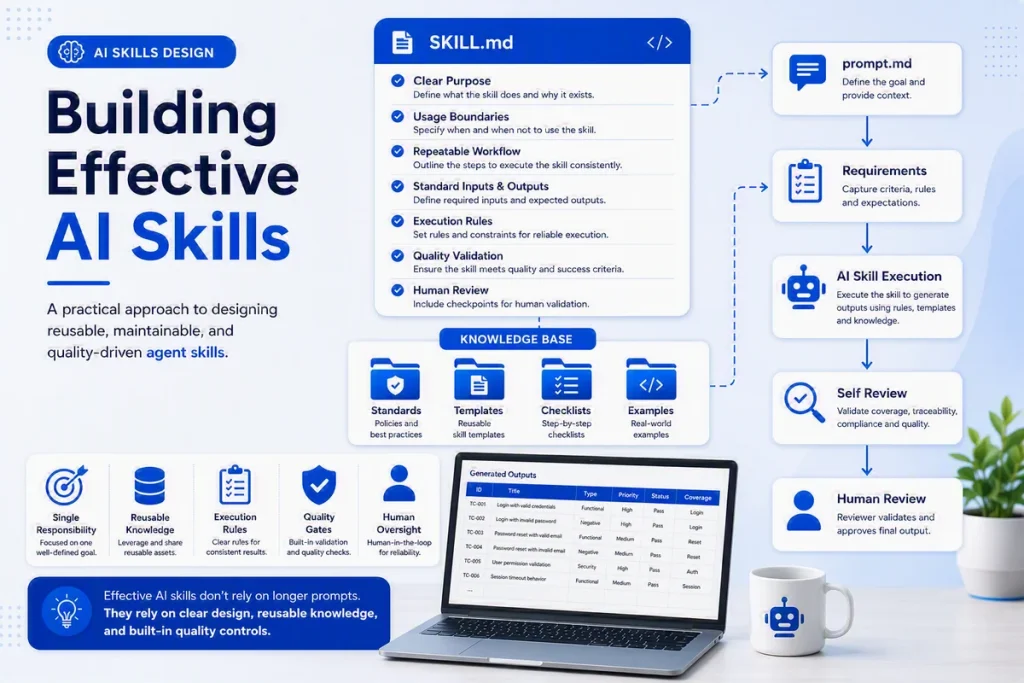
A better approach is to encapsulate testing knowledge into reusable AI skills. Each skill should have a single responsibility, follow a defined workflow, leverage shared knowledge, and produce consistent, high-quality outputs.
This article introduces eight building blocks for designing an effective AI testing skill using a real-world example: ai-design-test-case.
Example Skill
The following skill is responsible for generating risk-based test cases from software requirements.
---
name: ai-design-test-case
description: Use when generating complete, maintainable, risk-based test cases from user stories, use cases, acceptance criteria, business rules, functional specifications, or API specifications.
---
Rather than being a single prompt, this skill defines its purpose, workflow, decision rules, knowledge sources, and quality checks, making it reusable across projects.
Give the Skill a Clear Name
The skill name should immediately communicate its responsibility.
Good example
name: ai-design-test-caseThis clearly indicates that the skill is responsible for designing test cases.
Avoid generic names such as:
- ai-testing
- qa-helper
- automation
- testing-skill
A descriptive name improves discoverability, readability, and long-term maintainability.
Define a Single Purpose
Every skill should solve one well-defined problem.
From the example:
## Purpose Generate complete, maintainable, traceable, and risk-based test cases from software requirements to improve quality coverage, consistency, and delivery confidence.A good purpose statement should answer three questions:
- What does the skill produce?
- What inputs does it require?
- Why does the organization need it?
Avoid combining multiple responsibilities into one skill. For example, a test case design skill should not also generate automation scripts or execute tests.
Clearly Define When to Use the Skill
Users and AI agents should know exactly when the skill is applicable.
For ai-design-test-case, the supported scenarios include:
## When to Use
- When test cases must be generated from user stories, use cases, acceptance criteria, business rules, functional specifications, or API specifications.
- When the team needs standardized test case structure and traceability to requirements.
- When risk-based functional and/or non-functional test design is required before automation or execution.
The skill also defines situations where it should not be used.
## Do Not Use When

- Requirements are missing.
- The task is automation implementation.
- The task is test execution.
- The request is review-only.
Defining both the supported and unsupported scenarios prevents the skill from being applied to tasks outside its intended scope.
Add a prompt.md to Guide Skill Usage
# Prompt: AI Design Test Case

Use this skill to generate test cases from a requirement.

## Template
Design test cases for: <requirement-id-or-name>
Input: <path-or-content>
Scope: <functional|non-functional|both>
Format override: <optional>

## Example
Design test cases for: US-001 Customer Login
Input: requirements/US-001-customer-login.md
Scope: functional
Design a Repeatable Workflow
Instead of asking AI to “generate test cases,” define the sequence of activities the skill should perform.
The ai-design-test-case workflow is intentionally simple:
Load Knowledge
      ↓
Read Requirement
      ↓
Determine Test Scope
      ↓
Generate Test Cases
      ↓
Self Review
This structure encourages step-by-step reasoning rather than jumping directly to the final output.
More detailed logic is delegated to standards, checklists, and templates, keeping the workflow easy to understand and maintain.
Define Standard Inputs and Outputs
A reusable skill should behave like a software component with a well-defined interface.
Inputs
Required
- Requirement document
- Requirement content
Optional
- Test scope (functional, non-functional, or both)
- Output format override
Outputs
test-cases/

TC-US123-Login.md
TC-US456-Checkout.md
By standardizing the interface, the skill becomes easier to integrate into AI agents, IDE extensions, or CI/CD pipelines.
The prompt.md file acts as a user-facing instruction file. It explains how to call the skill, what information the user should provide, and what output they can expect.
Define Mandatory Execution Rules
Execution rules describe the process the AI must always follow.
For example:
- Read the requirement completely.
- Load the relevant standards.
- Load templates and examples.
- Apply risk-based test design.
- Execute the review checklist.
- Generate the output.
- Perform self-validation before returning the result.
These rules ensure the AI follows the same process every time, leading to more consistent and reliable outputs.
Reuse Knowledge Instead of Embedding It
One of the most important design principles is to separate workflow from knowledge.
Instead of embedding testing standards inside the skill, ai-design-test-case references reusable knowledge sources
ai-design-test-case/
├── SKILL.md
├── prompt.md
└── knowledge-base/
    ├── standards/
    │   ├── testing-standard.md
    │   ├── test-design-techniques.md
    │   └── test-design-approach.md
    ├── checklists/
    │   └── test-case-review-checklist.md
    ├── templates/
    │   └── test-case.template.md
    └── examples/
        └── test-case-login-example.md
Build Quality into the Skill
Unlike a simple prompt, a production-ready skill should validate its own output.
The ai-design-test-case skill includes three layers of quality control.
Quality Gates
Before completing, verify that:
- Standards have been applied.
- The review checklist has been executed.
- The required template has been followed.
- The output is complete.
Self Review
Execute the project review checklist before returning the final result.
Success Criteria
The generated test cases should satisfy measurable outcomes such as:
- The document is created using the correct naming convention.
- Every test case is traceable to a requirement.
- Positive, negative, boundary, and business-rule scenarios are covered where applicable.
- Duplicate scenarios are removed.
- Expected results are clear, measurable, and verifiable.
Treat AI-generated artifacts the same way you would treat software deliverables—with defined quality criteria and validation steps.
Human Review Remains Essential
AI can significantly accelerate test design, but it does not replace professional judgment.
Test engineers remain responsible for:
- validating generated test cases,
- reviewing assumptions,
- approving the final deliverables,
- ensuring compliance with organizational testing standards.
The objective is not to replace testers, but to automate repetitive design activities so they can focus on risk analysis, exploratory testing, and quality improvement.
Conclusion
A well-designed AI skill is much more than a prompt. It is a reusable software asset with clearly defined responsibilities, predictable behavior, and built-in quality controls.
Using ai-design-test-case as an example, an effective testing skill should define:
- A clear purpose : What problem does the skill solve?
- Usage boundaries : When should it be used, and when should it not?
- A repeatable workflow : How should the AI perform the task?
- Standardized interfaces : What inputs does it expect, and what outputs does it produce?
- Execution and decision rules : How should it behave in normal and exceptional situations?
- Reusable knowledge : Which standards, templates, checklists, and examples should it apply?
- Quality validation : How will the output be reviewed before it is returned?
The most successful AI testing skills are not those with the longest prompts or the most sophisticated models. They are the ones with clear responsibilities, reusable knowledge, deterministic workflows, and measurable quality expectations.
Reference: