


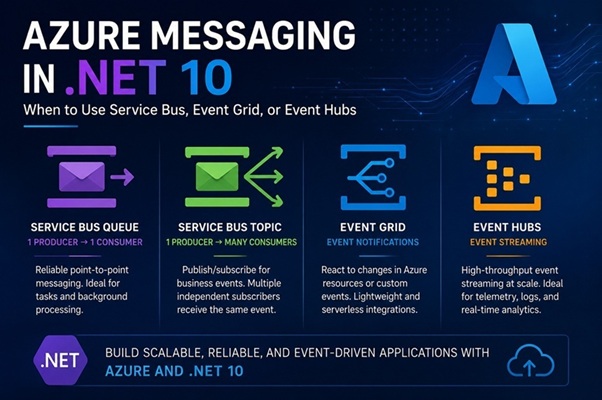
Azure Messaging in .NET 10: When to Use Service Bus, Event Grid, or Event Hubs
Modern .NET applications are increasingly built using event-driven architectures. Although Azure Service Bus, Event Grid and Event Hubs all move information between applications, they solve different problems.
Understanding the Four Messaging Patterns
- Service Bus Queue – One producer, one consumer
- Service Bus Topic – One producer, many business consumers
- Event Grid – Infrastructure and application event notifications
- Event Hubs – High-throughput event streaming
Quick Decision Guide
| Scenario | Recommended Service |
|---|---|
| One service processes the message | Service Bus Queue |
| Multiple business services react to an event | Service Bus Topic |
| Azure infrastructure events | Event Grid |
| High-volume telemetry or streaming | Event Hubs |
Service Bus Queue – Reliable Background Processing
Checkout Service
      |
      v
Service Bus Queue
      |
      v
Payment Service
Typical scenarios include processing payments, background jobs, image processing, sending emails and asynchronous workflows.
var sender = client.CreateSender("payments");
await sender.SendMessageAsync(
    new ServiceBusMessage("Process Payment"));
Service Bus Topic – The Event Bus for Microservices
Order Service
      |
      v
Service Bus Topic
      |
 +----+-----------+
 |    |           |
Billing Inventory Notifications
Typical business events:
- OrderCreated
- CustomerRegistered
- InvoicePaid
- UserDeleted
- ConversationCompleted
var sender = client.CreateSender("order-events");

await sender.SendMessageAsync(
    new ServiceBusMessage(JsonSerializer.Serialize(orderCreated))
    {
        Subject = "OrderCreated"
    });
Event Grid – Reacting to Azure Events
Blob Storage
     |
     v
Event Grid
     |
Azure Function
Examples include Blob uploads, Blob deletion, Key Vault secret rotation, Storage account events and App Configuration changes.
var client = new EventGridPublisherClient(
    new Uri(endpoint),
    new AzureKeyCredential(key));

await client.SendEventAsync(
    new EventGridEvent(
        subject: "orders/123",
        eventType: "Order.Created",
        dataVersion: "1.0",
        data: new
        {
            OrderId = 123
        }));
Event Hubs – Streaming Millions of Events
Applications
IoT Devices
Logs
Telemetry
     |
     v
Event Hub
     |
 +---+-----------+
 |               |
Analytics    Data Lake
Typical scenarios include application logs, metrics, IoT telemetry, clickstream analytics and real-time dashboards.
await using var producer =
    new EventHubProducerClient(connectionString, hubName);

using EventDataBatch batch = await producer.CreateBatchAsync();

batch.TryAdd(new EventData("Hello"));

await producer.SendAsync(batch);
Real-World Example: E-Commerce
Step 1: Customer Places an Order
Website
   |
   v
Service Bus Queue
   |
Payment Service
Step 2: Payment Succeeds
Payment Service
      |
      v
Service Bus Topic
      |
 +----+-----+-----------+
 |    |     |           |
Inventory Shipping Billing Notifications
Step 3: Application Telemetry
All Services
      |
      v
Event Hubs
      |
 +----+-----+---------+
 |    |     |         |
Monitoring Dashboard Data Lake Analytics
Step 4: Product Image Uploaded
Blob Storage
     |
     v
Event Grid
     |
Image Processor
Final Thoughts
There isn’t a single best Azure messaging service.
- Use Service Bus Queue when exactly one service should process a task.
- Use Service Bus Topic when multiple business services need to react to an event.
- Use Event Grid when responding to Azure resource changes.
- Use Event Hubs for high-volume telemetry, logs and analytics.
In many enterprise .NET applications, all four work together to build scalable, resilient and loosely coupled systems.