


In real projects, requirements rarely exist in one perfectly written Jira ticket. Important details may be scattered across the description, acceptance criteria, comments, linked issues, and Confluence pages. Before writing test cases, QA engineers often spend considerable time collecting and connecting this information.
Rovo AI can use the accessible context in Jira and Confluence to help summarize requirements, identify unclear points, and generate initial test cases. However, one principle should remain clear:
Rovo creates the draft; QA owns the accuracy and test coverage.
1. How Can Rovo AI Support QA Work?
Rovo is an AI capability within the Atlassian ecosystem. A QA engineer can use it to:
- Consolidate information from Jira tickets, comments, and related documents.
- Identify missing, ambiguous, or conflicting requirements.
- Suggest test conditions and draft test cases.
- Review coverage and detect duplicated cases.
Rovo respects the user’s existing access permissions. If a QA engineer cannot access a related Jira ticket or Confluence page, Rovo cannot use that content as context either. This is important because two users with different permissions may receive different answers for the same request. (What is Rovo?, Using Rovo Chat)
2. Practical Example: Generating Test Cases for a Login Feature
Assume a QA engineer receives Jira ticket LOGIN-128 with the following information.
User story
As a registered user, I want to log in using my email and password so that I can access the application.
Acceptance criteria
- A user can log in with a valid email and password.
- An error message is displayed when the credentials are incorrect.
- The account is locked for 15 minutes after five consecutive failed attempts.
- After a successful login, the user is redirected to the Dashboard.
Additional context is available elsewhere in Jira and Confluence:
- A recent BA comment states that the error message must be Invalid email or password and must not reveal whether an email address exists.
- A linked ticket states that the failed-attempt counter must be reset after a successful login.
- A security document states that the session expires after 30 minutes of inactivity.
- An older comment says that the account should be locked after three failed attempts, but a newer BA decision changes the limit to five.
If the QA engineer simply asks Rovo to Generate test cases for this ticket, Rovo may produce the happy path and a few invalid-login cases while missing the attempt limit, secure error handling, counter reset, or session timeout.
Step 1: Analyze the Requirements Before Generating Test Cases
Start by asking Rovo to organize the available context:
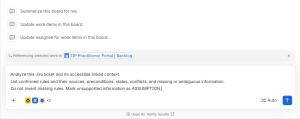
The expected output should resemble the following requirement map:
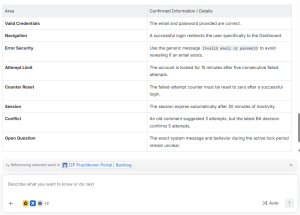
This step helps the QA engineer resolve incomplete or conflicting requirements before they become incorrect test cases.
Step 2: Generate Test Conditions and Test Cases
After the open questions have been clarified, use a more controlled prompt:
Output columns:
ID | Title | Priority | Preconditions | Steps | Expected Result | Source
Rules:
– One test case verifies one main objective.
– Expected results must be observable.
– Do not create duplicate cases.
– Mark unresolved cases as BLOCKED.
Cover successful and failed login, validation, boundaries, account lock,
counter reset, error-message security, and session timeout.
Rovo may generate a draft similar to this:
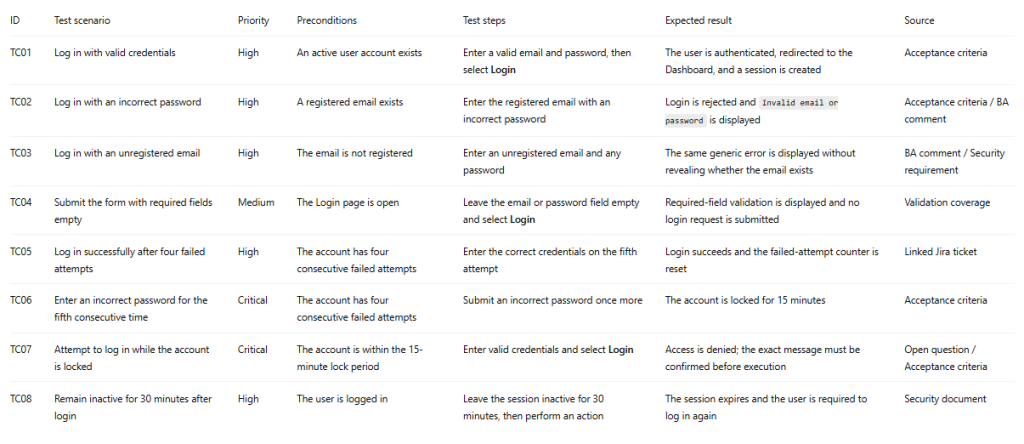
The QA engineer must still review the priority, test data, boundaries, and scope. For example, SQL injection testing may belong to a dedicated security-testing scope rather than the functional UI test suite.
Step 3: Ask Rovo to Review Coverage
Once the first draft is available, ask Rovo to compare the test cases against the confirmed rules:
Compare these test cases with the confirmed requirements.
Identify uncovered requirements, duplicates, cases with multiple objectives, unverifiable expected results, and assumptions written as facts.
Return findings only. Do not rewrite the test cases.
Separating requirement analysis, test generation, and coverage review makes errors easier to detect than asking Rovo to do everything in one prompt.
3. Common Problems in Real Projects
1. A Detailed Ticket Can Still Have Missing Requirements
Rovo may infer what should happen while an account is locked, even when the ticket does not define it. A plausible answer is still an assumption. Ask Rovo to label information as SOURCE, ASSUMPTION, or OPEN QUESTION instead of silently completing missing rules.
2. Old Comments Can Be Mixed with New Decisions
In the Login example, Rovo might use the old three-attempt rule instead of the latest five-attempt decision. Ask it to list conflicts and identify the newest confirmed decision. The team should then update the acceptance criteria so that the ticket has a clear source of truth.
3. More Test Cases Do Not Automatically Mean Better Coverage
Rovo may generate many variations of an incorrect password while missing account locking, counter reset, or session expiry. Review coverage against requirements and risks, not against the number of generated cases.
4. Expected Results May Be Too Generic
Statements such as Login fails correctly are not executable. An expected result should describe an observable message, status, navigation, API response, or data change. If a tester cannot clearly determine pass or fail, the expected result needs improvement.
5. Rovo May Not Have Access to All Relevant Context
Two QA engineers may receive different results if their Jira or Confluence permissions are different. Before repeatedly changing the prompt, verify that Rovo can access the required tickets and documents.
4. Best Practices for QA Teams
1. Split the Work into Small Stages
Use a controlled flow:
Jira context → Requirement analysis → Open questions
→ Test conditions → Test cases → Coverage review → QA approval
Each stage provides an opportunity to identify misunderstanding or missing coverage before it spreads into the final test suite.
2. Require a Source for Every Requirement
Each test condition should identify whether it comes from the acceptance criteria, a BA comment, a linked issue, a Confluence page, or a risk identified by QA. This improves traceability and makes disagreements easier to resolve.
3. Separate Requirement Coverage from Risk-Based Coverage
Redirecting the user to the Dashboard comes directly from the acceptance criteria. Preventing account enumeration through the error message comes from a security risk. Label these sources clearly so stakeholders understand why each test exists.
4. Standardize the Output Format
Agree on a consistent structure such as ID, Priority, Preconditions, Steps, Expected Result, and Source. A stable format makes test cases easier to review, compare, and transfer to a test-management tool.
5. A Reusable Prompt for QA Engineers
Act as a Senior QA Test Analyst.
Analyze this Jira ticket and its accessible linked context.
First, list confirmed rules, conflicts, assumptions, and open questions.
Do not invent missing information.
After I approve the analysis, generate test cases with:
ID | Title | Priority | Preconditions | Steps | Expected Result | Source
Cover positive, negative, boundary, validation, permission, security,
state-transition, and regression risks where relevant.
Use one primary objective per case. Avoid duplicates. Mark cases that
depend on unresolved information as BLOCKED.
Conclusion
Rovo AI can help QA engineers read Jira tickets, consolidate scattered context, and create test-case drafts more quickly. Its greatest value is not simply producing more test cases; it is helping the team expose business rules, conflicts, assumptions, and coverage gaps earlier.
For a Login feature, Rovo can easily generate the happy path. A QA engineer must still recognize less obvious risks such as account locking, counter reset, secure error messages, and session timeout.
Therefore, the most effective request is not:
“Generate all test cases for this ticket.”
It is:
“Analyze the requirements, identify what is unclear, propose the required coverage, and show where each test case comes from.”
Rovo improves speed; QA remains responsible for quality.