


Introduction
Imagine this scenario.
You have spent weeks building a regression test suite. Hundreds of automated test cases are running successfully in your CI/CD pipeline.
Then, a developer makes a small UI change.
A button’s id changes from
<button id="login-btn">Login</button>to
<button id="sign-in-btn">Login</button>The application still works perfectly.
But suddenly, several automated tests fail.
Nothing is wrong with the business functionality. The test simply cannot find the button anymore.
This is one of the most common maintenance challenges in UI test automation. Traditional automation relies heavily on locators such as IDs, XPath, CSS selectors, text, and DOM structures. When these implementation details change, tests can become fragile and require manual updates.
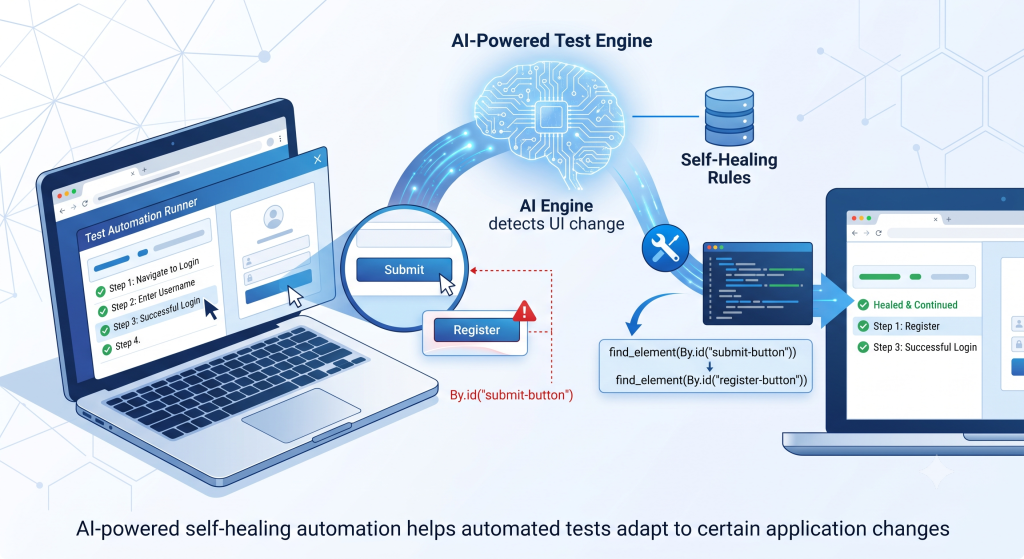
Self-healing test automation aims to address this problem by allowing automated tests to detect certain changes, identify alternative ways to locate the intended element, and continue execution with minimal human intervention.
With the increasing adoption of AI and machine learning in software testing, self-healing automation is becoming an important concept in modern QA strategies.
But what exactly is self-healing automation, how does it work, and can we really trust a test that “fixes itself”?
Let’s explore.
What Is Self-Healing Test Automation?
Self-healing test automation is an approach where automated tests can detect certain failures caused by application changes and automatically adapt their execution instead of immediately stopping.
In traditional automation, the process is straightforward:
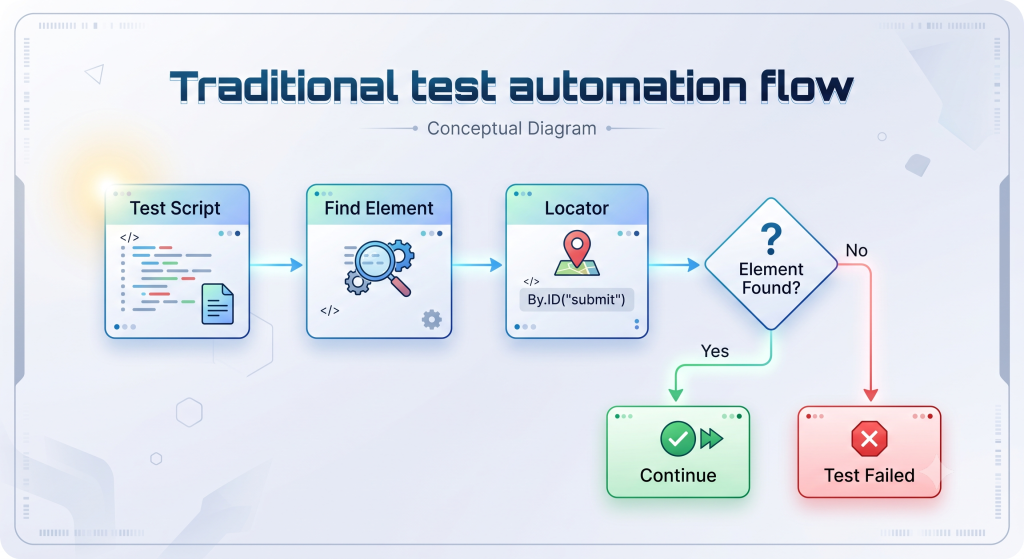
With self-healing automation, the process becomes more adaptive:
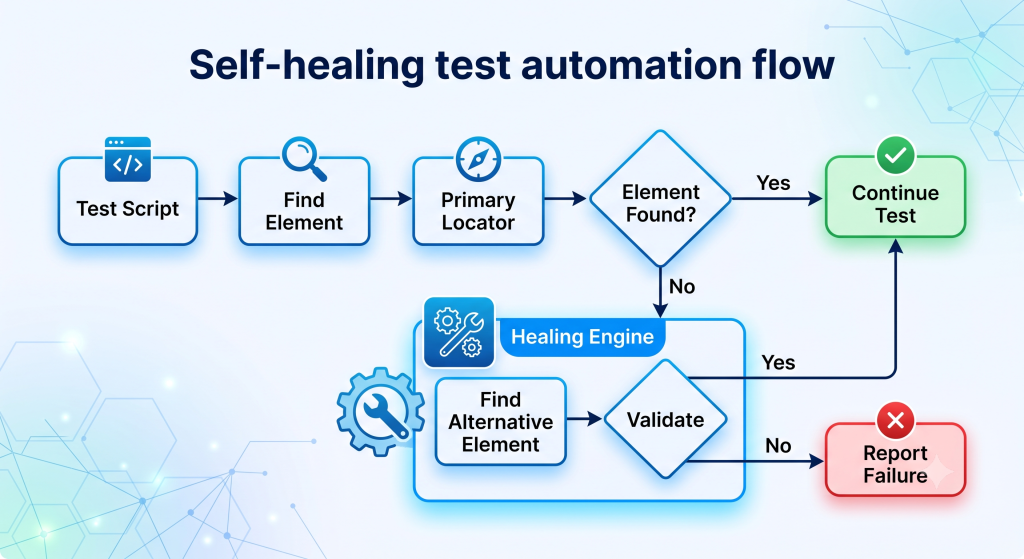
Instead of treating every locator failure as a test failure, the framework can investigate whether the element still exists under a different identifier or structure.
For example, suppose a test initially uses:
#login-btnThe application is later changed to:
<button id="sign-in-btn">Login</button>A self-healing mechanism may determine that the element is still likely to be the intended target because it retains characteristics such as:
- The same visible text:
Login - The same element role:
button - Similar surrounding elements
- Similar DOM characteristics
- Similar visual appearance
- Similar historical context
The goal is not to make broken tests disappear. The goal is to make tests more resilient to changes that do not affect the behavior being validated.
Why Do Traditional Automated Tests Break So Easily?
Automated tests are often tightly coupled to the implementation details of an application.
Consider a simple Selenium test:
driver.findElement(
    By.xpath("//button[@id='login-btn']")
).click();
The test depends on a specific implementation detail:
id="login-btn"Now imagine that a developer changes the HTML:
<button id="sign-in-btn">Login</button>The user experience has not changed.
The login button is still there.
The button still performs exactly the same action.
However, the automated test can fail because its locator is no longer valid.
This becomes particularly problematic in modern development environments where applications are continuously changing.
- UI redesigns: Buttons, forms, dialogs, and navigation components may be moved or redesigned.
- Attribute changes: IDs, class names, ARIA attributes, and other HTML properties may change during refactoring.
- Dynamic elements: Modern frameworks can generate dynamic DOM structures and identifiers.
- A/B testing: Different users may receive different versions of the same interface.
- Frequent releases: Continuous delivery means the application may change many times during a sprint.
As a result, QA engineers can spend significant time maintaining automation scripts instead of creating new tests, improving coverage, or investigating real defects.
This is why test maintenance has become an important challenge as automation suites grow larger.
How Does Self-Healing Test Automation Work?
Although implementations vary between tools, a typical self-healing mechanism can be described in five stages.
Step 1: Identify the Element
During test creation or previous executions, the framework can collect information about the target element.
For example:
Element: Login button

ID:       login-btn
CSS:      #login-btn
Text:     Login
Role:     button
XPath:    //button[@id='login-btn']
Context:  Login form
Some solutions may also capture visual characteristics, DOM relationships, or historical information from previous executions.
This provides multiple signals instead of depending on a single locator.
Step 2: Execute the Test
The automation framework first attempts to use the original locator.
Find "#login-btn"
       ↓
Element found
       ↓
Click
If the locator still works, there is no need for healing.
This is important because AI-based recovery should generally be used as a fallback mechanism rather than replacing deterministic automation completely.
Step 3: Detect the Failure
Suppose the application’s HTML changes from:
<button id="login-btn">to:
<button id="sign-in-btn">The original locator fails.
The healing mechanism can then determine whether this looks like a locator problem rather than a genuine application failure.
Step 4: Find an Alternative
The framework can evaluate possible alternatives using different signals.
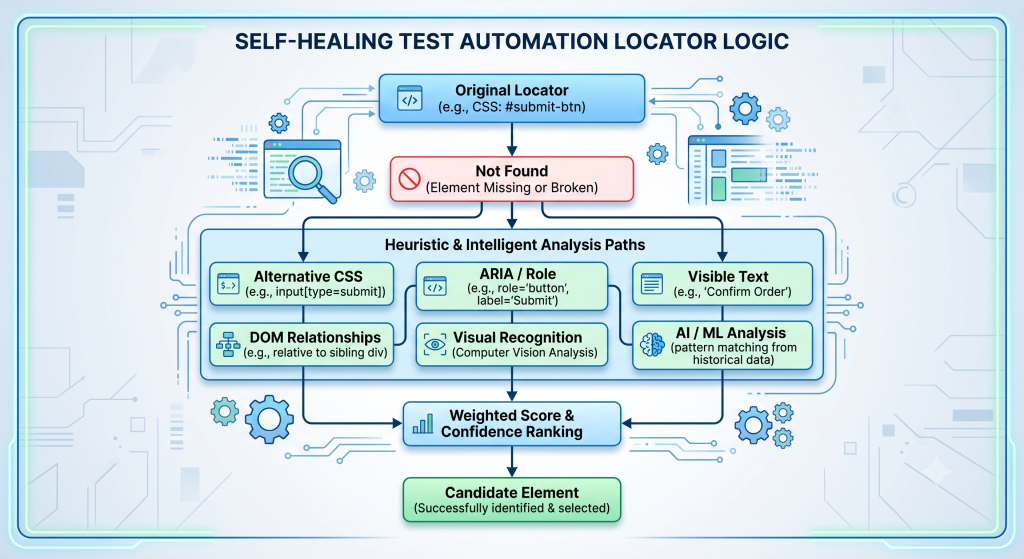
Depending on the tool, this may involve multiple locator strategies, heuristics, visual matching, historical execution data, or AI-based analysis.
Step 5: Validate and Continue
Finding an element that looks similar is not enough.
The system should validate whether the candidate is actually the intended element.
Candidate found
      ↓
Does the role match?
      ↓
Does the text match?
      ↓
Is the element in the expected context?
      ↓
Does the action succeed?
      ↓
YES → Continue test
A reliable healing mechanism should also record the healing event so QA engineers can review what happened.
Where Does AI Fit Into Self-Healing Automation?
AI is not necessarily required for every form of self-healing.
A basic implementation could use simple fallback rules:
Try ID
   ↓
Try CSS
   ↓
Try XPath
   ↓
Try Text
   ↓
Try ARIA
However, AI and machine learning can make the recovery process more flexible by evaluating multiple signals and identifying which candidate is most likely to represent the original element.
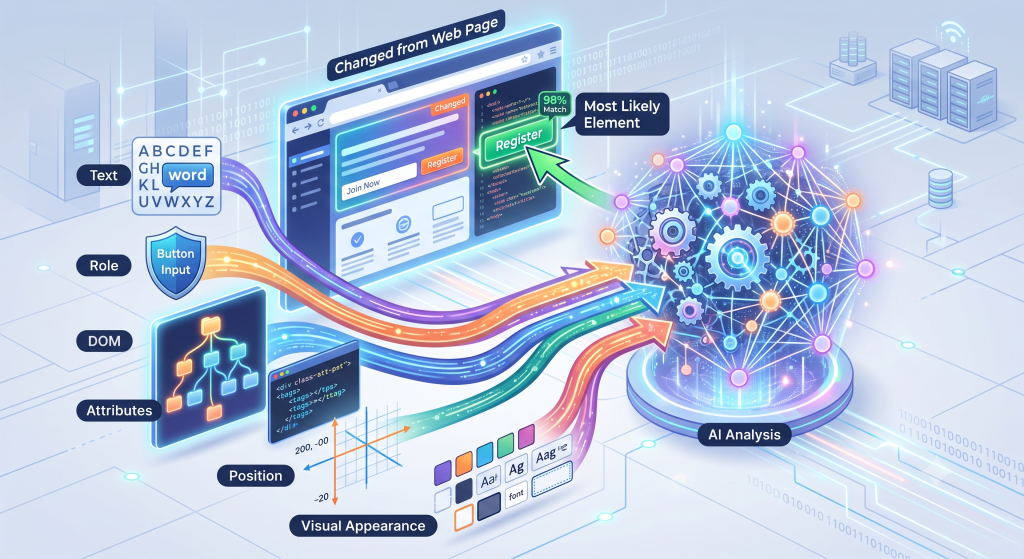
AI-Based Element Recognition
Instead of asking only:
“Does this element have the same ID?”
AI-based systems can potentially consider:
“Which element most likely represents the same UI component?”
For example:
Original:

Login button
ID = login-btn
Text = Login


Current UI:

Login button
ID = sign-in-btn
Text = Login
The element has changed technically, but its semantic role remains similar.
This allows an intelligent system to evaluate more than a single attribute.
Visual Recognition
Visual AI can identify an element based on its appearance rather than relying entirely on the DOM.
This can be useful when:
- DOM attributes are unstable
- Elements are dynamically generated
- Layout changes frequently
- Visual position or appearance provides useful context
Semantic Understanding
More advanced approaches can reason about the meaning of a test step.
For example:
Click the button that submits the login form.
Instead of depending exclusively on a technical selector, the automation system can use context to identify the appropriate action.
This represents an interesting evolution from simple locator replacement toward context-aware test automation.
A Practical Example: When a Locator Changes
Let’s take a simple login test written with Playwright:
await page.locator('#login-btn').click();The test passes.
Later, a developer changes the application:
<button id="sign-in-btn">Login</button>The original test now fails because #login-btn no longer exists.
A self-healing system might perform something similar to the following:
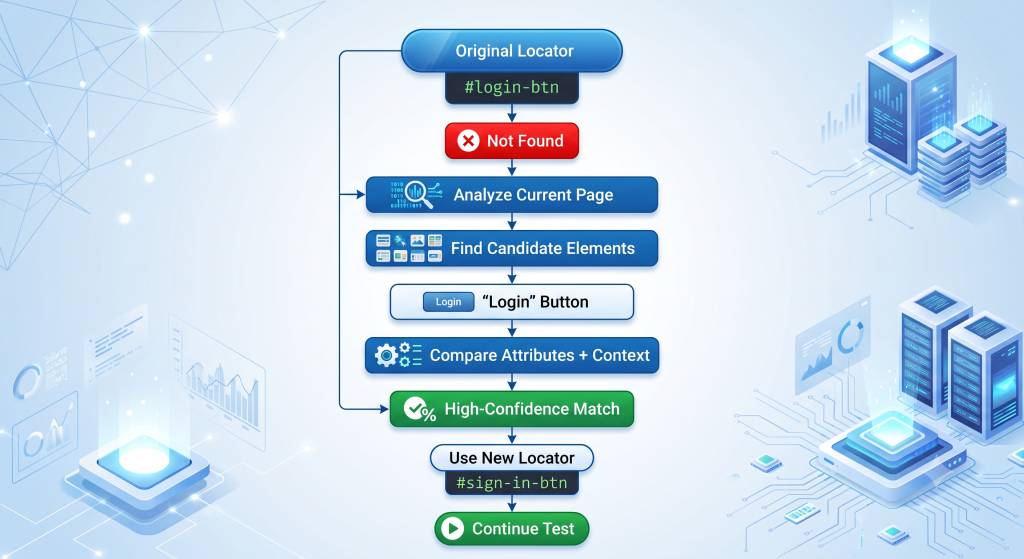
The important point is that the business intent of the test has not changed.
The test still wants to click the Login button.
Only the technical implementation of that button has changed.
This is where self-healing automation can provide significant value.
What Are the Benefits of Self-Healing Automation?
Reduced Test Maintenance
The most obvious benefit is reducing the amount of manual work required to update broken locators.
Instead of fixing every test after a small UI change, QA engineers can spend more time on activities that create greater value, such as improving test coverage, analyzing failures, and testing new features.
More Stable Test Suites
Tests become less sensitive to certain implementation changes.
This can help reduce failures caused by:
- Changed IDs
- Changed CSS classes
- DOM restructuring
- Dynamic elements
- Minor UI changes
Faster Feedback
When tests can recover from harmless UI changes, CI/CD pipelines can continue running instead of stopping because of a broken locator.
Developers can therefore receive feedback faster.
Better Productivity
Without self-healing:

With self-healing:
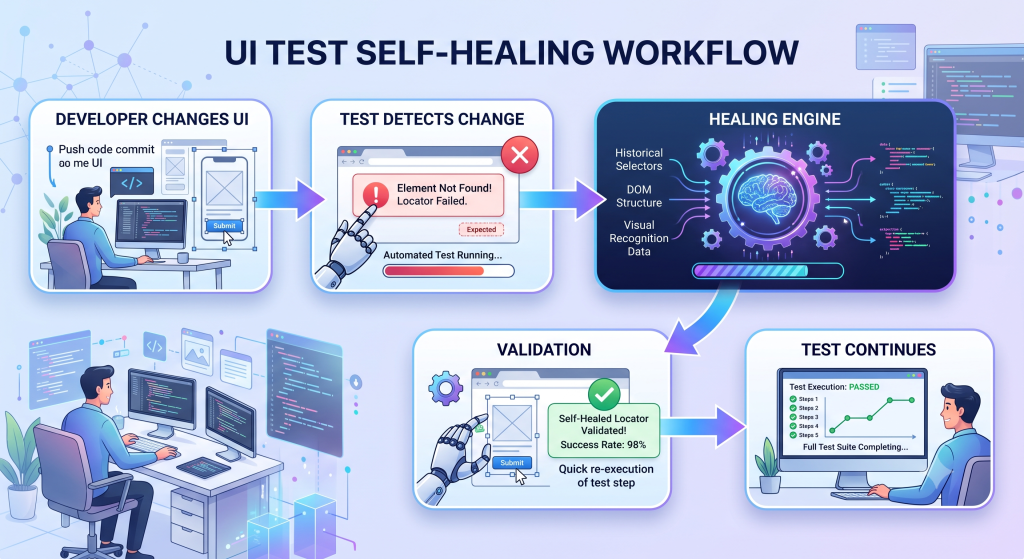
Self-healing does not eliminate QA work, but it can reduce repetitive maintenance.
Better Support for CI/CD
Modern software teams may execute hundreds or thousands of automated tests during continuous integration.
Self-healing capabilities can help automation tolerate certain expected UI changes while maintaining continuous feedback.
This makes the concept particularly relevant to Agile and DevOps environments.
Popular Approaches and Tools
Self-healing is not implemented in exactly the same way across all automation solutions.
Some approaches extend existing frameworks, while others are integrated into commercial AI-powered testing platforms.
| Approach | Examples | Typical Capability |
|---|---|---|
| Traditional automation + healing layer | Selenium + Healenium | Locator recovery |
| AI-powered platforms | Testim, mabl | Smart element identification |
| Visual AI | Applitools | Visual analysis |
| Enterprise automation | Tricentis Tosca | Model-based automation |
| Browser automation | Playwright-based solutions | Locator resilience |
| NLP-oriented automation | testRigor | Natural-language-based interaction |
However, teams should not select a solution simply because it advertises “AI” or “self-healing.”
A practical evaluation should consider:
- Browser and platform support
- Compatibility with the existing automation framework
- Element recovery accuracy
- Reporting and debugging capabilities
- CI/CD integration
- Human review capabilities
- Data privacy
- Licensing cost
Challenges: Can We Really Trust a Self-Healing Test?
This is probably the most important question.
Self-healing does not mean self-correcting everything.
There are situations where automatic healing can become dangerous.
Over-Healing
Suppose the application has two buttons:
Save
Delete
The original test expects to click:
SaveBut the locator becomes invalid.
If the healing mechanism incorrectly selects the Delete button, the test may continue from the automation framework’s perspective while performing the wrong business action.
That is much worse than a simple test failure.
A false healing result can be more dangerous than a visible test failure.
This is why self-healing mechanisms should use validation, confidence thresholds, logging, and human review for important workflows.
Other Challenges
- Complex UI changes: Self-healing may struggle when the application’s workflow fundamentally changes.
- Performance overhead: Analyzing multiple candidates or using AI can introduce additional processing time.
- Hidden defects: Over-aggressive healing could potentially mask real application problems.
- Initial setup: Teams still need good test design, synchronization, assertions, and locator strategies.
- Human oversight: Important healing events should remain observable and reviewable.
Therefore, self-healing should be treated as a safety net, not a replacement for good automation engineering.
Best Practices and the Future of Self-Healing Automation
Best Practices for Implementing Self-Healing Automation
Start With Stable Test Design
Self-healing cannot compensate for poorly designed tests.
Use:
- Clear assertions
- Appropriate Page Object Model design
- Stable test data
- Meaningful test names
- Reliable synchronization
- Independent test cases
Prefer Stable Locators First
Self-healing should not become an excuse for writing poor locators.
For example, a dedicated test attribute is usually easier to maintain than a deeply nested XPath.
<button data-testid="login-button">
    Login
</button>
This is generally preferable to:
/html/body/div[2]/div/div[1]/form/div[3]/buttonMonitor Healing Events
Every healing action should ideally be recorded.
For example:
Test Case: Login_ValidUser

Original Locator:
#login-btn

Healed Locator:
#sign-in-btn

Reason:
Original element not found

Confidence:
96%

Action:
Auto-healed

Status:
Validated
This information can help QA teams identify application areas that change frequently and require better locator strategies.
Integrate With CI/CD
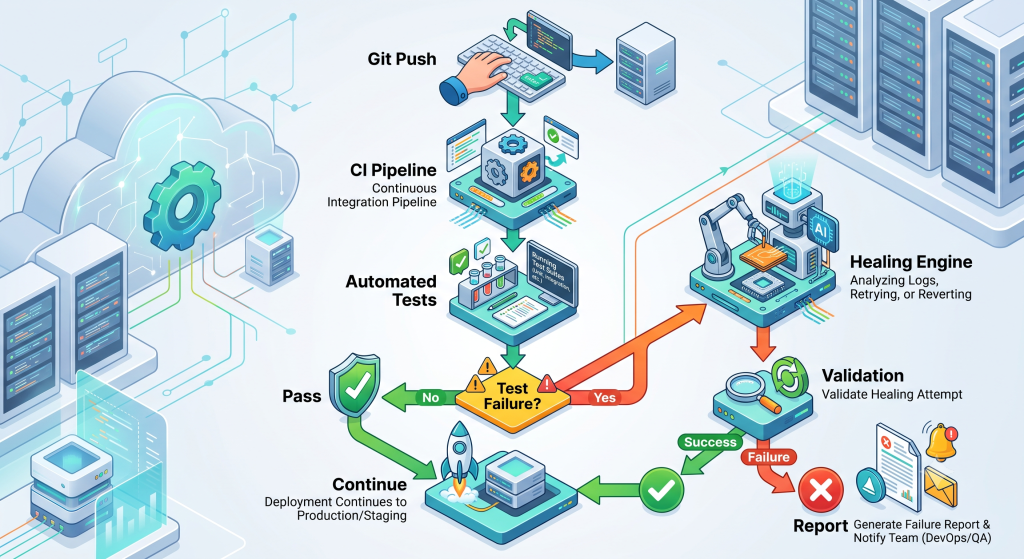
Keep Humans in the Loop
For critical business workflows, automatic healing should not blindly modify tests.
A better strategy is:
Automate recovery, but maintain human control over validation.
The Future of Self-Healing Test Automation
Self-healing automation is evolving beyond simply replacing broken XPath or CSS selectors.
Future intelligent testing solutions may combine:
- AI-powered locator recovery
- Visual recognition
- Natural-language understanding
- Automated test generation
- Predictive defect detection
- Autonomous test execution
- Risk-based test selection
- AI-assisted root-cause analysis
Imagine writing a test step such as:
Verify that the customer can successfully submit the checkout form.
The automation system could understand the intent, identify the relevant controls, execute the test, detect UI changes, and adapt when appropriate.
That vision is much more powerful than simply replacing one XPath with another.
However, the fundamental principle remains the same:
AI should make automation more resilient — not make testing less trustworthy.
Conclusion
Traditional test automation has transformed software quality by allowing teams to execute large numbers of tests quickly and consistently.
But automation has always had a major weakness: maintenance.
Applications change.
UI structures evolve.
Locators become obsolete.
And QA engineers can spend valuable time fixing tests that failed because of harmless implementation changes rather than actual product defects.
Self-healing test automation provides a promising approach by allowing tests to detect certain changes, search for alternative element representations, and recover automatically.
AI can take this further through:
- Intelligent locator prediction
- Visual recognition
- Semantic understanding
- Historical analysis
- Adaptive test execution
But self-healing is not a magic solution.
A reliable automation strategy still requires good test design, stable locators, strong assertions, monitoring, and human oversight.
The real value of self-healing automation is not “tests that never fail.”
It is tests that can distinguish between a real failure and a change they can safely adapt to.
As software delivery becomes faster and more dynamic, this ability could become an increasingly important part of building scalable, maintainable, and resilient QA automation.
References
- Self-Healing Test Automation: Automated Tests That Heal Themselves — ideyaLabs
- Self-Healing Automation: What It Is and Why It Matters — LinkedIn
- Self-healing automation using AI — GeeksforGeeks
- Self-Healing Test Automation Tools Explained — TestAutomationTools.dev