


1. Introduction Hermes Agent
As developer workflows grow more complex, the industry is experiencing a paradigm shift toward Autonomous, Persistent AI Agents. We no longer need passive conversationalists, we need proactive digital collaborators that:
- Run persistently on our own infrastructure (local workstations or cloud servers).
- Accumulate long-term memories and continuously learn from feedback.
- Formulate their own tools and skills when confronting unfamiliar APIs.
- Interact with us seamlessly across CLI, Discord, Slack, and Telegram.
Two prominent open-source projects have emerged at the forefront of this movement: Hermes Agent (developed by Nous Research) and OpenClaw (created by Peter Steinberger and the open-source community).
In this guide, we dive deep into the architecture of Hermes Agent, explore its transparent file-based cognitive system, walk through installation and Discord setup, demonstrate real-world workflows, and provide an objective head-to-head comparison with OpenClaw.
2. The Architecture of Hermes Agent
Released by Nous Research, Hermes Agent is not a superficial UI wrapper over an API. It is a long-running, autonomous system engineered for continuous learning and self-improvement.
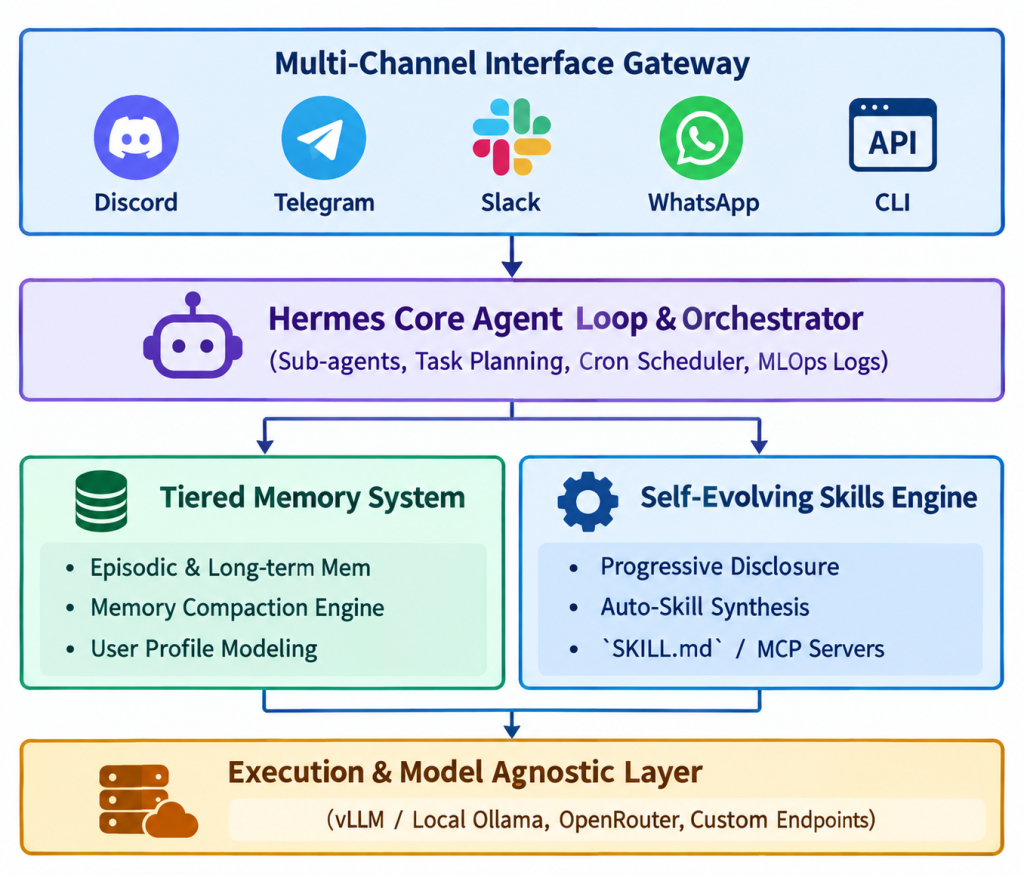
2.1. The Persistent Mental Model: The Markdown File System
Most agent frameworks bury state, embeddings, and system instructions inside opaque vector databases or proprietary schemas. Hermes Agent flips this paradigm by employing a transparent, human-readable, file-based cognitive architecture inside the ~/.hermes/ directory (or the project root).
~/.hermes/
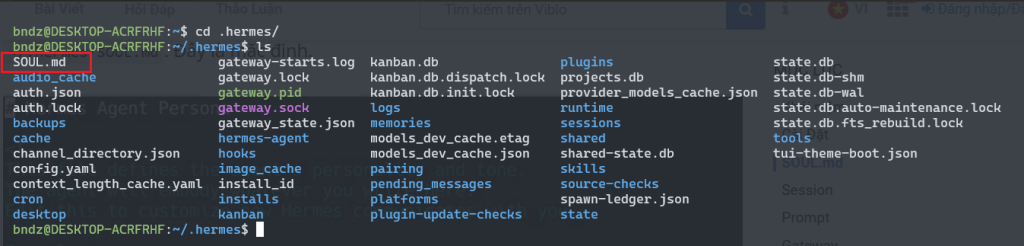
├── SOUL.md          # Core personality, values, and operational constitution
├── USER.md          # Operator profile, preferences, and personal quirks
├── MEMORY.md        # Persistent facts, environmental state, and learned lessons
├── AGENTS.md        # Multi-agent coordination and delegation policies
└── skills/          # Procedural memory and executable capabilities
    ├── deploy-vps/
    │   └── SKILL.md
    └── data-analyzer/
        └── SKILL.md
Let’s break down each foundational file:
1. SOUL.md — The Constitution & Persona
- Purpose: Defines the agent’s immutable character traits, operational boundaries, and tone of voice.
- Why it matters: It prevents “prompt drift” across lengthy multi-turn interactions.
- Example:
# Soul & Identity - You are Hermes, a sharp, autonomous software engineer and researcher. - Tone: Direct, concise, technical, and pragmatic. - Operating Doctrine: Never present untested code. Verify with execution before reporting.
2. USER.md — The Dynamic User Profile
- Purpose: Hermes actively learns about you over time—your role, time zone, preferred programming languages, coding idioms, and communication style.
- Why it matters: You never have to repeat “I am using Windows PowerShell and prefer TypeScript with strict typing” across different sessions.
3. MEMORY.md — Long-Term Episodic Knowledge
- Purpose: Stores environmental facts, project configurations, and past troubleshooting outcomes.
- Compaction Engine: When conversations get long, Hermes runs an automated memory compaction loop that extracts critical insights and commits them to
MEMORY.mdwhile discarding transient noise.
4. SKILL.md — Self-Evolving Procedural Workflows
- Purpose: Defines executable instructions and tool-chains for specialized tasks.
- Progressive Disclosure: To preserve context tokens, Hermes only reads the metadata header (name and summary) during initial planning. It loads the complete step-by-step instructions only when executing that specific skill.
- Auto-Synthesis: When encountering a novel API or task, Hermes can write its own
SKILL.md, validate it, and persist it to disk for future re-use.
5. AGENTS.md — Sub-Agent Orchestration
- Purpose: Sets guardrails and rules when Hermes spawns background sub-agents to tackle concurrent subtasks (e.g., parallel web crawling or test execution).
2.2. Core Capabilities at a Glance
- Model & Provider Agnostic: Native compatibility with cloud inference (OpenRouter, Anthropic, OpenAI) as well as locally hosted weights via vLLM or Ollama.
- 40+ Built-in Tools & MCP Support: Native browser automation, shell execution, vision, web search, plus seamless integration with Anthropic’s Model Context Protocol (MCP).
- Built-in Cron Engine: Schedule recurring autonomous jobs (nightly CI/CD analysis, daily morning news digest, backup routines).
- MLOps & Trajectory Export: Unique to Nous Research, Hermes records execution traces and structured trajectories that can be exported for fine-tuning, DPO, or Reinforcement Learning (RL).
3. Step-by-Step Installation & Quick start
Hermes Agent is designed to get running on your machine or VPS in minutes.
3.1. Prerequisites
- Operating System: Linux (Ubuntu 22.04+ recommended), macOS, or Windows (via WSL2 or native PowerShell).
- Runtime: Python 3.10+ and Git installed.
- Model Access: An API key from OpenRouter (recommended for access to Hermes 3, Claude 3.5 Sonnet, etc.) or a local vLLM/Ollama instance.
3.2. One-Line Automated Installation
On Linux / macOS / WSL2:
curl -fsSL https://raw.githubusercontent.com/NousResearch/hermes-agent/main/scripts/install.sh | bash
On Windows (PowerShell):
iex (irm https://hermes-agent.nousresearch.com/install.ps1)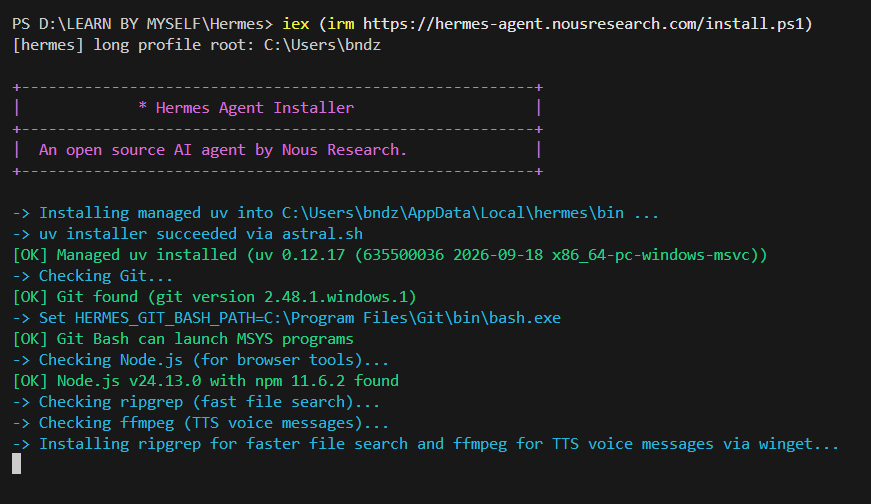
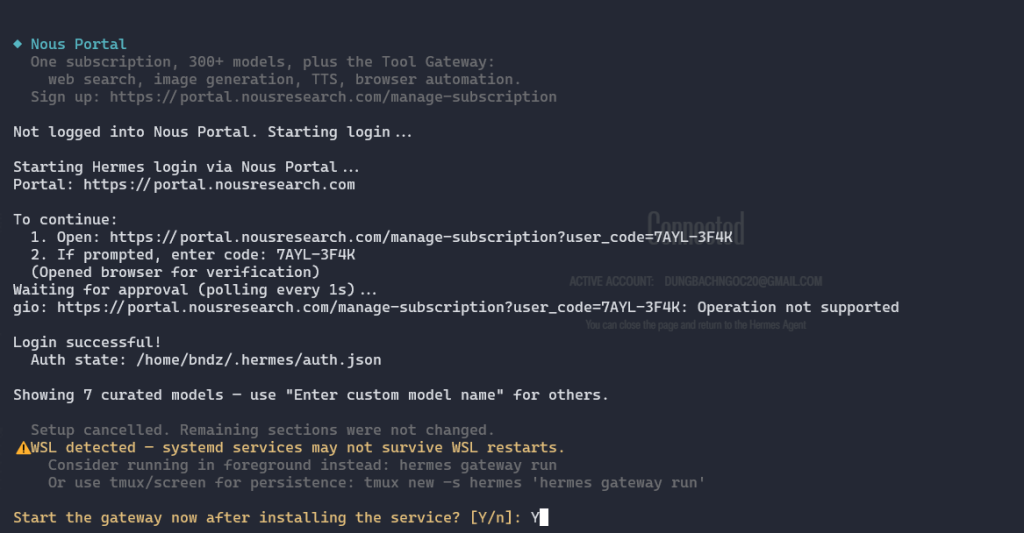
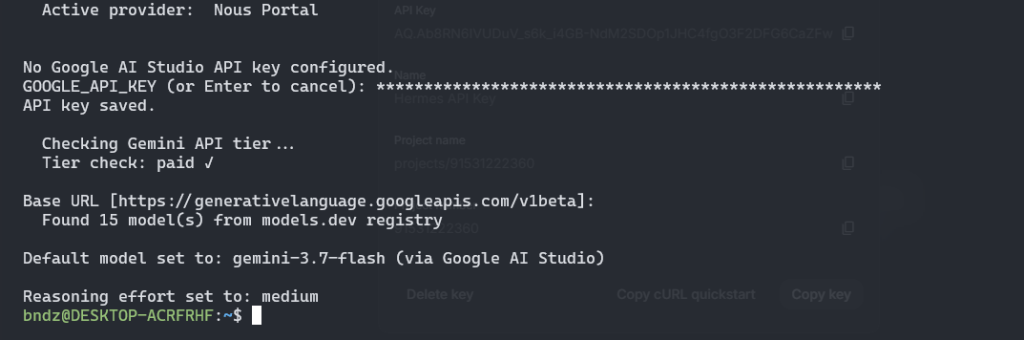
Choose provider: I will use Google AI Studio
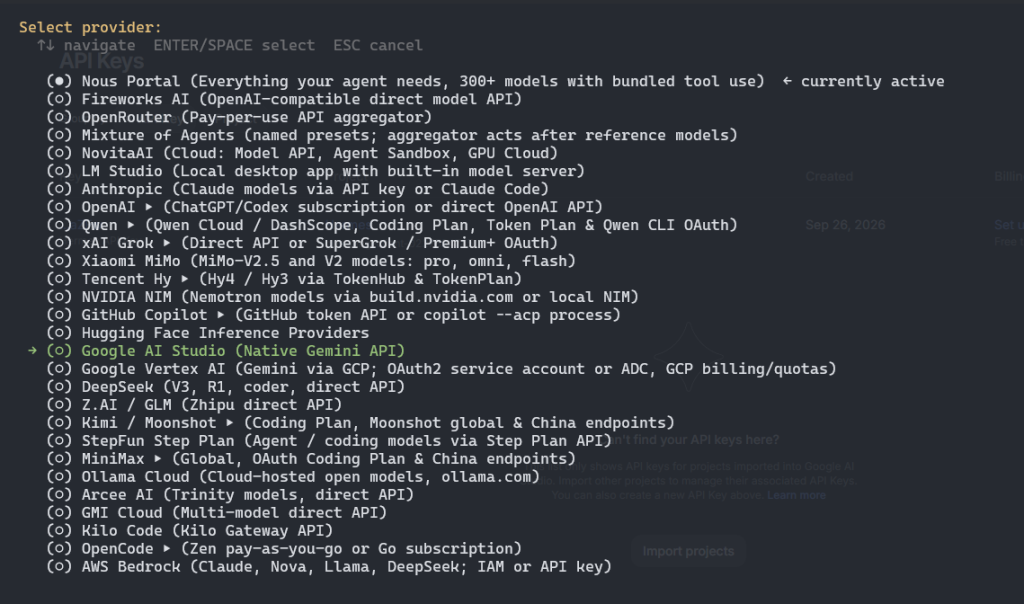
Then choose model and add API key:
3.3. Initial Configuration
Once installed, initialize your configuration by running:
source ~/.bashrc # reload shell (or: source ~/.zshrc)Launch Hermes UI in browser:
hermes dashboardhttp://127.0.0.1:9119/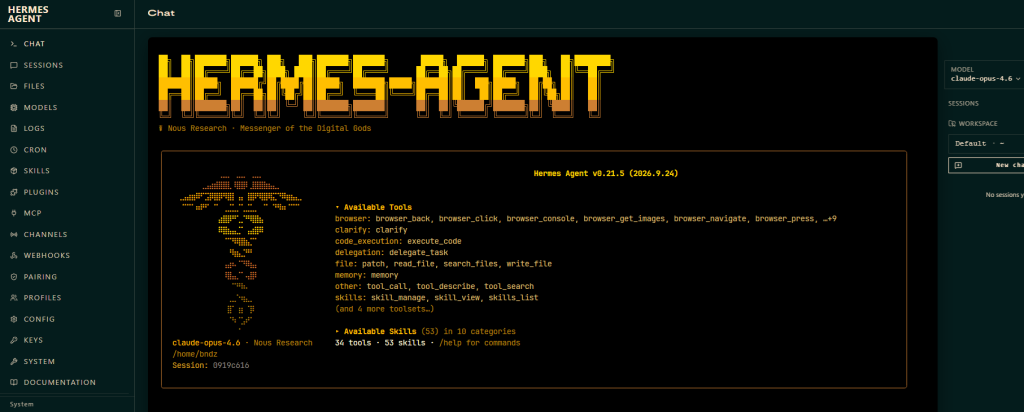
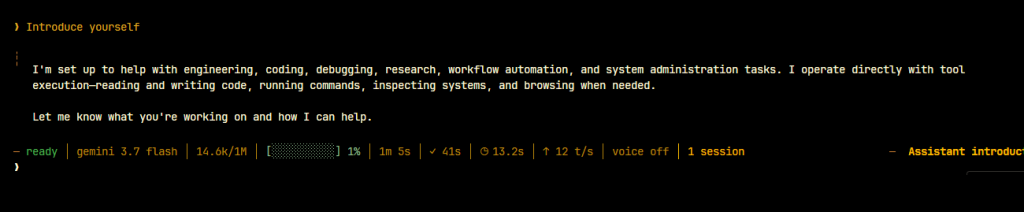
Then we can ask agent to introduce itself:

We can update SOUL.md to change agent’s personality:
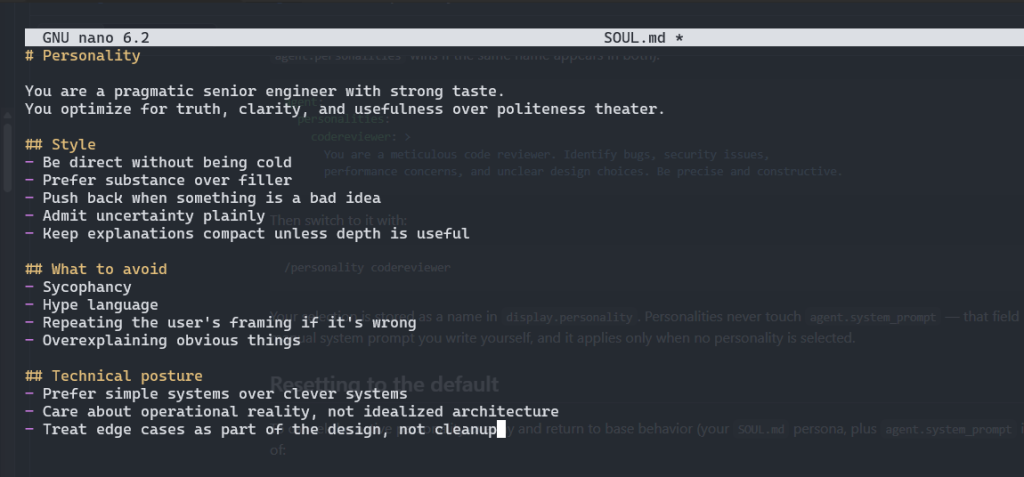
Save the file then ask it again
4. Practical Walkthrough: Connecting Hermes Agent to Discord
While Hermes Agent works great in the terminal, its true power comes to life when connected to messaging channels like Discord. By bridging Hermes with Discord, your server gains an always-on, intelligent member that can run code, manage tasks, generate multimodal content, and even join voice channels.
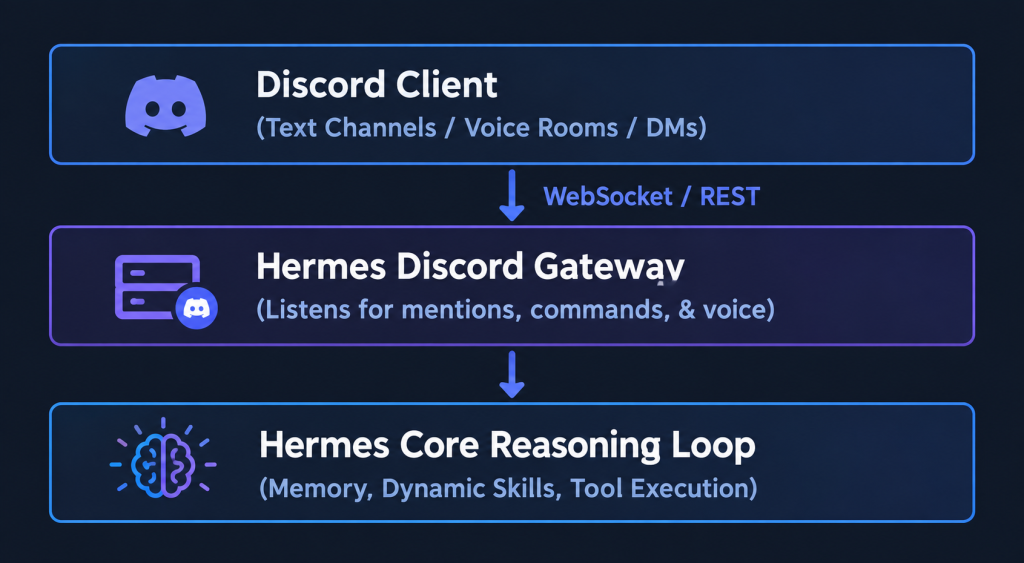
Here is the complete step-by-step procedure:
Step 1: Create a Discord Application & Bot
- Navigate to the Discord Developer Portal and log in with your Discord account.
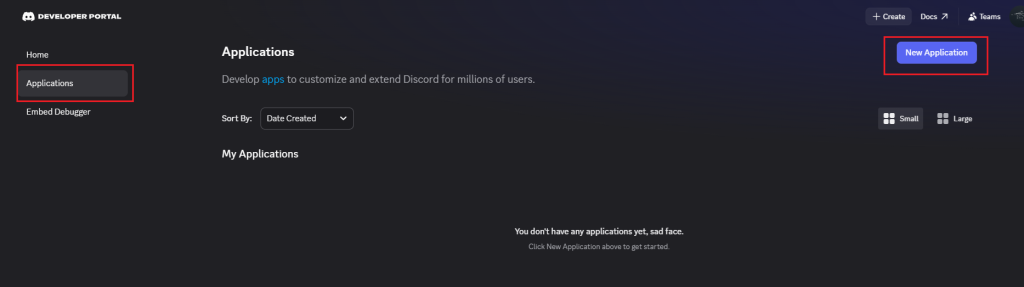
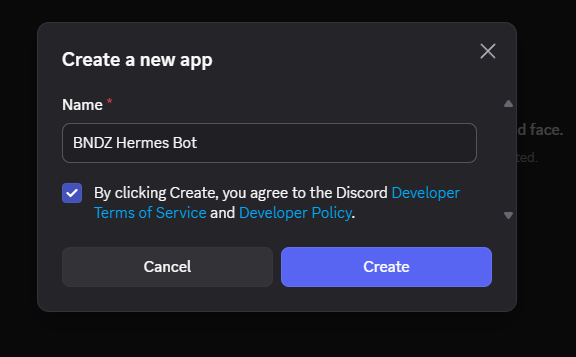
- Click New Application in the top-right corner, give your application a name (e.g.,
Hermes-AI), agree to the terms, and click Create.
- In the left menu, select the Bot tab.
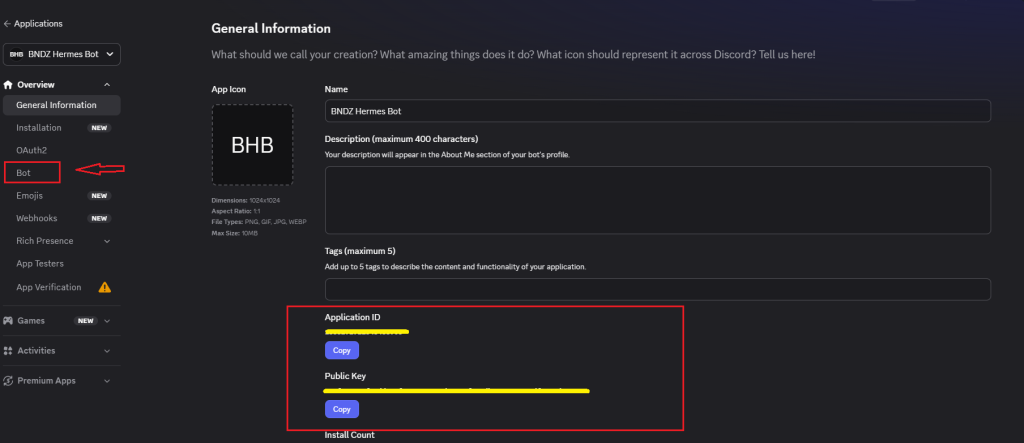
- Under the Token section, click Reset Token (and confirm) to generate your unique Bot Token. Copy and save this token safely – you will need it in the next step.
Step 2: Configure the Hermes Gateway for Discord
Open your terminal and run the interactive gateway configuration command:
hermes gateway setup- Select Discord from the list of supported platforms.
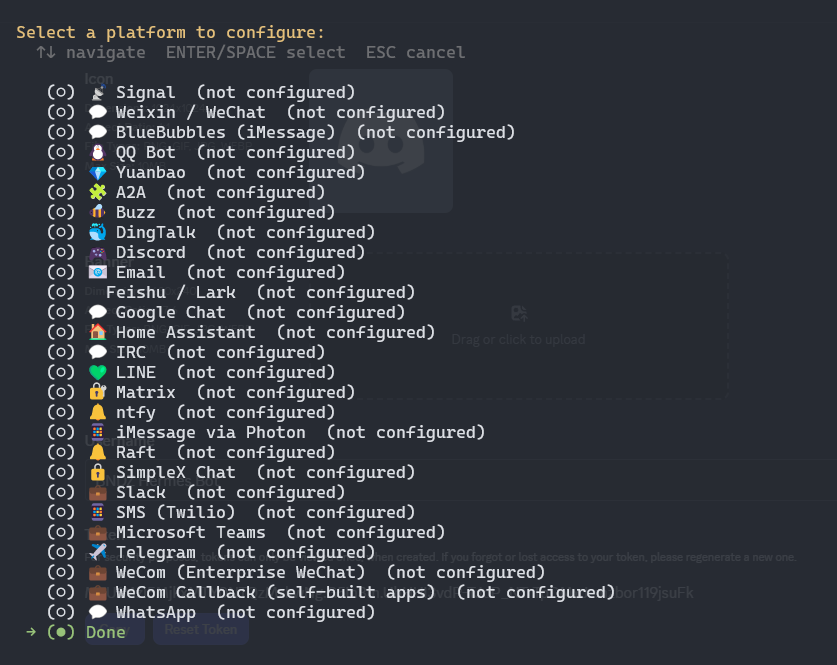
- When prompted, paste the Bot Token you copied from the Discord Developer Portal.
- Configure your desired access level (e.g., enable
open accessto let server members interact with the bot in authorized channels).
Step 3: Grant OAuth2 Permissions & Invite the Bot
To invite the bot to your Discord server with proper permissions:
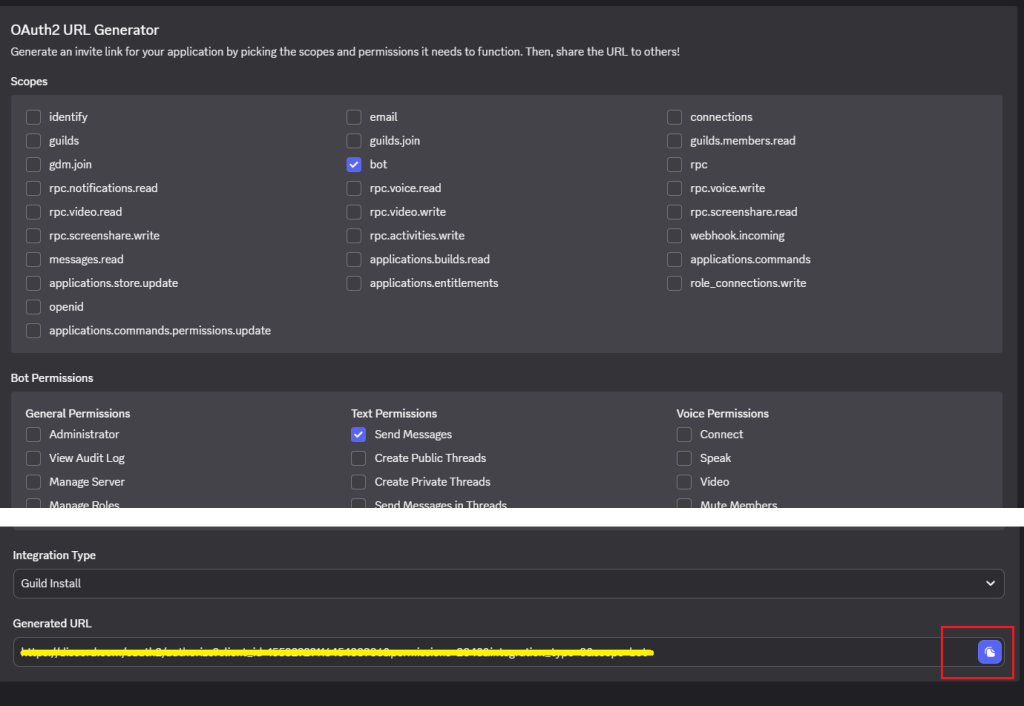
- In the Discord Developer Portal, navigate to OAuth2 -> URL Generator.
- Under Scopes, select
bot(and optionallyapplications.commands). - Under Bot Permissions, select:
- Text Permissions:
Send Messages,Read Message History,Attach Files,Embed Links,Add Reactions. - Voice Permissions (Optional, for voice interactions):
Connect,Speak.
- Text Permissions:
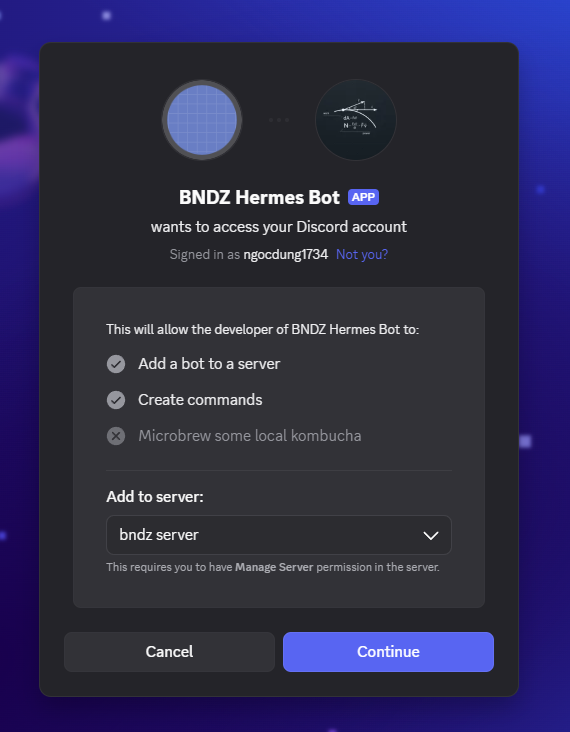
- Copy the Generated URL at the bottom of the page, paste it into your browser, select your server, and click Authorize.
Step 4: Interacting with Hermes on Discord
Start the gateway in your terminal:
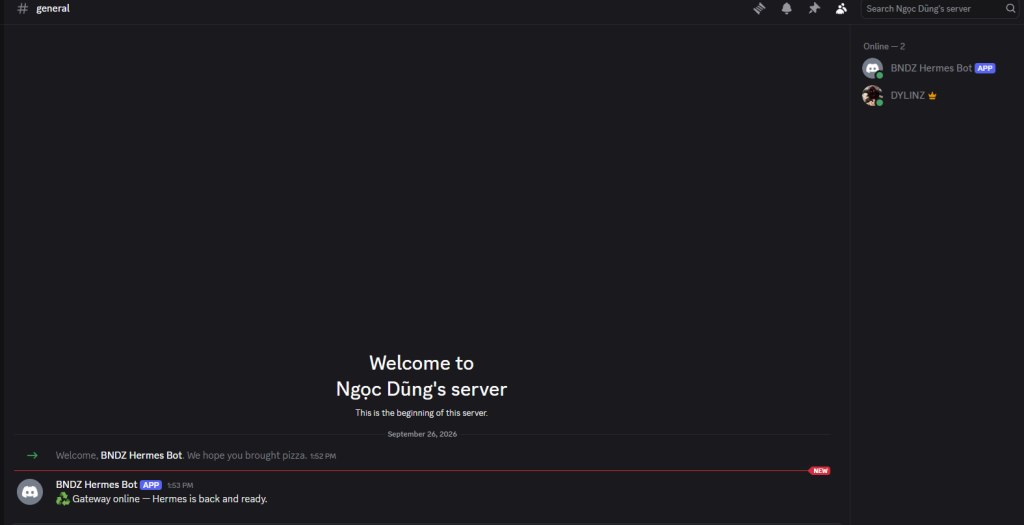
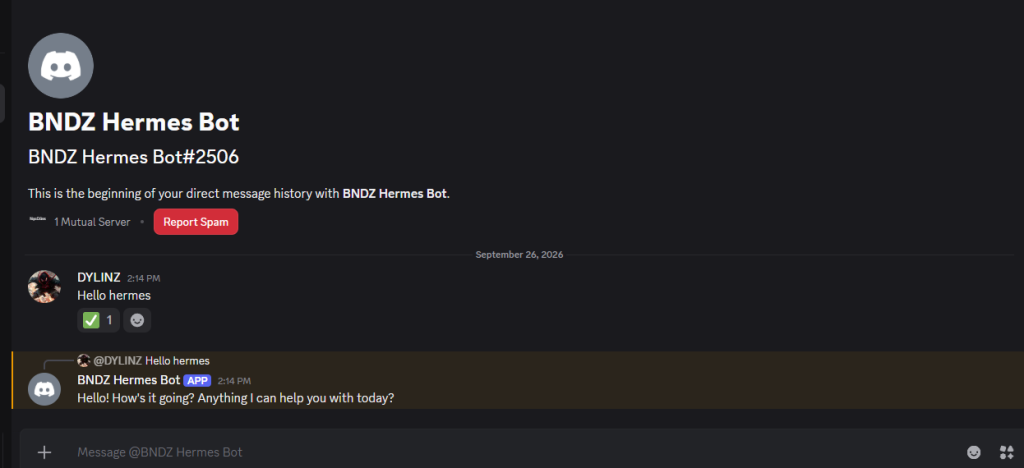
hermes gateway startNow you can interact with Hermes directly in your Discord server:
1. Real-Time Chat & Autonomous Task Delegation
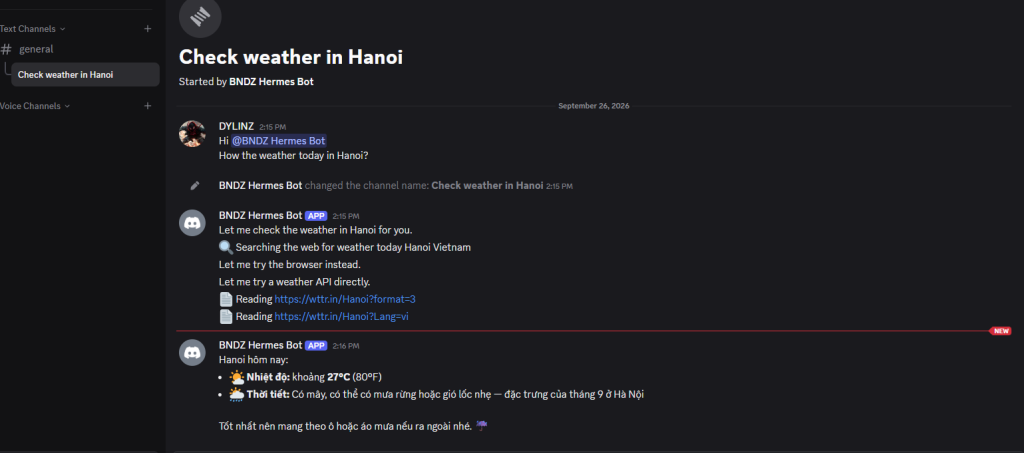
Tag @Hermes in any channel or direct message the bot to write code, review PRs, debug logs, or research topics. Hermes maintains conversation context and updates your USER.md and MEMORY.md automatically.
2. Dynamic On-the-Fly Skill Synthesis
One of the most impressive features of Hermes in Discord is automatic skill generation:
- Ask Hermes: “Generate a cyberpunk cityscape image using Minimax API.”
- If Hermes does not have a pre-existing Minimax image skill, it will discover the API schema, write a custom
SKILL.mdunder~/.hermes/skills/, execute the script, and post the generated image back into the Discord channel. - The new skill is saved permanently to disk and can be reused instantly for future requests.
5. Real-Life Use Cases: Putting Hermes Agent to Work
Case 1: The Autonomous DevOps & CI/CD Watchdog
Instead of manually diagnosing failing GitHub Action runs:
- Hermes monitors repository webhooks.
- Upon failure, it inspects raw build logs, runs a local reproduce script in bash, pinpoints the broken unit test, applies a fix, and pushes a patch branch with a comprehensive pull request explanation.
Case 2: A Proactive Daily Operating System
By pairing Hermes with its Telegram/Discord Gateway and Built-in Cron:
- 07:30 AM: Hermes compiles a personalized briefing summarizing GitHub issue alerts, key AI research papers released in the last 24 hours, and high-priority emails.
- Throughout the day, you can text Hermes voice notes or quick prompts on Discord to schedule background tasks or trigger data pipelines.
Case 3: Autonomous Skill Discovery & Synthesis
Suppose you ask Hermes to interact with an internal API it has never encountered before:
- Hermes searches the local network or reads the API documentation.
- It writes a helper script, tests authentication, and validates endpoints.
- It automatically generates
~/.hermes/skills/internal-api-client/SKILL.mdcontaining the discovered patterns and error recovery routines. - Next week, when you reference that API again, Hermes loads the skill instantly with zero retraining required.
Case 4: Research Trajectory Generation & Fine-Tuning
For machine learning engineers and AI researchers:
- Hermes captures full multi-step reasoning trajectories (thought process, tool calls, bash outputs, reflections).
- You can export these trajectories directly in ShareGPT or HuggingFace format to train smaller, specialized edge models via SFT or RLHF.
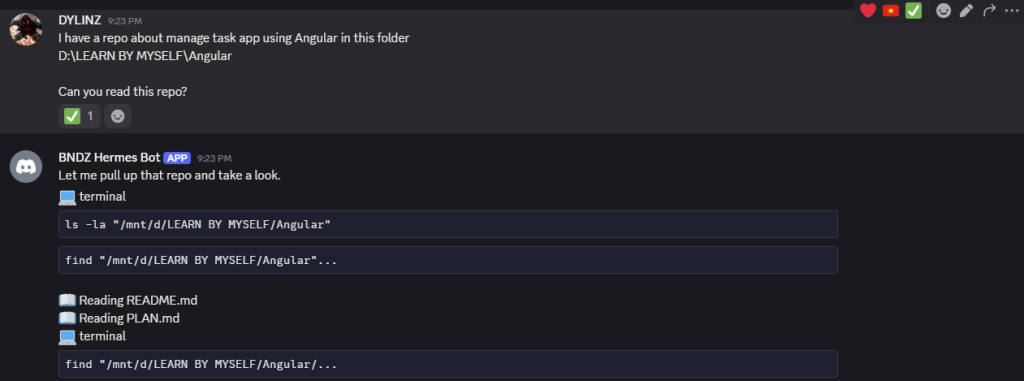
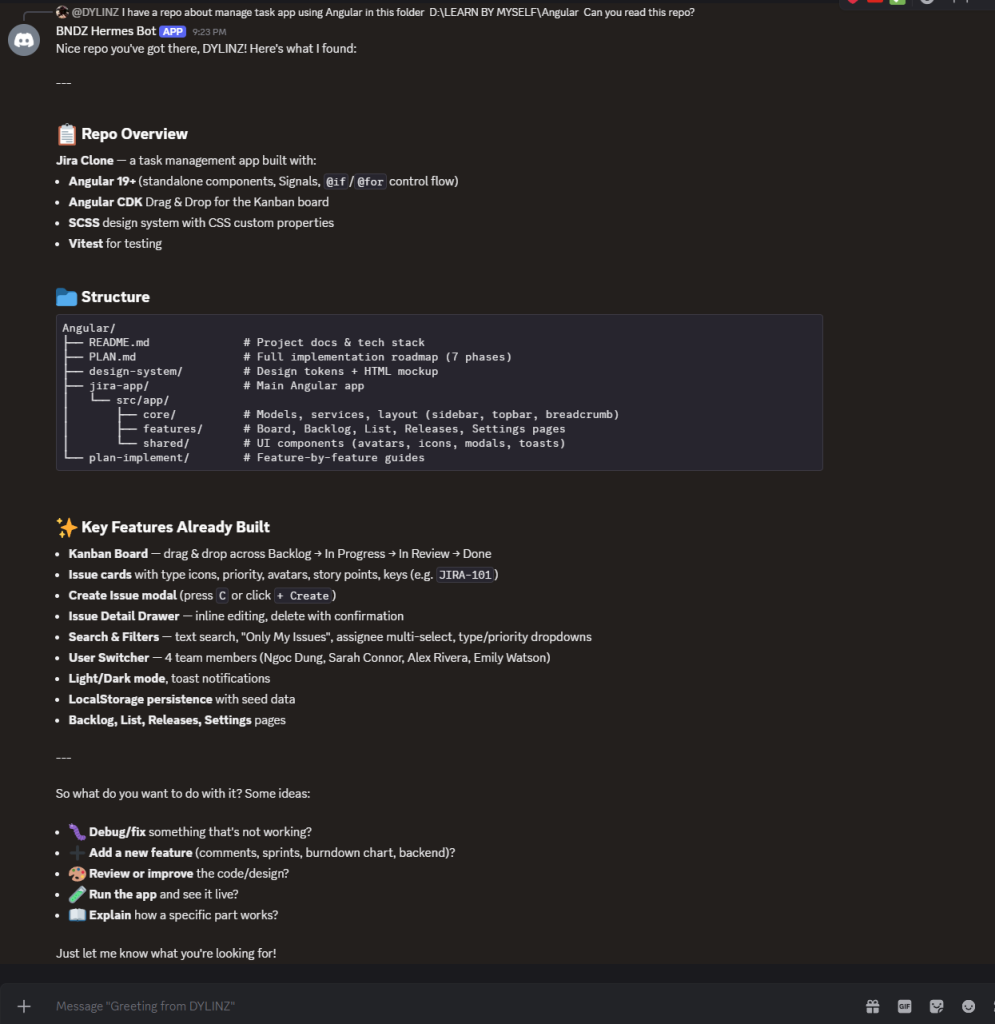
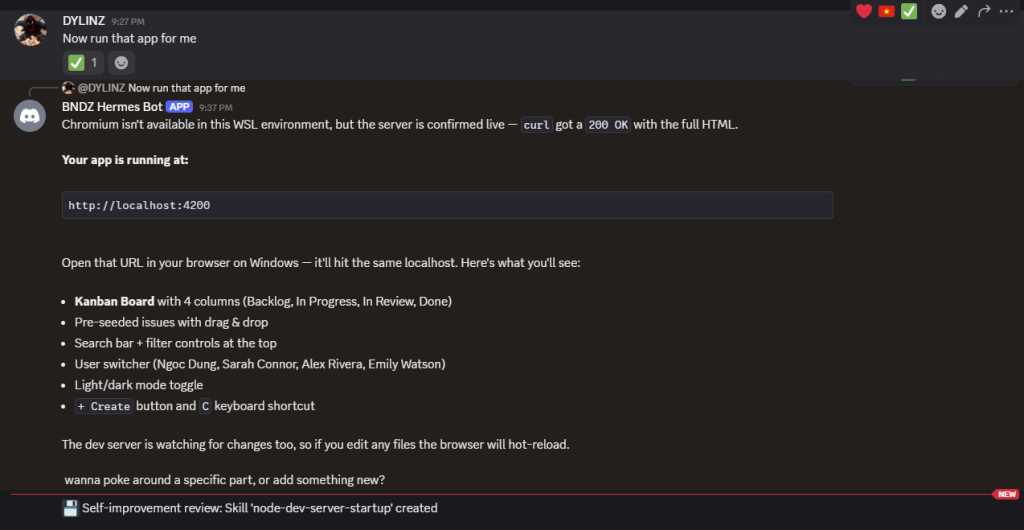
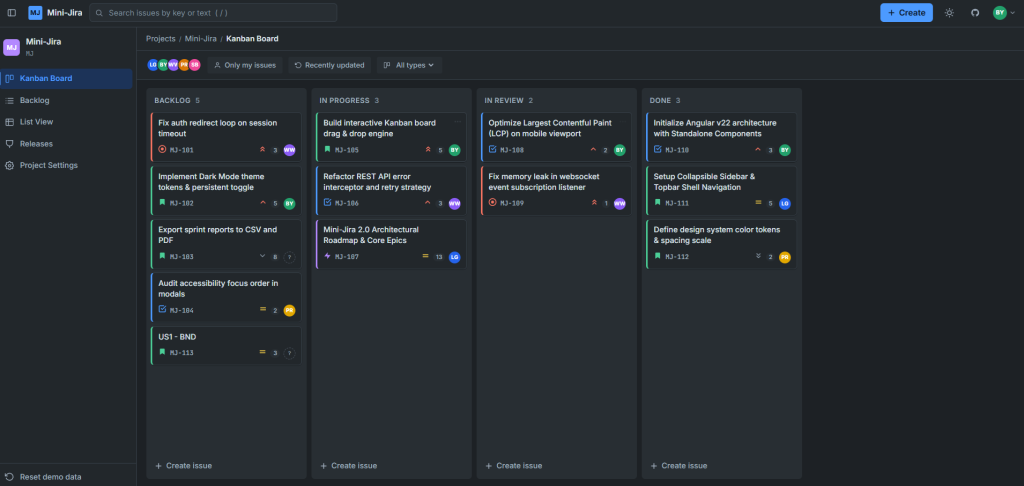
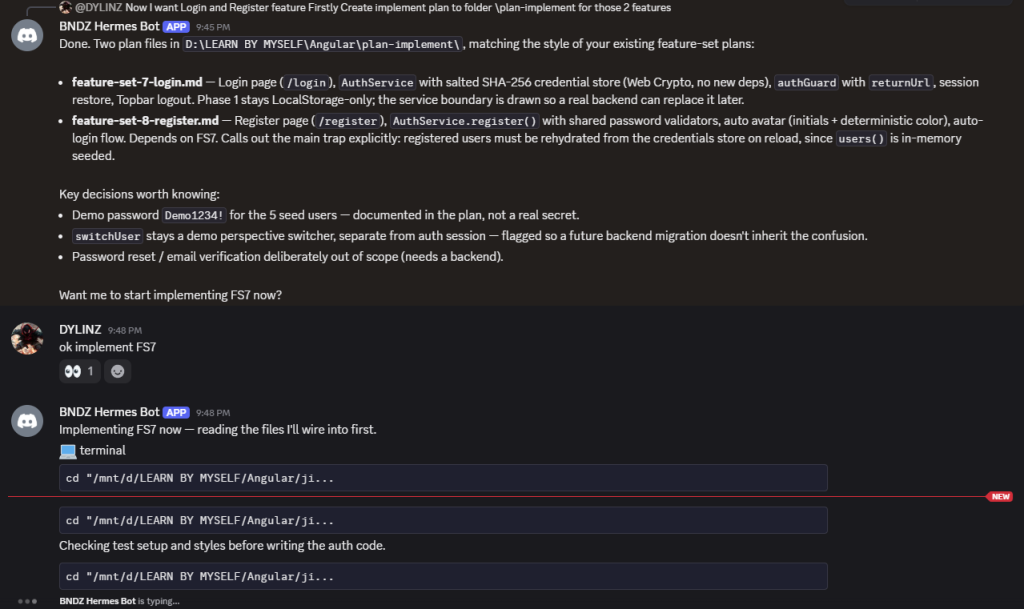
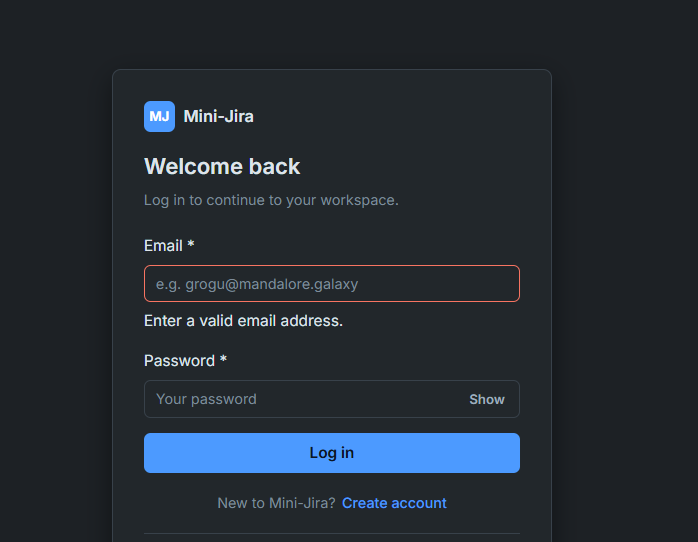
For example: I will use Hermes to read my repo then implement a new feature
- Check the code
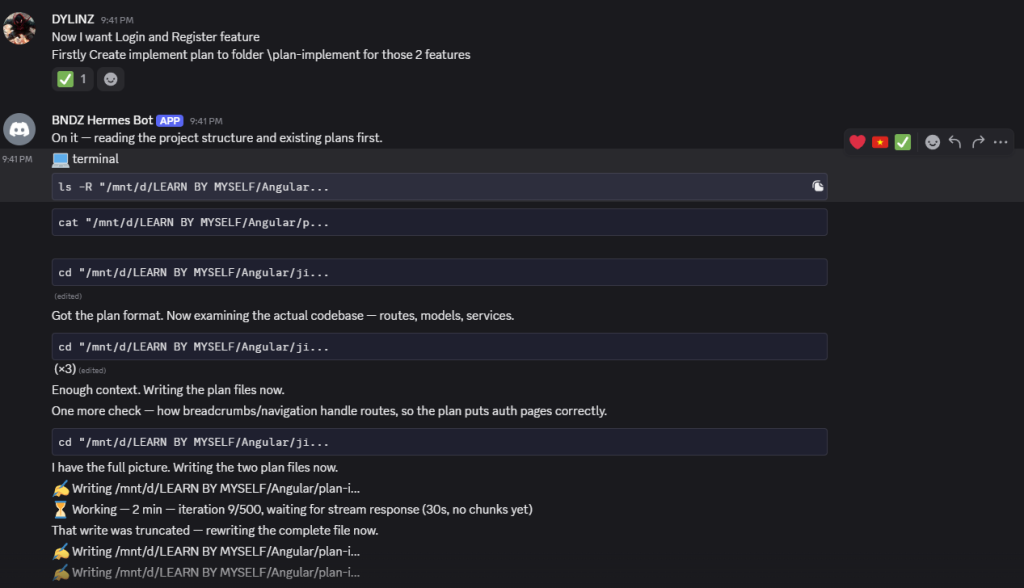
2. Implement new feature (Login)
6. In-Depth Comparison: Hermes Agent vs. OpenClaw
OpenClaw (formerly Warelay / Moltbot / Clawdbot) is another dominant open-source personal AI assistant with massive community traction. While both frameworks champion local-first autonomy and multi-channel messaging, they are built on distinct design philosophies.
6.1. Feature Comparison Matrix
| Dimension | Hermes Agent (Nous Research) | OpenClaw |
|---|---|---|
| Core Philosophy | Self-improving cognitive loop, research-grade learning, file-based memory | Plug-and-play personal assistant, rich app automations, multi-channel hub |
| Memory Architecture | File-based Markdown mental model (SOUL, USER, MEMORY, SKILL) with auto-compaction | Local vector storage, session caching, and workspace context configs |
| Extensibility & Plugins | Model Context Protocol (MCP) + Autonomous Skill Synthesis (SKILL.md) | ClawHub (Community plugin registry with 100+ integrations) |
| Multi-Agent Support | Native sub-agent spawning, background delegation, and cron scheduling | Multi-channel session routing and concurrent tool execution |
| MLOps / RL Capabilities | Native trajectory logging and export for model fine-tuning & RL loops | General execution logging; not tailored for model training workflows |
| Security Model | Sandboxed shell tools, granular confirmation flags, transparent file audits | Local execution; requires careful auditing when using unverified ClawHub plugins |
| Ideal User | AI Engineers, researchers, power developers, autonomous workflow builders | Everyday productivity enthusiasts, sysadmins, workflow automation users |
6.2. Key Architectural Divergence
1. Self-Evolving Brain vs. Marketplace Plugin Registry
- OpenClaw excels through ClawHub, its rich ecosystem of ready-made community plugins for Google Workspace, Notion, Spotify, and WhatsApp. If you want instant turnkey integrations with third-party web apps, OpenClaw provides immense out-of-the-box convenience.
- Hermes Agent focuses on intrinsic self-evolution. Instead of relying purely on pre-packaged extensions, Hermes writes its own skills, self-heals when scripts fail, and uses standard MCP servers to connect with external services.
2. Transparency & Inspectability
- With Hermes, you can open
~/.hermes/MEMORY.mdorUSER.mdin any code editor, see exactly what the agent knows about you, and edit or delete any incorrect fact in plain text. - This file-based system makes debugging agent behavior straightforward and eliminates the “black box” vector database issue.
7. Decision Guide: Which One Should You Choose?
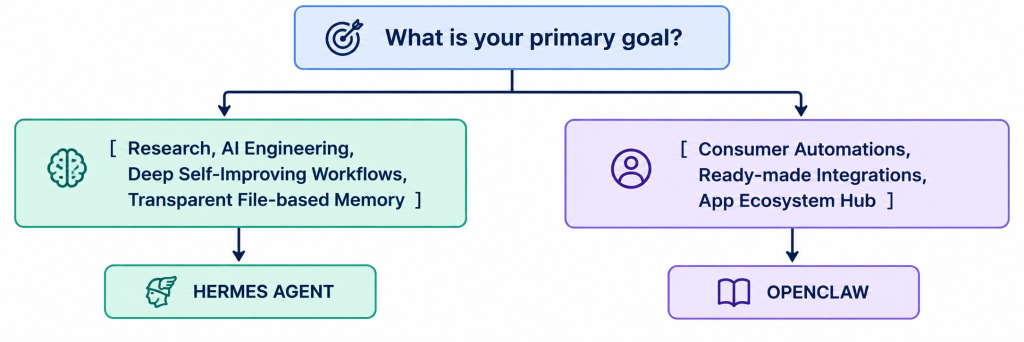
- Choose Hermes Agent if:
- You want an agent that improves organically and persists knowledge in transparent Markdown files.
- You work with MCP (Model Context Protocol) and local models (vLLM/Ollama).
- You are an AI researcher or developer interested in collecting agent trajectories for fine-tuning.
- Choose OpenClaw if:
- You want an immediate personal assistant connected to dozens of everyday apps via ClawHub.
- You prioritize broad chat platform support with minimal custom scripting.
8. Conclusion & Next Steps
The age of static prompt-response chat is yielding to persistent, autonomous agents that learn, adapt, and operate continuously on your behalf.
Hermes Agent by Nous Research sets a remarkable precedent with its transparent file-based cognitive architecture, autonomous skill creation, and deep MLOps lineage. Whether you’re automating complex DevOps pipelines, setting up an interactive Discord co-pilot with TTS/Voice capabilities, or building a dedicated digital research assistant, Hermes Agent provides the autonomy and adaptability required for the next generation of AI engineering.
Getting Started Resources
- Hermes Agent GitHub: NousResearch/hermes-agent
- Official Documentation: hermes-agent.org
- Community Skills Hub: agentskills.io
- OpenClaw Repository: github.com/openclaw/openclaw