


I. Introduction
Traditional web applications primarily exchange data through the request-response model: the client sends a request, and the server returns a response. This model remains effective for APIs and short-lived operations. However, real-time applications such as chat, notifications, dashboards, and collaborative editing often require continuous, bidirectional communication, where both the client and the server can send data as events occur.
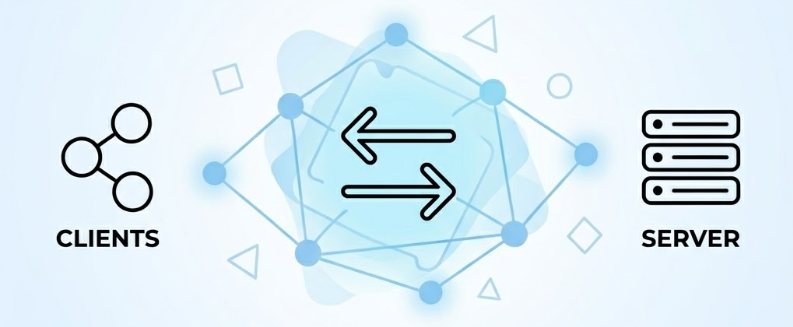
Several mechanisms can support data exchange between a client and a server. Common approaches include:
- HTTP request-response, which is well suited for APIs and short-lived operations.
- Polling, where the client periodically checks the server for new data.
- Long Polling, where the server keeps a request open until new data becomes available or the request times out.
- Server-Sent Events, which maintain a one-way stream of data from the server to the client.
- WebSocket, which maintains a persistent, full-duplex connection that allows both the client and the server to send data independently.
Each mechanism serves different communication requirements. WebSocket is particularly suitable for applications that require frequent, low-latency message exchange in both directions. Its persistent connection model also introduces testing considerations that differ from traditional HTTP request-response testing.
This article explores how to perform WebSocket performance testing with Apache JMeter. It begins by examining the limitations of JMeter core when working with WebSocket connections and then introduces a plugin-based approach for extending JMeter with WebSocket testing capabilities.
II. Problem Statement
Apache JMeter provides strong support for recording and testing HTTP request-response traffic. However, JMeter core does not provide dedicated samplers for opening WebSocket connections or exchanging messages over them.
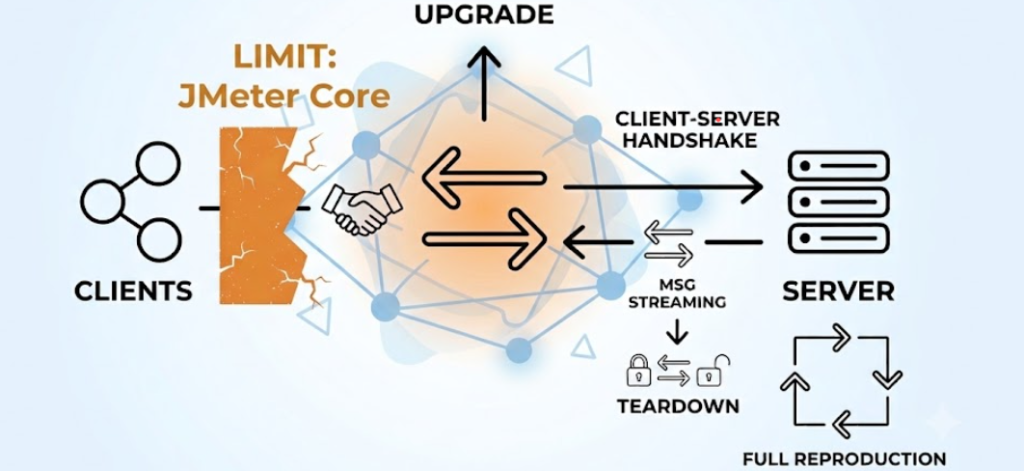
When recording HTTP traffic, JMeter typically captures the requests used to load the application and complete any HTTP-based preparation required before the WebSocket connection is opened, such as:

These requests establish the required application context, but they do not represent the complete WebSocket flow.
WebSocket follows a different communication model from traditional HTTP request-response. In a conventional HTTP exchange, the client sends a request, receives a response, and completes that exchange. With WebSocket, the client and server first establish a persistent WebSocket connection. Once established, the connection remains open, allowing both sides to exchange multiple messages independently over the same connection.
Recording and replaying only the preceding HTTP requests is therefore not sufficient to reproduce the persistent WebSocket connection and message exchanges required by the application.
A basic WebSocket test flow must also cover:

The core limitation is that JMeter core primarily follows the request-response model and does not provide dedicated samplers for managing long-lived WebSocket connections and message exchanges. Additional WebSocket capabilities are therefore required to reproduce the connection lifecycle and communication behavior of a real client.
The following Approach section introduces a plugin-based solution for extending JMeter with the operations required at each stage of the WebSocket lifecycle.
III. Approach
1. Extending JMeter with Plugin
For WebSocket testing with JMeter, WebSocket Samplers by Peter Doornbosch provides a practical way to address the lack of built-in WebSocket support. The plugin adds dedicated samplers for opening connections, exchanging text or binary messages, maintaining active sessions, and closing connections when required.
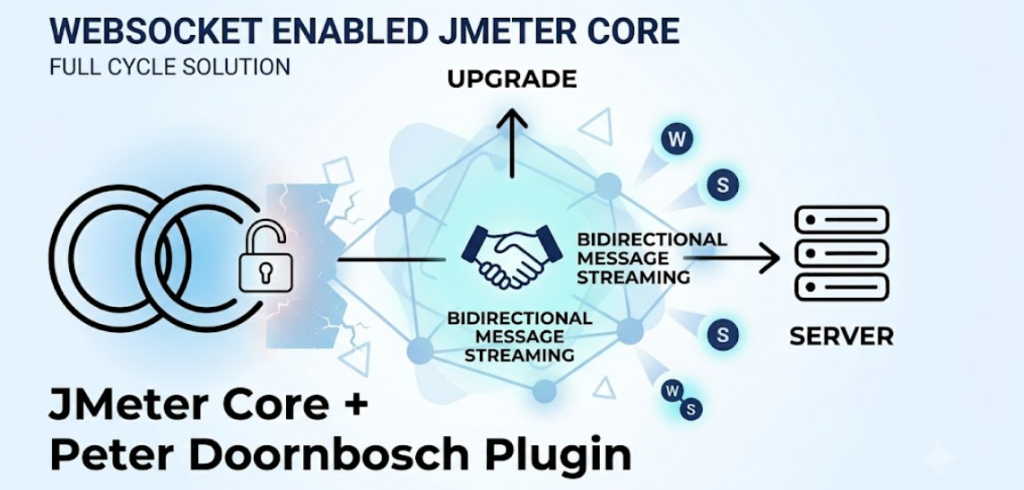
The primary samplers include:
- WebSocket Open Connection: Opens a WebSocket connection.
- WebSocket Single Write: Sends a text or binary message to the server.
- WebSocket Single Read: Waits for and reads a message sent by the server.
- WebSocket Request-Response: Sends a message and waits for a matching response.
- WebSocket Ping/Pong: Verifies or helps maintain an active connection.
- WebSocket Close: Closes the WebSocket connection.
The plugin supports both standard and secure WebSocket connections through ws and wss. It can also send and receive both text and binary WebSocket frames.
2. Common WebSocket Test Lifecycle
Before opening a WebSocket connection, the client may need to establish the required context through earlier HTTP requests, such as authentication, session creation, or application-specific connection preparation. The plugin can work with JMeter’s HTTP Header Manager and HTTP Cookie Manager, allowing the WebSocket opening request to include the applicable headers and cookies established during this preparation.
Although each application may use WebSocket differently, a JMeter test can generally be structured around the following high-level flow:
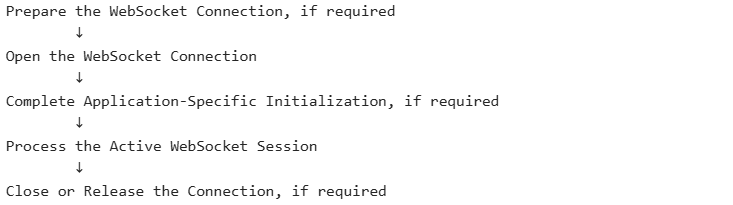
> Prepare the WebSocket Connection, if required
This stage completes any prerequisites needed before opening the WebSocket connection. Depending on the application, these steps may include:
- Opening the application.
- Authenticating the user.
- Perform application-specific connection initialization, if required
Not every application requires all of these activities. Some WebSocket endpoints can be opened directly, while others become available only after an earlier HTTP-based application flow has completed.
> Open the WebSocket Connection
This stage establishes the actual ws or wss connection by using the endpoint and connection information obtained during preparation.
At this point, the underlying WebSocket connection is open, but the application may still require additional initialization before the channel is ready for normal message exchange.
> Complete Application-Specific Initialization, if required
Some applications require additional messages to be exchanged immediately after the WebSocket connection is opened. These messages may complete an application-level handshake or initialize the session used by the channel.
This stage is optional. A simple channel may proceed directly to active message exchange, whereas a more complex channel may require several initialization messages first.
> Process the Active Channel Session
Once the connection and application session are ready, JMeter can reproduce the main activity of the client, such as:
- Sending messages to the server.
- Reading messages pushed by the server.
- Performing request-response exchanges when applicable.
- Sending ping or keep-alive messages.
- Keeping the connection active for the expected user-session duration.
> Finalize the Channel Session, if required
This stage completes the scenario by closing the WebSocket connection or performing any required session cleanup.
The connection may be closed explicitly to simulate a user leaving the application. In scenarios where users are expected to remain connected, it may instead remain open until the test or thread ends.
IV. Plugin Installation
The recommended way to install WebSocket Samplers by Peter Doornbosch is through the JMeter Plugins Manager. This approach automatically downloads the required plugin files and places them in the appropriate JMeter directories. The plugin is listed in the JMeter plugin catalog as WebSocket Samplers by Peter Doornbosch.
1. Install JMeter Plugins Manager
If Plugins Manager is already available in JMeter, skip this step.
Otherwise:
- Download
plugins-manager.jarfrom the JMeter Plugins website. - Copy the downloaded file to:
JMETER_HOME/lib/ext- Restart JMeter.
- Verify that Plugins Manager appears in the JMeter Options menu.
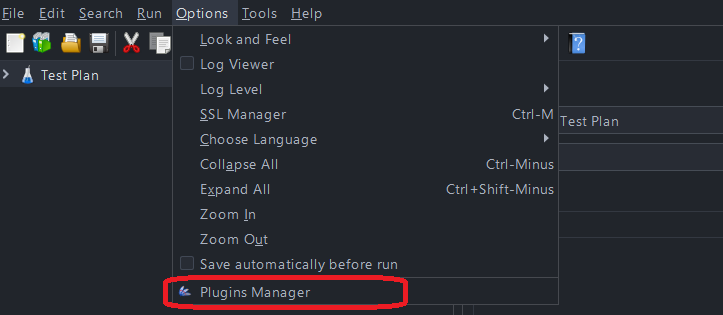
The Plugins Manager documentation identifies this as the standard installation process for adding plugin-management support to JMeter.
2. Install WebSocket Samplers
After Plugins Manager is available:
- Start JMeter.
- Open Options > Plugins Manager
- Select the Available Plugins tab.
- Search & select: WebSocket Samplers by Peter Doornbosch\
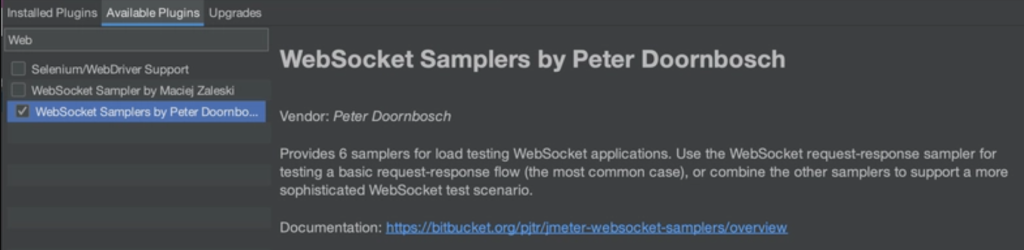
- Select the plugin.
- Click Apply Changes and Restart JMeter.
JMeter installs the plugin and restarts with the new WebSocket components enabled. The plugin can also be found through the JMeter Plugins catalog.
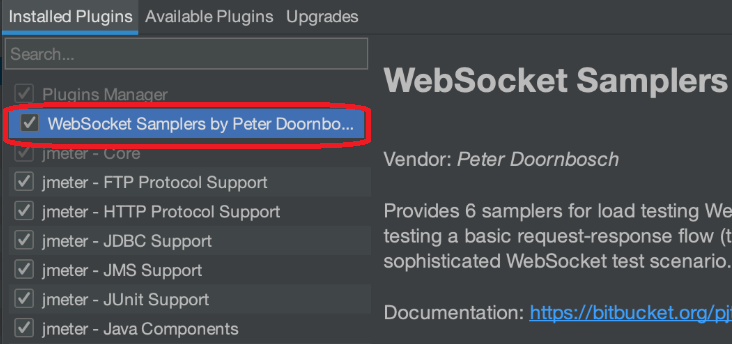
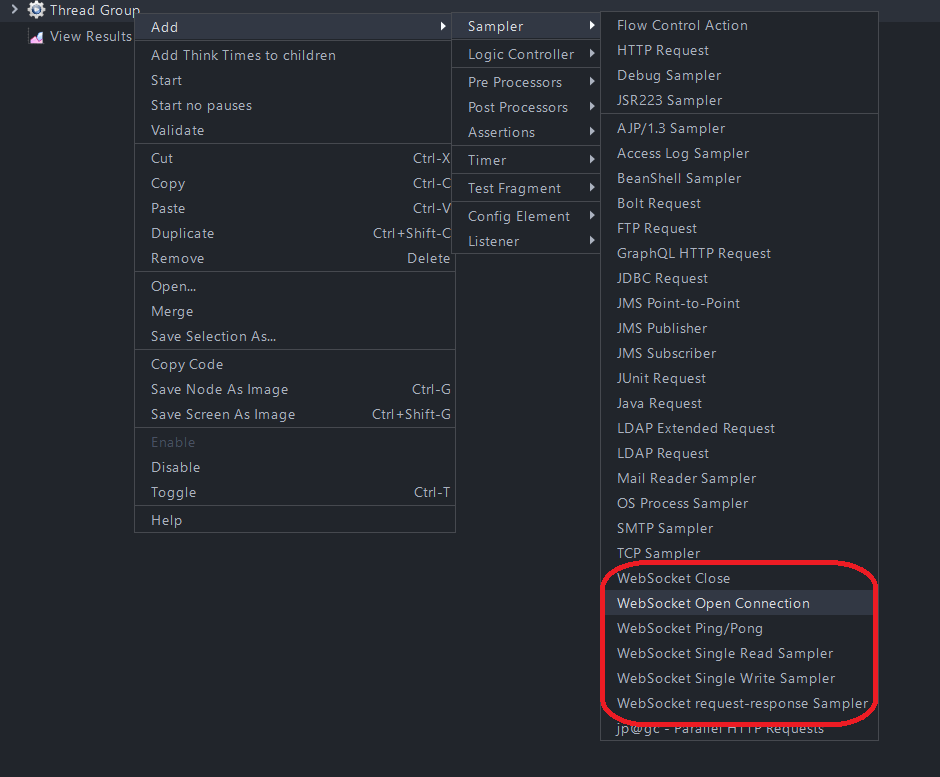
3. Verify the Installation
After JMeter restarts:
- Create or open a Thread Group.
- Right-click the Thread Group.
- Navigate to Add > Sampler
The following WebSocket samplers should now be available:
V. Technology & Application
1. Technology Context

WebSocket provides a persistent, bidirectional communication channel that allows a client and a server to send data independently over the same connection. However, WebSocket defines only the connection and message-framing mechanism. The protocol does not define how an application authenticates users, structures messages, manages sessions, performs reconnection, or routes data to specific clients.
At a lower level of abstraction, developers can work directly with the WebSocket APIs or lower-level libraries available in their technology stack. This approach gives the application greater control over the connection and message flow, but may also require it to define and manage:
- Connection establishment and termination
- Text or binary message formats
- Authentication and authorization
- Client and session identification
- Heartbeat and timeout behavior
- Error handling and reconnection
- Message routing and server-side connection tracking
The browser WebSocket API is one example of this lower-level approach, providing the fundamental operations required to open a connection and exchange messages in both directions without repeatedly polling the server.
Applications can also use higher-level libraries and frameworks that provide additional real-time communication capabilities. Common examples include:
- ASP.NET Core SignalR for real-time communication in .NET applications
- Socket.IO for event-based real-time communication, commonly used in Node.js applications
- Spring WebSocket for WebSocket and messaging support in Java applications
- Django Channels for asynchronous real-time communication in Python and Django applications
- Phoenix Channels for topic-based real-time communication in Elixir and Phoenix applications
- Action Cable for integrating WebSocket-based real-time features into Ruby on Rails applications
Although these technologies follow different implementation models, they can all use WebSocket to enable bidirectional, application-specific message exchange.
2. Sample Application

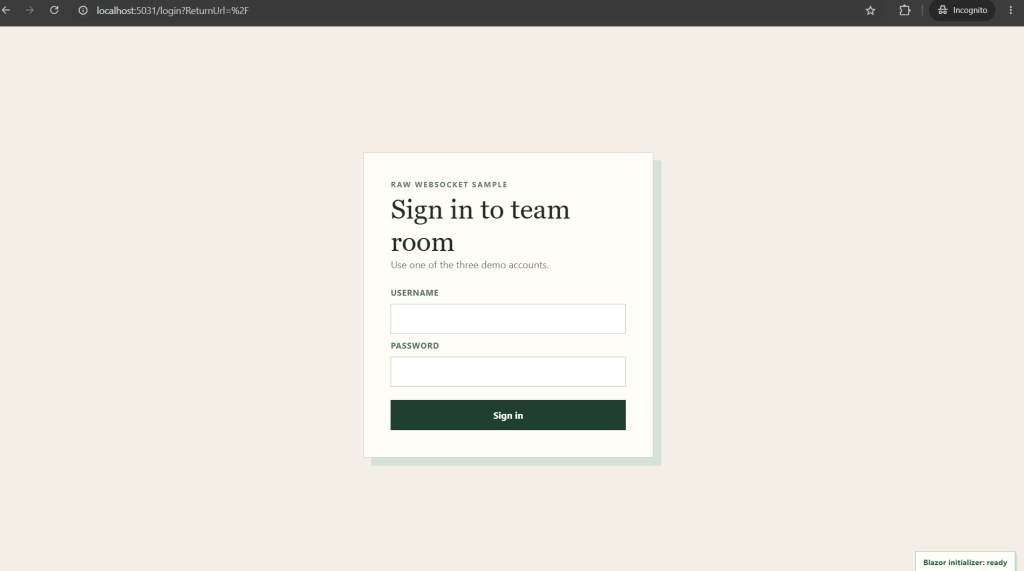
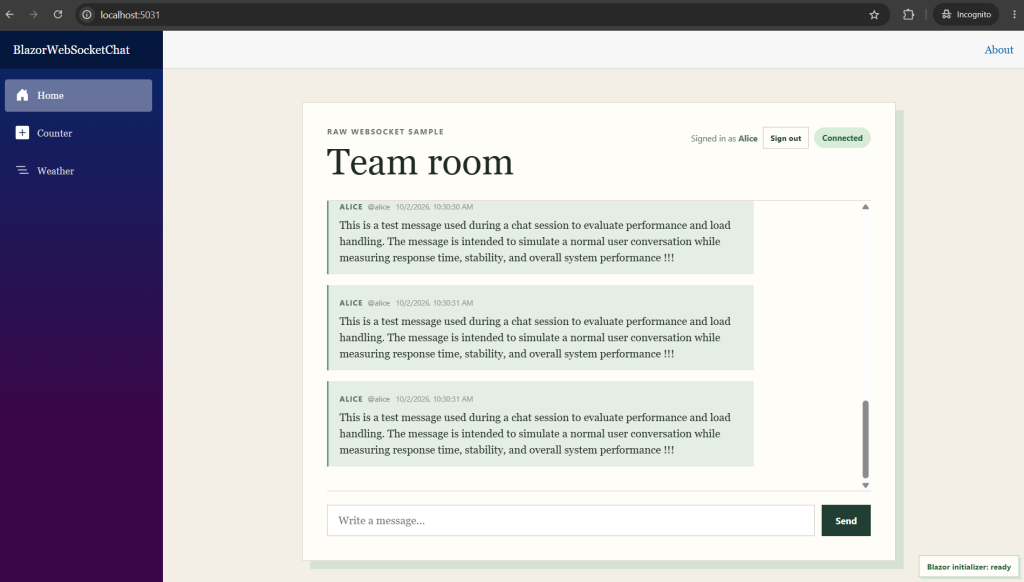
To make this general model more concrete, the following sample application shows how WebSocket communication appears in a practical web chat scenario before it is translated into a JMeter performance test. This sample uses a Blazor-based web chat application that combines two WebSocket implementation approaches: ASP.NET Core SignalR for the interactive Blazor application and the lower-level ASP.NET Core WebSocket API for chat-message exchange:




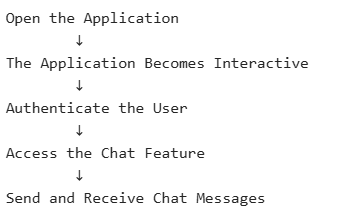
From the user’s perspective, the application flow is straightforward:
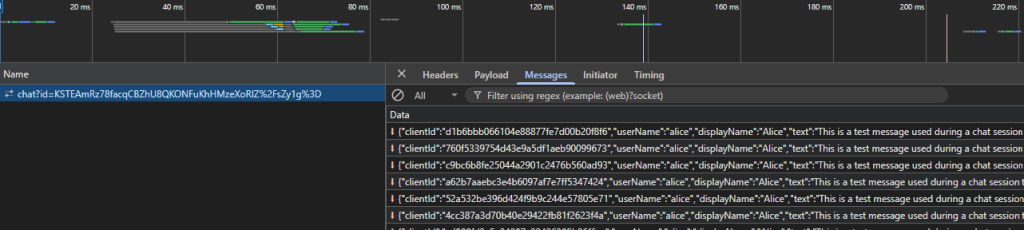
Behind this user journey, the browser maintains two independent WebSocket connections:
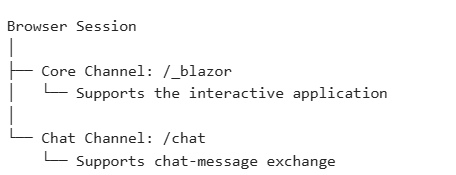
The two connections can remain active concurrently, but they serve different purposes:
- /_blazor operates the Blazor application and keeps the page interactive.
- /chat is opened after authentication and carries chat messages.
This distinction is reflected in the JMeter test structure, where the Core Channel and Chat Channel are executed as separate branches under a Parallel Controller.
> Core Channel: /_blazor
The Core Channel is the internal connection used by Blazor Interactive Server to operate and continuously synchronize the interactive application between the browser and the server:
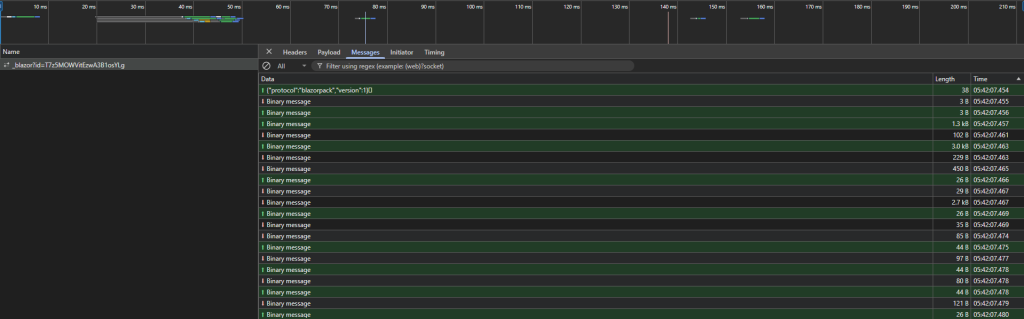
The communication is bidirectional:
- The browser sends user interactions and other client-side events to the server.
- The server sends application and rendering updates to the browser when the server-side component state changes and requires the displayed interface to be updated.
As a result, an update does not always have to begin with a direct user action. It can also originate from server-side processing, background activity, notifications, or other application events that trigger a component update.
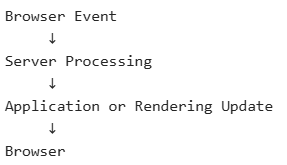
Or:
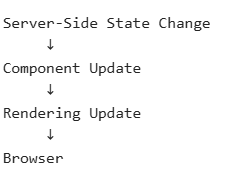
==> In simple terms:
The Core Channel keeps the browser synchronized with the server-driven application, carrying interactions to the server and delivering relevant application updates back to the browser as they occur.
The same connection also carries the framework-level communication required to initialize and operate the Blazor session, including circuit initialization, component coordination, JavaScript interop, rendering acknowledgements, and connection maintenance.
Technically, the Core Channel uses ASP.NET Core SignalR, with WebSocket as the underlying transport. The browser normally creates and manages this connection through blazor.web.js.
> Chat Channel: /chat
The Chat Channel is a separate WebSocket connection dedicated to chat-message exchange. Unlike the Core Channel, /chat is not opened immediately when the application first loads. The user must first authenticate and access the chat feature:

The user journey is:
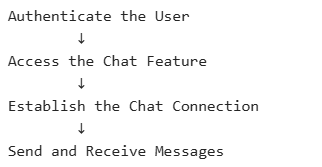
==> In simple terms:
The Chat Channel carries chat messages between the browser and the server after the user has entered the chat feature.
The Chat Channel flow is represented in JMeter as:
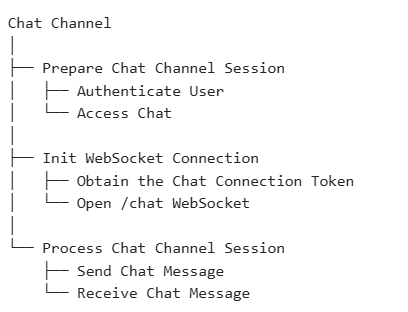
At a high level, this branch performs three responsibilities:
VI. Demonstration
This demonstration translates the sample application’s WebSocket architecture into a practical JMeter Test Plan. It shows how the Core and Chat connections can be structured, configured, and executed as concurrent flows using the WebSocket plugin.
1. Test Plan Design
As a practical starting point, the JMeter Test Plan can be organized with shared configuration and two concurrent channels representing the Core and Chat WebSocket flows:
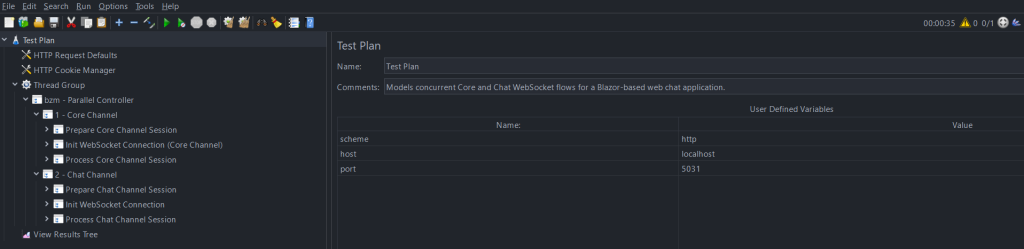
The structure is divided into three areas:
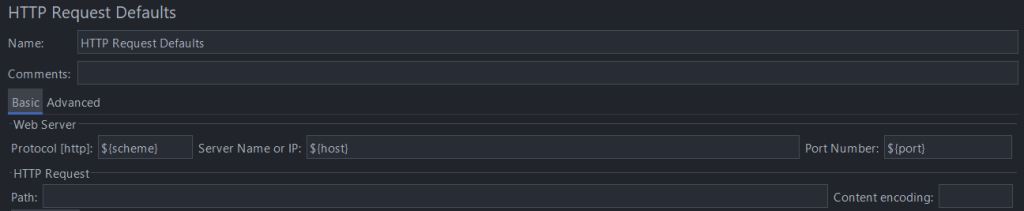
- Shared configuration <User Defined Variables, HTTP Request Defaults, HTTP Cookie Manager>: defines reusable environment values, HTTP defaults, and cookie handling.


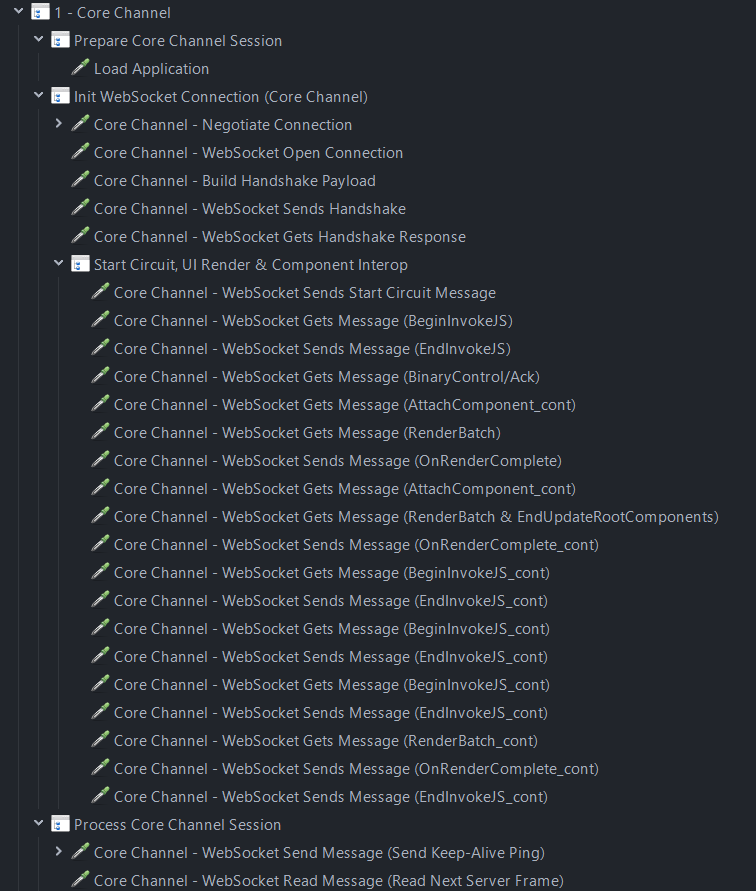
- Core Channel: models the complete
/_blazorflow, from establishing the SignalR WebSocket connection and initializing the Blazor circuit to processing the active application session.
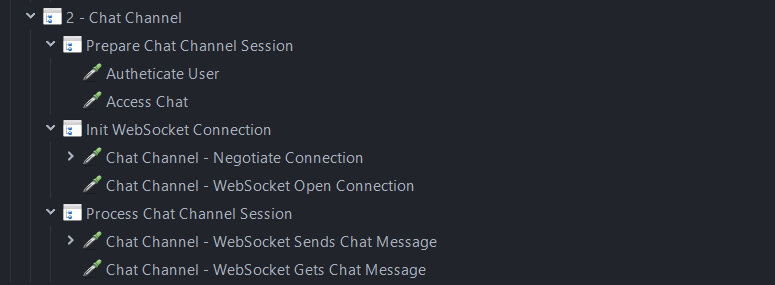
- Chat Channel: models the complete
/chatflow, from authenticating the user and accessing the chat feature to establishing the WebSocket connection and exchanging chat messages during the active session.
The Core and Chat channels are executed within the same Thread Group, which defines the virtual-user workload and test duration. The bzm Parallel Controller runs the Core and Chat branches concurrently, while preserving the sequential order of operations within each branch.
2. Execution
Once the Test Plan is configured, start with a single virtual user to confirm that JMeter can execute the complete application flow across both WebSocket channels.

During this initial execution, JMeter should be able to:
- Complete the required HTTP preparation and authentication.
- Establish the
/_blazorand/chatWebSocket connections. - Process the required initialization exchanges.
- Send and receive the expected application messages.
- Keep both connections active for the intended session.
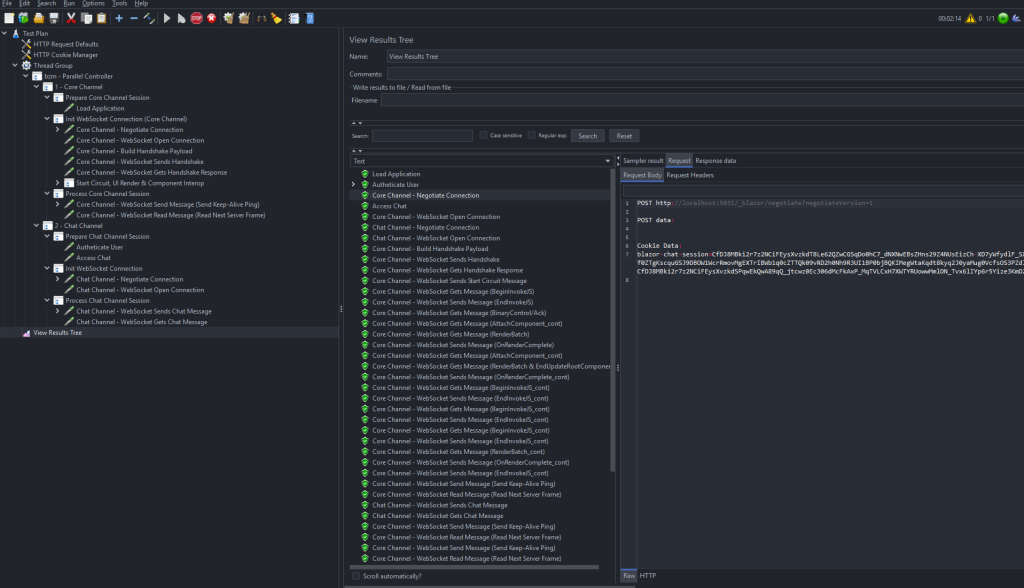
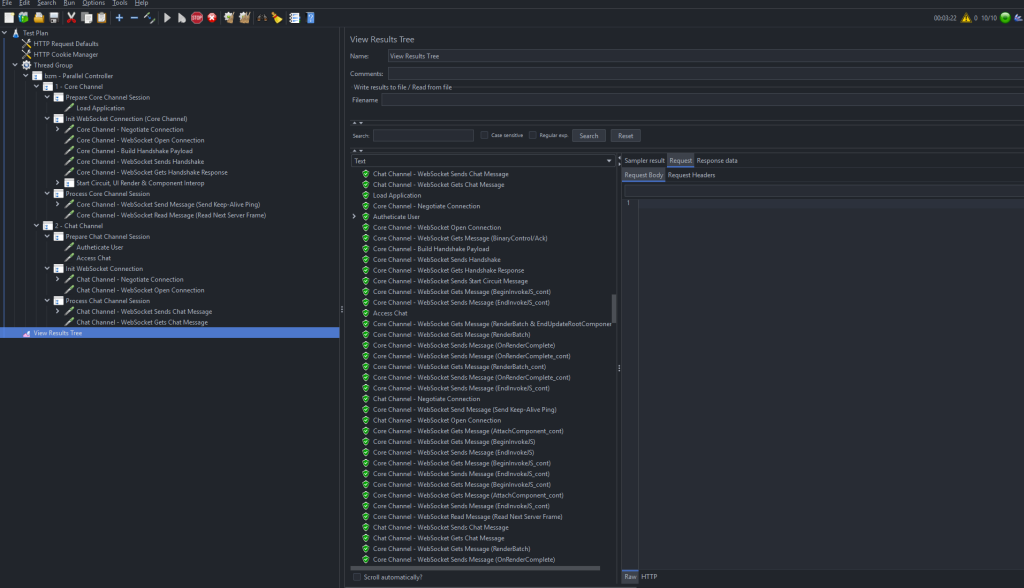
The View Results Tree can be used during this stage to inspect individual HTTP requests, WebSocket operations, and message payloads. A successful run confirms that the plugin can handle the WebSocket transport while the Test Plan reproduces the protocol and application behavior required by each channel.
The green samples in the example indicate that the modeled flow completed without sampler-level errors. However, successful sampler execution should be interpreted together with the expected connection state and message content, especially for asynchronous WebSocket reads.
Once the single-user flow is stable, continue with 10 concurrent virtual users, a 20-second ramp-up, and 1 iteration per user. JMeter starts the 10 users progressively over 20 seconds, approximately one new user every two seconds. Each virtual user executes the complete Core and Chat flow once, allowing multiple WebSocket sessions to run concurrently:

The demonstration provides a working foundation for executing the application’s WebSocket flows in JMeter. From this baseline, the workload can be scaled to X concurrent virtual users, a Y-second ramp-up, and Z iterations per user. Workload modeling, server monitoring, result analysis, and reporting can be expanded separately based on the application’s performance requirements.
VII. Conclusion
WebSocket-based applications require a different approach from traditional HTTP request-response systems. A WebSocket connection may remain active throughout the user session, carry messages in both directions, and support an application-specific protocol whose behavior varies across technology stacks.
Although JMeter does not provide built-in WebSocket support, this gap can be addressed effectively through WebSocket Samplers by Peter Doornbosch. The plugin supplies the connection-level operations required to open WebSocket connections, exchange text or binary messages, process incoming frames, maintain active sessions, and close connections when required.
The key principle is that the plugin handles the WebSocket transport, while the JMeter Test Plan models the protocol and application behavior carried over each connection. This includes preparing the required user context, correlating dynamic connection data, reproducing initialization exchanges, sending application messages, and maintaining long-lived sessions.
JMeter can overcome the WebSocket support gap through plugins, but an effective test still depends on understanding what each connection carries and translating the real application flow into the Test Plan.
VIII. References
https://bitbucket.org/pjtr/jmeter-websocket-samplers/src/master
https://plugins.jmeter.ai/blog/jmeter-websocket-plugin-tutorial-real-time-load-testing