


From a Browser Spell Checker to AI Sentence Suggestions
Explore the WriteBetter AI source code on GitHub
Building an AI-Powered Writing Assistant from Scratch, Part 1 of 2
When I write a technical article in English, I often know what I want to say before I know whether the sentence sounds right. Switching to another window to ask about a typo breaks the flow. I wanted to stay in the paragraph, see a suggested correction and decide whether to take it. That small interaction became the brief for a writing assistant.
My first acceptance test fit on one line: type I made a mistkae, pause, and accept mistake without retyping the sentence. There was enough engineering in that one typo to build the first version entirely in the browser.
Start with a draft the writer owns
I started WriteBetter AI as a Next.js application with a React textarea. In version 0.1.0, the page held the draft in memory and displayed word and character counts. A refresh cleared the draft. This gave me an ordinary place to type, paste a paragraph and observe exactly what an edit changed.
Even a character count forced a design decision. A family emoji such as 👨👩👧👦 displays as one symbol and occupies eleven UTF-16 code units in a JavaScript string. The counter uses Intl.Segmenter with grapheme granularity for display. The editor uses JavaScript string positions for slicing. If you use the displayed character count to locate a typo after that emoji, your replacement can land several positions too early.
Move dictionary lookups into a worker
Version 0.2.0 added two dependencies: dictionary-en for the English dictionary and nspell for spelling checks. A preparation script copies the word list, affix definitions and license into the application’s public assets. The browser fetches the first two files from the same origin. A Web Worker builds one dictionary instance and reuses it across reviews:
const dictionary = Promise.all([
  loadDictionaryFile("index.aff"),
  loadDictionaryFile("index.dic")
]).then(([affixes, words]) => createSpellChecker(affixes, words))
This division has a practical benefit. React can keep handling keystrokes while the worker searches for alternative spellings. It also introduces a timing problem: the writer may already have changed the text by the time the worker answers.
The textarea updates its own state immediately. A React effect schedules a review after 350 milliseconds of inactivity and clears the timer when the draft changes. Once a review has started, the worker echoes the exact text it checked alongside its suggestions. The component decides whether the result still applies with one comparison:
const current = review?.text === draft ? review : nullFor a short, locally reviewed draft, discarding a result after any edit is a reasonable trade. It keeps the first implementation simple. Reviewing a long document after each pause would deserve its own performance measurement.
Try a typo that appears twice
A suggestion carries the original text, its start position, a replacement, a category and a short explanation. I ran the project’s review function with its actual dictionary against four drafts. Positions below are zero-based JavaScript string offsets.
| Draft | Returned suggestions |
|---|---|
| I made a mistkae | At 9, replace “mistkae” with “mistake”. |
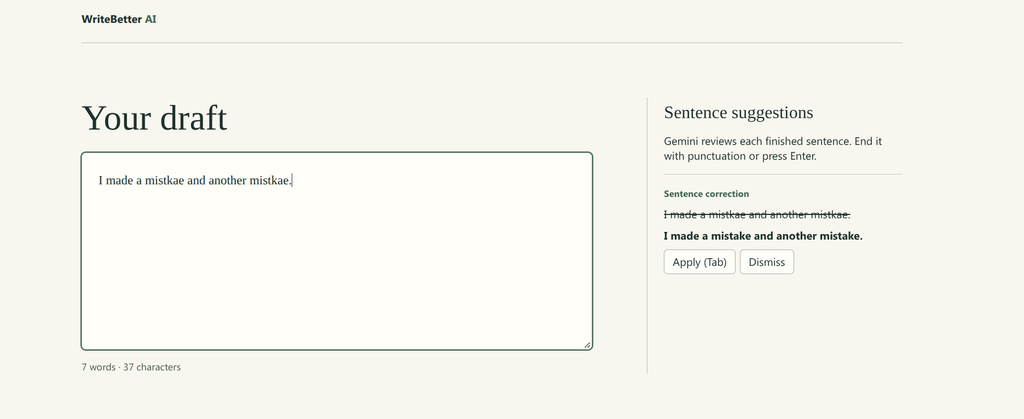
| I made a mistkae and another mistkae. | The same correction at 9 and 29. |
| She are ready . | At 4, change “are” to “is”. At 13, replace the space and period with a period. |
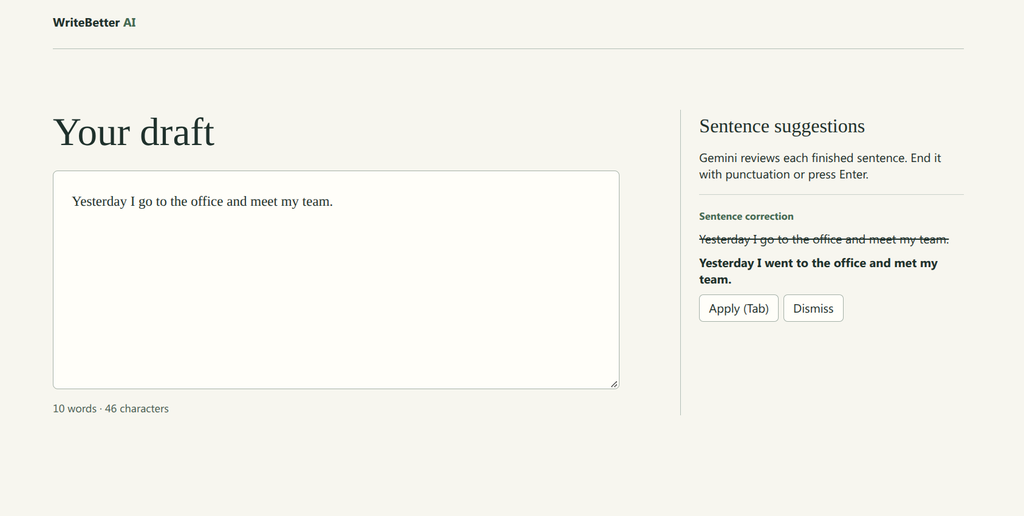
| Yesterday I go to the office and meet my team. | None. |
The local review implementation and the dictionary worker are available at the revision used for this stage. Browser spell checker on GitHub
The second result explains why a suggestion needs a range. Calling draft.replace("mistkae", "mistake") after a click on the second suggestion would fix the first occurrence. Here is the actual application’s guard and update:
const end = item.start + item.original.length
if (!current || draft.slice(item.start, end) !== item.original) return
setDraft(draft.slice(0, item.start) + item.replacement + draft.slice(end))
The third result came from two small rules layered on top of spelling checks: one recognizes a limited set of subject and verb combinations, the other catches spaces before punctuation. An earlier Chrome check exercised the interaction by accepting the grammar correction and dismissing the punctuation suggestion. This is deliberately narrow grammar coverage. A reader trying the application can reproduce the dictionary mode by starting the project without a Gemini key, running npm ci and npm run dev, and entering the four drafts above.
The fourth result gave me the next requirement. Every word in that sentence is spelled correctly. Yet “Yesterday” changes how I would write both “go” and “meet”. Clicking two independent word suggestions would also make me reconstruct the corrected sentence in my head. I wanted to see the whole proposed sentence before accepting either change.
Decide what leaves the browser
The local checker could examine the full draft after every pause. For a remote service, that same policy would repeatedly transmit unfinished paragraphs and consume quota while the writer was still choosing a word. I made a completed sentence the unit of review.
The editor segments English text with Intl.Segmenter. It looks for terminal punctuation or a line break, skips sentences longer than 2,400 JavaScript string units and selects the first eligible sentence without a cached review. A half-second timer gives the writer a moment to revise it. The browser then posts one field to a Next.js route:
{"sentence":"Yesterday I go to the office and meet my team."}That request also defines the limits of the feature. If the time reference occurs in the preceding paragraph, the model will never see it. Sending more context would change the privacy trade-off, the amount of input and the set of edits that should invalidate an earlier review.
Give the model a small contract
I configured a server-side GEMINI_API_KEY in .env.local and used Gemini 3.1 Flash-Lite. On a local checkout, the server selects the sentence editor when the key is present. Without it, the dictionary editor remains usable. The credentials stay on the server. Each submitted sentence travels to the provider.
The route validates the input, places the sentence in a user message as data, and uses a separate system instruction to preserve meaning, names, uncertainty and voice. A correct sentence should come back unchanged. I wanted wording that my application could compare and display. Here is the response configuration from the provider request:
generationConfig: { responseMimeType: "application/json", responseSchema: {
  type: "OBJECT", properties: { sentence: { type: "STRING" } }, required: ["sentence"]
} }
A schema can describe a string. It cannot guarantee that a rewrite preserves the author’s intent. Consider “I might publish on Friday.” A fluent replacement that drops “might” makes a stronger promise. For that reason the editor shows the original and replacement together. Only the writer can apply the change.
Follow a reply back to the editor
The server checks the provider’s completion reason, parses the structured content, and rejects an empty, excessively long or multiline replacement. The successful response to the browser is smaller still:
return Response.json({ replacement: output.sentence.trim() })The browser compares the replacement with the submitted sentence. An unchanged string produces no card. A changed string produces one card with Apply and Dismiss. Pressing Tab in the textarea accepts the first visible suggestion. This design turns “already correct” into a quiet outcome, which matters in a tool that examines every completed sentence.
A live Chrome run produced “Yesterday I went to the office and met my team.” The earlier local result on that same input was empty. This pair demonstrates the particular improvement we wanted. It says little about the model’s accuracy on other constructions, or whether a suggested stylistic change will suit a particular author.
The route tests replace the outgoing provider call with controlled responses. One test checks the model endpoint, server credential header and submitted sentence, then verifies that the route decodes a structured correction. Another returns HTTP 429 and then an empty candidate list. The route surfaces the quota error and rejects the incomplete response. A third sends 2,401 characters and confirms that the provider was never called. Run npm test on revision d904fd9 to execute these alongside the editor’s other unit tests.
Test failure without spending quota
On a provider error the editor pauses its queue and offers Retry. This avoids turning a quota failure into a new request at every keystroke. Successful requests bring a different problem: a perfectly reasonable correction can arrive after its sentence has changed. The first live reply took long enough for me to write another sentence. What happens to those new words when I press Tab?
Gemini route and its tests on GitHub · Next article: Keeping a React Editor in Sync While Waiting for Gemini