



Platform Engineering at NashTech series:
- https://blog.nashtechglobal.com/platform-engineering-at-nashtech/
- https://blog.nashtechglobal.com/platform-engineering-introduce-a-new-nashtech-self-service-portal-accelerator/ <= This part
- https://blog.nashtechglobal.com/platform-engineering-how-nashtech-self-service-portal-accelerator-work/
- https://blog.nashtechglobal.com/platform-engineering-exploring-nashtech-self-service-portal-accelerator-practical-steps/
At NashTech, we are working on heavy tasks to adapt our software engineering to the bedrock of the Platform Engineering trend. You can see the efforts to make it work at Platform Engineering at NashTech[1]. Based on it, we are continuing to work on BackStage to customize and put our building blocks into it, introducing it as an NT Accelerator for Self-service Portal Accelerator (will soon roll out on our NT Accelerator Website). The post today is mainly positioned out where it fits into other NashTech Architectural accelerators, and we end up with step-by-step to set up and play with it on the NashTech Self-service Portal accelerator in the following posts.
But first of all, we need to know what is different between the Internal Developer Platform and the Internal Developer Portal, so jump into the next section to explore it.
What is the Internal Developer Platform?
According to internaldeveloperplatform.org[2], “Internal Developer Platforms (IDPs) are configured by Ops teams and used by developers. Ops teams specify what resources start with what environment or at what request. They also set baseline templates for application configurations and govern permissions. This helps them to automate recurring tasks such as spinning up environments and resources and makes their setup easier to maintain by enforcing standards. Developer teams gain autonomy by changing configurations, deploying, spinning up fully provisioned environments, and rolling back. IDPs can be built or bought.”
At the beginning of a project, Ops teams shall set up and prepare everything that is needed for the developers of the project to get started, including infrastructure, source control, configuration management, guidance, learning-path documents, scripts to spin-up pre-producible dev environment, CI/CD pipelines, best practices to versioning artifacts, deployment strategies, observability, so on and so forth.
The Internal Developer Platform serves as the control plane to coordinate previous stuff. As you can see, there is a lot of work to deal with when the project starts, right? So, the question in our mind is how we can help release the heavy tasks for the guys in the Ops team based on the leverage of Ops knowledge of what we have done before in successful projects and fill the gaps of learning from scratch for many projects that we observe during many years now.
What is the Internal Developer Portal?
“An internal developer portal (“IDP”) is the singular interface to your developer platform. It discovers every aspect of your architecture, organizes it into a knowledge graph, and exposes information as well as actions developers can take in a unified user experience and API. An IDP also leverages its knowledge graph to support scenarios that are critically important to other enterprise stakeholders, including in architecture, ops, security, platform, reliability engineering, and FinOps. It is a powerful workflow and analytics tool that enables organizations to build more reliable, secure, cost-efficient software faster.” [3]
Because it is an interface (UI) of all stuff underneath it could expose the UI which helps developers to “Self-service Actions”, and behind the scenes, it composes all heavy tasks:
- Microservice software development lifecycle (we use the term microservice here because almost what you can solve with microservice then you can solve with a modular monolith as well) such as scaffolding a new service, deploying service in CI/CD pipeline automatically, upgrading a package version, etc.
- Request a cloud resource or component like AWS Aurora, Postgres, or RabbitMQ.
- Developer Environments such as devcontainer for reproducible environments in both on-premises or clouds.
- Site Reliability Engineering works such as updating auto-scaling groups in Kubernetes or Kafka, pod counts…
- Just name a few
What is the NashTech Self-service Portal accelerator?
“No man ever steps in the same river twice, for it’s not the same river and he’s not the same man”
Heraclitus
During many years working on software engineering, we have many things in our pocket and need to have a way to sell them out as well as help potential customers not to face the same problems we have faced. We can build our own interface to expose the self-service portal for developers, but we love Open Source and want to leverage some of them in our self-service portal. Our team experienced many Self-service Portals out there in the market, both commercial and open-source software such as Spotify BackStage, Humanitec, GetPort, and Choreo… but eventually BackStage won our hearts due to the open-source criterion and with many plugins in the community.
Seizing the new technology is our mission, so we work to position it into our picture as below.
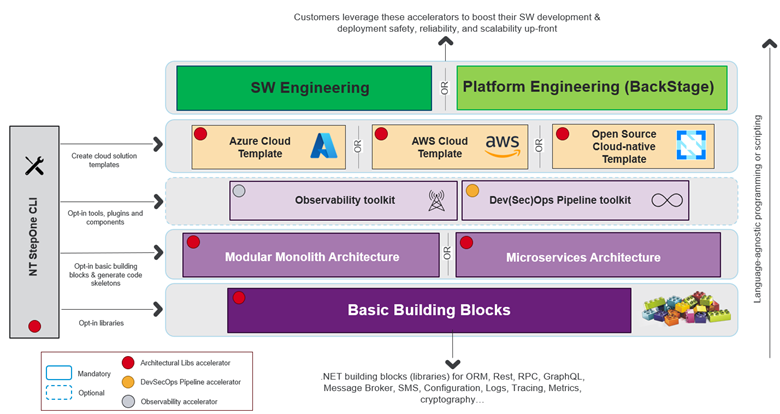
Figure: How NashTech Self-service Portal (customizing BackStage) fits other NashTech Architectural Accelerators
On the top of the figure above, we can see we can combine what we have done underneath (other accelerators). Let’s say we can use StepOne CLI (left-hand side on the bottom – of our NashTech Architectural Lib Accelerator) to compose the basic building blocks (.NET now, but we are not limited to ourselves in just this programming language and might add more in the future) into some popular architectural styles like Modular Monolith or Microservices architecture. In the upper layer, we can opt-in Observability or Dev(Sec)Ops toolkit. On top of that, we can use StepOne CLI to generate Azure, AWS, and Open-Source (CNCF) templates. With these generated templates, we can use them for our customers if they approach with current software engineering (on the top-left), and if with Platform Engineering approach, then we can combine it with BackStage to enable the Self-service Portal ability. We call it, NashTech Self-service Portal accelerator.
The next post is very interesting because we will deep dive into how to design and implement a bunch of plugins to extend the ability to compose the current NashTech accelerator with BackStage. More coming shortly, so stay stunned!
References
- [1] https://blog.nashtechglobal.com/platform-engineering-at-nashtech/
- [2] https://internaldeveloperplatform.org/what-is-an-internal-developer-platform/
- [3] https://www.configure8.io/blog/internal-developer-portal-vs-internal-developer-platform-whats-the-difference-and-why-both-matter