


We are going to discover about Blazor and JavaScript in this article. If you’re unfamiliar with Blazor, you can read these articles to learn more.
- Introduction to Blazor
- Introduction to Blazor WebAssembly
- Introduction to Blazor Server
- Differences between Blazor WebAssembly & Blazor Server
As we already known, Blazor provides developers with the ability to take advantage of their C# skill for building single page application like react and angular. It’s amazing to build SPA with C#, however when using Blazor, there are some typical questions about javascript:
- Is it possible to use JavaScript?
- Is it possible to use JavaScript libraries like ChartJS, Jquery, and others?
- Is there a limitation while using JavaScript?
The responses to the above questions: you can use JavaScript and JavaScript Library without any limitations. (as far as I can see). Many Nuget packages are available for Blazor, which is just a JavaScript library wrapper.
A few features that make working with javascript possible with Blazor include:
- Call javascript function from C# code
- Call C# function/method from javascript
Let’s create a new javascript file, say site.js, and add it to the index.html file to begin playing with javascript.

Blazor call javascript function
In your page or component, you need to inject the “IJSRuntime” service in order to call a JavaScript function.
To call a javascript function that returns no data, we can use the “InvokeVoidAsync”. In addition, to call the javascript function that returns data, use “InvokeAsync”.

Call Blazor function/method from javascript
The blazor method must have the attribute [JSInvokable] and be static.
In javascript file, use DotNet.invokeMethodAsync(‘BlazorWA’, ‘CallByJS’, {params})
- BlazorWA: assembly name (your blazor project’s name)
- CallByJS: name of your blazor method
- params: blazor method parameter if needed

Example of using ChartJS library
Get the js file from their official website or use the live version and include it in your index.html file to begin using ChartJS or any other JavaScript library you want to use.
ChartJS official website
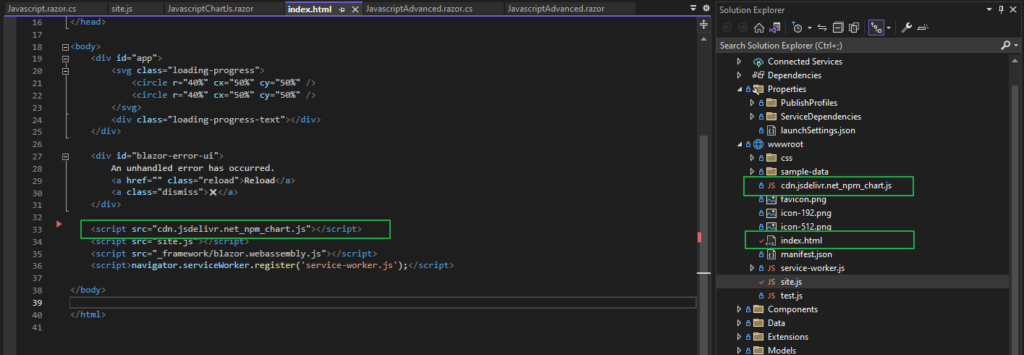
To learn how to make a chart, read the document. I’ve created a basic js function to generate a bar chart using the ChartJS library, as seen in the screenshot below. After that, use your C# method to call it.
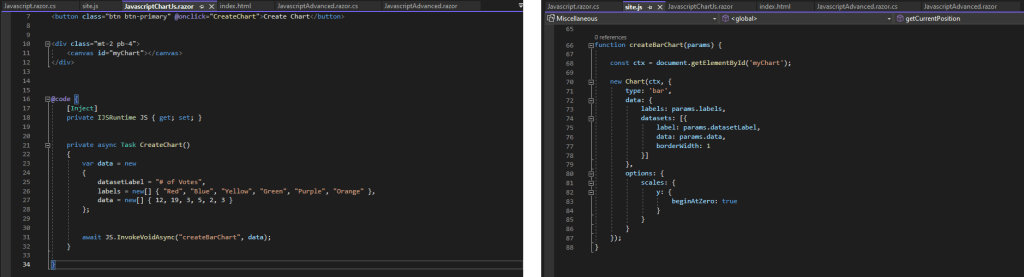
And this is the outcome.

Materials used in this article
- Window 10
- Visual Studio 2022 (64-bit) – Version 17.5.5
- .NET 7