



Automation testing is an essential part of modern software development, and Nightwatch.js is a popular framework for end-to-end testing with JavaScript. To ensure the success of our testing efforts, it’s crucial to write clean, maintainable, and scalable test code. In this blog post, we will explore the importance of these principles and provide practical guidance on coding conventions, naming conventions, documentation practices, and strategies for organizing test suites in Nightwatch.js.
The Importance of Clean and Maintainable Test Code in Nightwatch.JS
Writing clean and maintainable test code is crucial for several reasons:
- Readability
Clear code is simple to read, comprehend, and edit. Other team members will find it easier to work together and manage the test suite as a result. - Reduced Maintenance Overhead
Well-structured tests are easier to maintain in the long run. When application changes, we don’t need to rewrite large portions of the tests. - Scalability
As our project grows, the test suite will need to grow with it. Writing maintainable code allows us to add new tests and features efficiently. - Debugging
Debugging is more straightforward when the code is clean. We have to spend less time identifying issues, making it easier to keep tests up to date.
Follow the below link for getting started with Nightwatch JS:
https://nightwatchjs.org/v26/guide/using-page-objects/getting-started.html
Coding Conventions
Follow these coding conventions to ensure the Nightwatch.js tests are clean and maintainable:
- Consistent Indentation
Use a consistent number of spaces or tabs for indentation to improve readability. - Descriptive Test Names
Name the tests and test steps in a way that clearly communicates their purpose, which will enhance comprehension of the test’s intent. - Modularization
Break down the test suite into small, modular tests. Each test should focus on a specific feature or functionality. - Comments
Add comments to explain complex logic or why specific actions are being taken. This can be invaluable when someone else reviews or maintains the code. - Avoid Hardcoding Values
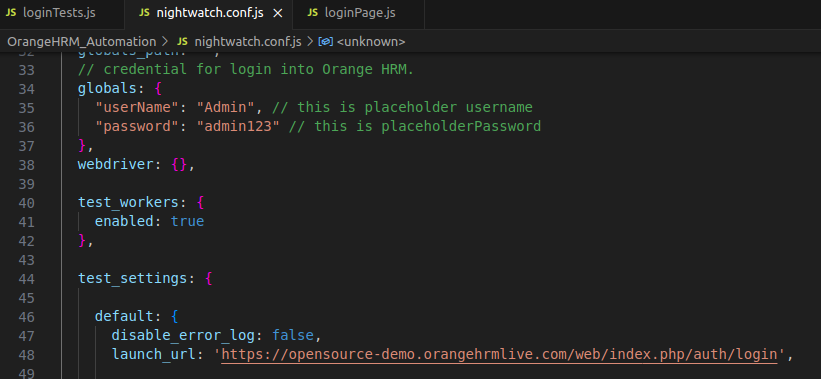
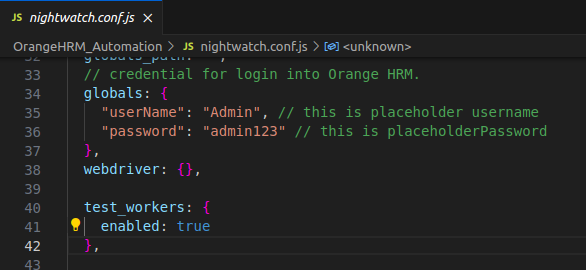
Instead of hardcoding values like URLs and credentials, use configuration files or variables to make the tests more flexible and adaptable.
Naming Conventions
Consistent and meaningful naming conventions are essential to keep our Nightwatch.js test suites organized and understandable:
- Test File Naming
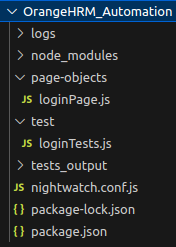
Use descriptive names for test files. A common convention is to prefix test files with the name of the feature or functionality they test. For example, “loginTests.js”. - Test Case Names
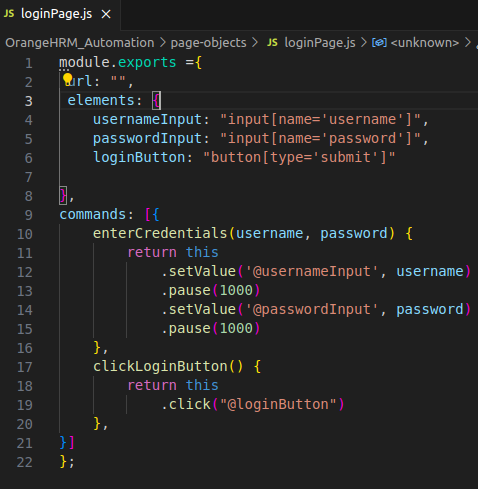
Give the test cases descriptive names that explain the specific scenario they are testing. For example, “Successfully login with Valid Credential”. - Test Suite Names
Name the test suites in a way that reflects the functionality they cover. For example, if we are testing user login functionality, then name the suite something like “User Login Tests”. - Page Objects
When we are creating page objects for the application, use descriptive names for elements and methods. This enhances code readability and understanding. - Element Selectors
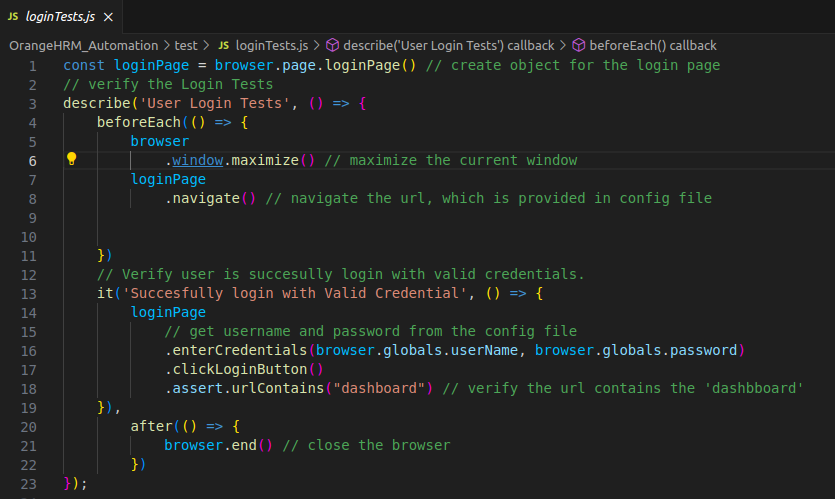
When defining element selectors, use names that are self-explanatory. For example, if selecting a login button, use a name like “loginButton”, rather than generic selectors like “button1” or “element123”. - Custom Commands
If you create custom commands, provide meaningful names for these commands, such as “clickLoginButton”.
const loginPage = browser.page.loginPage() // create object for the login page
// verify the Login Tests
describe('User Login Tests', () => {
    beforeEach(() => {
        browser
            .window.maximize() // maximize the current window
        loginPage
            .navigate() // navigate the url, which is provided in config file


    })
    // Verify user is succesully login with valid credentials.
    it('Succesfully login with Valid Credential', () => {
        loginPage
            // get username and password from the config file
            .enterCredentials(browser.globals.userName, browser.globals.password)
            .clickLoginButton()
            .assert.urlContains("dashboard") // verify the url contains the 'dashboard'
    }),
        after(() => {
            browser.end() // close the browser
        })
});
Documentation Practices
Good documentation practices help our team understand the purpose and context of the tests:
- README Files
Create a README file for the test suite to provide an overview, setup instructions, and any prerequisites for running the tests. - Inline Comments
Use inline comments to explain complex logic or actions within tests. - Test Case Descriptions
At the beginning of each test case, provide a clear and concise description of what the test is verifying. This facilitates testers’ and developers’ rapid understanding of the test’s purpose. - Scenario Outlines
When we are using parameterized tests, document the different scenarios or test data sets we are testing. Include explanations of the input data and expected outcomes.
Organizing Test Suites in Nightwatch.js
A well-organized test suite is easier to manage and scale:
- Test Directory Structure
Arrange tests into a logical directory structure. Consider grouping tests by feature or component to keep things organized. - Test Data Management
Store test data separately from test code. We can use JSON or CSV files to manage test data, making it easy to update without touching the test code. - Custom Commands
To enhance test scalability, create custom commands for common actions in our application. - Reusable Components
Reusable components, such as page objects, make it easier to maintain tests as our application evolves. - Parallel Test Execution
As test suite grows, consider running tests in parallel to save time. Nightwatch.js supports parallel test execution, which can significantly speed up the testing process.
Conclusion
In conclusion, writing clean, maintainable, and scalable tests in Nightwatch.js is crucial for the success of testing efforts. By adhering to coding and naming conventions, documenting tests, and organizing test suites effectively, we can ensure that the test suite remains an asset rather than a liability in software development process. Following these best practices will lead to more efficient testing, easier collaboration, and faster feedback on the quality of the application.