


What Is Cloud Testing?
Cloud testing is the process of using a real-device cloud to verify the quality of software. For real-time website and app testing, quality assurance teams have access to thousands of actual desktop and mobile devices. These gadgets are always available online since they are housed on cloud-based servers. Popular websites like “Browser Stack” and “Sauce Labs” are utilised for cloud testing.
Benefits Of Cloud Based Testing
- Accessing optimised test environments with all necessary software-hardware configurations and offering a testing environment that fairly closely resembles the production environment.
- After a test finishes, testers on the real device cloud erase all data and reset the device to factory defaults.
- Automated and parallel testing helps QAs to speed up test execution and results significantly.
- Improved collaboration and project management features can also contribute to achieving faster results.
- Cloud-based testing platforms such as Browser Stack provide multiple tool integrations, enabling the implementation of DevOps and CI/CD workflows, which creates a more efficient, goal-oriented software development pipeline.
- Allows testing of apps or websites on cross-platform mobile devices (Android and iOS).
- By testing both new and old iOS and Android devices running the preferred OS, teams may increase the scope of their device coverage.
- Teams can use regression testing to replicate production bugs in apps available on the Google Play Store and the Apple App Store.
Importance Of Leveraging Cloud Platforms For Automated Testing
- Scalability: Automated tests can run concurrently on several virtual machines or containers thanks to cloud platforms’ access to scalable infrastructure. This makes it possible to handle several tests at once and execute them more quickly.
- Cost-effectiveness: Pay-as-you-go cloud platforms enable businesses to cut expenses by just purchasing the resources they utilise. Furthermore, cloud-based testing reduces capital expenditure and maintenance expenses by doing away with the requirement for on-premises infrastructure.
- Flexibility: The flexibility of cloud platforms allows us to furnish a vast array of processing, storage, and testing technologies as needed, enabling the correct setup of testing environments and the efficient distribution of resources.
- Geographic Distribution: Cloud providers have spread data centres among multiple geographic regions, enabling distributed testing over those regions. For verifying application operation and performance under various network situations, this is especially helpful.
- Collaboration and Accessibility: By giving team members centralised access to testing environments and results, cloud-based testing promotes efficient communication and information exchange.
- Integration with Continuous Integration/Continuous Delivery (CI/CD): Integration of cloud platforms with CI/CD pipelines makes it possible to effectively integrate automated testing into the software delivery process.
Guide On Integrating Nightwatch.js With Browser Stack
Please follow the below steps:
- Sign up for a Browser Stack account at Signup Page.
- Install the necessary dependencies. In your project directory, run the following command:
npm install nightwatch --save-devnpm install browser stack-local --save-dev
- Add some line of codes in test-settings of nightwatch.config.js file. :
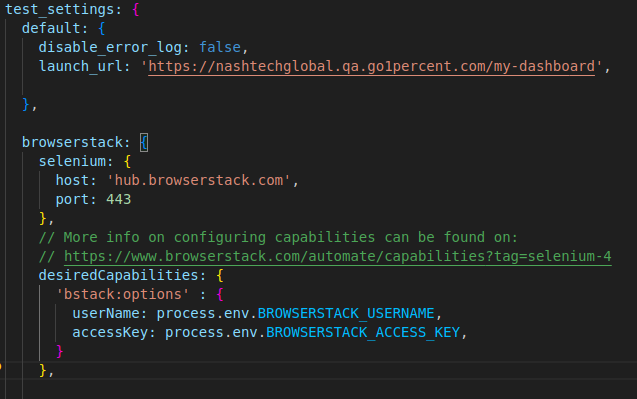
- Keep Username and Access key in “.env file” and from there we are calling it into the nightwatch.config.js file.
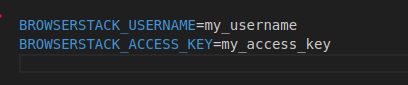
- If we want to use .env file data then we have to install ‘dotenv’ dependency.
- Run command npm install dotenv –save

- Call dotenv in nightwatch.config.js file by using ‘require’ at the top.

- Run the test by using command:
- npm run test –env browser stack
Demo Of Test Execution With Browser Stack Report
1.Run the test execution command in the project terminal:
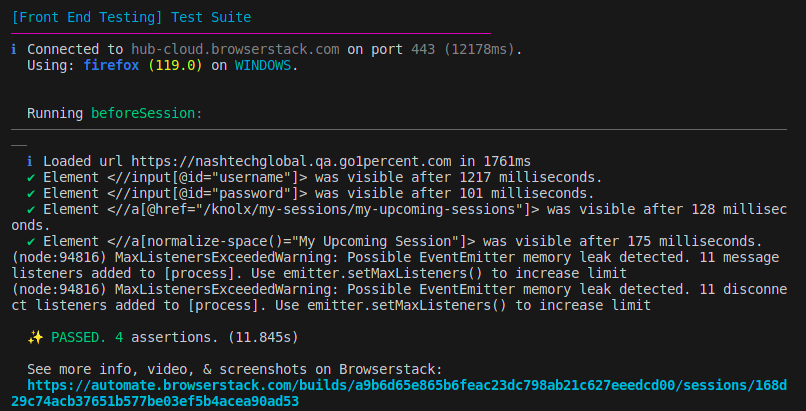
All test cases are executed in the terminal after the command is run, and the report is generated directly on the Browser Stack website.
2.Report Generation In The Browser Stack
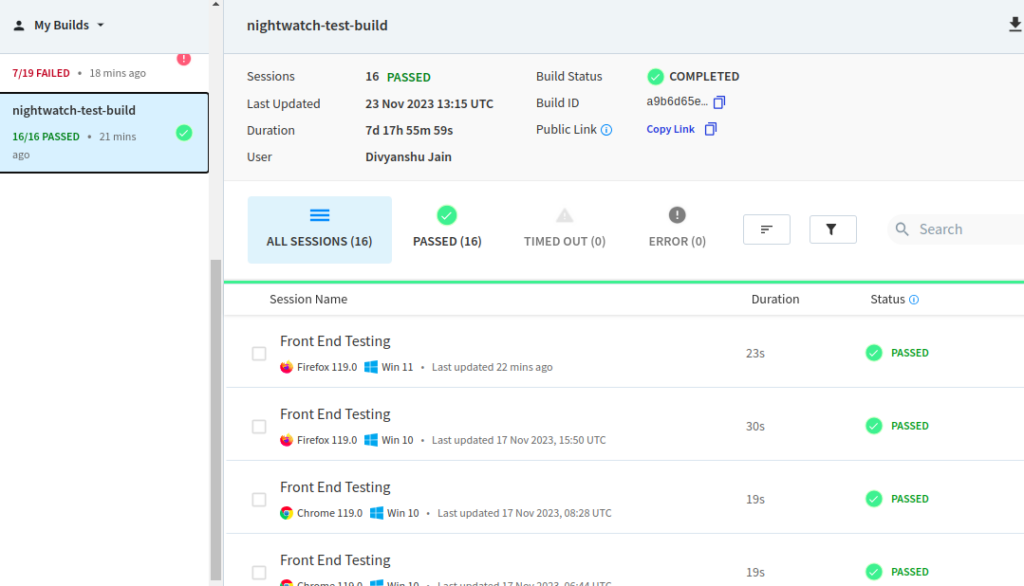
Go to the browser stack website after the execution to see the report that contains all the details about the executed test case, including whether it passed or failed.
3.Detailed Report
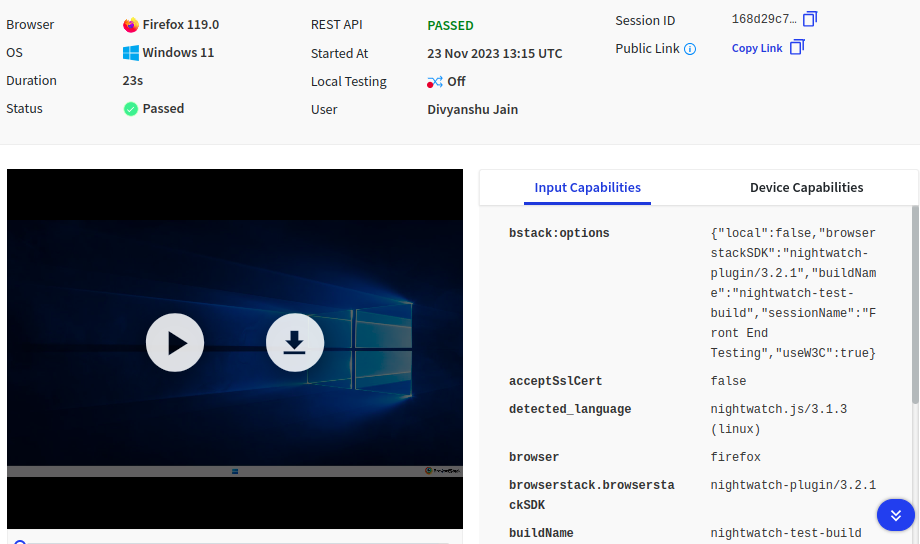
We can see the complete execution by clicking the play button, which also allows us to view the execution’s detailed information.
Strategies For Managing Test Environments, Handling Test Data, And Optimizing Test Execution In The Cloud
Managing test environments, handling test data, and optimizing test execution in the cloud are important strategies to ensure efficient and effective testing practices. Here are some strategies for each aspect:
1.Test Environment Management:
- Configuration Management: Automate the configuration and setup of test environments by using tools such as Ansible, Puppet, or Chef. This guarantees uniformity and lessens the need for manual environment setup.
- Environment Isolation: To prevent intertest interference, isolate test environments. To avoid conflicts, every test environment should have its own dedicated resources, like virtual machines or containers.
- Infrastructure as Code (IaC): To define and manage your test environments, use infrastructure automation tools like Terraform or CloudFormation. This makes resource provisioning and de-provisioning simple, reproducible, and version control possible.
- Environment Monitoring: To monitor the condition and functionality of test environments, put in place alerting and monitoring systems. This makes problems easier to find and fix quickly.
2.Test Data Handling:
- Data Generation: Use tools like Faker or random data generators to generate test data dynamically rather than depending only on manually created data. This makes it possible to cover more test scenarios.
- Test Data Versioning: To manage changes over time, apply version control to test data. By doing this, tests are guaranteed to be consistent and repeatable throughout various testing cycles.
- Data Masking: In order to comply with privacy regulations, make sure that data is appropriately masked or anonymized when working with sensitive or personally identifiable information (PII). Rubrik and Delphix are two tools that can help with data masking.
- Test Data Provisioning: To create and manage test data containers that are easily provisioned and refreshed for testing purposes, use tools such as Docker or Kubernetes.
3.Test Execution Optimization:
- Parallel Test Execution: Make use of the cloud infrastructure’s capabilities to distribute test cases among several machines and run tests concurrently. This increases efficiency and shortens the total execution time.
- Dynamic Resource Allocation: To automatically scale the testing infrastructure in response to demand, make use of the autoscaling features offered by cloud providers. This guarantees the best possible resource allocation during times of high demand.
- Analysis of Test Results: Use frameworks and tools like Allure or ELK Stack to collect and examine the outcomes of test execution. This facilitates the efficient identification of failures, bottlenecks, or performance problems.
- Test Execution Monitoring: Use tools like Jenkins, Circle CI, or Azure DevOps to keep an eye on the status and progress of test executions. This makes it possible to see how tests are progressing and aids in efficiently organising and prioritising testing efforts.
- Continuous Integration/Continuous Delivery (CI/CD): Integrate automated testing into your CI/CD pipeline to trigger tests automatically whenever there are code changes. This ensures a continuous feedback loop and allows for faster identification of issues.
Reference
- https://nightwatchjs.org/guide/quickstarts/create-and-run-a-test-with-cloud-providers.html
- https://www.browserstack.com/