



In this blog, we’ll delve into a comprehensive example showcasing the seamless integration of Terraform configuration files with Spacelift for executing Continuous Integration and Continuous Deployment (CI/CD) operations. We’ll guide you through the step-by-step process, offering insights and practical demonstrations on how to leverage Spacelift’s capabilities to streamline the management and deployment of Terraform infrastructure configurations.
Prerequisites:
- Spacelift account
- AWS account
- Terraform
References:
Please consider this github repository :
https://github.com/vidushi-bansal/Spacelift-Terraform
Let’s begin:
Start by creating a stack in Spacelift. Stacks represent a logical grouping or configuration of infrastructure elements through Terraform. Stacks serve as containers fro related sets of Terraform code, consisting of configurations, modules, and associated resources that collectively define a specific part of your infrastructure. Within each stack, we define variables, secrets, and other configurations necessary for deploying and managing the associated infrastructure. Spacelift provides a streamlined interface to visualize, edit, and version control these stack configurations, enabling teams to collaborate effectively and maintain consistency across their infrastructure deployments.
Spacelift already creates a demo stack for you to visualise how things work.

Demo stack is the default stack created by Spacelift. You can take a tour to learn how things work here.
To create your own stack. Click on Create Stack.

Enter your stack details, such as Name and Labels (if, any)

Next, integrate your VCS by selecting the repository you want to create CICD flow for. You can select the branch to work on here.

Choose the vendor. Here we will select Terraform as our source code is supported by Terraform. Spacelift allows you to select the specific version of terraform. You can also provide a range of versions to use.

You can add hooks if required. Hooks enable us to integrate custom actions or external services into the lifecycle of our Terraform stacks. We can execute specific actions or scripts at defined points within the stack’s lifecycle, such as before or after certain operations like apply, plan, or destroy.

While configuring hooks in Spacelift, we specify the hook type, the command or script to execute, and any associated conditions or triggers that determine when the hooks should run.

Once you have specified everything, recheck the configurations in your Summary.

If everything looks OK, create Stack.
Well, for obvious reasons you would get the error as follows:

Since we haven’t provided any aws credentials for it to authenticate itself and create subsequent resources in the cloud, it will give you this error.
Add the AWS credentials
Here is one way of adding the AWS credentials. In the stack, click on Environment tab.

Click on Edit


Click on SECRET to store it as a secret value.

Now trigger a run manually.

Your pipeline will start to run. Once the planning phase is completed, the pipeline will pause since by default auto-approval is off. So we will have to explicitly confirm the changes to execute the final state.

Click on Confirm.

The pipeline ran successfully. Since we have added the outputs block, you would be able to see it in the logs section as well.

Check AWS console and verify the resources have been created or not.


Lets look at the Spacelift Resources section. In the stack console, click on Resources.

If you want to check details of any resource, you can just click on the box ahead of the resource.

To recheck the Outputs, you don’t necessarily have to check the logs of the run again. Click on the Outputs block.
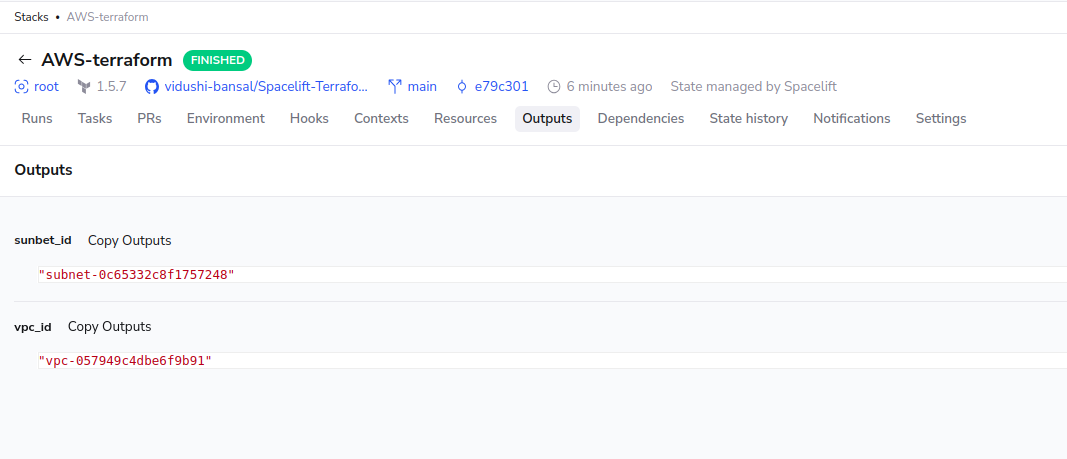
If you want to look at the history of your pipeline, Click State history

Clicking on any state will take you that particular instance and you can view logs of each state.
Hey, readers! Thank you for sticking up till the end. This was a brief on spinning AWS resources using Spacelift and Terraform. If you have any questions/feedbacks regarding this blog, I am reachable at vidushi.bansal@nashtechglobal.com. You can find more of my blogs here.
Proudly powered by WordPress