



Hello Readers! We are again back with another exciting topic i.e. KDB+. KDB+ is a powerful and most efficient high-performance database and programming language, designed for handling time-series data. Basically It is originally developed by Kx Systems, KDB+ has gained popularity in the finance industry for its ability to handle large number of datasets with its fast speed and precision. As the number and size of data is increasing day by day, we need a database system to handle these data. So, in this blog post, we’ll explore the basics of getting started with KDB+ and will see its key features.
What is KDB+?
It is a columnar database that excels in handling time-series data, making it well-suited for financial applications, scientific research, and other industries where timestamped data is crucial. Its key features include:
Columnar Storage: Data in KDB+ is stored in columns rather than rows in other database, allowing for quicker access to specific fields. All the operations are applied to column vectors. This structure is particularly advantageous for time-series data analysis.
Speed: This real time database is mainly known for its incredible speed and efficiency in querying and processing large datasets. Hence it can perform complex analytics on vast amounts of time-series data in real-time very fast.
Built-in Query Language (Q): KDB+ comes with its own programming language called Q. This is the language we can use on top f this database. Therefore this is concise and expressive, which makes it easy to manipulate and analyse data within the database.
In-memory compute engine: Due to its unique design and architecture that leverages the power of in-memory computing, KDB+ is known as in-memory compute engine. This feature reduces latency automatically as all the data resides in memory. During execution we don’t need to retrieve information from disk.
Installation of KDB+:
Now we need to install KDB+ on our system. KDB+ is available for various platforms, including Windows, Linux, and macOS. So, We can easily download the installer from the official Kx Systems website.
Once downloaded, follow the installation instructions provided for your specific operating system. After installation, you can start a KDB+ server and interact with it through the Q console.

Q Language:
Q is the programming language that we need to work with KDB+. It is specifically designed for working with time-series data. For confirming KDB+ is working fine, start your first q session:

It got launched successfully. Here are some basic concepts to get we can get started:
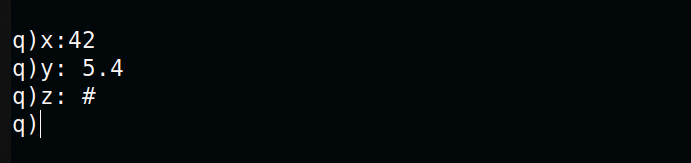
1. Data Types
Q language supports various data types, including integers, floats, symbols, and more.
2. Operations
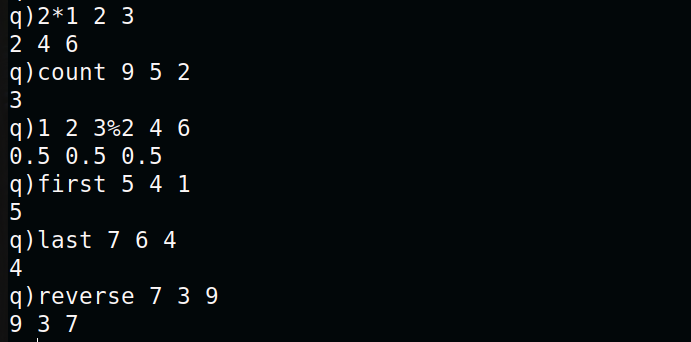
Q supports a variety of operations for manipulating data like other languages. Here are some basic examples:
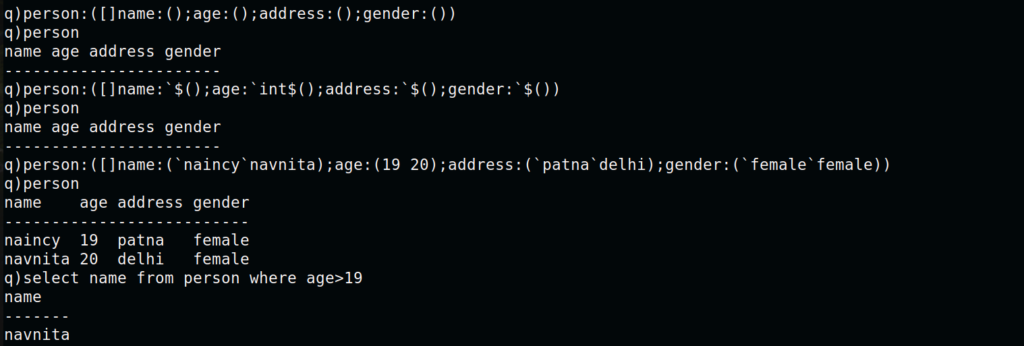
3. Lists and Tables
They are fundamental data structures in Q. Lists are ordered collections, and tables are two-dimensional structures with columns.
So, For tables operations follow bellow queries:
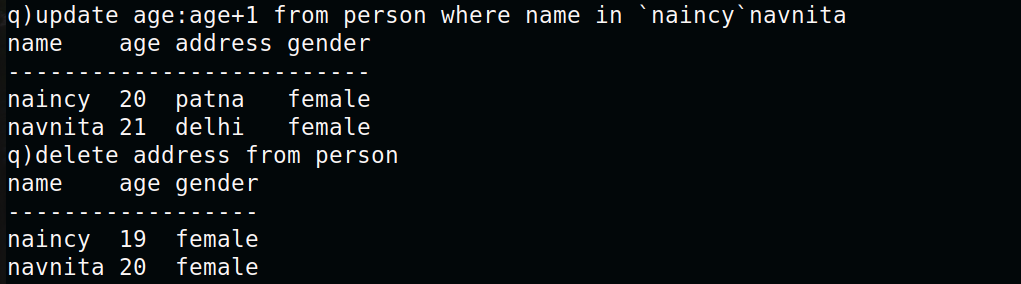
These are really very simple queries that you can start trying it. So, this brief guide provides a starting point for working with KDB+. As you move deeper into the Q language and database, you can discover more advanced features and optimizations that make it a powerful tool for handling time-series data. It’s interesting, I’m sure you will enjoy this.
Conclusion:
In conclusion, with the growing demand of such tool which can handle efficiently time-series data, KDB+ fulfils here our requirement. Thanks for being with us till end. So please share this blog with the needful. For more details or any queries get in touch with Naincy Kumari at Naincy.Kumari@NashTechglobal.com.