



What is GitLab
GitLab is a web-based platform that provides a set of DevOps tools for software development, source code management, continuous integration, continuous delivery,and more. It offers a comprehensive solution for teams and organisations to plan,develop, test, secure, deploy, and monitor their software projects. GitLab is often used for version control, project management, and collaboration among software development teams.
There are several CI/CD tools in the market and we are going to explore GitLab today.
What is GitLab Pipeline
A GitLab pipeline is a set of automated processes and actions that are triggered when changes are pushed to a GitLab repository. These pipelines are a key feature of GitLab’s continuous integration and continuous delivery (CI/CD) capabilities.
Components of GitLab Pipeline
GitLab Pipeline has some components and concepts which is used to create the pipeline and these are..
1. Pipeline File:
Pipelines in GitLab are defined using a configuration file typically named .gitlab-ci.yml. This file describes the jobs and stages that make up the pipeline, as well as the runners (execution environments) that should be used.
2. Stages:
Stages in GitLab Pipeline is used to Separate different tasks. Like – Build ,Test or deploy. One Stage can have multiple Jobs.
3. Jobs:
In a pipeline, jobs are the individual tasks or steps. When jobs belong to the same stage, they can run concurrently, optimizing efficiency. However, the subsequent stages initiate their execution only after ensuring the completion of all jobs in the preceding stage.
4. Runners:
Runners are agents or machines responsible for executing the jobs defined in the pipeline. GitLab provides shared runners (hosted by GitLab) and allows you to set up your own custom runners on your infrastructure.
5. Artifacts:
Jobs in a pipeline can produce and pass artifacts, such as build outputs or test results, to subsequent jobs or stages in the pipeline. Artifacts allow you to efficiently share data between pipeline stages.
6. Caching:
GitLab provides caching capabilities that allow you to cache dependencies between pipeline runs. This can speed up builds by reusing cached dependencies instead of downloading them.
GitLab Pipeline Example
Here is an example of GitLab Pipeline to build a docker image and push it on Dockerhub.
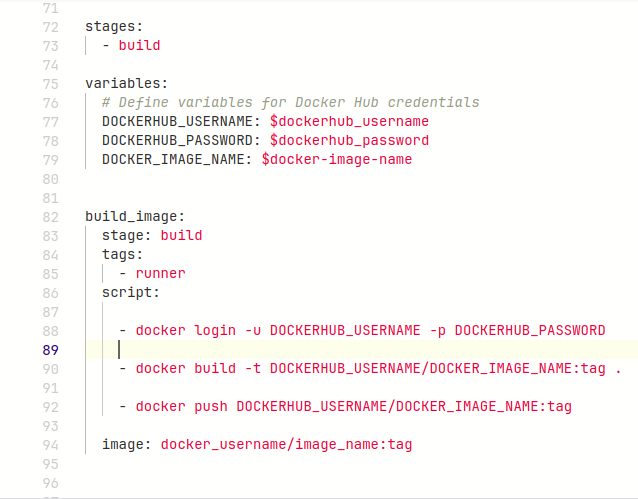
In this Pipeline There are 1 stage That is build stage and only one Job In this stage named as build_image.
In this Pipeline there are runner with docker executer and runner tag are using with docker image (where docker should be installed).
Moreover pipeline in using script component to login to DockerHub , Build the docker image and at last push the Image to Docker registry.
For the DockerHub Credentials pipeline is using GitLab CICD Variables to store the credentials securely
You can find variable section in your projects – Setting > CICD > Variables
Conclusion
In conclusion, GitLab pipelines offer an indispensable solution for automating software development workflows. Throughout this blog, we’ve explored the basics of CI/CD in GitLab, delved into the fundamentals of GitLab pipelines, and discussed their configuration using YAML. We’ve covered concepts like stages, jobs, and runners, emphasizing their role in streamlining development processes.