




What is Delta Sharing?
Delta sharing is an open protocol that is developed by Databricks for securely sharing data with other organizations, regardless of the computing platform they use. Through delta sharing, we can share the data either with Databricks members or with non-Databricks members as well.
There are three ways to share the data using Delta Sharing:
- Databricks to Databricks sharing
- Databricks Open Delta Sharing
- Customer-managed implementation of open-source Delta Sharing
What is a share?
In delta sharing, a share is a read-only collection, in which It contains the tables, views, notebook, etc. that a provider wants to share with other databricks teams.
What is a provider?
A provider is the engineer who shares the data with a recipient. He can manage the share by adding new assets, deleting the share, assigning the recipient, and revoking access assets from the recipient.
What is a recipient?
A recipient is the engineer who accesses the shared data and uses that data for their analytics performance. If a provider deletes a recipient from their delta sharing, then the recipient loses access to all shares it could previously access.
Databricks to Databricks Sharing via Delta Sharing
1. Databricks metastore admin will enable Delta Sharing for the Unity Catalog to the users.
2. Now user can navigate to Delta Sharing Option -> Catalog > Delta Sharing > Shared By Me
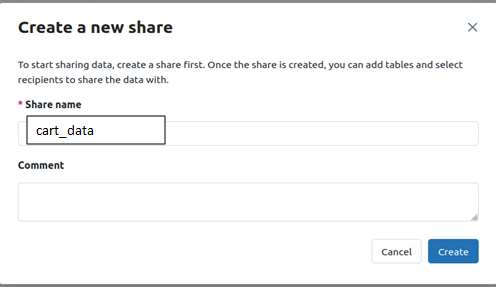
3. Create a share: Share includes all the data assets you want to share. After creating the share inside that add the data asset.
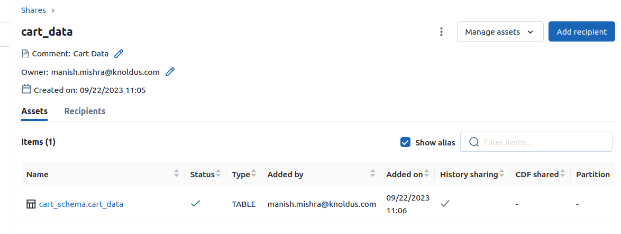
By Clicking on the manage assets we can add and remove the data assets such as table, view, etc.
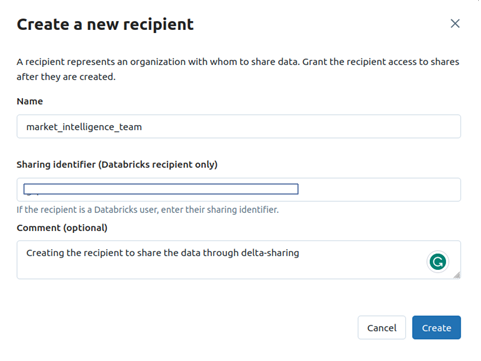
4. Create a recipient: You need a recipient metastore identifier to create a recipient. So, ask the recipient to share it through a secure platform. The recipient identifier is a combination of alphabet and number(alphanumeric).
5. Grant the recipient access to one or more shares: It can be done by navigating to share and within share click on data asset and adding the recipient to that data.
6. Now recipient needs two permissions by their metastore admin to access the shared data.
- GRANT USE PROVIDER ON METASTORE TO `principal`
- GRANT CREATE CATALOG ON METASTORE TO `principal`
A principal is the user under the databricks. Example: user_name@gmail.com
Conclusion
Delta Sharing facilitates data sharing in Databricks through various methods, allowing providers to create shares with specific data assets. Recipients, granted access by providers, can analyze shared data, emphasizing collaboration and secure sharing within the Databricks platform. Refer for more information