


Setting up an Ubuntu user on an Amazon EC2 instance often involves several manual steps. To simplify this process, we introduce the “Automating EC2 Ubuntu Setup Script” – a Bash script designed to automate the configuration steps, making the initial setup swift and efficient.
Why Automate?
Manually configuring an Ubuntu user on an EC2 instance can be time-consuming and prone to errors. Automating this process not only saves time but also ensures consistency across deployments. The script streamlines the following key tasks:
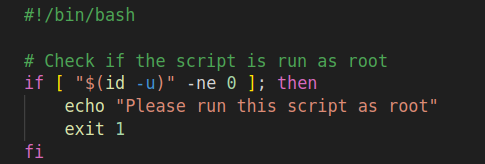
- Root Privilege Check:
The script initiates by checking whether it is run with root privileges. If not, it gracefully exits, prompting the user to run the script as root.
- Password Setup:
The script sets the password for the ‘ubuntu’ user to ‘knoldus.’ The passwd command, combined with echo, facilitates this process.

- Sudo Group Addition:
The ‘ubuntu’ user is added to the sudo group using the usermod command.

- SSH Configuration:
The script identifies the path to the SSH daemon configuration file (sshd_config) and uses sed to enable password authentication.

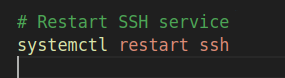
- SSH Service Restart:
To apply the configuration changes, the script restarts the SSH service.
Security Considerations
- Password Strength: While the script sets the password to ‘knoldus,’ it’s crucial to replace it with a strong, secure password according to your organization’s policies.
- SSH Security: Enabling password authentication introduces security considerations. Evaluate the impact on overall security and consider using SSH keys.
Conclusion
Automating the EC2 Ubuntu user setup with this script not only simplifies the process but also contributes to a more secure and consistent deployment environment. This script automates the configuration of an Ubuntu system, enhancing security and accessibility. It ensures proper privileges, sets a specific password for the ubuntu user, grants sudo permissions, enables password authentication in the SSH configuration, and restarts the SSH service. It’s a convenient and automated way to initialize system configurations for specific requirements.