



What is website rendering?
Website rendering refers to the process by which a web browser interprets and displays the content of a website. When you enter a web address in your browser and hit “Enter,” the browser sends a request to the server hosting the website, retrieves the necessary files (HTML, CSS, JavaScript, images, etc.), and then processes and displays the content on your screen.
There are two main stages in website rendering:
- Rendering stage: The browser parses the HTML (Hypertext Markup Language) code received from the server. HTML defines the structure and content of a web page, specifying elements like headings, paragraphs, links, images, and more. After parsing the HTML, the browser constructs a Document Object Model (DOM), which is a representation of the document’s structure. The browser then combines this with the CSS (Cascading Style Sheets) to determine the layout, styling, and visual presentation of the content, it also execute JavaScript to modify the DOM and make additional requests to the server for dynamic content.
- Hydration stage: Hydration comes into play when the browser loaded and executed client-side JavaScript code after displayed the initial server-rendered page. This JavaScript code is responsible for adding dynamic behavior and interactivity to the static content already present on the page. During hydration, the JavaScript code “hydrates” or attaches event listeners, state management, and other interactive features to the existing DOM (Document Object Model) created during server rendering.

What is a good website?
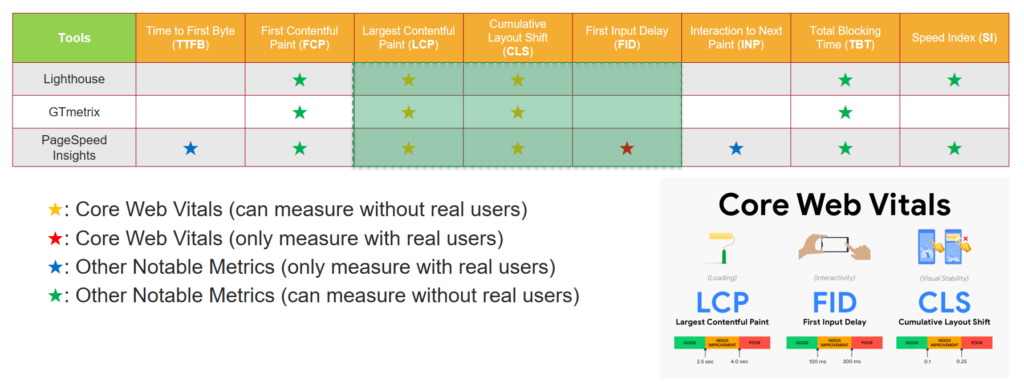
A good website is one that effectively meets its intended goals and provides a positive experience for its users. While the criteria for a good website can vary depending on its purpose, target audience, and industry, there is one criterion that is always important is performance of website. To evaluate performance, we have Core Web Vitals which are a set of specific factors that Google considers important in determining the user experience on a website. These factors include:
- Largest Contentful Paint (LCP): This measures the loading performance of a page. Google recommends that LCP should occur within 2.5 seconds of when the page first starts loading.
- First Input Delay (FID): This measures the interactivity of a page. To provide a good user experience, pages should have an FID of less than 100 milliseconds.
- Cumulative Layout Shift (CLS): This measures the visual stability of a page.
How rendering works?
Static Rendering (SR)
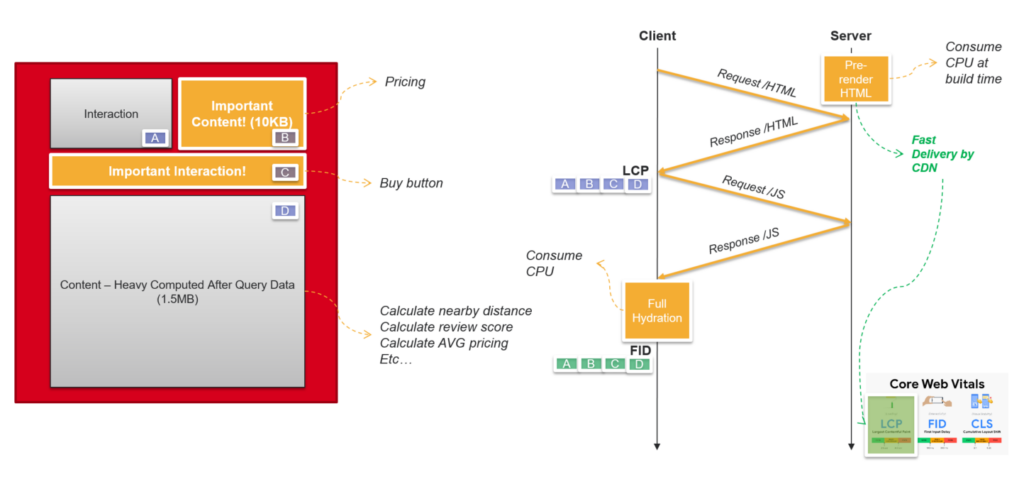
Static rendering is an approach in web development where the server generates the HTML pages for a website in advance, at build time, and serves these pre-rendered pages to clients upon request. This is in contrast to traditional dynamic rendering, where pages are generated dynamically on the server for each request.
How SR works
- Build Time:
- During the build process, the server generates HTML pages for all the routes or pages of the website.
- This process is often initiated when developers deploy or build the website, and it may involve fetching data from various sources (APIs, databases) and rendering the HTML content.
- Pre-rendering:
- The server executes any necessary code to fetch data and generate HTML for each page.
- The generated HTML includes the content of the page and can also include any styles, scripts, or other assets needed for rendering.
- Output Directory:
- The generated HTML pages are stored in a specific directory on the server, often referred to as the “output” or “public” directory.
- Server Deployment:
- The entire output directory, including the pre-rendered HTML pages and other assets, is deployed to a web server.
- Client Requests:
- When a user requests a page, the server serves the pre-rendered HTML directly.
- No server-side processing is required for generating the page content in real-time.
Advantages
- Improved Performance:
- Since HTML pages are pre-rendered, they can be served faster to users, resulting in improved loading times.
- Cost-Effective:
- Static sites can be hosted on simple and cost-effective hosting solutions, as there is minimal server-side processing required for each request.
- SEO-Friendly:
- Pre-rendered HTML content is readily available for search engine crawlers, contributing to better search engine optimization (SEO) compared to purely client-rendered applications.
- Scalability:
- Static sites are often highly scalable as the server only needs to serve static files, and there is no need for server-side processing for each user request.
- Security:
- The attack surface is reduced because there is no server-side code execution for each request.
While static rendering has its advantages, it may not be suitable for all types of websites, especially those requiring real-time data updates. Therefore, we will look at using Server Rendering.
Server Rendering (SSR)
Server rendering, also known as server-side rendering (SSR), is an approach in web development where the server dynamically generates HTML content for a web page in response to each user request.
How SSR works
- User Request:
- A user enters a URL or clicks a link, initiating a request for a specific web page.
- Server-Side Processing:
- The server receives the request and begins processing it on the server.
- Server-side code (often written in languages like Node.js, PHP, .NET Core, etc.) is executed to fetch data, query databases, or perform any other necessary server-side logic.
- HTML Generation:
- The server dynamically generates the HTML content for the requested page based on the data and logic executed during server-side processing.
- This HTML generation may involve rendering templates, combining data with HTML markup, and incorporating any necessary styles or scripts.
- Sending HTML to the Client:
- The server sends the fully generated HTML content as the response to the user’s request.
- Client Display:
- The user’s browser receives the HTML response and begins rendering the page.
- Stylesheets, scripts, and other assets referenced in the HTML are also fetched and executed as needed.
- Interactive Elements:
- If the page contains interactive elements or dynamic content, client-side JavaScript may be included in the HTML response.
- This JavaScript code can further manipulate the DOM (Document Object Model) and handle user interactions.
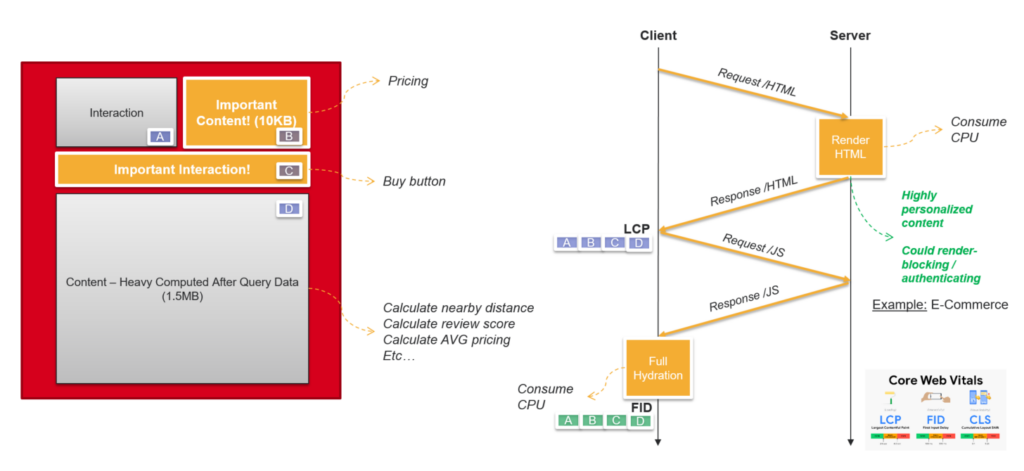
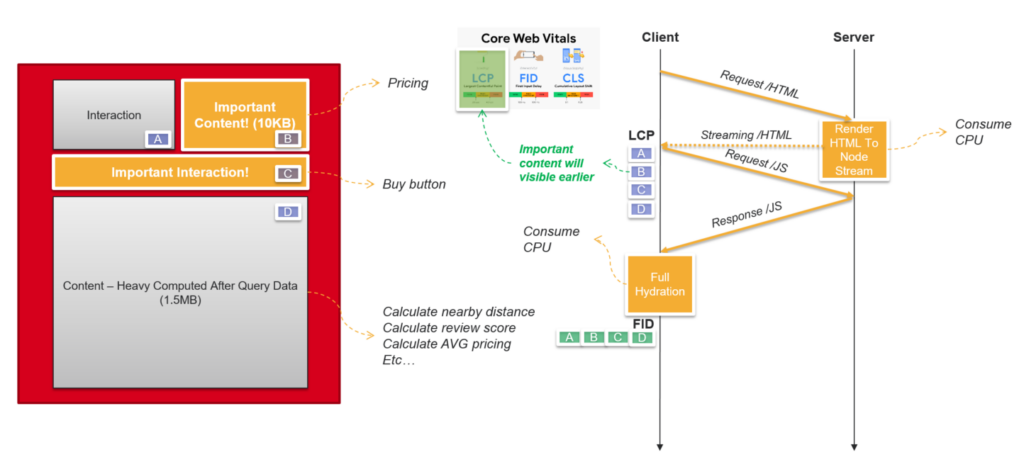
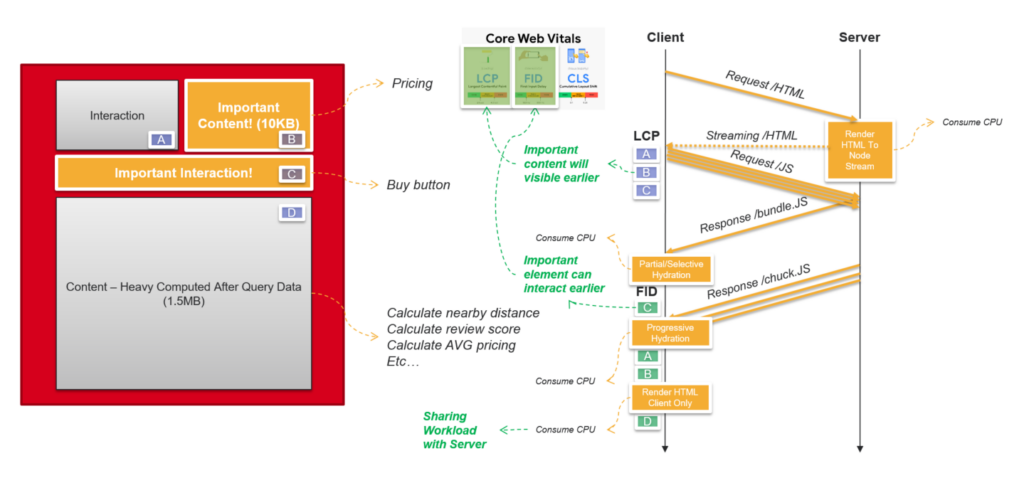
But the LCP score will be low if the server response time is too long. To optimize it, we will look at using Streaming SSR which is an optimization technique that allows web servers to start sending HTML to the client as soon as it becomes available, rather than waiting for the entire HTML page to be fully rendered on the server before sending it. This helps to reduce the time to first byte (TTFB) and improve perceived performance for users.
How Streaming SSR works
- Server-Side Rendering (SSR) Initialization:
- When a user makes a request to a server-rendered page, the server starts generating the HTML content for that page.
- Server-side code executes to fetch data, render templates, and generate the initial HTML.
- Streaming Output:
- Instead of waiting for the entire HTML page to be generated, the server starts sending chunks of HTML to the client as soon as they are ready.
- The server sends these chunks of HTML in a streaming pipe, enabling the client to begin processing and rendering the content progressively. Chunks may correspond to different sections of the page or different components.
- Parallel Processing:
- As the client receives HTML chunks, it can start fetching and processing associated assets such as stylesheets, scripts, and images in parallel.
- This parallel processing contributes to faster overall page loading.
- Continued Streaming:
- The server continues to generate and send additional chunks of HTML until the entire page is rendered.
- The client progressively renders the page based on the received content.
- Completion:
- Once all HTML chunks have been sent and processed, the page is fully rendered on the client side.
Advantages
- Faster Perceived Performance:
- Users perceive the page to load faster as content becomes visible and interactive sooner.
- Reduced Time to First Byte (TTFB):
- Streaming SSR can reduce the time it takes for the first byte of the response to reach the client, improving overall page load times.
- Parallel Asset Loading:
- Allows the client to fetch and process assets in parallel with the streaming HTML, further improving loading performance.
- Improved User Experience:
- Users can start interacting with the page sooner, leading to a more responsive and engaging user experience.
Although server rendering has its advantages, but what if server cost is very high for generating complexity HTML on the server and sending it to the client’s browser for display?! So, we will consider using Client Rendering.
Client Rendering (CSR)
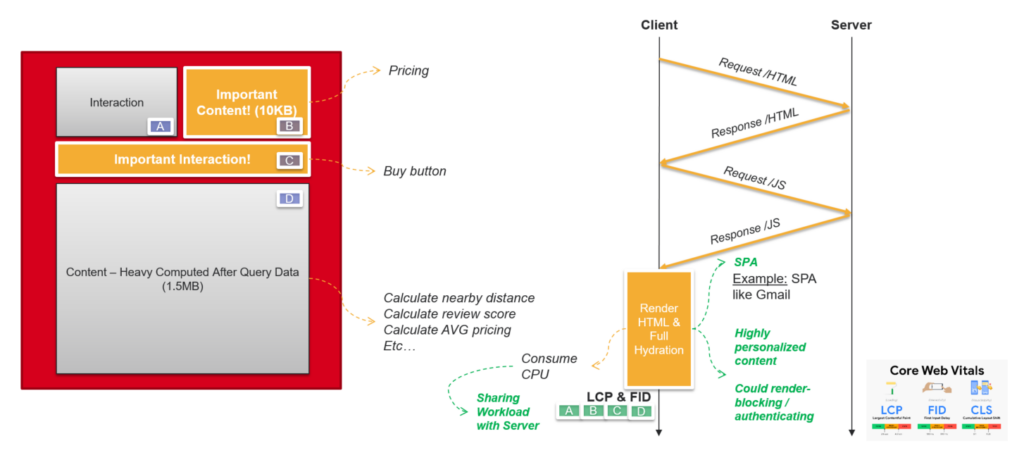
Client rendering, also known as Client-side rendering (CSR) is an approach in web development where the rendering of web pages primarily occurs on the client’s browser rather than on the server. In client rendering, the server sends a minimal HTML document to the client, and the bulk of the page rendering and content generation happens using JavaScript on the client side.
How CSR works
- Initial Request:
- The user enters a URL or clicks a link, initiating a request for a specific web page.
- Server Response:
- The server sends a minimal HTML document to the client. This HTML often includes references to external stylesheets, scripts, and other assets.
- JavaScript Execution:
- The client’s browser starts executing the JavaScript code included in the HTML document.
- This JavaScript code is responsible for making additional requests to fetch data from APIs or other sources.
- Data Fetching:
- The client-side JavaScript code fetches the necessary data from the server or external APIs.
- DOM Manipulation:
- Using the fetched data, the JavaScript code manipulates the Document Object Model (DOM) of the page, dynamically adding, updating, or removing elements as needed.
- Rendering Content:
- The client-side JavaScript code renders the actual content of the page based on the fetched data and manipulates the DOM accordingly.
- CSS Styling:
- Stylesheets referenced in the initial HTML document are applied, and the styles are rendered on the client side.
- Interactive Elements:
- Any interactive elements or user interfaces are implemented and become functional, allowing users to interact with the page.
- Event Handling:
- JavaScript code handles user interactions and events, triggering appropriate actions or updates to the DOM.
- Page Display:
- The fully rendered page is displayed to the user in the browser.
Advantages
- Interactivity:
- Client-side rendering allows for highly interactive and dynamic user interfaces, as the client can handle user interactions without needing to reload the entire page.
- Reduced Server Load:
- The server’s primary responsibility is to serve data through APIs, reducing the server load associated with rendering HTML pages for each request.
- Improved Responsiveness:
- Since rendering happens on the client side, users can experience faster initial page loads, especially if subsequent interactions only require fetching and updating data, rather than reloading the entire page.
- Better Support for Single Page Applications (SPAs):
- Client rendering is well-suited for SPAs, where a single HTML document is loaded, and subsequent views are updated dynamically without full page reloads.
However, client-side rendering also comes with its own challenges, including potential SEO issues, initial loading performance concerns, and the need to manage application state and routing on the client side. As a result, we will consider a combination of server-side rendering and client-side rendering, known as universal rendering, to achieve a balance between initial loading performance and dynamic interactivity.
Universal Rendering (UR)
Universal rendering, also known as isomorphic rendering, is an approach in web development that combines both server-side rendering (SSR) and client-side rendering (CSR) to leverage the advantages of both. The goal is to achieve a balance between server-side rendering’s initial performance benefits and client-side rendering’s dynamic interactivity. With universal rendering, web applications can render content on the server for the initial page load and then switch to client-side rendering for subsequent interactions.
How UR works
- Initial Request (Server-Side Rendering):
- When a user makes an initial request to a web page, the server performs server-side rendering to generate the initial HTML content.
- The server starts sending chunks of HTML to the client as soon as they are ready, along with the necessary stylesheets, scripts, and assets to the client.
- Client-Side JavaScript Hydration:
- Upon receiving the streaming HTML, the client-side JavaScript “hydrates” the HTML, meaning it attaches event listeners, state, and other interactive features to the existing DOM elements.
- This process is sometimes referred to as “hydration” because the client-side JavaScript is rehydrating the server-rendered HTML to make it interactive.
- Interactive Elements (Client-Side Rendering):
- Once the initial page is displayed, the client-side rendering takes over for subsequent interactions.
- User interactions trigger client-side JavaScript code to dynamically update the DOM, fetch additional data, and render new content without a full page reload.
- Client-Side Routing:
- Navigation within the application, such as switching between pages or views, is handled on the client side through client-side routing. This avoids full-page reloads for subsequent views.
- Data Fetching (Client-Side Rendering):
- For dynamic or real-time updates, client-side rendering allows the application to fetch data from APIs or other sources as needed.
Advantages
- Improved Initial Loading Performance:
- Users experience faster initial page loads since the server provides pre-rendered HTML, enhancing time to first paint (TTFP) and time to interactive (TTI).
- SEO-Friendly:
- Rendered HTML sent by the server is beneficial for search engine optimization (SEO) as search engines can easily crawl and index the content.
- Dynamic Interactivity:
- Subsequent interactions within the application are handled with client-side rendering, allowing for dynamic content updates without full page reloads.
- Maintainability:
- Developers can benefit from a consistent codebase for both server-side and client-side rendering, simplifying maintenance and reducing potential code duplication.
Implementing universal rendering often involves using frameworks or libraries that support both server-side rendering and client-side rendering, as well as managing application state and routing effectively. Popular JavaScript frameworks like Next.js or Astro provide tools and patterns for building applications with universal rendering.
Conclusion
The decision to use which rendering pattern depends on various factors, including the type of application, user experience goals, and specific requirements. Here are some considerations for when to use each approach.
Documents (content-centric)
- SEO Considerations:
- Use SSR if search engine optimization (SEO) is a critical requirement. Search engines can easily crawl and index server-rendered content.
- Initial Page Load Performance:
- For applications where fast initial page load times are crucial, SSR can be beneficial. Users see content more quickly, as pre-rendered HTML is sent from the server.
- Performance on Low-Powered Devices:
- SSR can be advantageous for users on low-powered devices or with slower network connections, as less client-side processing is required for the initial page load.
- Content Accessibility:
- If providing content to users without relying on client-side JavaScript execution is important, SSR ensures content availability even when JavaScript is disabled.
- Static Content:
- For content that doesn’t change frequently and doesn’t require real-time updates, SSR or static site generation may be suitable.
- Traditional Multi-Page Applications (MPAs):
- In traditional multi-page applications, SSR is often the default choice for rendering server-generated pages.
Applications (behavior-centric)
- Interactivity and Dynamic Updates:
- Use CSR when a high level of interactivity and dynamic content updates is a key requirement. CSR allows for seamless user interactions without full page reloads.
- Single Page Applications (SPAs):
- For SPAs, where a single HTML page is loaded initially, and subsequent views are dynamically updated, CSR is a natural fit.
- Real-Time Data and Updates:
- CSR is well-suited for applications that require real-time data fetching and updates from APIs without reloading the entire page.
- Interactive User Interfaces:
- When building complex and interactive user interfaces that rely heavily on client-side frameworks and libraries, CSR is often preferred.
- Faster Subsequent Page Loads:
- For applications where users are expected to navigate between views frequently, CSR can lead to faster subsequent page loads, as only data needs to be fetched, and not the entire HTML.
- Developer Flexibility:
- CSR allows developers to have more control over the client-side application structure, state management, and routing.
Progressive web apps (hybrid)
- SEO and Interactivity:
- For applications that require both SEO optimization and a high level of interactivity, universal rendering provides a solution.
- Consistent Codebase:
- When maintaining a consistent codebase for both server-side and client-side rendering is a priority, universal rendering can simplify development.
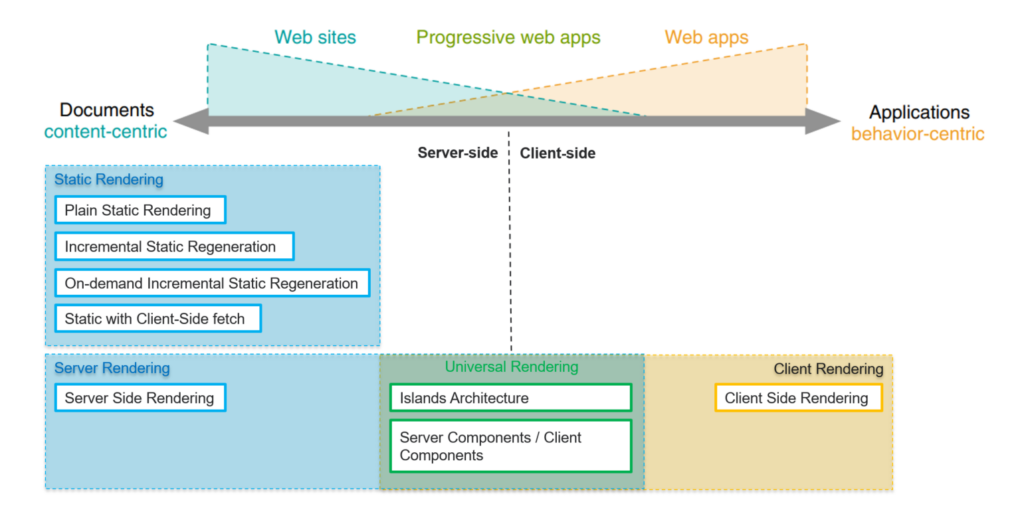
Ultimately, the choice between server-side rendering and client-side rendering (or a combination of both) depends on the specific goals and requirements of the project. Many modern web frameworks and libraries provide tools for implementing universal rendering, allowing developers to choose the rendering approach that best suits their needs.