



If you are not working with Frontend tech stack maybe “build tool” is an unfamiliar concept to understand. It’s a tool that helps create new web applications efficiently and provides a fast development experience. One of the forefronts build tools you may use called “webpack” is a big guy behind CRA, Vite is being considered a strong competitor with npm downloads per week jumped from 2.5 million to 7.5 million in the last year.
Vite is a build tool that aims to provide a faster and leaner development experience for modern web projects.
1. What is “build tool” used for?
Build tool has 2 main purposes: serve code for development and bundle code for production.
These are main features to effectuate those purposes:
- Hot module replacement (HMR): reload only changed components instead of whole page.
- Compile source code: compile modern code (from tools like React, Vue, TS, …) into final production-ready bundle (JS, HTML, CSS files) that browser can understand.
- Optimize and minify: build tool can help optimize images, remove dead code (tree-shaking), split code into small chunks and lazy-load for better production performance.
- Versioning: mark the version for new changes and deployment.
- Packaging: combine all components into a file or bundle that can be used in the browser.
2. So, Why Vite?
Vite is JavaScript build tool created by creator of Vue, but it doesn’t mean it’s limited to only use in Vue. We can use it in other frameworks and Vite support create-vite to bootstrap templates. Nowadays, many developers prefer using Vite because of its simplification, better development experience, and faster build time. Moreover, it’s been used as default build tool for many frameworks like Angular 17, Nuxt 3, Astro, SvelteKit, …
2.1. Faster start dev server
Vite using esbuild to pre-bundles dependencies which means when you run vite for the first time, it will bundle your project dependencies to improve subsequent page load performance. Moreover, it converts ESM dependencies with many internal modules into a single module.
Vite serves source code over native ESM which means browser will have to handle bundling, Vite will only transform and serve code on demand when browser request it (via code-splitting).
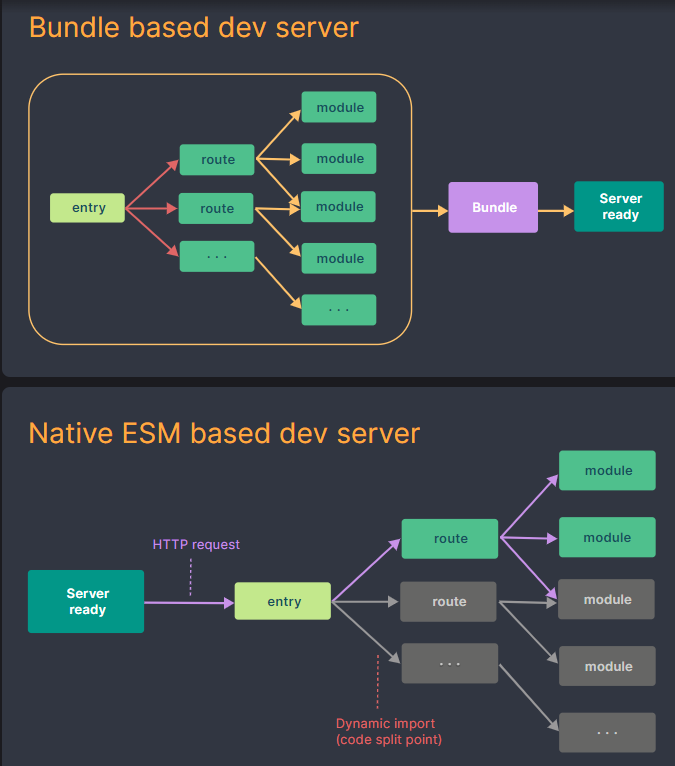
2.2. Faster update dev server with HMR
Old build tools (such as webpack) implement HMR by creating a dependency graph that includes every module your application needs, then bundles all those modules into a bundle (JavaScript file) that can run in the browser. So, every time we change some code, it will need to process again. The more dependencies we use, the more time application consume.
What makes Vite standout is that Vite doesn’t re-construct the entire bundle. It uses ES modules (ECMAScript Modules) to invalidate the chain between the edited module and its closest HMR boundary (mostly itself), and leverages HTTP caching headers so they don’t hit the server again once cached.
Vite’s HMR only update changed component, keep the application states. It won’t reload the page even when you make changes in source code.
2.3. Faster build time
Vite uses Rollup to bundle code for production. Rollup is a powerful JavaScript module bundle that focuses on source code optimization. It avoids additional network round trips (by fetching chunk parallel) caused by nested imports, provides features like tree-shaking, chunk splitting, lazy loading. Furthermore, Vite provides customization options for developers:
- Customizing the Build: via build config options and Rollup options via
build.rollupOptions. - Chunking strategy: you can choose to split code into chunks based on path, function, or component.
- Rebuild when file change:
vite build –watchcommand will trigger Vite rebuild application whenevervite.config.jschanges. - Library mode: allow you to use Vite as a library, not a main build tool for application.
- Advanced base options: provide experimental support for access to different paths of deployed assets and public files.
2.4. Strong plugin system
Vite has a flexible plugin system that helps you extend and customize the build process to your project’s specific needs. Vite’s plugin community is very rich, from CSS management, image optimization, to integration with frameworks like Vue or React.
3. Comparison with webpack
Webpack is a very familiar build tool to frontend developers at the very first page. By comparison, webpack is notable for its comprehensive documentation and the abundance of third-party it offers. The considerable number of tutorials and solutions accessible for webpack establishes it as a reliable option for developers looking for detailed guidance and solutions in various scenarios.
| Vite | Webpack | |
| Performance | Faster | Slower due to more extensive features |
| Learning | Easy to learn | More difficult |
| Community | Grow rapidly | Well-established |
| HMR | Faster because it uses ES modules to serve code | Slower because it bundles modules into one file |
| Should use in | Project of any size require instant feedback | Complex applications |
Conclusion
Vite is one of the next-generation JavaScript bundlers aimed to simplify and speed up development and the build process based on ES Modules, Rollup and esbuild. In this year 2023, Vite and StackBlitz organize a tech talk called ViteConf2023 to introduce Vite ecosystem around libraries, frameworks, tools such as: Storybook, NX, Nitro, SolidJS, Nuxt, Angular, Qwik, React, …
The flexibility, rapidity and robust integration with modern technologies are the decisive factors for Vite’s success in today’s web build tool community.