


Hi folks,
Welcome again! I hope you are doing well. I am thrilled to see you here. In this blog, we discussed the Ionic Components.
Introduction
In the dynamic world of mobile app development, Ionic has emerged as a powerful framework that facilitates the creation of cross-platform applications using web technologies.
One of the key aspects that contribute to the success of Ionic is its robust set of UI components.
These components not only provide a sleek and polished look to the applications but also offer a seamless user experience. Today, we see the inner workings of components to understand how they function and how developers can harness their potential.
Understanding Ionic Components:
Ionic components are essentially building blocks that developers use to construct the user interface of their applications. It offer a consistent look and feel across different platforms, whether it’s iOS, Android, or the web.
These are built using web technologies like HTML, CSS, and JavaScript. Under the hood, these components leverage the power of Angular, a popular JavaScript framework, for their implementation. Angular provides a solid foundation for building dynamic and responsive web applications, making it an excellent choice for Ionic.
Key Components of Ionic Architecture:
- Angular Framework: Ionic components heavily rely on Angular for their architecture. It provides a structured and organized way to build dynamic web applications, making it an ideal choice for creating reusable and maintainable UI components.
- Web Components: Ionic components adhere to web standards and are designed as web components. Developers can create reusable and encapsulated components using web components, making them compatible across various frameworks and libraries. This ensures flexibility and compatibility in various environments.
- CSS Grid System: Ionic uses a responsive CSS grid system to ensure that components adapt to different screen sizes and orientations. This grid system is crucial for creating a consistent layout across various devices, providing a seamless user experience.
- Theming and Styling: Ionic components come with a robust theming system that allows developers to customize the appearance of their applications easily. This theming system is based on CSS variables, making it simple to adjust colors, fonts, and other styling aspects.
- Lifecycle Hooks: Angular’s lifecycle hooks play a significant role in the functioning of Ionic components. These hooks enable developers to execute code at specific points in a component’s lifecycle, allowing for actions like initialization, data fetching, and cleanup.
- Gesture Recognition: Ionic components include built-in gesture recognition, providing a smooth and responsive touch experience. This is crucial for mobile applications, where gestures like swiping and tapping are common user interactions.
Working of Ionic Component
First of all, we need the ionic library imported, we have access to this core of Ionic, to these components.
Ionic Component:
<ion-card></ion-card>
<ion-button></ion-button>
We can use these ionic components just like the regular HTML elements by adding them with their tags into your HTML code.
<ion-button fill=”outline” color=”primary”>
Here is a native normal HTML button that has some extra styling and extra functionality to it.
Here the button is configure to receive attributes, and you can observe the fill=”outline” attribute.
These elements can also emit events.
example: ion change event for select dropdown
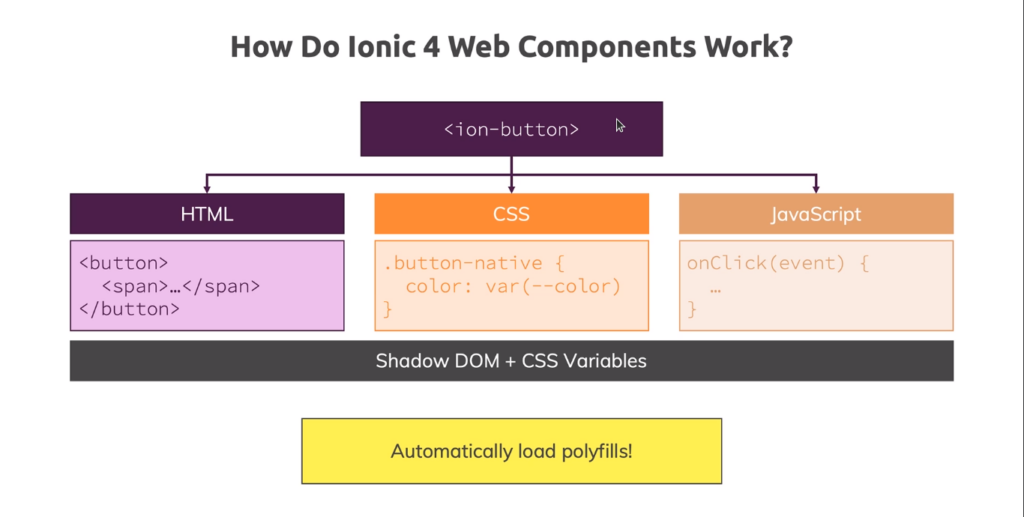
Now under the hood, this button in the end a combination of the three core drivers of front-end web development. Which contains some HTML code, has some CSS styling, and also has a Javascript portion. This javascript portion helps to add certain functionalities to that component.
Now, under the hood, this employs a technique known as The Shadow DOM and CSS variables. These features aid in encapsulating the styles of this component, preventing the applied styling from affecting your app or other components. Additionally, Ionic web components automatically load any necessary polyfills to ensure compatibility with older browsers.
If you’re intrigued, dive deeper by visiting its GitHub repository under the Ionic team. Feel free to delve into the core folder to inspect the source code of the specific component that captures your interest.
Conclusion:
Understanding the inner workings of Ionic components sheds light on the sophistication and thoughtfulness that goes into creating a framework for cross-platform development. Leveraging the power of web technologies, Angular, and web components, Ionic provides developers with a powerful toolkit to build visually appealing and high-performance applications. As the mobile app landscape continues to evolve, Ionic’s commitment to excellence in its components ensures that developers can create engaging and reliable applications across various platforms.
Hey, let’s stay in touch!
If you liked this blog, please share it with your friends and colleagues. Connect with FE studio on LinkedIn to read more about such topics.