


Introduction:
Take a trip through the ever-changing world of Android UI development and see how Kotlin and Jetpack Compose work incredibly well together. Take in the smooth transition from XML to Kotlin, a paradigm change that not only makes coding simpler but also represents a significant turning point in the development of expressive programming for developers. Come along on this excursion into the world of Android app creation, where mastery and innovation meet. By navigating through the complexities of Kotlin using Jetpack Compose, we can simplify Android UI development and expedite the development process. This adventure promises an unmatched expressive experience, revolutionizing the way developers create user interfaces and establishing a new benchmark for Android app design going forward.
The Rise of Kotlin:
With an official endorsement from Google in 2017, JetBrains’ Kotlin programming language has cemented its standing as the preferred choice for Android developers. Developers find comfort in Kotlin’s straightforward syntax and strong null safety features, which are well-known for their smooth interoperability with Java. Favored by developers, Kotlin’s expressiveness greatly reduces boilerplate code, which enhances readability and maintainability while also streamlining the development process. Since Kotlin is a powerful and adaptable language that appeals to developers all over the world, it continues to evolve and is a major factor in changing the Android development scene.
Introducing Jetpack Compose:
In the world of Android development, Jetpack Compose is a trailblazing UI toolkit that is all about making the complex process of creating user interfaces easier to understand and manage. Compose stands out for its revolutionary declarative UI development methodology. Developers using Compose articulate the UI based on the current state, breaking away from the classic imperative methodologies and bringing in a new era of understandable and intuitive code structures. This change improves the user experience overall and streamlines the development process because developers can now precisely design complex interfaces. With Jetpack Compose, developers can now approach Android UI creation with greater efficiency and expressiveness, signaling a paradigm shift.
Why Kotlin with Jetpack Compose?
- Conciseness and Expressiveness: Kotlin’s concise syntax pairs seamlessly with Compose, enabling developers to write expressive code with fewer lines, enhancing the overall development experience.
- Type Safety: Kotlin’s strong static typing, coupled with Compose’s type-safe APIs, ensures early error detection and a robust development environment, reducing the likelihood of runtime errors.
- Reactivity: Jetpack Compose introduces a reactive programming model that aligns well with Kotlin’s functional programming features. This synergy enhances the responsiveness of the UI, allowing for a smoother user experience.
- Interoperability: Kotlin’s interoperability with existing Java code and libraries facilitates a smooth transition for developers looking to adopt Compose in their existing projects.
Kotlin vs. Java in Android Development:
Java is a widely used programming language in the Android development community and is the basis for a vast number of applications. But with its clear syntax, improved null safety, and abundance of contemporary features, Kotlin has changed the game and established itself as the better option. The reason Kotlin is so popular is that it can work with Java very well, making it possible for developers to migrate to Kotlin gradually. The move from Java to Kotlin turns out to be really easy, and Kotlin’s compatibility and adaptability guarantee a clean interaction with current codebases. As developers use Kotlin’s expressive power to reshape the Android app creation landscape, the outcome is not simply a language shift but also an evolution of the development process.
Getting Started with Kotlin and Compose:
To start a new Android project with Kotlin and Jetpack Compose, ensure you have the necessary dependencies set up in your project. Utilize Android Studio’s built-in support for Compose, making it easy to create Compose components and preview them in real-time.
Let’s visualize it :
Prerequisite:
- Basic programming language
- Understandings of Android Basics.
- Gradle (Build Tool).
- Integrated Development Environment(IDE) i.e. Android Studio.
Let’s see how can we create a project using Compose:
To create projects, Open Android Studio, and go to file -> new project. Then you can see the below screens:
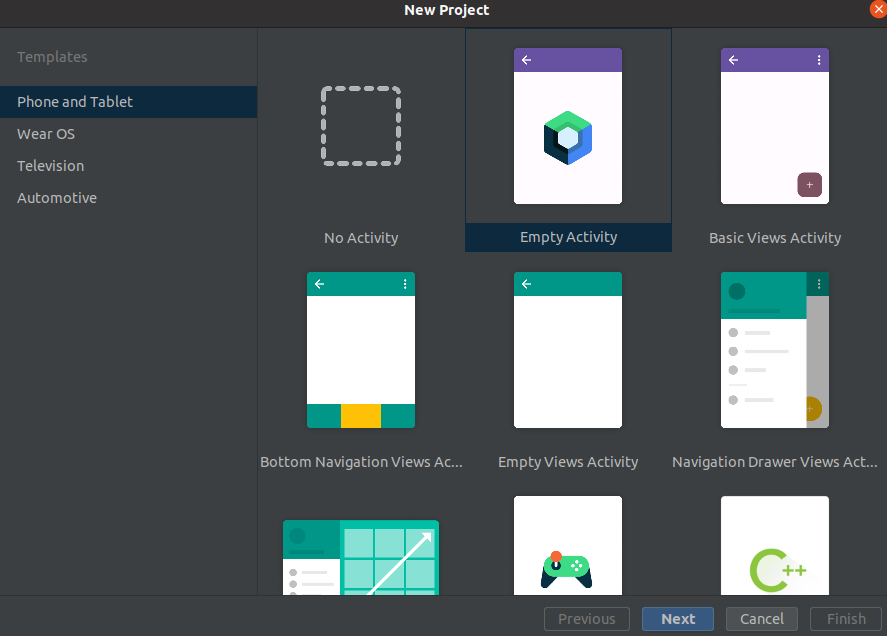
Now, select the Empty Activity and Click on Next.
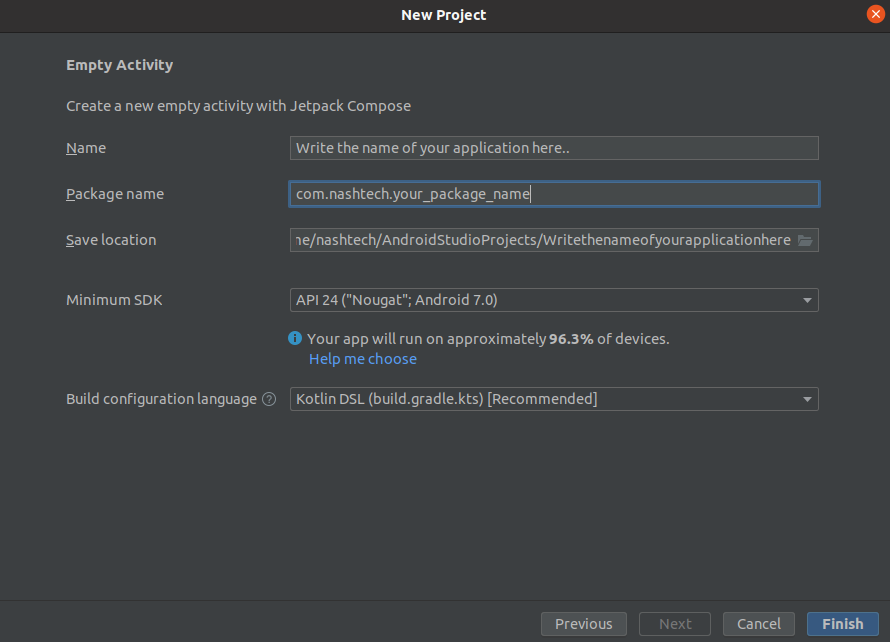
Now, set the name i.e. name of your project, package name, project location, and SDK, and set Kotlin DSL as a build configuration.
After clicking on Finish you need to wait for a few minutes to load the project.
Once the project is loaded then it will look like this:
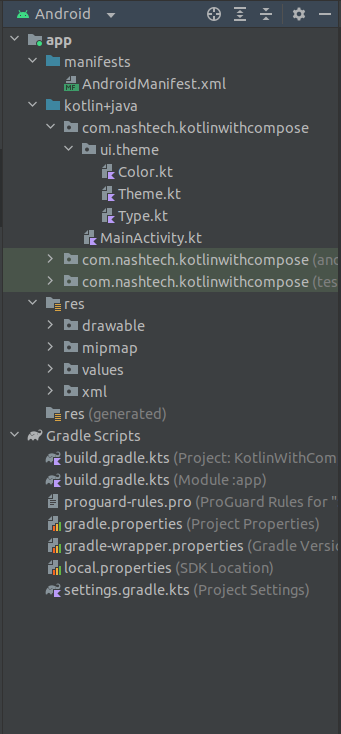
Differences between the file structure of XML vs Jetpack Compose:
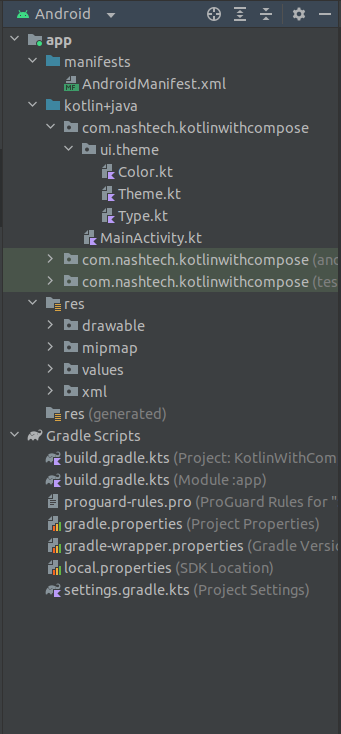
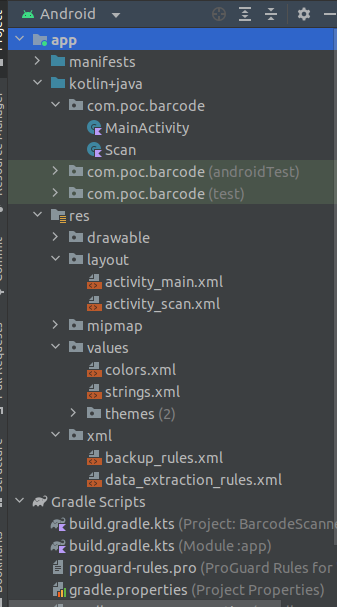
Key differences:
1. Declarative UI vs. Imperative UI:
- Kotlin with XML: Traditional Android development involved creating UI layouts imperatively using XML. Developers specify the structure and appearance of UI elements in XML files.
- Kotlin with Jetpack Compose: Jetpack Compose introduces a declarative UI approach. Developers describe what the UI should look like based on its current state. Compose handles the underlying updates, making UI development more intuitive and readable.
2. Code Structure:
- Kotlin with XML: UI elements are defined in XML files within the
res/layoutdirectory. These XML files often contain both the structure and appearance of the UI. - Kotlin with Jetpack Compose: UI elements are created using Kotlin code directly in the activity or fragment. There is no need for separate XML files for defining layouts.
3. Boilerplate Code:
- Kotlin with XML: XML-based layouts can result in significant boilerplate code, especially for complex UI structures.
- Kotlin with Jetpack Compose: Compose significantly reduces boilerplate code. UI elements can be created with concise and expressive Kotlin syntax, leading to more readable and maintainable code.
4. Reactivity:
- Kotlin with XML: Achieving reactivity often involves using callbacks, listeners, and complex event handling to update the UI based on changes.
- Kotlin with Jetpack Compose: Compose adopts a reactive programming model. UI elements automatically update when their underlying data changes, simplifying the handling of UI updates.
5. Preview and Live Editing:
- Kotlin with XML: Previewing UI changes often require running the app on an emulator or physical device.
- Kotlin with Jetpack Compose: Compose offers real-time preview and live editing capabilities directly within Android Studio, allowing developers to see changes instantly.
6. Adaptability:
- Kotlin with XML: XML-based layouts are still widely used in Android projects and libraries.
- Kotlin with Jetpack Compose: Compose is gradually gaining adoption, and its adaptability is increasing. Developers can choose to use Compose in new projects or integrate it gradually into existing XML-based projects.
7. Flexibility and Extensibility:
- Kotlin with XML: XML layouts offer a consistent and reliable method for specifying user interface structures.
- Kotlin with Jetpack Compose: Compose is designed to be highly extensible. Developers can create custom UI elements and modifiers, providing flexibility for unique UI requirements.
8. Interoperability:
- Kotlin with XML: Libraries frequently use XML for UI definition, and XML layouts are tightly related to the Android ecosystem. XML for UI definition.
- Kotlin with Jetpack Compose: Compose is interoperable with existing XML layouts. Developers can work with Compose and XML in the same project, allowing for a smooth transition.
NOTE:
Jumpstart Compose will help you simplify the world of Android UI development as you explore the possibilities of Kotlin. Explore the smooth transition from XML as well, as it will enable you to embrace an expressive experience for all developers and streamline coding. Click this link if you’re eager to get some real-world experience with JetPack Compose and XML in Android:–
- https://blog.nashtechglobal.com/kotlin-tutorial-for-beginners/
- https://github.com/NashTech-Labs/kotlin-with-Jetpack-Compose.
Future Prospects:
Java has been the standard language for Android development for a very long time and is the basis for many applications. But the rise of Kotlin has changed the game, establishing itself as the better option with its clear syntax, improved null safety, and abundance of contemporary features. The reason Kotlin is so popular is that it can work with Java very well, making it possible for developers to migrate to Kotlin gradually. The move from Java to Kotlin turns out to be easy, and Kotlin’s compatibility and adaptability guarantee a clean interaction with current codebases. As developers use Kotlin’s expressive power to reshape the Android app creation landscape, the outcome is not simply a language shift but also an evolution of the development process.
Conclusion:
The combination of Jetpack Compose and Kotlin, in conclusion, provides developers looking for a cutting-edge and effective method for creating Android applications with a strong pull. The future of the Android development paradigm will be redefined by simplicity and expressiveness, and developers who grasp the nuances of Jetpack Compose and its interaction with Kotlin will be well-equipped to make judicious judgments. With the combination of Jetpack Compose and Kotlin, the road ahead promises more innovation, more efficient workflows, and an improved user experience.