


Introduction
Snowflake’s Data Cloud is a powerful platform for managing your data. It excels at storing, processing, and analyzing data much better than traditional methods. Think of it as a personal manager for your data in the digital world! What sets Snowflake apart is that it doesn’t use outdated database technology or complex software like Hadoop. Instead, it employs a new approach, acting like a smart search engine and a cloud-based storage solution combined. Why does this matter? Snowflake offers all the benefits of a top-tier data tool, plus some extra features. It’s like upgrading from a regular car to a supercharged one—making your data handling faster, easier, and more flexible.
Self-Managed Service
Snowflake is like having a personal assistant for your data—here’s why:
- No Hardware Hassle: You don’t have to worry about choosing, setting up, or dealing with any hardware (the physical or virtual stuff) because Snowflake takes care of it all.
- Almost No Software Stress: Installing and managing software can be a headache, right? Well, Snowflake makes it easy because you hardly have to install or manage any software. They handle the technical stuff so you can focus on using your data.
- Snowflake Takes Charge: Think of Snowflake as your data’s bodyguard. All the ongoing tasks, like maintenance, upgrades, and tuning, are taken care of by Snowflake. You don’t have to lift a finger.
- Cloud-Only Coolness: Snowflake lives in the cloud. Every part of its service, except for a few optional things, runs on the internet. It doesn’t hang out in private clouds (like on your own servers) because it loves the open digital skies.
- Virtual Magic: Snowflake uses virtual computer thingies (compute instances) and a special storage service to handle your data. It’s not something you install like regular software; Snowflake manages it all, from setting up to keeping it updated. Easy peasy!
Snowflake’s Architecture
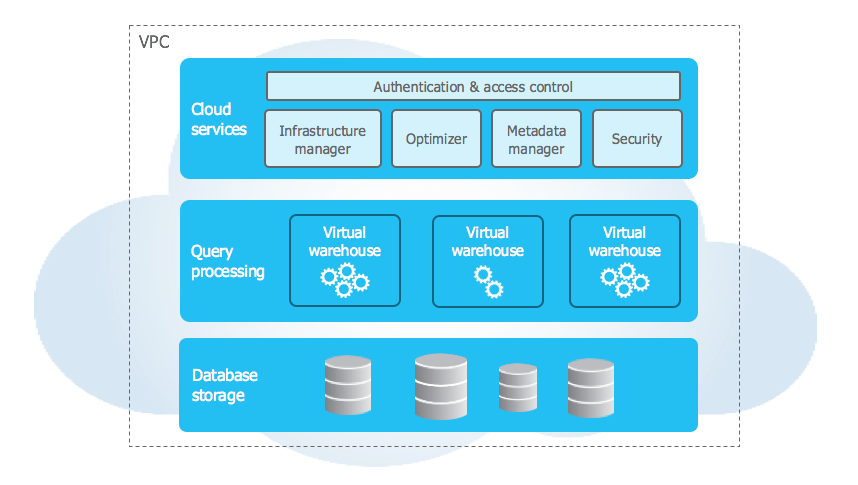
Think of Snowflake’s architecture like a hybrid car—it takes the best of both worlds!
- Shared-Disk Comfort: Snowflake has a central hub (think of it as a data meeting point) where all the important data hangs out. Just like everyone in a family sharing the same bookshelf, this data is easily accessible to all the different parts (or nodes) of Snowflake.
- Shared-Nothing Speed: When it comes to processing questions or tasks, Snowflake kicks it up a notch. It splits the work among a bunch of super-smart computing teams (clusters), and each team member (node) stores a piece of the data. This teamwork, known as massively parallel processing (MPP), makes things super fast and scalable.
So, it’s like having the simplicity of everyone using the same bookshelf (shared-disk) but the speed and teamwork of each person having their own piece of the puzzle (shared-nothing). Snowflake’s design brings the best of both worlds for efficient data management and high performance.
Three key Layers of Snowflake
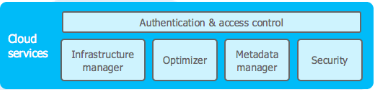
Cloud Services:
- Purpose: This layer is the communicator and manager. It handles all the coordination between different parts of Snowflake, ensuring everything runs smoothly.
- How it Works: Think of it as the traffic director. It manages the flow of data and queries, making sure each request gets to the right place. It also takes care of the behind-the-scenes tasks, like software updates, security, and overall system health.
- Benefits: Cloud Services make Snowflake a self-managed service. You don’t have to worry about updates, security patches, or system health checks. It’s all taken care of, allowing you to focus on using your data without being bothered by the technical details.
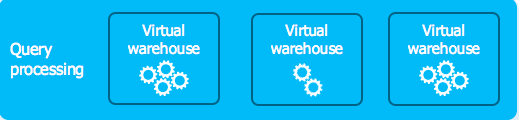
Query Processing:
- Purpose: When you ask Snowflake a question or give it a task, this layer gets to work. It’s like the brain of the operation, figuring out the best way to get the answer or complete the task.
- How it Works: Snowflake uses MPP (massively parallel processing) clusters, which are like a team of workers. Each worker (or node) processes a part of the task simultaneously, making things happen much faster than if one worker had to do everything.
- Benefits: The parallel processing approach boosts speed and efficiency. It’s like having many hands making light work, allowing Snowflake to handle complex queries and tasks with ease.
Database Storage:
- Purpose: This layer is like Snowflake’s memory bank. It stores all the data you throw at it, and it does so in a smart, efficient way.
- How it Works: Instead of a traditional approach where all data is stored in one place, Snowflake uses a special storage service that divides and conquers. The data is split into smaller, manageable pieces, and each piece is stored in a way that makes it easily accessible when needed.
- Benefits: This setup makes storing and retrieving data more efficient. It also allows for easy scalability because you can add more storage without disrupting everything else.

Important System Roles in Snowflake
- ORGADMIN (Organization Administrator):
- The ORGADMIN, or Organization Administrator, is the role responsible for managing operations at the organization level. This includes creating accounts within the organization, viewing all accounts and enabled regions, and accessing usage information across the entire organization.
- ACCOUNTADMIN (Account Administrator):
- The ACCOUNTADMIN role is the top-level role in the system, encompassing SYSADMIN and SECURITYADMIN roles. It should be granted to a limited number of users. It provides extensive system-level privileges and control.
- SECURITYADMIN (Security Administrator):
- The SECURITYADMIN role manages global object grants, user and role creation, monitoring, and management. This role inherits privileges from the USERADMIN role and is crucial for maintaining security aspects within the system.
- USERADMIN (User and Role Administrator):
- The USERADMIN role focuses on user and role management exclusively. It has the ability to create users and roles within the account and can manage those it owns. Ownership privilege is necessary for modifying object properties.
- SYSADMIN (System Administrator):
- SYSADMIN is the System Administrator role with the authority to create warehouses, databases, and other objects in the account. It is recommended to create a role hierarchy where all custom roles are eventually assigned to SYSADMIN.
- PUBLIC:
- PUBLIC is a pseudo-role automatically granted to every user and role in the account. It’s used when explicit access control isn’t needed, treating all users equally in terms of access rights. Objects owned by PUBLIC are accessible to every user and role in the account.
Some Unique features of Snowflake
- Multi-Cloud Support:
- Snowflake is like a data home that can live in different clouds, such as Amazon, Microsoft, or Google. This means you get to pick the cloud that suits you best. And if you ever want to switch clouds, it’s as easy as moving your furniture to a new house without any interruptions.
- Time Travel:
- Think of Snowflake as a time machine for your data. If you accidentally delete or mess up something important, Snowflake lets you go back to how things were before the oopsie. It’s like hitting undo on your computer, but for your data.
- Zero Copy Cloning:
- Snowflake has a cool feature called Zero Copy Cloning. It’s like making an instant copy of your data playground without actually copying the toys. This way, you can try out different things without messing up the original setup. It’s a fast and easy way to play and experiment.
- Secure Data Storage:
- Snowflake takes data security seriously. It wraps your data in layers of protection, like putting it in a super-secure vault. It encrypts everything, controls who gets access, and keeps a watchful eye on what’s happening. It’s like having a trustworthy guardian for your important information. And here’s the extra reassurance: Snowflake is certified with SOC 2 Type II, which is like a gold star for meeting the top-notch security standards. So, your data is not just safe; it’s super safe!
- Automatic Query Caching:
- Snowflake is like having a smart assistant that remembers things for you! It automatically stores and remembers queries that you often use. So, when you ask the same question again, it already has the answer ready, making things super fast. This feature is like having a shortcut to save time when looking at and analyzing your data. Also, Snowflake’s virtual warehouses are like magic computing spaces that you can adjust whenever you want. Need more power? Scale up! Want to save resources? Scale down! It’s like having a switch to make sure your data questions are always answered as quickly and efficiently as possible.
Start your free trial!
In conclusion, Snowflake’s Data Cloud is a game-changer for managing data. It makes storing, processing, and analyzing data simpler and more efficient than traditional methods. Snowflake stands out because it uses a new, cloud-based approach, offering the benefits of top-tier data tools with extra features. It handles the technical stuff for you, so you can focus on using your data. With its unique architecture and useful features, Snowflake ensures that your data is managed quickly, easily, and securely. It’s like upgrading to a high-performance vehicle for all your data needs.