




Introduction:
Backstage is an open platform for building developer portals. Powered by a centralized software catalog, Backstage restores order to your microservices and infrastructure and enables your product teams to ship high-quality code quickly — without compromising autonomy. Backstage unifies all your infrastructure tooling, services, and documentation to create a streamlined development environment from end to end.
Backstage.io was originally developed at Spotify as an internal tool and then open-sourced in 2020. It provides developers with a single access point to discover the platform’s capabilities. It also enables developers to build products faster and centralize their information. Backstage.io is designed to fit the Kubernetes model and run as a stateless application with an external PostgreSQL database. Companies like CVS Health, Siemens, LinkedIn, REI, Vodafone, and Lego are building out their own developer portals from the Backstage framework.
Key Features of Backstage.io:
- Centralized Software Catalog: At the heart of Backstage lies a comprehensive software catalog. This catalog acts as a single source of truth for all your internal tools and services, including details like descriptions, owners, usage instructions, and links to relevant documentation. Developers can easily browse and search the catalog to find what they need.
- Unified Dashboard: Backstage provides a unified dashboard that gives developers a bird’s-eye view of all their available resources. From services and components to documentation and workflows, everything is accessible in one place. This makes it easy for developers to stay on top of what’s available and find what they need quickly.
- Customizable and Extensible: Backstage is designed to be flexible and adaptable. You can customize the platform to fit your specific needs and workflows. Plugins allow you to integrate your existing tools and services, and extend the functionality of Backstage. So this makes it a versatile solution that can grow with your organization.
- Developer Experience Focus: Backstage is all about improving the developer experience. The platform is designed to be user-friendly and intuitive, making it easy for developers to discover and use the tools they need. This can lead to increased productivity and efficiency.
Benefits of Using Backstage.io:
- Improved Developer Productivity: By providing a central hub for all development resources, Backstage can help developers find the tools they need quickly and easily. So this can lead to significant improvements in developer productivity and efficiency.
- Reduced Time to Market: By streamlining the development process, Backstage can help organizations get their products and services to market faster.
- Increased Collaboration: Backstage fosters collaboration by making it easier for teams to share and discover common resources. So this can lead to better communication and more effective teamwork.
- Standardized Practices: Backstage can help organizations enforce best practices and standards across their development teams. So this can lead to higher quality software and reduced maintenance costs.
- Greater Control and Visibility: Backstage gives organizations greater control over their internal tools and services. Therefore platform provides valuable insights into how these resources are being used, which can help make better decisions about infrastructure and tooling.
Backstage.io and DevOps:
Backstage aligns perfectly with DevOps principles by:
- Promoting collaboration: The centralized platform fosters communication and information sharing between developers and operations teams.
- Automating manual tasks: Integrating DevOps tools into Backstage allows automating tasks like infrastructure provisioning, configuration management, and deployment pipelines.
- Improving visibility: Backstage provides a single source of truth for services, components, and infrastructure, offering increased visibility and control for DevOps teams.
- Empowering developers: Self-service access to tools and resources through Backstage gives developers more autonomy and faster feedback loops.
DevOps Tools in Backstage:
Backstage’s plugin ecosystem allows integration with various DevOps tools to enhance your developer experience. Here are some examples:
- CI/CD pipelines: Integrate tools like Jenkins, CircleCI, or Drone.io to visualize pipeline status and trigger deployments within Backstage.
- Infrastructure provisioning: Connect tools like Terraform or AWS CloudFormation to manage infrastructure resources and therefore provide developers with self-service provisioning capabilities.
- Configuration management: We use tools like Ansible or Puppet so to display configuration details for services and components within the Backstage catalog.
- Monitoring and logging: We can Integrate tools like Prometheus, Grafana, or ELK Stack, So we can visualize service health, performance metrics, and logs in real-time within Backstage.
Getting Started with Backstage.io
Prerequisites:
- Access to a Unix-based OS (Linux, MacOS, or Windows Subsystem for Linux)
- GNU-like build environment (make, build-essential on Debian/Ubuntu, XCode command line tools on MacOS)
- Elevated rights for dependency installation
- curl or wget installed
- Node.js Active LTS Release installed (via nvm recommended)
- Yarn classic for project creation (can be migrated to Yarn 3 later)
- Docker and Git installed
- Open ports: 3000, 7007 if not directly accessible over the network.
Create your Backstage App:
To install the Backstage Standalone app, we use npx, a tool to run Node executables straight from the registry. This tool is part of our Node.js installation. Now we’ll be running the command below will install Backstage. The wizard will create a subdirectory inside our current working directory.
npx @backstage/create-app@latest
Run the Backstage app:
So when the installation is complete you can go to the application directory and start the app. The yarn dev command will run both the frontend and backend as separate processes (named [0] and [1]) in the same window.
cd myapp-nt
yarn dev
After the [0] webpack compilation is successful, you can open your web browser and go to http://localhost:3000 to access your newly installed Backstage portal. You can begin exploring the demo right away. Keep in mind that the in-memory database will be reset upon restarting the app, So it’s advisable to proceed with the database setup steps if needed.
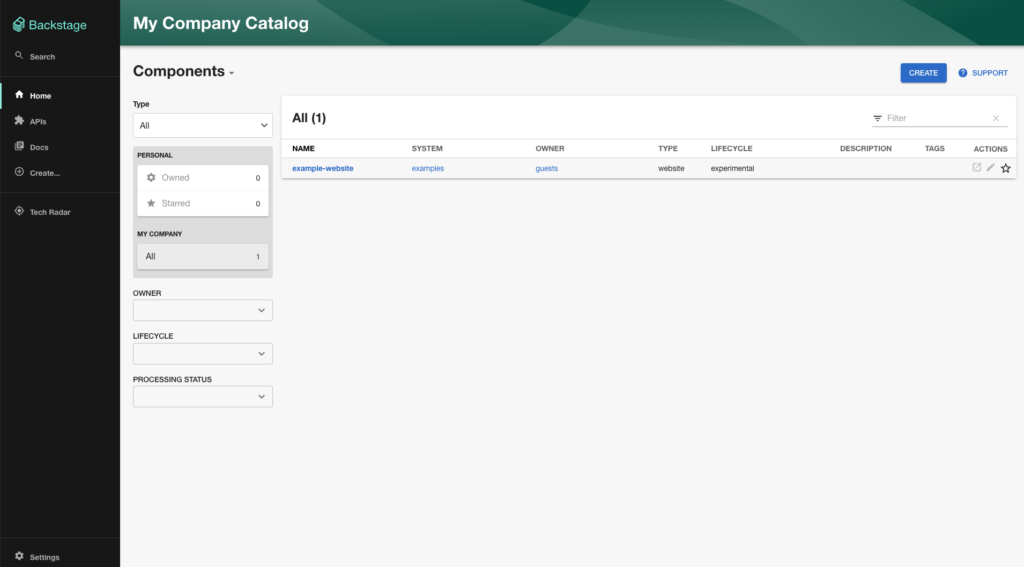
So this is how portal looks. We can immediately start using this portal for integrating many tools. As we get more experienced with the app, in future you can run just the frontend with yarn start in one window, and the backend with yarn start-backend in a different window.
Conclusion:
In a nutshell, Backstage.io is a free, open-source platform for building beautiful and functional developer portals. It acts as a one-stop shop for developers, centralizing tools, services, documentation, and workflows in one place. So we can think of it as a developer’s dream library and navigation system, making everything discoverable, usable, and delightful to interact with.
Resources:
- Getting Started Guide: https://backstage.io/docs/getting-started/
- Backstage Plugins: https://backstage.io/docs/plugins/
- Backstage Community Forum: https://github.com/backstage/backstage