



In the dynamic world of software development, building robust and resilient applications is essential to ensure a seamless user experience. With the release of .NET 8, Microsoft has introduced two NuGet packages to the .NET ecosystem. These new libraries are based on the Polly library, a widely recognized open-source project.
Importance of Resilience
When different services talk to each other using the internet language (HTTP), it’s crucial that these conversations don’t go wrong. Sometimes, the requests can face problems because of internet issues or glitches on the server side. As our service connects with more and more other services, there’s a chance that a problem in one place can create a chain reaction, causing issues in other connected parts. This is what we call cascading failures. You can use the following tips for creating better HTTP requests.
Resilience Packages
| NuGet package | Description |
| 📦 Microsoft.Extensions.Resilience | This package provides a minimal set of APIs. It provides mechanisms to harden apps against transient failures. |
| 📦 Microsoft.Extensions.Http.Resilience | This NuGet package provides resilience mechanisms specifically for the HttpClient class. |
Simple Tips for Better HTTP Requests
- Set Time Limits:
- Why? Waiting forever for a response is not a good idea. If we’ve asked for something, and it’s taking too long, it’s better to stop waiting and move on.
- How? Just like we set a timer for cooking something, we set a time limit for our requests. If it takes too long, we stop asking.
- Try Again if Things Go Wrong:
- Why? Sometimes, things go wrong temporarily, like a quick internet hiccup. We don’t want to give up just because of a small problem.
- How? If we ask for something, and it doesn’t work the first time, we wait a bit and ask again.
- Take a Break if Someone’s Busy:
- Why? If the service we’re talking to is having a tough time, bombarding it with more requests won’t help.
- How? If we find out that the other service is having a problem, we stop asking it for things for a little while. Once it’s feeling better, we start talking again.
- Have a Backup Plan:
- Why? Relying only on one way of doing things can be risky. We need a backup plan just in case our first idea doesn’t work.
- How? In our service, if the usual way of doing things fails, we have another way to get things done.
New Extension Methods for IHttpClientBuilder
- AddStandardResilienceHandler: Can be used in routine situations where resilient HTTP requests are needed.
- AddStandardHedgingHandler: Useful when an extra layer of caution is desired, providing a backup option for HTTP requests.
- AddResilienceHandler: Utilize in scenarios with unique requirements not covered by standard tools, allowing flexibility in tailoring resilience strategies.
Standard Resilience Pipeline
It is the recommended to use standard resilience API. It is suitable for most scenarios and uses different Polly strategies. The standard pipeline contains the following strategies executed in the order below:
| Order | Strategy | Description |
| 1 | Rate limiter | The rate limiter pipeline limits the maximum number of concurrent requests being sent to the dependency. |
| 2 | Total request timeout | The total request timeout pipeline applies an overall timeout to the execution, ensuring that the request, including retry attempts, doesn’t exceed the configured limit. |
| 3 | Retry | The retry pipeline retries the request in case the dependency is slow or returns a transient error. |
| 4 | Circuit breaker | The circuit breaker blocks the execution if too many direct failures or timeouts are detected. |
| 5 | Attempt timeout | The attempt timeout pipeline limits each request attempt duration and throws if it’s exceeded. |
Standard Hedging Pipeline
It is similar to standard resilience handler. However, instead of using a retry strategy, this pipeline uses a hedging strategy, which improve request latency by issuing multiple concurrent requests.
The standard hedging pipeline consists of the following strategies:
| Order | Strategy | Description |
| 1 | Total request timeout | The total request timeout pipeline applies an overall timeout to the execution, ensuring that the request, including hedging attempts, doesn’t exceed the configured limit. |
| 2 | Hedging | The hedging strategy executes the requests against multiple endpoints in case the dependency is slow or returns a transient error. Routing is options, by default it just hedges the URL provided by the original . |
| 3 | Rate limiter (per endpoint) | The rate limiter pipeline limits the maximum number of concurrent requests being sent to the dependency. |
| 4 | Circuit breaker (per endpoint) | The circuit breaker blocks the execution if too many direct failures or timeouts are detected. |
| 5 | Attempt timeout (per endpoint) | The attempt timeout pipeline limits each request attempt duration and throws if it’s exceeded. |
Getting Started
To use the new HTTP resilience APIs, install the package from the command line:

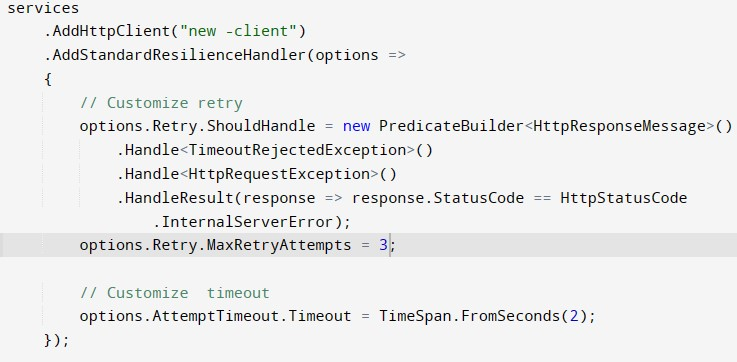
You can add and customize AddStandardResilienceHandler as shown below. It uses the IServiceCollection to create a new HtppClient with standard resiliency handler.
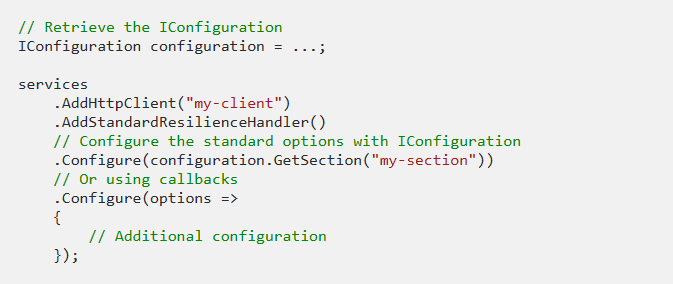
Alternatively, configure the options with the Configure extensions:
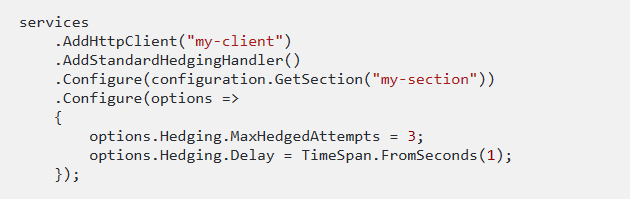
Like the standard pipeline, you can also configure standard hedging options:
Conclusion
With the Microsoft.Extensions.Resilience NuGet package, .NET developers can elevate the resilience of their applications without introducing complex and error-prone code. Based on the PollyV8, it has improved performance, built in telemetry support and fluent syntax. It makes developer life easier with the simplified integration and efficiency.