


Introduction:
The Azure Storage platform is Microsoft’s cloud storage solution for modern data storage scenarios. Azure Storage offers highly available, massively scalable, durable, and secure storage for a variety of data objects in the cloud. In the realm of cloud computing, where data reigns supreme, Azure Storage stands out as a cornerstone of Microsoft’s ecosystem. With its robust architecture, scalability, and a plethora of features, Azure Storage has become the go-to solution for businesses of all sizes seeking reliable data storage and management capabilities in the cloud.
Understanding Azure Storage:
At its core, Azure Storage is a cloud-based storage solution that offers a range of storage services designed to cater to diverse requirements, from simple file storage to complex big data analytics. Leveraging Microsoft’s global infrastructure, It ensures high availability, durability, and low latency for storing and accessing data from anywhere in the world.
Benefits of Azure Storage:
These services offer a multitude of advantages for both application developers and IT professionals:
- Durable and Highly Available: Storage ensures the durability of your data by implementing redundancy measures, safeguarding it against transient hardware failures. Additionally, you have the option to replicate data across data centers or geographical regions, providing an extra layer of protection against local disasters or unforeseen outages.
- Secure: Every piece of data written to an storage account is encrypted by the service. Azure Storage grants users granular control over data access, allowing for precise management of permissions and security policies.
- Scalable: Azure Storage is built to scale massively, accommodating the storage and performance requirements of modern applications. Whether your data needs grow rapidly or gradually over time, It can adapt seamlessly to meet your evolving needs.
- Managed: Microsoft Azure takes care of hardware maintenance, updates, and critical issues, freeing up valuable time and resources for developers and IT professionals to focus on core business activities.
- Accessible: Data stored in Azure Storage is accessible from anywhere in the world via HTTP or HTTPS. Microsoft offers client libraries for Azure Storage in various programming languages, including .NET, Java, Node.js, Python, and Go, facilitating seamless integration into diverse application ecosystems. Furthermore, Azure supports scripting through Azure PowerShell or Azure CLI, while the Azure portal and Azure Storage Explorer provide intuitive visual interfaces for managing and interacting with your data.
Azure Storage Data Services:
Microsoft Azure Storage comprises several key components, each tailored to specific use cases:
- Blob Storage: Blob (Binary Large Object) Storage is designed to store large amounts of unstructured data, such as images, videos, documents, and log files. It provides three storage tiers – hot, cool, and archive – offering varying levels of performance and cost-efficiency based on data access patterns.
- File Storage: Azure File Storage offers fully managed file shares in the cloud, accessible via the Server Message Block (SMB) protocol. It enables organizations to migrate legacy applications to the cloud seamlessly and provides shared access to files across multiple virtual machines.
- Table Storage: Azure Table Storage is a NoSQL data store that offers schema-less storage of structured data. It is well-suited for applications requiring fast and scalable storage of semi-structured data, such as IoT telemetry, user profiles, and session state.
- Queue Storage: Azure Queue Storage provides reliable messaging between application components, enabling asynchronous communication and decoupling of services. It facilitates building resilient, scalable, and loosely coupled cloud applications.
- Disk Storage: Azure Disk Storage offers durable and high-performance block storage for virtual machines and containerized applications. It supports both managed and unmanaged disks, allowing users to choose the level of management and automation required for their workloads.
Each service is accessed through a storage account with a unique address. Get started and Create a storage account.
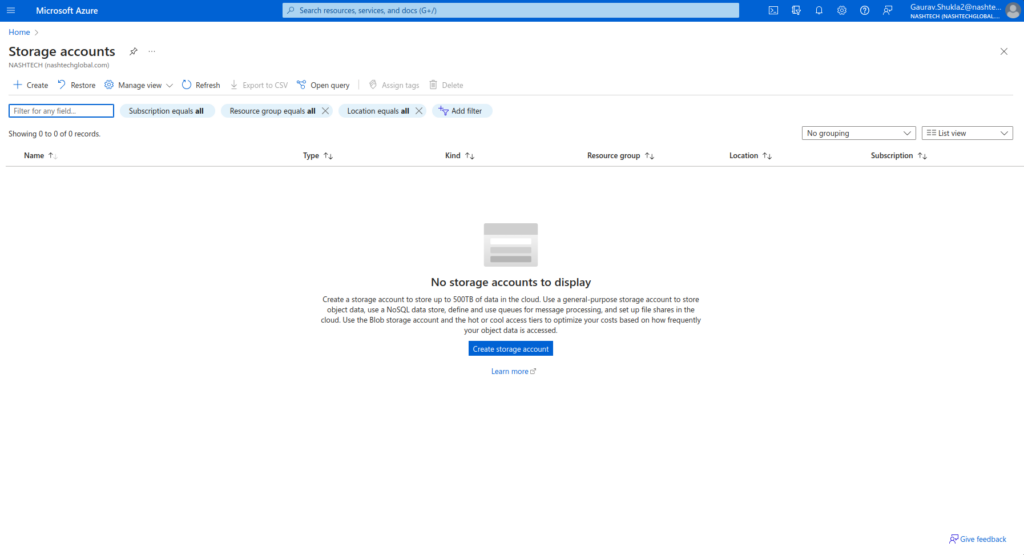
Within an Azure storage account resides all your Azure Storage data entities, encompassing blobs, files, queues, and tables. This storage account furnishes a distinct namespace for your Azure Storage data, accessible globally via HTTP or HTTPS protocols. So your data within the storage account boasts durability, high availability, and stringent security measures. Moreover, it offers unparalleled scalability to accommodate varying storage needs effectively.
Authentication to an Storage account:
Authentication to an storage account involves several methods:
- Shared Key Authentication: Uses account access keys but requires sharing sensitive information.
- Shared Access Signature (SAS): Offers granular access control without exposing account keys, granting specific permissions for a defined time period.
- Azure Active Directory (AAD) Authentication: Integrates with Azure AD for centralized identity management and supports features like multi-factor authentication and role-based access control.
- Azure Managed Identity: Enables seamless authentication between Azure services and resources without managing explicit credentials.
- Role-Based Access Control (RBAC): Allows assigning specific permissions to users, groups, or applications at different levels, providing flexibility in access management.
So these methods ensure secure access to Azure storage resources while adhering to various security and compliance requirements.
Data Types Supported by Azure Storage:
Storage supports a wide range of data types, accommodating diverse workload requirements:
- Binary Data: Blob Storage is optimized for storing binary data, including images, videos, audio files, and backups. It provides a scalable and cost-effective solution for storing and serving media content, application artifacts, and archival data.
- Structured Data: Table Storage excels in storing structured data in key-value pairs, making it ideal for scenarios involving tabular data, entity attributes, and metadata. Developers can store and query structured data at scale, leveraging partition keys and row keys for efficient access.
- Text Data: File Storage supports the storage of text files, configuration files, logs, and application data in a shared file system accessible from multiple virtual machines. So It enables collaborative file sharing and centralized data management across distributed environments.
- Message Data: Queue Storage facilitates the storage and processing of message data for building resilient and scalable cloud applications. So It supports messages of various formats, including JSON, XML, and plain text, enabling seamless integration with message-based architectures.
- Block Data: Disk Storage caters to the storage of block data, including operating system images, application binaries, databases, and transaction logs. So It delivers high-performance block storage for virtual machines, ensuring low-latency access and data durability.
Data Tools provided by Azure:
- Azure Synapse Analytics: Formerly known as Azure SQL Data Warehouse, Azure Synapse Analytics is a cloud-based analytics service that combines data integration, enterprise data warehousing, and big data analytics into a single platform. So It enables organizations to analyze large volumes of structured and unstructured data in real-time, leveraging both relational and non-relational data sources.
- Azure Databricks: Azure Databricks optimizes big data processing and machine learning workloads through its Apache Spark-based analytics platform. So It provides a collaborative environment for data engineers, data scientists, and business analysts to build, train, and deploy machine learning models at scale.
- Azure HDInsight: Azure HDInsight enables organizations to process, analyze, and visualize big data workloads using open-source technologies such as Hadoop, Spark, and Kafka in a fully managed service. So It supports a wide range of big data frameworks and integrates seamlessly with storage and analytics services.
- Azure Data Factory: Azure Data Factory is a cloud-based data integration service that allows organizations to create, schedule, and orchestrate data pipelines for ingesting, transforming, and loading data from various sources to target destinations. So It supports hybrid data integration scenarios and provides built-in connectors for popular data sources and destinations.
- Azure Stream Analytics: Azure Stream Analytics is a real-time event processing service that enables organizations to analyze and derive insights from streaming data in real-time. So It supports complex event processing and temporal analysis, making it suitable for applications like IoT telemetry, fraud detection, and predictive maintenance.
Conclusion:
In conclusion, Azure Storage emerges as a versatile and comprehensive storage platform that addresses a myriad of storage requirements across industries and domains. From unstructured blob data to structured tables, from file shares to message queues, So Azure Storage offers a unified and scalable storage solution for modern cloud applications.