


Microbenchmarking : What are Microbenchmarks and why do we need them?
Our application demands that hot paths be fast and efficient, particularly when they are mission critical frequently called. Even in a cloud environment like Azure or AWS, where we can scale vertically or horizontally, cost-effectiveness and high throughput remains essential. Consequently, our application must consistently demonstrate performance and efficiency. Microbenchmarking is a way to measure the the performance of our code and finding root cause of issues.
To achieve this, we need to measure and compare different code implementations for the same function, understanding which one performs better at minute level – ranging from seconds to nanoseconds. While this may seem like a negligible figure in isolation, considering an application serving thousands or millions of requests daily, the cumulative impact is substantial. It significantly contributes to cost reduction and ensures optimal performance.
Moreover, there are often multiple ways to accomplish the same task, and developers tend to stick to one approach for a longer time. Changing their perspective is challenging unless supported by data. Therefore, it is crucial to share performance metrics across teams and demonstrate the advantages of adopting better methods.
Why BenchmarkDotNet?
Reliability : Benchmarking is generally complex, making it challenging to obtain accurate numbers. Writing code for benchmarking is easy, but it’s equally easy to adopt an incorrect approach, leading to inaccurate conclusions. Microbenchmarking introduces another challenge: ensuring consistency in results across multiple runs and considering various factors such as CPU, architecture, memory constraints, and Framework version that might impact our tests.
To simplify this process, the BenchmarkDotnet library abstracts these complexities. It allows us to concentrate on writing the benchmarks themselves and facilitates displaying results. This approach enables us to draw conclusions and make decisions based on reliable and abstracted benchmarking data.
Ease of Use : The adoptability of a library depends upon how easy it is to use and get started with it. With BenchmarkDotnet it is easy to write your first benchmark which we are going to see below. The APIs are easy and friendly to use and tune parameters with attributes and simple configuration. For example, to compare how a inbuilt function performs across various .Net runtime versions and see how it evolves and improves over .Net versions. Also, to compare libraries like Entity Framework and Dapper here.
How to write microbenchmarks with BenchmarkDotnet?
💡The focus of this blog post will be on writing the benchmarks rather than the results of examples shown.
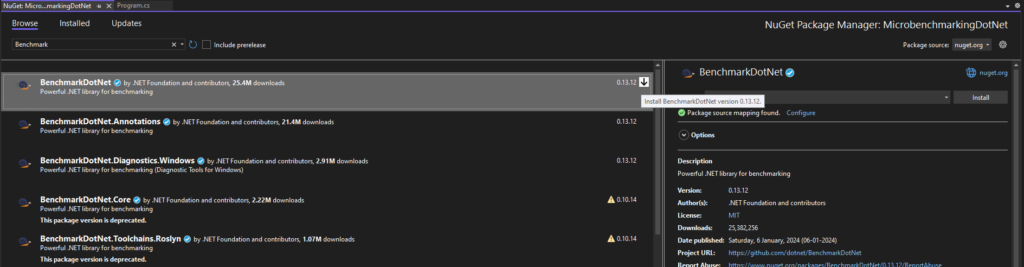
1. Installing NuGet package
Create a new Console Application using Visual Studio and install BenchmarkDotnet package:
2. Writing Benchmark
Create a new class and setup required fields. Notice the [Benchmark] attribute on every function that we want to compare.
public class StringContainsBenchmark
{

    private const string stringToSearch = "abcdefghijklmnopqrstuvwxyz";

    [Benchmark]
    public bool ContainsWithString()
    {
        return stringToSearch.Contains("x");
    }

    [Benchmark]
    public bool ContainsWithChar()
    {
        return stringToSearch.Contains('x');
    }

    [Benchmark]
    public bool IndexOfString()
    {
        return stringToSearch.IndexOf("x") != -1;
    }

    [Benchmark]
    public bool IndexOfChar()
    {
        return stringToSearch.IndexOf('x') != -1;
    }

}BenchmarkRunner.Run<StringContainsBenchmark>();💡You can create the benchmark class in a separate file too, just to keep it simple I’ve kept it in the same file.
3. Running Benchmarks
Now, it’s time to run the benchmarks and wait for the results. But before that, don’t forget to build your project in
⚡ Release mode (Most Important) and pass Optimize=true parameter.
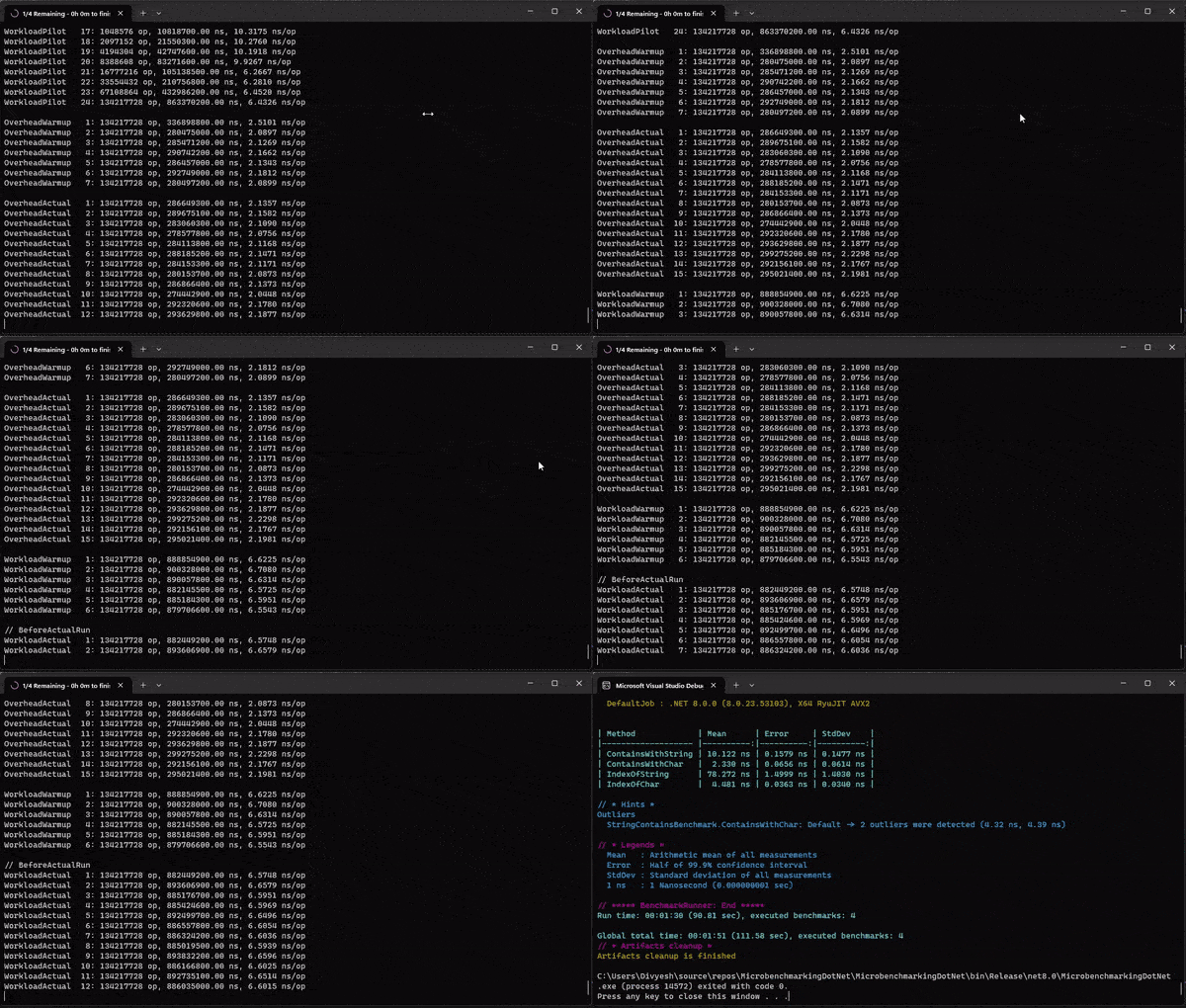
Build Command : dotnet build -c Release /p:Deterministic=true /p:Optimize=true
Once the benchmarks have run, it will show us the results like following:
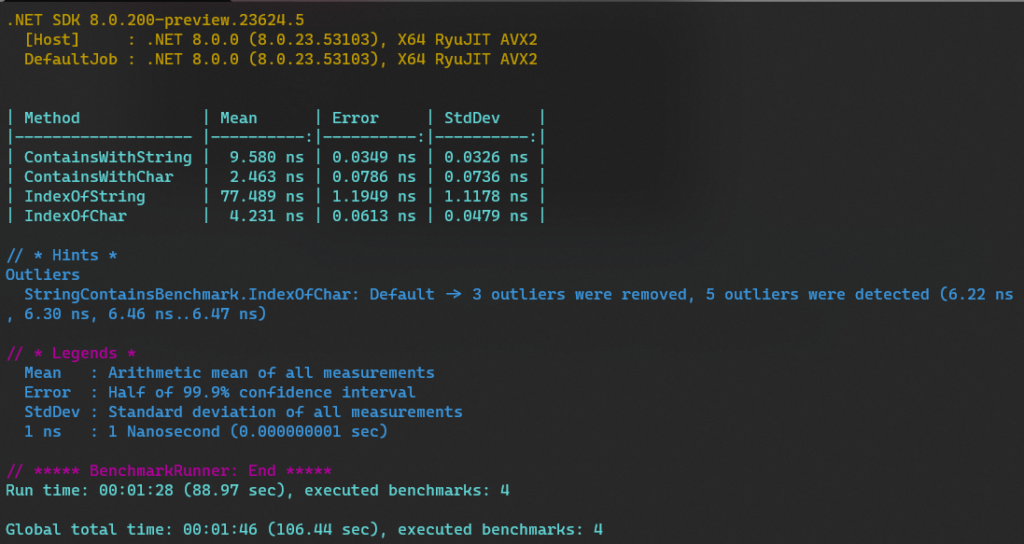
By looking at the Mean column, we can see that the fastest way to check if a string contains a charcter or not is to use .Contains('<char>') method. There is a difference even between passing string and just a charcter to .Contains method. Again this is just a simple example of how you can write a benchmark easily and compare different methods available.
4. Parameterizing
Let’s look at another Example below and using [Params] attribute to test our method with several combinations:
BenchmarkRunner.Run<SumBenchmark>();

public class SumBenchmark
{
    [Params(10, 100, 1000)]
    public int Iterations;


    [Benchmark]
    public void SumForLoop()
    {
        int sum = 0;
        for (int i = 0; i < Iterations; i++)
        {
            sum += i;
        }
    }

    [Benchmark]
    public void SumForEachLoop()
    {
        int sum = 0;
        foreach (var i in new int[Iterations])
        {
            sum += i;
        }
    }

    [Benchmark]
    public void LinqSum()
    {
        int sum = Enumerable.Range(0, Iterations).Sum();
    }

    [Benchmark]
    public void LinqAggregate()
    {
        int sum = Enumerable.Range(0, Iterations).Aggregate((a, b) => a + b);
    }
}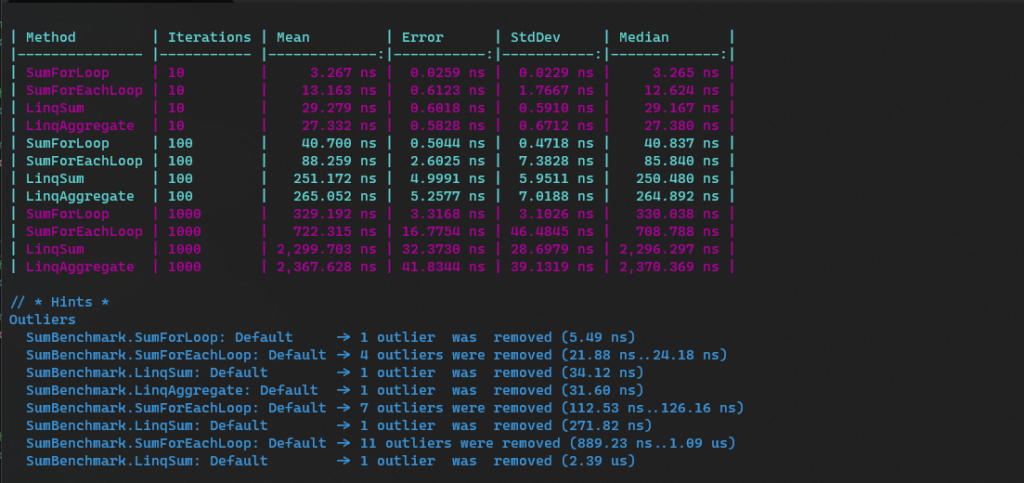
Here we got results with combination of different iterations and we can understand how the number of iterations affects our results. Thus, we came to know that handwritten for loop is the fastest way in this case.
5. Tracking heap memory allocation
Next, if we want to keep track of memory allocated and compare methods, we can put [MemoryDiagnoser] attribute like following. You can pass false to it’s constructor if you are not intersted in Generations information.
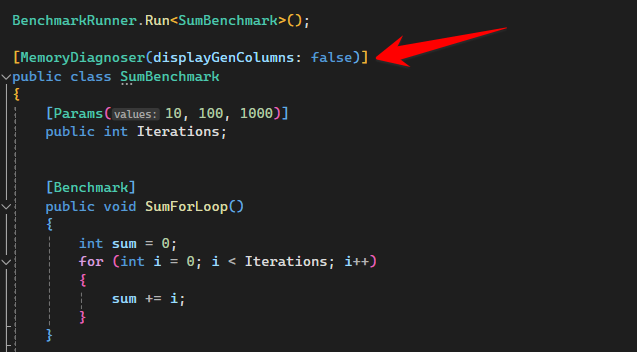
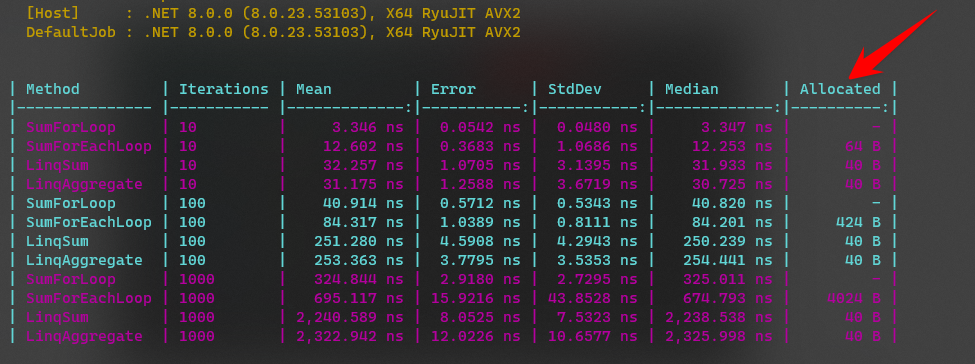
This time we have an additional column with the amount memory allocated on heap for every benchmark as can be seen below:
6. Baselining a benchmark
We can also treat a benchmark as our baseline using [Benchmark(Baseline = true)].
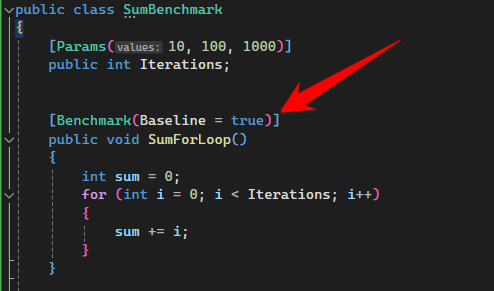
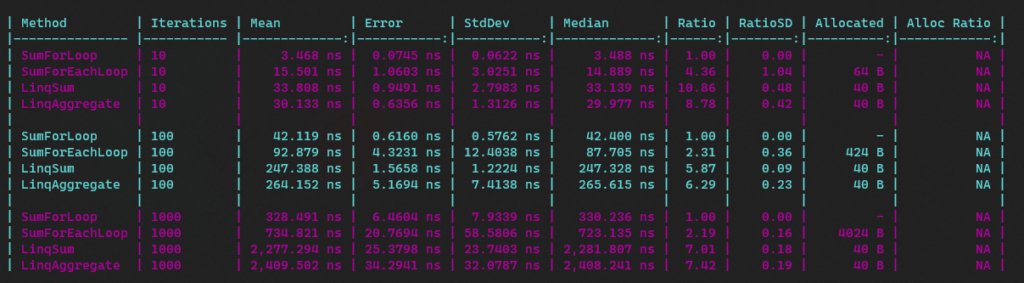
This gives us results with few additional columns to compare. Thus we can conclude that using a simple for loop is twice as fast compared to it’s counterpart foreach loop.
Best practices for writing benchmarks and performance tests
- Always run benchmarks in Release mode with /p:Optimize=true
- Close all the background applications while benchmarks are running including Visual Studio and use CLI to run benchmarks.
- Use High-Performance mode and keep the laptop plugged in to charging.
Conclusion
Writing benchmark with BenchmarkDotNet is easy and user-friendly and it offers tons of options to configure and get our desired results accurately and easily. While there’s lot more stuff that we’ll cover in another post. That’s all folks, to get started and write your first microbenchmark in .Net with BenchmarkDotnet.
Happy benchmarking!