



Nowadays, Everyone seeking innovative solutions to enhance efficiency and improve user experiences. One such solution gaining traction is AI-driven dynamic element identification. This approach leverages artificial intelligence (AI) techniques to identify and adapt to dynamic elements within systems or environments in real-time. Whether it’s for website personalization, automated content tagging, or dynamic object recognition in video streams, implementing AI-driven dynamic element identification requires careful consideration and adherence to best practices. In this blog, we’ll delve into the key steps and considerations for successfully implementing this cutting-edge technology.
Artificial Intelligence(AI)
Artificial intelligence is the new buzzword which is gradually spreading in the world and in every major industry.
AI is the ability of machines or computer systems to perform tasks that typically require human intelligence like thinking like a human or acting like a human.
Scenario – Let’s say you have a website to test and let’s say a developer changes the ID, name or some attribute of an element on the web page. Once you run your test it will break due to change so what have to do in this case?
We will use Dynamic Elements. The AI underneath the platform in real-time, analyzes all the DOM objects of the page and extracts the objects and their properties.
Artificial intelligence is the new buzzword which is gradually spreading in the world and in every major industry.
AI is the ability of machines or computer systems to perform tasks that typically require human intelligence like thinking like a human or acting like a human.
We will use Dynamic Elements. The AI underneath the platform in real-time, analyzes all the DOM objects of the page and extracts the objects and their properties.
There are many tools of Artificial Intelligence-
- Applitools
- Testim
- Testcraft
- TestRigor
We will see an example in Applitool-
Applitool is a web and mobile AI automation tool and it provides visual testing. It also provides a feature to identify the dynamic elements on web pages or mobile apps during the testing process.
Here is one example of dynamic data identification
Suppose you have a web application that displays a list of items, and new items are added to the list dynamically when a user performs an action like clicking a button. You want to verify that the new item is displayed correctly on the page using Applitools.
Identify Dynamic Elements in AI:
First, identify the elements on your web page that contain dynamic data. In this case, let’s say you have an element with the user’s name and another element with their account balance or password.
Use Applitools Eyes SDK with AI:
Integrate Applitools Eyes SDK into your test automation framework. Here’s a simplified example using JavaScript and the Selenium WebDriver for web automation:
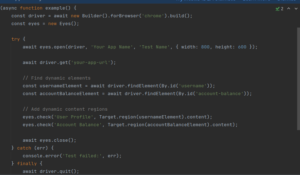
const { Builder, By } = require(‘selenium-webdriver’);
const { Eyes, Target } = require(‘@applitools/eyes-selenium’);(async function example() {
const driver = await new Builder().forBrowser(‘chrome’).build();
const eyes = new Eyes();try {
await eyes.open(driver, ‘Your App Name’, ‘Test Name’, { width: 800, height: 600 });await driver.get(‘your-app-url’);
// Find dynamic elements
const usernameElement = await driver.findElement(By.id(‘username’));
const accountBalanceElement = await driver.findElement(By.id(‘account-balance’));// Add dynamic content regions
eyes.check(‘User Profile’, Target.region(usernameElement).content);
eyes.check(‘Account Balance’, Target.region(accountBalanceElement).content);await eyes.close();
} catch (err) {
console.error(‘Test failed:’, err);
} finally {
await driver.quit();
await eyes.abortIfNotClosed();
}
})();
Configure Dynamic Content Matching:
We can define matching rules for dynamic content. For example, you can specify that the username should match any text and the account balance or password should match any currency format.
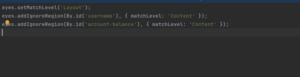
eyes.setMatchLevel(‘Layout’);
eyes.addIgnoreRegion(By.id(‘username’), { matchLevel: ‘Content’ });
eyes.addIgnoreRegion(By.id(‘account-balance’), { matchLevel: ‘Content’ });
Here contents should match from username and account balance.
By configuring Applitools Eyes to use the appropriate match levels and defining dynamic data effectively.
Best Practices for Testing AI Applications:
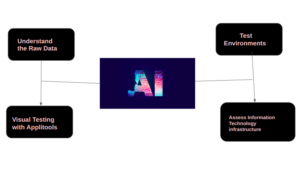
As we know Applitool is a very popular tool. It can help to automate web and Mobile applications. Here are some best practices for testing with Applitools:
-
Understand the Raw Data: Incomplete data may cause misleading results and AI execution failure. Ensure that the sample data contains all the elements required for analysis.
- Visual Testing with Applitools: For Best Practice, Applitool is best for visual testing of AI-driven user interfaces. Applitools allows you to automate the comparison of visual layouts, making it easier to detect any unexpected changes.
- Assess Information Technology infrastructure: Consider the use of resources in terms of the time, cost, complexity, and skill set required to build an AI model and demonstrate a business case.
- Test Environments: Create test environments that closely resemble real-world conditions to evaluate the AI system’s performance accurately.
By following these best practices, you can effectively test AI applications with Applitools to ensure they meet quality, performance, and reliability requirements.