



Test large data volume is a process that ensures the functionality and performance of applications dealing with massive amounts of data that can vary in size from gigabytes to terabytes. In this post, I will share my very own experience in testing large data volume with low-cost solutions, no license software needed.
Why need to test large data volume
Test large data volume is necessary for several reasons:
- Data Accuracy: It is essential for business planning, decision-making, and forecasting. Inaccurate data will lead to misleading insights and bad decisions. Testing helps identify and remove these inaccuracies, ensuring you sail on reliable information. It also helps ensure that the data process validation works appropriately, mainly based on the design logic.
- Data Completeness: Testing helps verify that all expected data is present and that there are no gaps or missing pieces in the dataset
- Data Quality: Testing helps identify and address issues such as inconsistencies, duplications, or inaccuracies in the data, ensuring its overall quality.
- Performance: Testing evaluates the performance of systems, including data ingestion, processing, and retrieval. Performance testing helps identify bottlenecks, optimize resource utilization, and ensure that the system can handle the expected workload efficiently
Additionally, Test large data volume offers other benefits:
- Cost Savings: Fixing errors early prevents costly rework and downstream problems.
- Improved User Experience: Efficient and accurate data systems translate to a smoother user experience for data analysis and reporting.
- Increased Confidence: Knowing your data is reliable and your systems are optimized fosters trust in the derived insights, leading to better decision-making.
When need to test large data volume
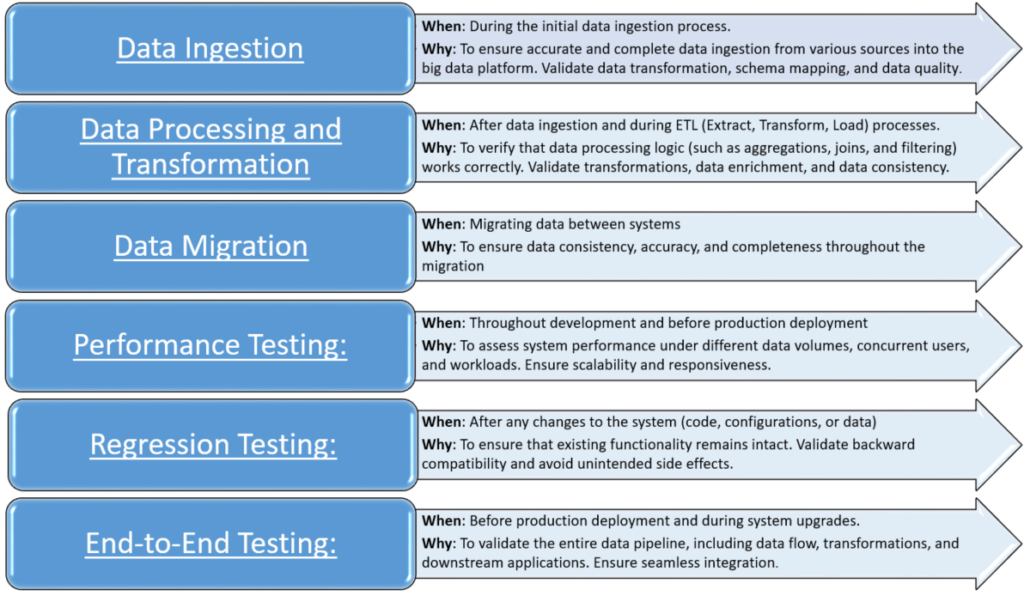
Test large data volume should be conducted at multiple stages of the project lifecycle, from data ingestion to analysis and visualization.
How to test large data volume
- Define your testing goals and scope:
-
- What are you testing? (Functionality, performance, data quality, etc.)
- What specific components or processes are involved?
- What are the expected outcomes of your tests?
- Understanding data set: the structure, quality, and characteristics of the dataset. Identify key attributes, data types, patterns, and anomalies that may impact testing.
- Sampling Strategy: apply for functional testing to validate data processing logic and ETL pipelines. Due to the large volume of data, we use sampling techniques to select representative subsets for testing. Ensure that the samples cover various data patterns and edge cases.
- Data Quality: check data accuracy, completeness, and consistency
Here are some basic steps to check data quality:
-
- Check null data
- Check format data: number, date time, string, currency, phone, email…
- Check the number of rows, sum
- Check unique data and duplication data: can use Group by in SQL statement, Pivot or remove duplicates or highlight duplicate data in MS Excel.
- Check business rules of data processing by using sample data that covers various data, including both happy cases and unhappy cases.
- Compare data:
- Using SQL statements EXCEPT and MINUS in SQL-Based Tools. Some functions related to date conversion, trim space, replace specific characters are useful in comparison.
- Power Query in MS Excel: a free add-in. The benefits of Power Query include data preparation, automated data refresh, easy data transformation, support for various data sources, and the ability to repeat and modify data transformations with a single click, support merge query to compare data quickly.
- Some other compare tools: Diffchecker, Winmerge, compare plugin of notepad++…
- Performance test
-
- Using tools to generate data:
- INSERT INTO … SELECT statements in SQL-Based Tools
- Online tools: GenerateData, DatabaseTestData.com, ExtendsClass Random Data Generator.
- Talend Studio: a powerful open-source platform that can be used to create various data types. This allows us to define the structure of data, map data from one format to another, filter, join, aggregate, and connect to various databases like MySQL, Oracle, and PostgreSQL to extract data.
- Use scripting languages like Python, JavaScript, or Ruby to generate data with custom logic and complexity.
- Using logs to check whether the system interrupts or not when processing large data volume
- Using tools like Apache JMeter or The Grinder to test the scalability, throughput, and response time of data processing operations
- Using tools to generate data: