



When executing test scenarios, one common and time-consuming workflow is logging in. Each logging-in takes dozens of seconds, which can increase run time considerably when incorporated in hundreds of test cases.
When the test case is not an end-to-end test, and the function under test is not user log-in, it’s inefficient to repeat this flow in each test execution.
Fortunately, there are ways to circumvent login screens and streamline your tests. This blog post will explore how to skip login screens using web cookies.
1. Cookies And Their Use In Automation Test
Cookies are small text files that websites store on your computer to remember your preferences and browsing history. They are resent to the website on the user’s subsequent visits.
Storing user login credentials as cookies is a common practice to avoid repeatedly authorizing the user on every page. Additionally, session cookies are used to keep track of the user’s activity within the website.
These cookies are not only helpful for improving the user experience but also for test automation. Reusing these cookies across multiple test scenarios can help bypass authorization and accelerate certain steps, making the testing process more efficient.
2. Working with Cookies using Selenium
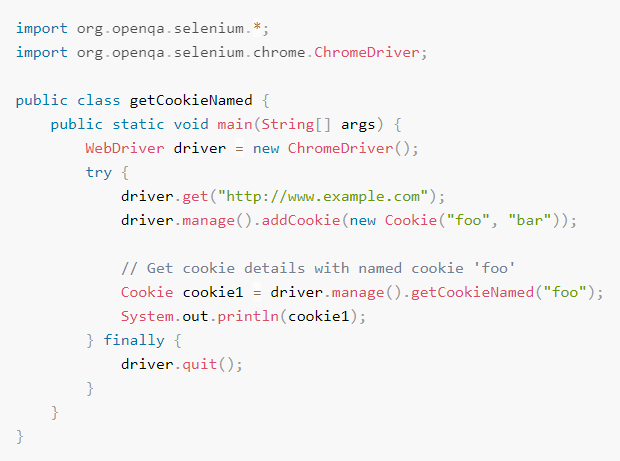
As of version 4.0, Selenium provides native support for interacting with cookies via its Webdriver API. This blog will explore the most relevant functions to the topic, which are: get named cookie, get all cookies and add cookie.
2.1 Get named Cookie
2.2 Get all Cookies

2.3 Add Cookie
Important Note: You need to be on the same domain that the cookie will be valid for before adding the cookie.

Read Selenium official document regarding working with cookies.
3. Implementing in automation test suite
3.1 The code
As demonstration, we will execute a simple login flow as follows:
- Do Login with a valid user account,
- Navigate to Profile page,
- Verify that the user has logged in successfully.
We are going to compare 2 scenarios: with cookies and without cookies.
For the scenario utilizing cookies, the first test case logs in manually, then store all current cookies. Subsequent test cases retrieve the stored cookies then navigate to the Profile page.
*As noted above, you need to be in the same domain, so before adding cookies we can navigate to a lighter page to save load time. The domain’s 404 page is a good candidate for this.

For the scenario not utilizing cookie, each test case just logs in manually.

3.2 The result

As shown above, with cookies, the run time of each subsequent test cases has been reduced by more than 2 seconds, since we don’t need to navigate to the login page to authenticate the session.
This run time can be trimmed down even more if the login page load time is higher.
4. Conclusion
To sum up, reusing cookies can be a great technique to enhance your Selenium tests. This approach not only reduces the time taken to run the tests but also simplifies the implementation process of the test scripts. Give it a shot and observe how much time you can save!
1 thought on “Speeding Up Selenium Test: How to Skip Login Screens Using Cookies”
A great trick to run tests quicker! Brilliant!
Comments are closed.