



Abstract
With the growth rapidly of big data, machine learning, and deep learning, most of them could be executed efficiently with GPU support, such deep learning models usually cannot be directly deployed and executed on other platforms supported by small Android devices due to various computation resource limitations, such as the computation power, memory size, and energy.
A few years ago, to use Model AI on smartphones, we had to set up a server and publish an endpoint of API so the mobile app could call the request. By this way, we can develop an Android application with Model AI, but it always requires a network.
Now, there is a new solution for performing traditional machine learning tasks without the need for an external API or server, allowing running machine learning models on mobile devices naming Tensorflow Lite. TensorFlow Lite (TFLite) is a collection of tools to convert and optimize TensorFlow models to run on mobile and edge devices. It was developed by Google for internal use and later open-sourced. Today, TFLite is running on more than 4 billion devices [1]!
In the following, we will discuss:
- What is – TensorFlow vs TensorFlow Lite (TFLite)
-
What is the difference between TensorFlow Lite and TensorFlow?
- Key features of TFLite
- TFlite development workflow
- How to use & Practice with TF Lite (will be released in the next article)
What is TensorFlow?
TensorFlow is an open-source software library for AI and machine learning with deep neural networks. TensorFlow was developed by Google Brain for internal use at Google and open-sourced in 2015. Today, it is used for both research and production at Google.
What is TensorFlow Lite?
TensorFlow Lite lets you run TensorFlow machine learning (ML) models in your Android apps. The TensorFlow Lite system provides prebuilt and customizable execution environments for running models on Android quickly and efficiently, including options for hardware acceleration. [2]
What is the difference between TensorFlow Lite and TensorFlow?
- TensorFlow Lite is a lighter version of the original TensorFlow (TF). TF Lite is specifically designed for mobile computing platforms and embedded devices, edge computers, video game consoles, and digital cameras. TensorFlow Lite is supposed to provide the ability to perform predictions on an already trained model (Inference tasks).
-
On the other hand, TensorFlow is used to build and train the ML model.
Key features
- Optimized for on-device machine learning, by addressing 5 key constraints: latency (there’s no round-trip to a server), privacy (no personal data leaves the device), connectivity (internet connectivity is not required), size (reduced model and binary size) and power consumption (efficient inference and a lack of network connections). [2]
- Multiple platform support: Android and iOS devices, embedded Linux, and microcontrollers. [2] Besides, there is one official plugin with the Flutter framework, named tflite_flutter. The API is similar to the TFLite Java and Swift APIs.
- Diverse language support, which includes Java, Swift, Objective-C, C++, and Python. [2]
- High performance, with hardware acceleration and model optimization. [2]
- End-to-end examples, for common machine learning tasks such as image classification, object detection, pose estimation, question answering, text classification, etc. on multiple platforms. [2]
TFLite development workflow
In the workflow below, TensorFlow is meant for training models, then TensorFlow Lite is more useful for inference and edge devices. After we have a trained ML model, then convert them to TF Lite model got a smaller size.
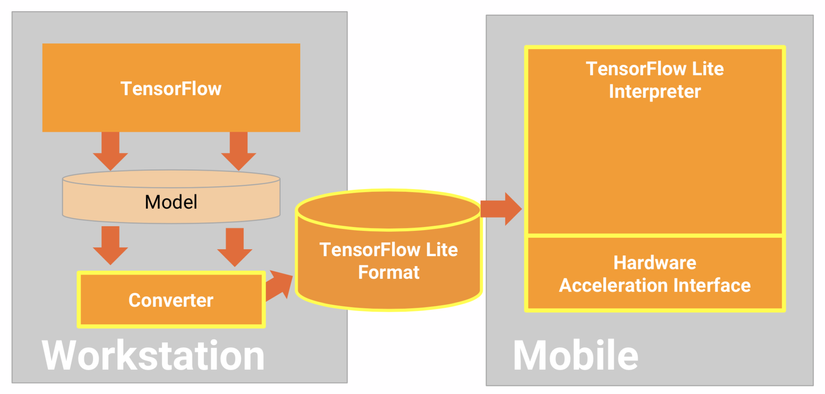
However, we need to pay attention to evaluating model which is an important step before attempting to convert it. When evaluating, we want to determine if the contents of our model are compatible with the TensorFlow Lite format. We should also determine if our model is a good fit for using on mobile and edge devices in terms of the size of data the model uses, its hardware processing requirements, and the model’s overall size and complexity.
Can use the converter with the following input model formats [3]:
- SavedModel (recommended): A TensorFlow model saved as a set of files on disk.
- Keras model: A model created using the high-level Keras API.
- Keras H5 format: A lightweight alternative to SavedModel format supported by Keras API.
- Models built from concrete functions: A model created using the low-level TensorFlow API.
References
[1] TensorFlow Blog