



I. What is Geo-location testing?
Geo-location testing typically refers to the process of evaluating the accuracy and effectiveness of a system’s ability to determine the geographic location of a device or user. This can be relevant for various applications, such as mobile apps, websites, or services that rely on location-based information.
Geolocation testing is just testing all your geolocation-related functionality on the website or mobile application. Does your app automatically fetch the current location if you have a food delivery application? If it does, is it the exact location that the device is in? Next, does your app filter out the restaurants according to the location? If it does, do they exist in the exact location, or is it taking some other latitude and longitude? Such things come inside geolocation testing.
II. Benefits of Geo-location testing
Geo-location testing offers several benefits, ensuring that applications or services relying on location-based information function accurately and provide a positive user experience
- Accuracy Verification: Geo-location testing helps verify the accuracy of location-based services, ensuring that the application accurately determines the user’s or device’s geographic position. This is crucial for applications where precise location information is essential, such as navigation or mapping services.
- Enhanced User Experience: Accurate geo-location ensures a better user experience by delivering relevant and location-specific content or features. Applications can customize information based on the user’s whereabouts, providing a more personalized and valuable experience.
- Reliability Across Locations: Geo-location testing ensures that the application adheres to privacy standards and regulations. It helps verify that user location data is handled securely and that the application requests and respects the user’s consent for accessing location information.
III. Automated geolocation testing for web applications with LambdaTest
1. About LambdaTest
LambdaTest’s cloud-based mobile testing platform has become an essential tool for organizations looking to ensure the high-quality performance of their mobile applications. Users rely on LambdaTest’s virtual machine feature to simulate different devices, screen sizes, resolutions, and operating systems, allowing them to diagnose issues and reproduce problems effectively. By quickly spinning up virtual machines with the same configurations and network conditions as problematic devices, LambdaTest helps users identify the root cause of problems and deliver a seamless user experience across various devices and configurations.

2. How does LambdaTest support automation Geo-location testing for web applications with Selenium?
LambdaTest’s website geolocation testing lets you choose from 53+ countries and verify how your websites and mobile apps behave in these locations by passing capability to the Selenium driver that would allow you to run your test from different geographies across the world.
IV. Implementation
1. Setup LambaTest account
To use geolocation testing feature of LambdaTest, you must have a Web Automation subscription to LambdaTest, and unfortunately, LambdaTest doesn’t support this feature in a trial account, so in this example, we will use a Web Automation plan with 1x parallel test.
- Step 1: Create your LambdaTest account
- Step 2: Heads up to the Upgrade page
- Step 3: Choose a Web Automation plan with 1 x Parallel test. Important: Multi OS option must be chosen to use the Automated Geolocation Testing feature, otherwise, you can only use Geolocation for manual testing

- Step 4: Purchase the plan with your credit card. After purchasing successfully, head up to Automation > Web Automation menu, you will see a screen like below, with your parallel test capacity is 1


2. Setup test framework
In this example, we will use Selenium with C# as a programming language and NUnit as a test runner, additionally, we will add a send mail function to notify if our website in a certain location is down.
- C#
- Selenium 4
- WebDriverManager
- NUnit 3
- Fluent Email
Implementation steps:
- Step 1: In Visual Studio, create a new blank console project
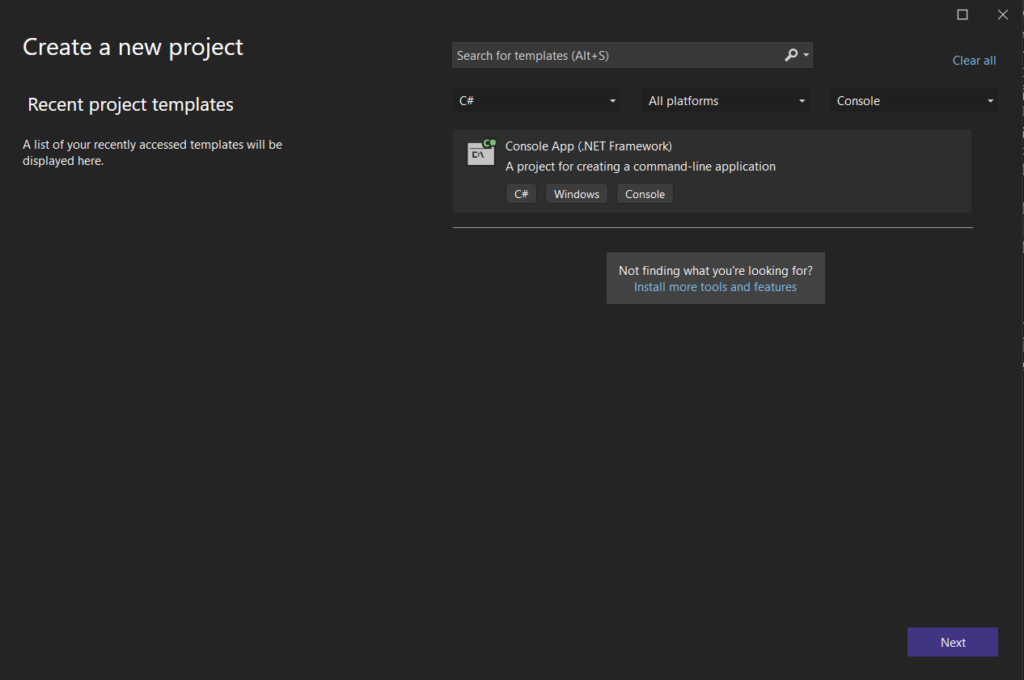
- Step 2: Heads up to Nuget Package Manager console and install prerequisite dependencies as below:
NuGetInstall-Package WebDriverManager -Version 2.17.2
NuGetInstall-Package Selenium.WebDriver -Version 4.18.1
NuGetInstall-Package Selenium.Support -Version 4.18.1
NuGetInstall-Package Selenium.WebDriver.ChromeDriver -Version 123.0.6312.2800-beta
NuGetInstall-Package FluentEmail.Razor -Version 3.0.2
NuGetInstall-Package FluentEmail.SendGrid -Version 3.0.2
- Step 3: Create a simple WebDriverFactory class with the InitWebDriver method like this, we will initialize the driver instance based on geolocation via geoLocation that we passed as a Chrome capability.
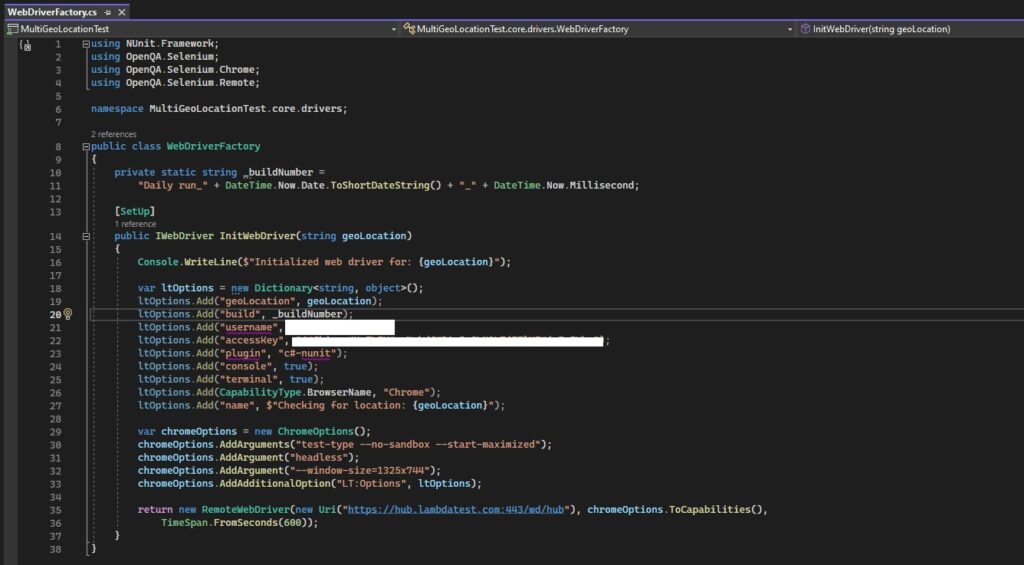
We can get username and accessKey capabilities from the LanbdaTest Web Automation dashboard

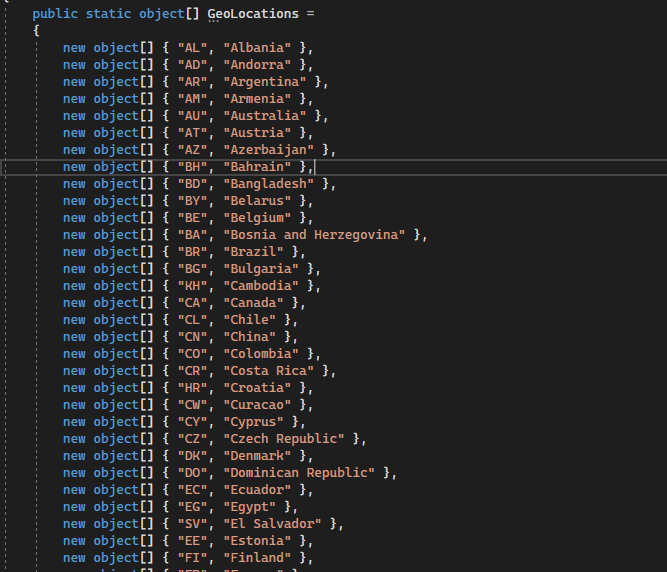
- Step 4: Create a TestExecution class, and create a GeoLocations object array that has 2 properties – geo location code and geo location name like below.
Note: Geolocation code and geo location name values can be referred to here: Desired Capabilities In Selenium To Run Automated Tests | LambdaTest
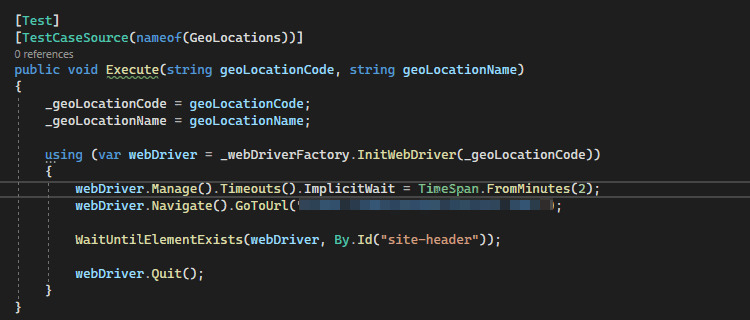
- Step 5: In the same TestExecution class, add a single test case that takes GeoLocations object as a TestCaseSource like this.
- Step 6: Add send email functionality: We have a very long list of geo-locations that may take around an hour to go through all of them, For that reason, we will add a send mail function to notify us of the test result, this can be achieved by using SendGrid service. I will not describe in detail this step, just a brief of how this idea can be done.
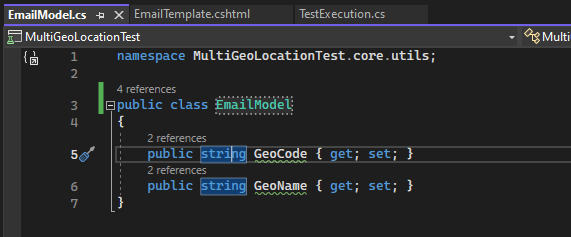
- Create an EmailModel class with 2 properties like below.
-
- Create an email template named EmailTemplate.cshtml using the Razor template.
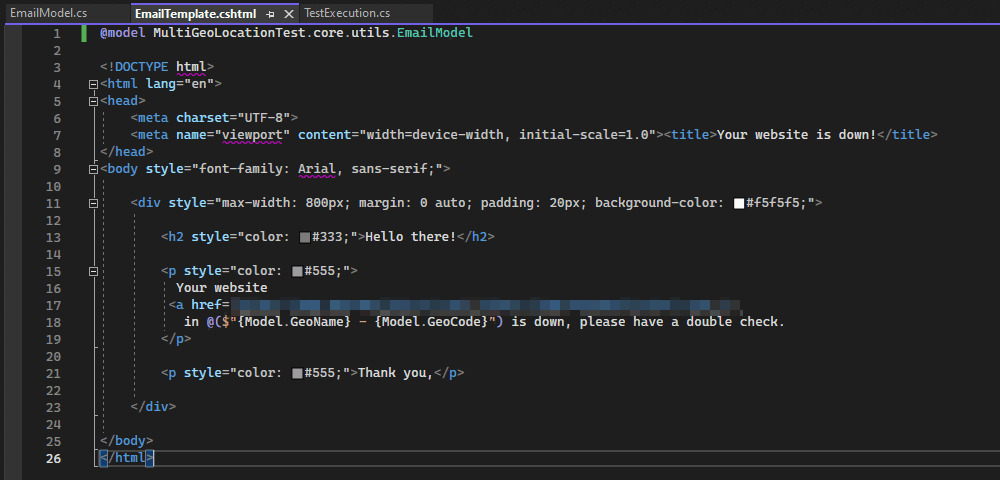
Code snippet:
@model MultiGeoLocationTest.core.utils.EmailModel
<!DOCTYPE html>
<html lang="en">
<head>
<meta charset="UTF-8">
<meta name="viewport" content="width=device-width, initial-scale=1.0"><title>Your website is down!</title>
</head>
<body style="font-family: Arial, sans-serif;">
<div style="max-width: 800px; margin: 0 auto; padding: 20px; background-color: #f5f5f5;">
<h2 style="color: #333;">Hello there!</h2>
<p style="color: #555;">
Your website
<a href="https://www.example.com">https://www.example.com</a>
in @($"{Model.GeoName} - {Model.GeoCode}") is down, please double check.
</p>
<p style="color: #555;">Thank you,</p>
</div>
</body>
</html>
-
- Create an EmailSender class with SendEmail method
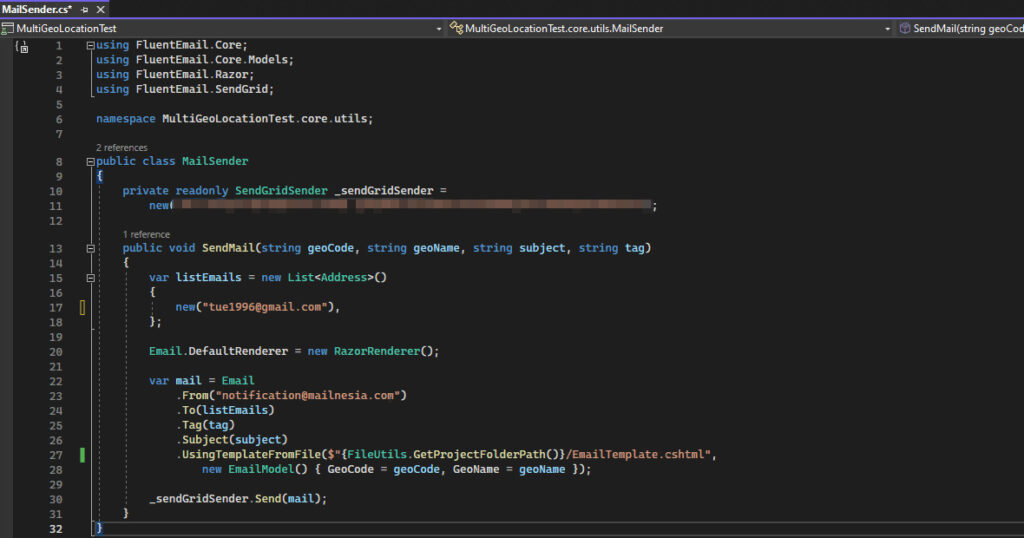
- Update our test case to call SendMail method when a test case fails in a certain location
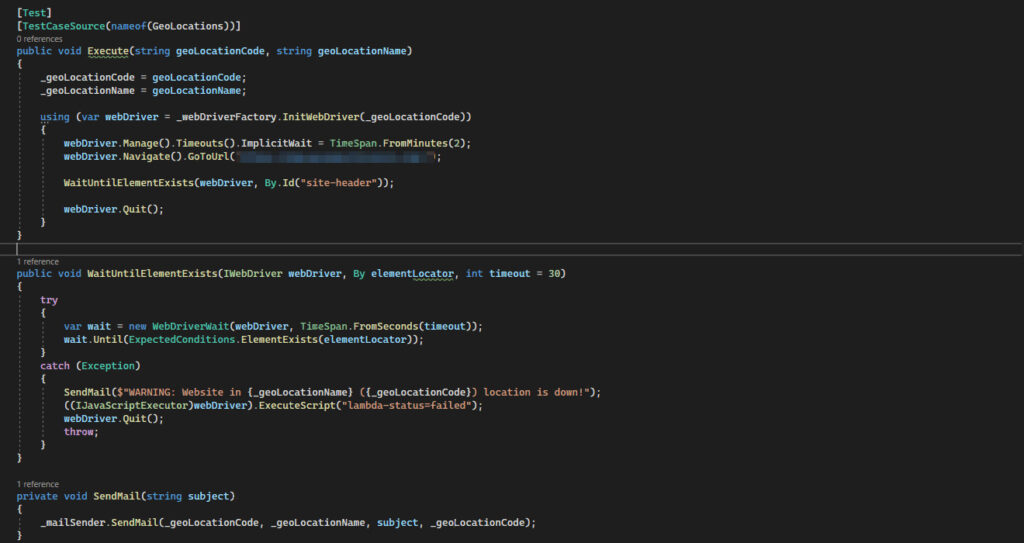
3. Run test
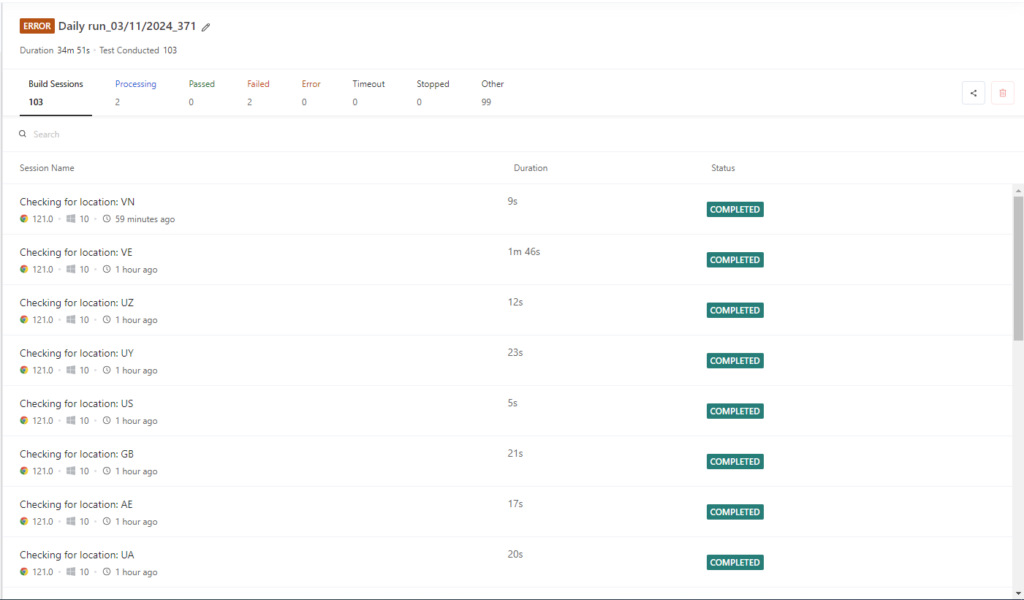
Test execution will be run on the LambdaTest cloud, we can check the test status via the LambdaTest Web Automation dashboard.
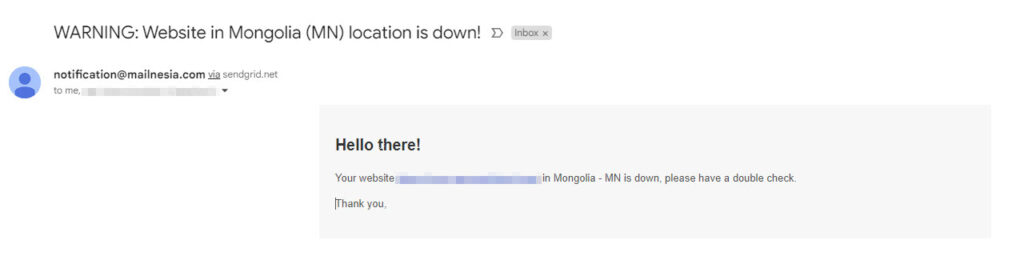
As well as an email will be sent whenever our website isn’t accessible in a certain location.
V. Conclusion
In conclusion, automated geolocation testing is useful when we need to check our website across multiple locations around the world. With LambdaTest and Selenium framework, we can schedule the daily test run to verify our application on various regions.
Reference:
- https://www.lambdatest.com/