


Introduction
This example is step by step to classify all the bad comments from customers. This example is using GPT-3.5 for a specific AI service and document as Models – OpenAI API.
Lets talk about what is needed to call ChatGPT API from a Java Spring Boot Microservice app. Not much. All we need to do is create a controller, create a service, a couple of POJO’s and were done. Takes 30 minutes top.
Step by Step Integration
Create a secret key on the OpenAi as API keys – OpenAI API
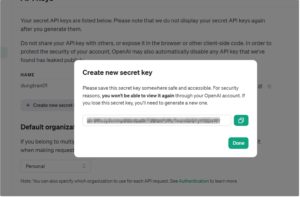
Please consider GPT 3.5 turbo cost when using ChatGPT

Assuming that using Spring Boot. Configure ChatGPT endpoint and API key on application.yml

Endpoint import data comments on OpenAIClientController.java

Method handling import comment input and question input to send gpt-3.5-turbo analysis data comment then returning data comment by input prompt provided.
See OpenAIClientServiceImpl.java

Here is the happy case when data comments have meaning.
You make a post from Postman, pass in the query
Input Data
{ “parcelId”: 1, “courierId”: 1, “comment”: “shit.”, “star”: 1 }, { “parcelId”: 2, “courierId”: 2, “comment”: “so good”, “star”: 4 }, { “parcelId”: 3, “courierId”: 3, “comment”: “what the fuck” }
Output Data after classifying from ChatGPT
{ “insult_comments”: [ { “courierId”: 1, “comment”: “shit.” }, { “courierId”: 3, “comment”: “what the fuck” }, { “courierId”: 6, “comment”: “SOB” }, { “courierId”: 9, “comment”: “SOB” }, { “courierId”: 10, “comment”: “Doesn’t knock very loudly!!” } ], “good_comments”: [ { “courierId”: 2, “comment”: “so good” }, { “courierId”: 4, “comment”: “5hit” }, { “courierId”: 5, “comment”: “so good delivery” }, { “courierId”: 7, “comment”: “awesome.” }, { “courierId”: 8, “comment”: “No ideal” }, { “courierId”: 11, “comment”: “good job” }, { “courierId”: 12, “comment”: “Perfect.” } ] }
Now you know all the secrets and can implement this in your own code.
Good luck, feel free to connect and follow me.