



Introduction –
The dynamic nature of modern applications presents significant challenges when it comes to ensuring robust and reliable UI element interaction during test automation. In traditional approaches, element identification struggles to accommodate dynamic changes in an application’s interface, resulting in brittle tests and increased maintenance costs. This blog post explores how harnessing artificial intelligence (AI) techniques can revolutionize dynamic element identification in test automation, offering architectural insights into integrating AI algorithms for precise UI element interaction.
In Harnessing AI for Dynamic Element Identification in Test Automation: Architectural Insights blog post, we will explore the following topics in –
- The need for AI-driven dynamic element identification in test automation
- Architectural Overview of AI-Powered Dynamic Element Identification:
- Explore considerations for integrating AI-powered dynamic element identification into existing test automation workflows
- Benefits and Best Practices
1. The need for AI-driven dynamic element identification in test automation
Traditional test automation methods like XPath and CSS selectors struggle with dynamic UI elements. These elements can change their attributes, structure, or position at runtime, leading to test failures and increased maintenance costs.
AI-driven dynamic element identification algorithms can address this challenge by leveraging machine learning techniques to identify and interact with dynamic UI elements more effectively. These algorithms can learn from historical data and adapt to changes in the application environment. Basically, it started from the Traditional method with many challenges, and these challenges were resolved by AI-driven DEI. In between these two, we have also learned about two more element identification approaches. The below diagram depicts the hierarchy.
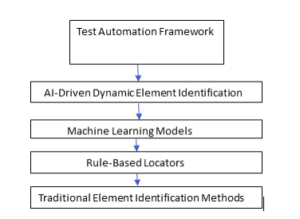
In this hierarchy, each level builds upon the previous one, with AI-driven dynamic element identification representing the most advanced and effective approach for handling dynamic elements within a test automation framework.
2. Architectural Overview of AI-Powered Dynamic Element Identification:
In the Architectural overview of the dynamic element identification scenario, the AI testing tool examines the application’s Document Object Model (DOM) to identify and learn the various UI elements and their properties. This learning process involves understanding the relationships in elements, their attributes, and how they change over time. It then uses that information to generate and maintain accurate test cases as the application evolves.
Here’s a simple diagrammatic representation of AI-driven Dynamic Element Identification in test automation:
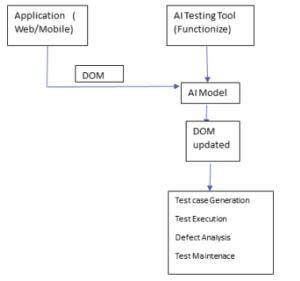
In this diagram, the application’s DOM is fed into the AI Testing Tool (Functionize), which then uses its AI Model to learn the UI elements and their properties. The tool then generates test cases, executes them, analyzes defects, and maintains the test cases as the application evolves.
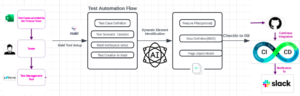
Architecture Diagram-
3. Integrating AI-powered Dynamic Element Identification into Test Automation Workflows –
Many AI tools exist for Dynamic Element Identification in the Test Automation framework. Here I will explore the use of one of the tools from the list of AI tools- Testism
Testim is a cutting-edge AI-powered testing tool that revolutionizes the way testers identify and interact with dynamic elements within user interfaces. With its advanced machine learning algorithms and computer vision capabilities, Testim empowers testers to create robust and adaptive automation frameworks capable of handling the complexities of modern applications.
Example-
Let’s see it with a coding example and compare it with the traditional locator strategy-
First, let’s assume that we want to locate the “First Name” field on the RoboForm website (https://www.roboform.com/filling-test-all-fields). This field has a unique data-id attribute that we can use to locate.
To locate this element dynamically using Selenium WebDriver and Java, use the following code:
This code uses the By.cssSelector() method to locate the element using its data-id attribute. The [] syntax in CSS selectors allows select elements based on their attributes.
Now, let’s say we want to use an AI tool like Testim to make our element locators more robust and dynamic. Testim uses machine learning algorithms to analyze your web application and generate dynamic locators that are less likely to break when the application changes.
To use Testim with Selenium WebDriver and Java, we’ll need to install the Testim Chrome extension and use the Testim Recorder to generate dynamic locators for our elements. Here’s an example of how we can do that:
- Install the Testim Chrome extension and navigate to the RoboForm website.
- Click the Testim icon in your browser and start recording.
- Interact with the “First Name” field by typing “John” into it.
- Stop recording and generate a dynamic locator.
Testim will generate a dynamic locator that looks something like this:
import com.testim.cloud.api.selenium.TestimDriver;
import com.testim.cloud.api.selenium.TestimElement;
public class DynamicElementLocatorsWithTestim {
public static void main(String[] args) {
TestimDriver driver = new TestimDriver();
driver.get(“https://www.roboform.com/filling-test-all-fields”);
// Locate the first name field using Testim’s dynamic locator
TestimElement firstNameField = driver.findElement(“[{\”type\”:\”css selector\”,\”value\”:\”[data-id=’firstName’]\”}]”);
// Interact with the element (e.g. send keys)
firstNameField.sendKeys(“John”);
driver.quit();
}
}
This code uses the TestimDriver class to interact with Testim’s dynamic locators. The findElement() method takes a JSON array that specifies the type of locator (in this case, a CSS selector) and its value ([data-id=’firstName’]).
Testing with dynamic locators combined AI tools like Testim can ensure that Selenium tests run more reliably and are less likely to break as our web application changes.
4. Benefits and Best Practices-

- Automation: AI tools automate dynamic element identification, easing test creation and maintenance. They also provide record-and-play functionality for streamlined testing processes.
- Robustness: AI adapts to UI changes, ensuring test scripts remain effective and reliable.
- Accuracy: AI algorithms accurately identify UI elements, reducing false positives and enhancing test reliability.
- Efficiency: AI tools automate dynamic element identification, saving time and effort in test creation and maintenance.
Best Practices-
- Continuous training: Regularly update AI models with fresh data to improve accuracy and adaptability to UI changes.
- Collaboration: Foster collaboration between testers, developers, and AI experts to provide feedback and refine AI models for better performance.
- Monitoring and validation: Monitor test results regularly. Validate AI-generated scripts for accuracy.
- Feedback loop: Establish a feedback loop to capture insights from test executions and incorporate them into AI models, enhancing their predictive capabilities over time.
Conclusion-
In conclusion, AI-driven dynamic element identification in test automation offers a powerful solution to the challenge of testing dynamic UI elements. AI algorithms and following architectural insights, we can integrate AI models into test automation frameworks, ensuring precise UI element interaction and robustness in dynamic application environments.
References-