



Introduction
Modern world requires modern solutions with the advent of continuous deployment process, where modifications takes place in a inevitable and continuous manner. A small piece of code might generate an unexpected output which may impact business at large scale of loss. Regression test automation is a type of Software testing used to ensure that the existing feature or functionality have no impact against the new changes made. To overcome such challenges, we implemented with new strategies i.e., Automated Regression Testing in a Continuous Deployment during SDLC (Software Development Life Cycle). It emphasize a stable, bug-free, robust product. You can refer to the following diagram.
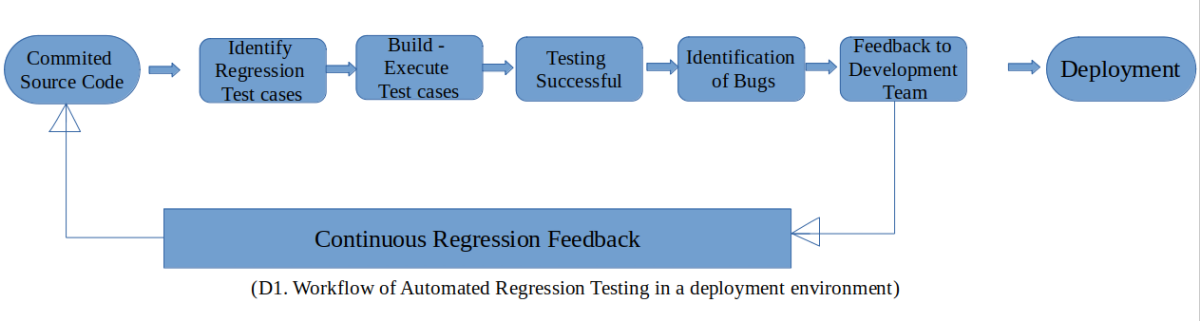
Continuous Deployment
Continuous deployment is an agile strategy in software development where code changes to an application are released automatically into the production environment. Each of the release merged to main branch after a certain process as bellow:
- Continuously compiling
- Validating
- Deploying new code updates
A continuous deployment pipeline should be constantly evolving and improving with new features and involving new tools to increase speed and automation. Some of them are:
- Jenkins
- Azure Devops
- Codeship
- PagerDuty
Code snippet for a simple YAML file for a CI/CD pipeline:
trigger:
branches:
include:
– main
variables:
solution: ‘**/*.sln’
buildPlatform: ‘Any CPU’
buildConfiguration: ‘Release’
stages:
– build
– test
– publish
– deploy
build:
stage: build
script:
– dotnet restore
– dotnet build –configuration $buildConfiguration
test:
stage: test
script:
– dotnet test –configuration $buildConfiguration –logger trx –results-directory TestResults
publish:
stage: publish
script:
– dotnet publish –configuration $buildConfiguration –output ./publish
deploy:
stage: deploy
script:
– scp -r ./publish user@server:/var/www/html/
- A CI/CD YAML file is a pipeline defination or configuration file that defines the steps neccessary to build, test and deploy of an application in a continuous integration and delivery pipeline.
- This involves several stages and each stage have one or more jobs that perform a specific task in the pipeline.
Sections under YAML file
- Trigger: It specify which branch to be trigger the pipeline.
- Variables: Defines variables that will trigger throughout the pipeline.
- Stages: This involves the stages under pipeline as below we have discussed(Build, Tests, Publish, Deploy).
- Build: This step checks for any dependency for that application by using some configuration
- Tests: In this this step we can configure which test need to be done and respective logs can be addressed to TestResults directory.
- Publish: Publish directory will publish the application.
- Deploy: This stage is responsible for deployment of the application to a wireless server using the scp command.
Importance of Automated Regression Testing
- Increased Coverage: It offers multiple combinations of test case into different combinations of browser and OS with in the limitation of time.
- Efficiency: Automated testing tools allows parallel script execution, background process for a large number of test cases execute with in a fraction of time and out the immediate feedback on their respective log.
- Accuracy: Especially for repetitive tasks, automated regression is having more accuracy comparatively manual test execution.
- Scalability: Automated test execution is faster and covers more test and also it is human error risk free, so accuracy will be at top.
- Reusable Test Scripts: We can have reuse the same healthy script for regression testing through out multiple releases.
Challenges with Regression Test Automation
- In-consistence behaviour of the application or tenant.
- Maintain and Integrate the tools for automation.
- Selecting the right test cases to minimize the time limit under planned deployment.
- Manual Intervention in between regression test automation.
Automated Regression in a Continuous Deployment Environment Best Practices
- In the initial phase of the release, make sure that not only the application is ready for testing and configuration setup is done but also look forward to the testing environment is ready to proceed.
- Select critical test cases first according to priority and severity.
- Always try to avoid manual intervention with in the script and check script should be healthy(running on both User Interface and headless mode rigorously).
- Although this may be true that all scenario(e.g.- captcha, OTP, image comparison) can’t be automated, consequently we can adopt third party tool in our project to achieve our goal.
Practical Example:
Here is an real time example of web application testing with automated regression test in a continuous deployment environment. To test in your local machine please do the needful as mentioned below:
- Go to vscode and run “npm init nightwatch” – It will initiate nightwatch for you.
- Run “npm install” – It will install all the nightwatch related stuff
- execute “npm install nightwatch typescript @types/nightwatch chromedriver –save-dev” – It will install chrome driver for your chrome browser
- Run “npm install typescript -g” – It will allow to use typescript globally
Below is a concise TypeScript and Nightwatch (Wrapper of selenium) logic focusing on crucial points:
To run the test use the command in terminal “npx nightwatch ./nightwatch/YOUR FILE NAME”
First feature added:
import { NightwatchBrowser, NightwatchTests} from ‘nightwatch’;
const demoTest: NightwatchTests ={
before: (browser:NightwatchBrowser) => {
//Maximize the window
browser.window.maximize();
};
//Navigate to a URL
browser.navigate(‘youtube.com‘)
.pause(2000)
//Validation-1: Validate browser URL as expected
.assert.urlContains(‘youtube’);
browser.close();
};
export default demoTest;
- In first feature we navigate to a URL and validated the URL is as expected or not.
Second Feature Added:
import { NightwatchBrowser, NightwatchTests} from ‘nightwatch’;
const demoTest: NightwatchTests ={
before: (browser:NightwatchBrowser) => {
//Maximize the window
browser.window.maximize();
};
//Navigate to a URL
browser.navigate(‘youtube.com‘)
.pause(2000)
//Validation-1: Validate browser URL as expected
.assert.urlContains(‘youtube’)
.pause(2000)
.setvalue(‘#search’, ‘Nashtech Limited’)
//Validation-2: Validate browser URL as expected
.assert.urlContains(‘Nashtech’);
browser.close();
};
export default demoTest;
- In second case, we did the same task as first case and we add a new functionality to search a value and validated the URL is as expected or not. If we are facing an issue in first case after the source code changes for second case, then we may encounter some regression bugs.
Conclusion
Therefore, We should be more focused towards implementing the automated regression testing in a continuous deployment environment. Moreover, It plays a key role in ensuring software quality in today’s fast-paced software development environments.
References
- https://digitate.com/blog/what-is-regression-testing-in-ci-cd-and-can-we-automate-it-completely
- https://moldstud.com/articles/p-tips-for-successful-regression-testing-in-continuous-deployment