



Introduction
In the realm of software development, maintaining clean, scalable, and maintainable codebases is paramount. One pattern that has gained significant traction in the .NET ecosystem for achieving these goals is the Mediator pattern, and the MediatR library has emerged as a powerful tool for implementing it. In this blog post, we’ll delve into the depths of MediatR, exploring its features, benefits.
Introducing MediatR
MediatR is a lightweight library for .NET that facilitates the implementation of the Mediator pattern. It provides a simple yet powerful mechanism for handling messages between different parts of an application. With MediatR, developers can decouple message senders from receivers, leading to more modular and testable code.
Understanding the Mediator Pattern
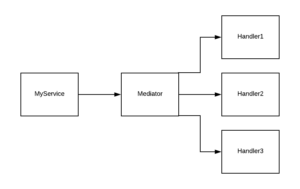
At its core, the Mediator pattern promotes loose coupling between components by centralizing communication. Instead of components directly communicating with each other, they interact through a mediator object. This mediator encapsulates the communication logic, thereby reducing dependencies and simplifying the overall architecture.
Key Features of MediatR
- Request and Handler Separation: MediatR encourages a clear separation between requests and their corresponding handlers. Requests are simple objects that encapsulate data, while handlers contain the logic for processing these requests. This separation promotes code organization and allows for easier addition or modification of request types without impacting other parts of the system.
- Pipeline Behaviors: One of the standout features of MediatR is its support for pipeline behaviors. Pipeline behaviors allow developers to intercept requests before and after they are handled. This capability is invaluable for implementing cross-cutting concerns such as logging, validation, caching, and authorization in a centralized manner.
- Request Pre/Post-processing: In addition to pipeline behaviors, MediatR supports request pre and post-processing hooks. These hooks enable developers to execute custom logic before and after request handling, further enhancing the extensibility and flexibility of the library.
- Async Support: MediatR seamlessly integrates with asynchronous programming patterns in .NET. Asynchronous request handling is fully supported, enabling developers to build responsive and scalable applications without sacrificing performance.
Getting Started with MediatR
To begin using MediatR in a .NET project, follow these steps:
- Install MediatR Package: Use NuGet Package Manager or .NET CLI to install the MediatR package into your project.
- Define Requests and Handlers: Create classes to represent requests and their corresponding handlers. Requests should be simple DTOs that carry input data, while handlers contain the logic to process these requests.
- Register MediatR with Dependency Injection Container: Register MediatR and its dependencies with the built-in .NET Core dependency injection container or any other container of your choice.
- Send Requests: In your application code, use MediatR to send requests to their respective handlers. MediatR will automatically route requests to the appropriate handlers based on their types.
Implementing Mediator Design Pattern Real-Time Example in C#
Step 1: Creating Mediator – This will be an Interface that defines operations that colleague objects can call for communication.
namespace MediatorDesignPattern
{
    //Mediator Interface
    //This is going to be an Interface that defines operations
    //which can be called by colleague objects for communication.
    public interface IFacebookGroupMediator
    {
        //This Method is used to send the Message who are registered with the Facebook Group
        void SendMessage(string msg, User user);
        //This method is used to register a user with the Facebook Group
        void RegisterUser(User user);
    }
}
Step2: Creating ConcreteMediator – This will be a class implementing the communication operations of the Mediator Interface.
using System.Collections.Generic;
namespace MediatorDesignPattern
{
    // Concrete Mediator
    // This is going to be a class implementing the communication operations of the Mediator Interface.
    public class ConcreteFacebookGroupMediator : IFacebookGroupMediator
    {
        //The following variable is going to hold the list of objects to whom we want to communicate
        private List<User> UsersList = new List<User>();

        //The following method simply registers the user with Mediator
        public void RegisterUser(User user)
        {
            //Adding the user
            UsersList.Add(user);
            //Registering the user with Mediator
            user.Mediator = this;
        }

        //The following method is going to send the message in the group i.e. to the group users
        public void SendMessage(string message, User user)
        {
            foreach (User u in UsersList)
            {
                //Message should not be received by the user sending it
                if (u != user)
                {
                    u.Receive(message);
                }
            }
        }
    }
}
Step 3: Creating the Colleague – This will be an abstract class that defines a property that holds a reference to a mediator.
namespace MediatorDesignPattern
{
    // Colleague
    // This is going to be an abstract class that defines a property that holds a reference to a mediator.
    public abstract class User
    {
        //This Property holds the name of the user
        protected string Name;

        //This Property is going to set and get the Mediator Instance
        //This Property value is going to be set when we register a user with the Mediator
        public IFacebookGroupMediator Mediator { get; set; }

        //Initializing the name using Constructor
        public User(string name)
        {
            this.Name = name;
        }

        //The following Methods are going to be Implemented by the Concrete Colleague
        public abstract void Send(string message);
        public abstract void Receive(string message);
    }
}
Step4: Creating Concrete Colleague – These are the classes that communicate with each other via the mediator.
using System;
namespace MediatorDesignPattern
{
    //Concrete Colleague
    //These are the classes that communicate with each other via the mediator.
    public class ConcreteUser : User
    {
        //Parameterized Constructor is required to set the base class Name Property
        public ConcreteUser(string Name) : base(Name)
        {
        }

        //Overriding the Receive Method
        //This method is going to use by the Mediator to send the message to each member of the group
        public override void Receive(string message)
        {
            Console.WriteLine(this.Name + ": Received Message:" + message);
        }

        //This method is used to send the message to the Mediator by a user
        public override void Send(string message)
        {
            Console.WriteLine(this.Name + ": Sending Message=" + message + "\n");
            Mediator.SendMessage(message, this);
        }
    }
}
Step5: Client – The Main method of the Program class is going to be the client.
using System;
namespace MediatorDesignPattern
{
    class Program
    {
        static void Main(string[] args)
        {
            //Create an Instance of Mediator i.e. Creating a Facebook Group
            IFacebookGroupMediator facebookMediator = new ConcreteFacebookGroupMediator();

            //Create instances of Colleague i.e. Creating users
            User Ram = new ConcreteUser("Ram");
            User Dave = new ConcreteUser("Dave");
            User Smith = new ConcreteUser("Smith");
            User Rajesh = new ConcreteUser("Rajesh");
            User Sam = new ConcreteUser("Sam");
            User Pam = new ConcreteUser("Pam");
            User Anurag = new ConcreteUser("Anurag");
            User John = new ConcreteUser("John");

            //Registering the users with the Mediator i.e. Facebook Group
            facebookMediator.RegisterUser(Ram);
            facebookMediator.RegisterUser(Dave);
            facebookMediator.RegisterUser(Smith);
            facebookMediator.RegisterUser(Rajesh);
            facebookMediator.RegisterUser(Sam);
            facebookMediator.RegisterUser(Pam);
            facebookMediator.RegisterUser(Anurag);
            facebookMediator.RegisterUser(John);

            //One of the users Sending one Message in the Facebook Group
            Dave.Send("dotnettutorials.net - this website is very good to learn Design Pattern");
            Console.WriteLine();

            //Another user Sending another Message in the Facebook Group
            Rajesh.Send("What is Design Patterns? Please explain ");

            Console.Read();
        }
    }
}
Benefits of Using MediatR
- Modularity: MediatR promotes modularity by decoupling the components of an application. This separation of concerns makes the codebase easier to maintain, test, and extend.
- Testability: With MediatR, unit testing becomes more straightforward since individual request handlers can be tested in isolation without the need to set up complex scenarios.
- Simplicity: By embracing the Mediator pattern facilitated by MediatR, developers can simplify the communication flow within their applications, leading to cleaner and more readable code.
Conclusion
MediatR is a powerful library that simplifies application development in the .NET ecosystem by promoting the use of the Mediator pattern. By leveraging MediatR, developers can achieve cleaner, more modular, and testable codebases. Whether building small projects or large-scale applications, MediatR proves to be a valuable tool for enhancing code organization and maintainability in .NET development.