


In the world of containerization, Docker has revolutionized the way we build, ship, and deploy applications. However, as Docker usage continues to grow, so does the importance of optimizing Docker images for both size and security. A bloated Docker image not only consumes more storage but also increases the potential attack surface, making it crucial to streamline our images without compromising security. In this blog post, we’ll dive into actionable strategies and best practices to help you optimize Docker images, ensuring they are lean, efficient, and secure. Whether you’re a Docker novice or an experienced user, these insights will empower you to create lightweight and fortified Docker containers for your applications.
Why Optimize Docker Images?
Optimizing Docker images brings out the following benefits:
– Faster deployment times
– Reduced storage consumption
– Better performance and scalability
– Enhanced security by reducing attack surfaces
Understanding Docker Image Layers:
Docker images can be defined as a combination of layers. Each instruction within a Dockerfile creates a new layer. Understanding how layers work is important because layers are cached, and Docker reuses them when building new images, therefore increasing the build speed. However, unnecessary layers can bloat image size.
Optimization Techniques:
Use Alpine Linux as Base Image:
Alpine Linux is lightweight and minimalistic, making it a perfect choice for Docker base images. It offers less attack surface and significantly reduces image size compared to standard Linux distributions, such as Ubuntu or CentOS. Using a minimalistic base image is a very crucial part when you are in need to optimize docker images.
Combine RUN Commands:
The RUN instruction in a Dockerfile is a command that creates a new layer. To minimize layers, combine different RUN commands together to a single command with the && operator.
Clean Up Unused Files:
After installation of packages or dependencies, remove unnecessary files and caches in order to lessen the image size. Use the ‘rm -rf’ command to clean up temporary files, package caches, and any unused dependencies.
Optimize Dockerfile Instructions:
Try to eliminate unnecessary instructions in your Dockerfile. Use a specific command like ‘COPY’ instead of ‘ADD’ while copying files, as ‘COPY’ is more transparent and doesn’t perform other tasks like unpacking tarballs.
Utilize Multi-Stage Builds:
Multi-stage builds enable you to make use of multiple FROM statements in a single Dockerfile. Use separate build and runtime stages to build the dependencies and binaries in one stage, and to only copy the necessary artifacts to the final stage, thereby creating production-ready images that are smaller than development images.
Let’s Optimize Docker Image for a Go Application
Based on the docker image optimization tops that we just discussed above, I am going to optimize a Docker image for a GoLang application. Let’s see how it goes.
To start with, I have this Dockerfile that is not optimised but still, it will just do the work by building our Go application and we will be able to run the application as a docker container. Let’s have a look at it:

Now, let’s optimise the docker image for the same Golang application but this time, we will be using the best practices to optimise a docker image and then we will see the difference it makes. So, here is our optimised Dockerfile for the same Go application:
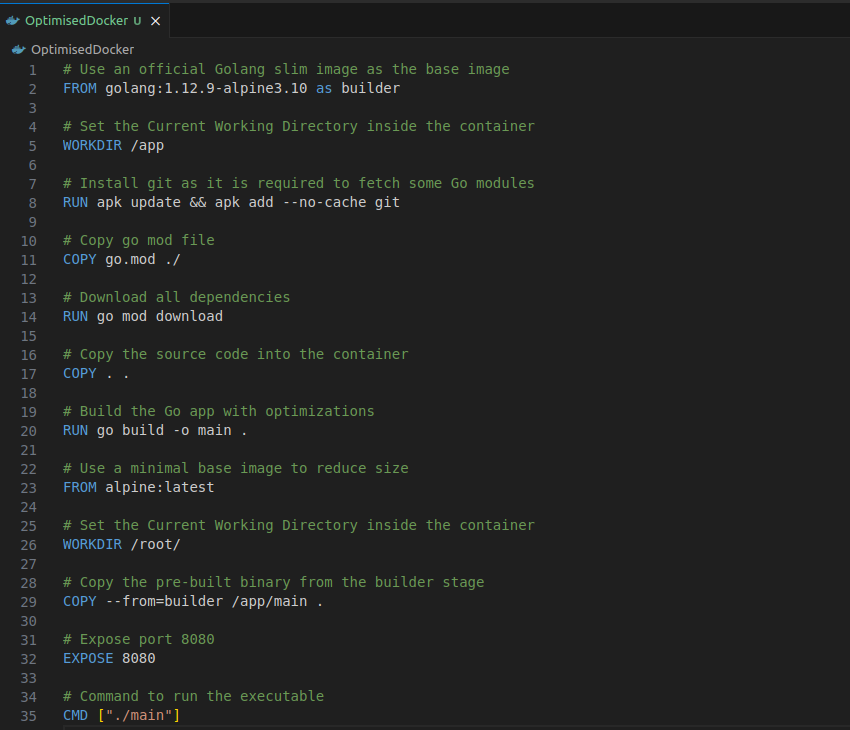
In the optimized Dockerfile:
- We use the golang:1.17-alpine image as it is smaller than the standard Golang image.
- We use a multi-stage build to reduce the final image size. The first stage builds the Go application with optimizations,
- Both the stages use a minimal Alpine image to run the application.
Wonder how much of size difference can be for such a small application when using an optimised Dockerfile? Let’s see the image size created by the above two Dockerfiles:
 As you can see the image size for the optimised docker image is reduced by 45x! That’s a huge number when working with microservices.
Conclusion
Optimizing Docker images can greatly improve performance, reduce resource consumption, and enhance security. Use the following techniques, and apply them to your Dockerfiles for a leaner and more efficient Docker images on your applications.
Remember to review them regularly and adjust your Dockerfiles to incorporate new optimization strategies and keep your images light and efficient.