



Dynamic content is trend, it’s a spice where users seamless experiences with content that updates without requiring a full-page refresh. Whether it’s AJAX updates, modals, or dynamically generated elements, these dynamic elements pose a unique challenge when it comes to ensuring accessibility. As an engineer, we strive to create inclusive experiences for all users, including those with disabilities. Fortunately, tools like Axe and Selenium can help us achieve this goal by allowing us to automate accessibility testing. However, handling dynamic content in accessibility tests requires some additional techniques to ensure comprehensive coverage.

In this blog post, we’ll explore how to effectively handle dynamic content in accessibility tests using Axe and Selenium.
The Challenge of Dynamic Content
Imagine browsing a website where content magically updates without the page refreshing, or a modal window gracefully appears in response to a click. These are all part of dynamic content, but they also introduce unique accessibility challenges. Dynamic content, such as elements generated dynamically via JavaScript, AJAX-loaded content, or changes triggered by user interactions, can pose a challenge for accessibility testing. Ensuring that dynamically generated content adheres to accessibility standards requires special attention and testing strategies:
- AJAX Updates: When content changes dynamically without a full page reload.
- Modals: Interactive pop-up windows that overlay the main content.
- Dynamically Generated Elements: Content that appears on the fly based on user actions or server responses.
Setting the Stage with Axe-Selenium
Axe is a powerful accessibility testing tool that can be seamlessly integrated into Selenium tests. It allows us to programmatically scan web pages for accessibility violations and provides detailed reports on any issues found. Selenium, on the other hand, is a popular framework for automating web browsers, making it an ideal companion for Axe in accessibility testing.
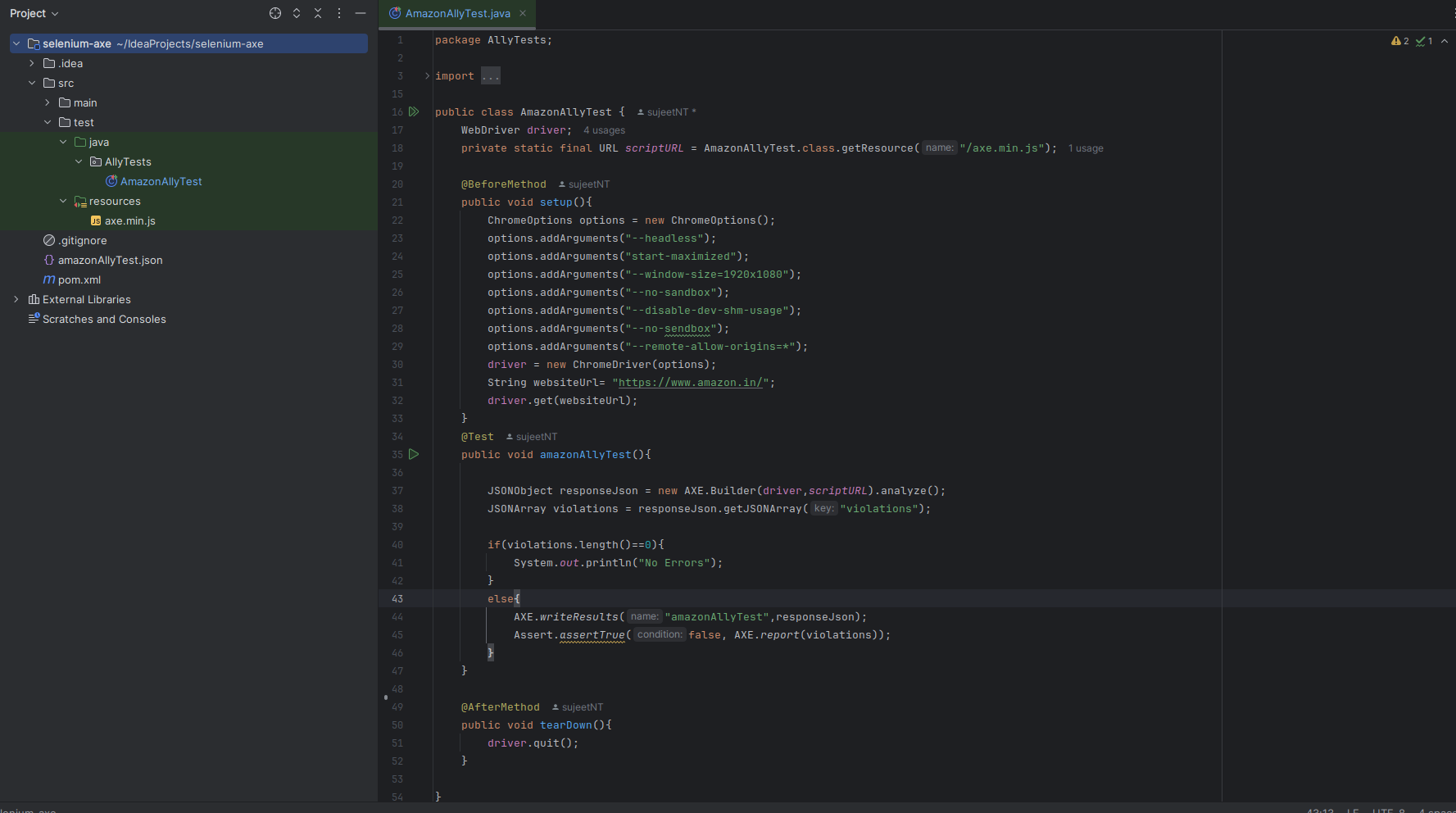
let’s start by creating a basic selenium test script where we will navigate to a web page and check the accessibility violations with the help of axe.min.js library. Simply open your IDE and create a new java class add the below code, in this case i have created the class named AmazonAllyTest.java. You can also click here to checkout my last blog for the same.
public class AmazonAllyTest {
WebDriver driver;
private static final URL scriptURL = AmazonAllyTest.class.getResource("/axe.min.js");

@BeforeMethod
public void setup(){
ChromeOptions options = new ChromeOptions();
options.addArguments("--headless");
options.addArguments("start-maximized");
options.addArguments("--window-size=1920x1080");
options.addArguments("--no-sandbox");
options.addArguments("--disable-dev-shm-usage");
options.addArguments("--no-sendbox");
options.addArguments("--remote-allow-origins=*");
driver = new ChromeDriver(options);
String websiteUrl= "https://www.amazon.in/";
driver.get(websiteUrl);
}
@Test
public void amazonAllyTest(){

JSONObject responseJson = new AXE.Builder(driver,scriptURL).analyze();
JSONArray violations = responseJson.getJSONArray("violations");

if(violations.length()==0){
System.out.println("No Errors");
}
else{
AXE.writeResults("amazonAllyTest",responseJson);
Assert.assertTrue(false, AXE.report(violations));
}
}

@AfterMethod
public void tearDown(){
driver.quit();
}

}
In this code, we are using axe.min.js library to execute accessibility tests over a web page. we have BeforeMethod where we are initializing the chrome browser and navigate to our webpage. Then we have Test method where we are executing our axe library to check accessibility violations. At the end of script, we have AfterMethod where we are quitting the driver.
Handling Dynamic Content
Let’s walk through some techniques for handling dynamic content in accessibility tests using Axe and Selenium:
1. Dealing with AJAX Updates
Imagine you’re waiting for a dynamic update to appear on a page. It’s crucial to wait for it to fully load before assessing its accessibility. This is where WebDriverWait comes into play:
// Setting up a WebDriverWait instance with a timeout for 10 seconds
WebDriverWait wait = new WebDriverWait(driver, 10);

// Waiting until the loading spinner disappears
wait.until(ExpectedConditions.invisibilityOfElementLocated(By.cssSelector(".loading-spinner")));
This snippet patiently waits until the loading spinner vanishes, indicating that the AJAX update has completed before diving into accessibility checks. WebDriverWait is used to wait for a maximum of 10 seconds until the loading spinner (a common indicator of AJAX activity) disappears from the page. This ensures that the AJAX update is complete before proceeding with accessibility checks.
2. Handling Modal
Modals, those delightful pop-ups that demand attention, can be a headache when it comes to accessibility testing. Before running checks, ensure the modal is fully visible and loaded:
// Setting up a WebDriverWait instance with a timeout for 10 seconds
WebDriverWait wait = new WebDriverWait(driver, 10);

// Waiting until the modal is fully visible
wait.until(ExpectedConditions.visibilityOfElementLocated(By.cssSelector(".modal")));
This snippet ensures that Axe-Selenium waits until the modal window is fully visible in the DOM before proceeding with accessibility checks. WebDriverWait ensures that the accessibility tests don’t start until the modal is fully visible on the page. This guarantees that Axe-Selenium accurately evaluates the accessibility of the modal content.
3. Navigating Dynamically Generated Content
Dynamically generated elements are like surprises waiting to be unwrapped. To ensure we catch them all, let’s wait until they’re present in the DOM before performing accessibility checks:
// Setting up a WebDriverWait instance with a timeout for 10 seconds
WebDriverWait wait = new WebDriverWait(driver, 10);

// Waiting until the dynamically generated element is present in the DOM
wait.until(ExpectedConditions.presenceOfElementLocated(By.cssSelector(".dynamic-element")));
This snippet ensures that Axe-Selenium doesn’t miss out on any dynamically generated elements by patiently waiting until they’re present in the DOM. Once they’re detected, accessibility checks can proceed accurately.
Conclusion
By incorporating these dynamic content handling techniques into your Axe-Selenium tests, we are not only ensuring accessibility but also we are crafting an inclusive digital experience for all users. By using the capabilities of Axe and Selenium, we can implement robust testing strategies that ensure comprehensive coverage of dynamic elements in web applications.