



Micro-services are the building blocks of modern applications. These small, independent services offer flexibility and scalability, but what happens when you throw a traffic surge their way? Capacity testing is crucial to ensure your micro-services can handle the load without buckling.
In this post, we’ll explore the how-to’s of capacity testing for micro-services and a small example, helping you to improve your approach to conduct similar performance tests effectively.
1. Why Capacity Testing
For example, imagine a micro-service responsible for processing user payments during a Black Friday sale. If it crumbles under the pressure of high traffic, the consequences can be disastrous – lost sales, frustrated customers, and reputational damage.
That is why we need to conduct Capacity testing to understand how your microservices perform under pressure, it helps you:
- Identify Bottlenecks: Pinpoint weaknesses in your service or infrastructure before real-world traffic overwhelms it.
- Set Performance Baselines: Establish benchmarks for response times and resource utilization under normal load.
- Optimize for Scalability: Ensure your service can adapt to increased traffic by scaling resources effectively.
2. Capacity Testing Strategy
2.1. Tools for Capacity Testing
Here’s what you’ll need:
- Load Testing Tool: Tools like JMeter, and BlazeMeter simulate user requests and bombard your service with virtual users.
- Monitoring Tool: Tools like Datadog track server health, including CPU, memory usage, and response times.
2.2. Step-by-Step Capacity Testing
- Baseline Performance: Start by measuring response times and resource utilization with a low, steady load. This sets the benchmark for normal operation.
- Design Your Scenarios: Think about user behavior – how many users will access the service concurrently? Will the load be constant or have spikes? Create scenarios in your load testing tool to mimic these patterns.
- Ramp Up the Pressure: Begin with a low number of simulated users and gradually increase it. Monitor response times and resource utilization carefully.
- Find the Weak Spots: Watch for significant increases in response time or resource utilization beyond acceptable thresholds. This indicates a potential bottleneck.
- Analyze and Improve: Dig into server logs and monitoring data to pinpoint bottlenecks. (Is your database struggling to keep up? Or your data is queueing up and waiting for processing) Then, optimize your service or infrastructure to handle the identified load. (Maybe database caching can help!)
- Repeat and Refine: Don’t stop at one scenario! Test with various user behavior patterns and peak loads to ensure your overall system can handle the pressure.
Notice:
- Tailor Your Test: The number of users and acceptable response times will vary depending on your specific service.
- Realistic User Behavior: Design scenarios reflecting how real users will interact with your service.
- Iterative Process: Capacity testing is an ongoing process. Refine your service and infrastructure based on your test results.
3. Example for Capacity Testing
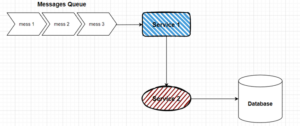
The diagram above is a fictional e-commerce application with the following microservices:
- Product Service (Service 1): Retrieves product information from the database based on a product ID received from the message queue.
- Order Service (Service 2): Processes customer orders received from the message queue. It interacts with the product service to get product information and the database to store order details.
How to test the System
We will follow up the step-by-step above to test this system. In this situation, we want to ensure the system can handle peak loads during a sales promotion. Here’s how we can perform capacity testing:
- Identify Baseline Performance:
- Simulate a typical number of customer orders using the load testing tool (e.g., 100 orders per minute).
- Measure:
- Average response time to process an order (e.g., 200 milliseconds).
- Resource utilization (CPU, memory) of each micro-service and the database.
- Product Service CPU Utilization: 50%
- Order Service CPU Utilization: 30%
- Database Write Throughput: 1000 writes per second.
- Design Load Scenario:
- Simulate a surge in orders during the sales promotion.
- Configure the load testing tool to send a much higher volume of messages to the queue than what is typical (e.g., 500 orders per minute – 5x increase).
- Ramp Up Load Gradually:
- Start with a moderate increase in order requests (e.g., 2x baseline) and gradually raise it to simulate the expected peak load (5x baseline).
- Continuously monitor response times and resource utilization.
- Pinpoint Bottlenecks:
- Look for any significant increase in response time or resource utilization beyond acceptable thresholds.
- This indicates a potential bottleneck in a micro-service or the database.
- Analyze and Improve:
- Analyze logs and monitoring data to identify the bottleneck source.
- For instance, maybe the product service is overloaded with requests (CPU utilization reaching 85%), or the database is struggling to keep up with writes (throughput reaching 2500 writes per second). Here are some common issues you might encounter during the analyze:
- Micro-service Bottlenecks:
- High CPU Usage: A micro-service might be overloaded if its CPU utilization reaches a high threshold (e.g., exceeding 80%). This can lead to slow response times and service degradation.
- Memory Leaks: Memory leaks can slowly consume available memory in a service, eventually causing crashes or performance issues.
- Inefficient Code: Poorly written code can be inefficient and consume excessive resources, hindering performance under load.
- Database Interactions: Frequent database queries or slow database response times can bottleneck the entire system if a micro-service relies heavily on the database.
- Messaging Queue Issues:
- Queue Backlog: If the message queue becomes overloaded, messages will start to backlog, causing delays in processing orders or tasks.
- Message Delivery Failures: Issues with the messaging system can lead to messages being lost or delivered out of order, potentially causing inconsistencies in data processing.
- Infrastructure Bottlenecks:
- Limited Resources: Servers with insufficient CPU, memory, or network bandwidth might struggle to handle increased load during peak periods.
- Database Scaling Issues: Database limitations in handling writes or reads can become a bottleneck if the database can’t keep up with the volume of requests.
- Micro-service Bottlenecks:
- Take corrective actions to address the bottleneck. This might involve:
- Auto-scaling: Setting up auto-scaling for resources to automatically scale up or down based on real-time demand.
- Horizontal Scaling: Scaling services and database horizontally (adding more servers) to distribute the load and improve overall capacity.
- Optimizing Code: Refactoring code to improve efficiency and reduce resource consumption.
- Implementing Caching: Caching frequently accessed data can reduce database load and improve response times.
- Database Optimization: Optimizing database queries or implementing database sharding to improve database performance.
- Repeat with Different Scenarios:
- Test with various order processing patterns and peak loads to ensure the overall system can handle different usage surges.
I hope by applying these strategies, you can effectively test the capacity of your micro web services, ensuring they can handle even the most demanding traffic scenarios and contribute to the performance and stability of your overall system.
Feel free to ask further questions about specific challenges or tools you’re considering!