


Introduction
Angular: Angular is a leading framework for building dynamic and scalable web applications. With its component-based architecture and features like dependency injection, It helps developers to create maintainable front-end applications.
State Management: In any substantial application, managing state is very important. State management refers to the handling of the application’s state in a predictable manner. It involves tracking user inputs, server responses, and the overall behaviour of the application as the user interacts with it.
NgRx – Reactive State Management: NgRx helps to provide state management solution. It is a library inspired by Redux made specifically for Angular applications. NgRx uses RxJS observables to create a single source of truth for an application’s state, making it easier to debug, test, and maintain. By implementing action dispatching, reducing state changes, and handling side effects, NgRx brings a structured and efficient approach to managing state in Angular applications.
Importance of NgRx: The integration of NgRx into Angular applications provides control, essential for complex applications. It helps in isolating state management from the UI, which simplifies testing and improves code quality. NgRx adhere to immutable state and pure functions, which aligns with Angular’s change detection strategy.
Why use NgRx?
For instance, imagine our application includes a real-time dashboard for monitoring stock prices. The state we’re managing is the list of stock prices that update frequently based on market conditions. Various events, such as market fluctuations or user actions, can trigger changes to this state, such as adding new stocks or updating existing prices. While one could theoretically maintain this list in a global variable and manually manage updates to the UI and other components, this approach can quickly become unmanageable and error-prone.
NgRx offers a structured and reactive approach to managing this state. It allows us to define clear actions for every possible change, manage these changes through reducers, and reflect them in the UI with selectors. This method not only makes our state changes predictable but also makes our application more maintainable and easier to debug.
NgRx State Management Lifecycle
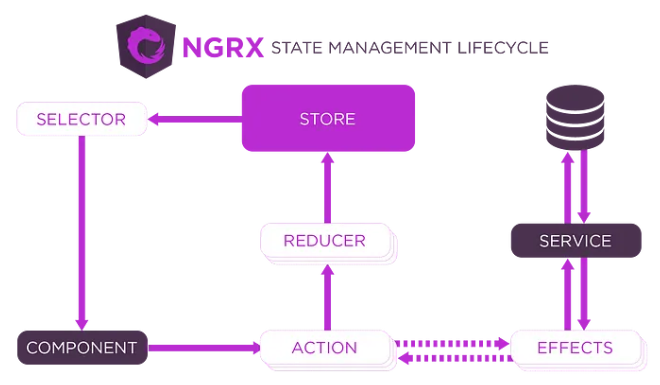
1. Selectors
- Selectors are pure functions that take the entire application state as input and return a specific slice of state.
- Components use selectors to subscribe to specific parts of the state that they need to render their view.
- This promotes separation of concerns by keeping the component logic focused on UI and not data management.
2. Store
- The NgRx store is the central repository for your application’s state.
- It holds a single source of truth for all your application data.
- The store provides methods for selectors to get data and for actions to update the state.
3. Actions
- Actions are plain JavaScript objects that describe events that happen in your application.
- They typically have a type property that identifies the type of action and an optional payload property that carries any additional information needed to update the state.
- Components can dispatch actions to the store in response to user interactions or other events.
4. Reducers
- Reducers are pure functions that take the current application state and an action as input and return a new state.
- They are the heart of NgRx state management, and they are responsible for determining how the application’s state changes in response to actions.
- Reducers must be deterministic, meaning that they should always return the same output for the same input.
5. Effects
- Effects are side effects that can be triggered by actions.
- They are typically used for asynchronous operations such as fetching data from a server or persisting data to local storage.
- Effects can dispatch new actions to update the store in response to the completion of the side effect.
We will build a shopping cart angular app implementing NgRx as follows:
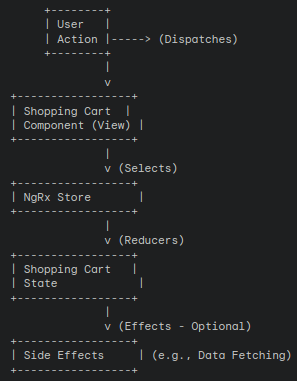
Breakdown:
-
- User: The user interacts with the shopping cart component (view) through actions like adding or removing items.
- Shopping Cart Component (View): This component displays the shopping cart contents, loading indicator, and error messages. It dispatches actions to the NgRx store based on user interactions. It also subscribes to selectors to retrieve specific parts of the state (e.g., cart items) for rendering the view.
- NgRx Store: This repository holds the entire application state, including the shopping cart state. It receives actions dispatched by components and updates the state based on reducers.
- Shopping Cart State: This interface defines the structure of the data managed by NgRx for the shopping cart. It includes properties like
items(array of shopping cart items) &loading(flag indicating data fetching). - Reducers: Functions that take the current state and an action as input and return a new state. They handle state updates based on the dispatched action type. In our example, reducers would update the
itemsarray,loadingflag, based onaddToCart,removeFromCart, andloadProductsactions.
Build Angular app with NgRx
- Prerequisites: Make sure Node.js and Angular CLI are installed.
-
Create an Angular App with Angular CLI, use the following cli command –
ng new angular-state-management --style=scss --routing=false. This will add and install all the required dependencies. -
Load the project into text editor/IDE of your choice (for e.g. Visual Studio Code, IntelliJ IDEA).
- Run the application – Just to check if the app is created successfully, without any errors. Navigate to your application root folder and type the following command in your terminal –
npm start - Install NgRx – NgRx Schematics generate the boilerplate code needed for NgRx functionality within Angular application. These schematics integrate with the Angular CLI, allowing us to create most NgRx elements directly through CLI commands.
We will start by adding NgRx Schematics to the project, using the following CLI command –
ng add @ngrx/schematics@latest-
Configure the Schematics using the following command –
ng config cli.defaultCollection @ngrx/schematics -
Install NgRx dependencies and development tools using following commands-
npm install @ngrx/store --savenpm install @ngrx/effects --savenpm install @ngrx/entity --savenpm install @ngrx/store-devtools --save
-
-
Add NgRx Store to the app –
ng generate @ngrx/schematics:store State --root --module app.module.ts -
Create a sub-Module for ShoppingCart –
ng generate module ShoppingCart -
Create a ShoppingCartItem model –
ng generate class models/ShoppingCartItem
export class ShoppingCartItem {

    constructor(

        public productId: number,

        public productName: string,

        public quantity: number,

        public price: number

        ) {}

}
1. State Interface (shopping-cart.state.ts):
export interface ShoppingCartState {
  items: ShoppingCartItem[];
  loading: boolean;
  error: string | null;
}

export interface ShoppingCartItem {
  productId: number;
  productName: string;
  quantity: number;
  price: number;
}
2. Actions (shopping-cart.actions.ts):
import { createAction, props } from '@ngrx/store';

export const loadProducts = createAction('[Shopping Cart] Load Products');

export const loadProductsSuccess = createAction(
  '[Shopping Cart] Load Products Success',
  props<{ products: ShoppingCartItem[] }>()
);

export const loadProductsFailure = createAction(
  '[Shopping Cart] Load Products Failure',
  props<{ error: string }>()
);

export const addToCart = createAction(
  '[Shopping Cart] Add To Cart',
  props<{ productId: number }>()
);

export const removeFromCart = createAction(
  '[Shopping Cart] Remove From Cart',
  props<{ productId: number }>()
);
These actions represent events in our application. We have actions for loading products, adding items to the cart, and removing items from the cart.
3. Reducers (shopping-cart.reducer.ts):
import { createReducer, on } from '@ngrx/store';
import {
  loadProducts,
  loadProductsSuccess,
  loadProductsFailure,
  addToCart,
  removeFromCart,
} from './shopping-cart.actions';

const initialState: ShoppingCartState = {
  items: [],
  loading: false,
  error: null,
};

const shoppingCartReducer = createReducer(
  initialState,
  on(loadProducts, (state) => ({ ...state, loading: true })),
  on(loadProductsSuccess, (state, { products }) => ({
    ...state,
    loading: false,
    items: products,
  })),
  on(loadProductsFailure, (state, { error }) => ({
    ...state,
    loading: false,
    error: error,
  })),
  on(addToCart, (state, { productId }) => {
    const existingItem = state.items.find((item) => item.productId === productId);

    if (existingItem) {
      return {
        ...state,
        items: state.items.map((item) =>
          item.productId === productId ? { ...item, quantity: item.quantity + 1 } : item
        ),
      };
    } else {
      return {
        ...state,
        items: [...state.items, { productId, quantity: 1 }],
      };
    }
  }),
  on(removeFromCart, (state, { productId }) => ({
    ...state,
    items: state.items.filter((item) => item.productId !== productId),
  }))
);

export function reducer(state: any, action: any) {
  return shoppingCartReducer(state, action);
}
Conclusion
NgRx is one of the most-used libraries for state management in Angular applications. Complex apps need structure! State management tools like NgRx help you keep your Angular codebase clean as your app grows. And understanding state management basics makes using Redux in other projects easier, even if you’re not an Angular developer. I hope this article gives you a head start in creating your own Angular application using NgRx.
References
- Official Documentation – https://ngrx.io/docs
- StackAcademic Post – https://blog.stackademic.com/state-management-with-ngrx-angular-734e39f2d5a2