


Microservices architecture has become a popular choice for building scalable and maintainable applications. However, managing the underlying infrastructure for a multitude of independent services can quickly become complex. This is where Terraform comes into play.
Introduction
Terraform is an open-source infrastructure-as-code (IaC) tool. It allows you to define and provision your infrastructure using code, making it repeatable and versionable. With Terraform, you can manage resources across various cloud providers like AWS, Azure etc. It’s cross-platform, which means you can take care of all your infrastructure management needs on any platform with one tool.
Why Terraform for Microservices
- Modularity: Terraform allows you to break down infrastructure into reusable modules. Each microservice can have its own dedicated module, promoting code organization and maintainability.
- State Management: Terraform keeps track of the provisioned infrastructure in state files. This allows for efficient updates and ensures deployments reflect the desired state.
- Cloud Friendly: Terraform works with multiple cloud providers, offering flexibility and reducing vendor lock-in.
- Improved Efficiency: Streamline infrastructure provisioning and management, saving time and effort.
- Increased Reliability: Version control and IaC principles make infrastructure deployments more reliable and less error-prone.
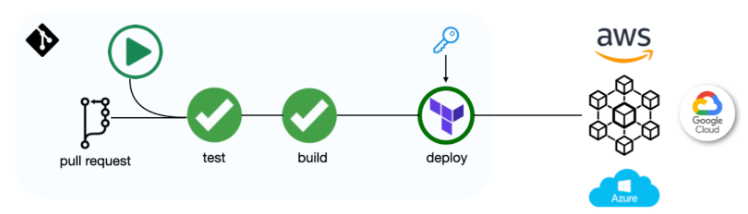
Fig: CI/CD pipeline with Terraform to provision resources in public cloud.
Terraform & Microservices
Instead of managing a single complex system, microservices break down the application into smaller, independent components. Each microservice might require its own database, queueing system etc. One solution is to leverage IaC tools. IaC allows you to define your infrastructure like code and automate its management. This ensures consistency and reduces the risk of errors that can occur with manual configuration.
For instance, imagine building a social media application with microservices. You might have separate services for handling user profiles, posts, and feeds. Each service might need a database to store its data. Instead of manually creating and configuring databases for each service, you could use IaC to define a standard database template and automatically deploy it for each microservice.
Setting Up Terraform Environment
The steps to set up your Terraform environment are as follows:
Prerequisites
- Download and Install Terraform: Head over to https://developer.hashicorp.com/terraform/install and download the Terraform binary compatible with your operating system.
- Choose a Text Editor or IDE: Terraform utilizes HashiCorp Configuration Language (HCL) for writing infrastructure code. Any text editor like Visual Studio Code or Sublime Text will work.
Configuration Steps
-
Initialize Your Workspace: Navigate to your project directory using the terminal and run
terraform init. This command downloads any required plugins based on your Terraform configuration and initializes the working directory. -
Configure Terraform Providers: Providers act as plugins that connect Terraform to cloud platforms like Azure or GCP. To define a provider, create a file named
main.tfin your project directory. Within this file, use theproviderblock specifying the chosen cloud provider and its configuration details.
Example:
# Configure the AWS provider
provider "aws" {
  region = "us-east-1" # Update with your preferred region
  access_key = "your_access_key_id" # Replace with your actual credentials
  secret_key = "your_secret_access_key" # Replace with your actual credentials
}
- Write Your Infrastructure Code: Once the environment is set up, you can start defining your infrastructure resources using HCL syntax within Terraform configuration files. These files have a
.tfextension.
Example (Creating a Simple S3 Bucket):
resource "aws_s3_bucket" "my_bucket" {
  bucket = "my-terraform-code-bucket"
  acl    = "private"

  tags = {
    Name = "Terraform Code Storage"
  }
}
- Plan and Apply Your Changes: Before applying changes to your cloud infrastructure, it’s crucial to preview them. Use the
terraform plancommand to see the planned modifications Terraform intends to make based on your configuration. Once you’re confident with the plan, runterraform applyto create or update resources in your cloud environment.
Folder Structure
The following is the directory structure of a Terraform Project:
+-- service-a

| buckets.tf

| sa.tf

| main.tf

| terraform.tfvars

| variables.tf

| versions.tf

+-- service-b

| buckets.tf

| sa.tf

| main.tf

| terraform.tfvars

| variables.tf

| versions.tf

+-- domain-a

| buckets.tf

| sa.tf

| main.tf

| terraform.tfvars

| variables.tf

| versions.tf

+-- platform-kubernetes

| main.tf

| cluster.tf

| nodepool.tf

| terraform.tfvars

| variables.tf

| versions.tf

+-- environment-dev

| terraform.tfvars

+-- environment-stage

| terraform.tfvars

+-- environment-prod

| terraform.tfvars

+-- common

| terraform.tfvars
Breakdown:
- Directories: Directories like
service-a,domain-a, andplatform-kubernetesare organization based on components. - Files: Files with names
buckets.tf,sa.tf, andcluster.tfcontain Terraform configurations for specific resources like buckets, service accounts, and clusters. - Variable files: Files named
terraform.tfvarsandvariables.tfhold variable definitions used throughout the Terraform configuration. - Versioning: Files named
versions.tfmanage Terraform module versioning. - Environment folders: Directories like
environment-dev,environment-stage, andenvironment-prodare environment-specific configurations using separate variable files (terraform.tfvars). - Common folder: A
commondirectory hold shared variable definitions applicable across all environments.
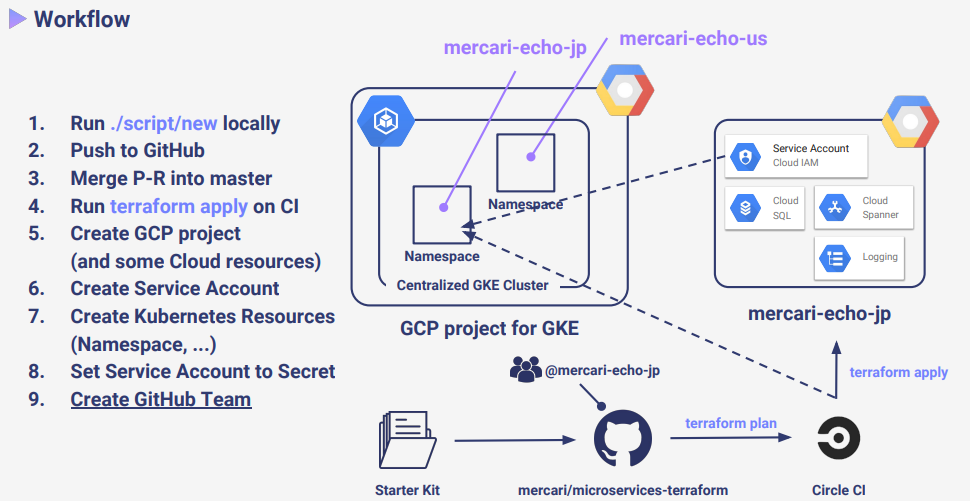
Sample Workflow
Most Used Commands
Here are some essential Terraform commands you’ll encounter when working with microservices:
1. Initialization (init):
- Function: This command kicks off your Terraform workspace. It fetches any necessary plugins and prepares your working directory for infrastructure management.
- Usage: Whenever you begin a new Terraform project or move your code to a different machine,
initis the first step.
2. Planning (plan):
- Function: This command meticulously analyzes your Terraform configuration. It then outlines the planned modifications to your infrastructure, including creating, updating, or removing resources.
- Usage: Before applying any changes, run
planto see precisely what Terraform intends to do. It acts as a safety net before making permanent modifications.
3. Applying Changes (apply):
- Function: This command is the workhorse for infrastructure changes. Based on your Terraform configuration, it creates or modifies infrastructure resources in your chosen cloud environment.
- Usage: Once you’re confident with the planned changes revealed by
plan, executeapplyto put those changes into action.
4. Destroying Infrastructure (destroy):
- Function: This command serves as a deconstruction tool. It tears down existing infrastructure resources that are currently being managed by Terraform.
- Usage: Use this command with caution, as it permanently deletes resources. It’s valuable for cleaning up test environments or removing infrastructure that’s no longer required.
5. Refreshing State (refresh):
- Function: This command prompts Terraform to refresh its understanding of your infrastructure’s current state. It retrieves information directly from your cloud provider or configured backend storage.
- Usage: If your Terraform state (which tracks existing resources and their attributes) becomes out of sync with reality due to manual changes made outside Terraform, use
refreshto rectify the discrepancy.
Best Practices
Structuring Your Terraform Projects
Organize your Terraform code into logical units. Use separate directories for each microservice and consider a mono-repo or multi-repo strategy based on your team’s workflow.
├── microservice_1
│ ├── main.tf
│ ├── variables.tf
│ └── outputs.tf
├── microservice_2
│ ├── main.tf
│ ├── variables.tf
│ └── outputs.tf
Managing State Files
State files are crucial in Terraform. Ensure they are securely stored and backed up. Use remote state backends like AWS S3 with state locking via DynamoDB to prevent conflicts.
# Example of configuring a remote backend
terraform {
backend "s3" {
bucket = "my-terraform-state-bucket"
key = "state/terraform.tfstate"
region = "us-east-1"
...
}
}
Modularization
Create reusable modules for common infrastructure patterns. This DRY (Don’t Repeat Yourself) approach promotes code reuse and simplifies maintenance.
# Example of using a module for a microservice
module "microservice_database" {
source = "./modules/database"
version = "1.0.0"
...
}
Version Control
Use version control systems like Git to track changes, collaborate with team members, and roll back when necessary.
Continuous Integration/Continuous Deployment (CI/CD)
Integrate Terraform with CI/CD pipelines to automate the deployment process. This ensures that changes are tested and deployed systematically.
# Sample CI/CD pipeline configuration snippet
pipeline:
plan:
stage: plan
script:
- terraform plan -out=plan.tfplan
apply:
stage: apply
script:
- terraform apply "plan.tfplan"
Security
Always follow security best practices. Encrypt sensitive data, use minimal privilege access, and regularly review IAM policies and security groups.
Conclusion
Terraform lets us ditch the low-level API calls and YAML configs for microservices. Write infrastructure as code (IaC) with HCL, like high-level blueprints. This cuts errors and scales services like deploying Docker containers. Share infrastructure modules for teamwork and reuse. Control your state (central S3 or local files) for flexibility. Terraform simplifies infrastructure which results in easy implementation.
References
- Official Documentation – https://developer.hashicorp.com/terraform
- Medium Post – https://ronan-barrett.medium.com/microservice-centric-infrastructure-as-code-with-terraform-at-voi-715963290e1d
- SpeakerDeck – https://speakerdeck.com/b4b4r07/terraform-ops-for-microservices?slide=34