


How to Build Microservice in ASP .NET Core
A microservices architecture can help you build applications that are flexible, scalable, and easy to maintain. Here’s how to get started with microservices in ASP.NET Core.
Microservices architecture describes a collection of loosely coupled, extensible, independently deployable services that interact with each other through well-defined interfaces.
In this blog, we’ll explore microservices architecture, discussing its advantages and disadvantages. Subsequently, we’ll demonstrate how to implement a basic microservice in ASP.NET Core. We will finalize our microservices-based application by incorporating an API gateway and establishing interactions between our microservices.
What is microservices architecture?
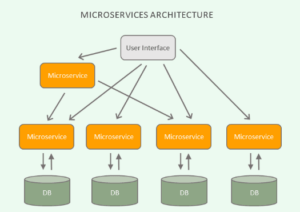
The term microservices refers to a software architecture where a large application divides into a collection of small, autonomously deployable services. Each microservice is crafted to perform specific tasks and remains deployable and maintainable independently.
Put differently, a microservices-based application fragments into numerous small, discrete, decentralized, loosely coupled, and autonomously deployable services that collaborate seamlessly.
Furthermore, microservices-based applications facilitate easy scalability and maintenance. Changes to the source code of one service can occur independently of others, eliminating the need to redeploy the entire application. Instead, only the affected service requires redeployment.
Benefits and drawbacks of microservices
In this section, we’ll briefly explore the key benefits and drawbacks of microservices architecture. Firstly, microservices architecture offers:
Transitioning to the benefits, firstly, microservices architecture offers:
- Scalability: Individual services can scale independently based on demand, enhancing overall system scalability.
- Agile DevOps: Teams can independently develop and deploy services, fostering faster development cycles and facilitating continuous delivery and deployment in line with DevOps principles and practices.
- Fault Isolation and Resilience: If one service fails, it doesn’t affect the entire application, making the system more resilient and capable of gracefully handling failures.
- Technology Flexibility: Each service can use a different programming language, framework, and technology, allowing teams to choose the desired technology stack for each service.
- Autonomous Teams: Microservices promote small, cross-functional teams, enabling them to work on individual services, fostering autonomy, efficiency, and focus.
On the other hand, potential drawbacks include:
- Complexity: Microservices architecture introduces a higher level of complexity compared to its monolithic counterpart, including challenges such as network latency, synchronous communication, eventual consistency, and distributed data management.
- Operational Challenges: Managing and monitoring multiple services in a distributed environment necessitates additional tools for proper service discovery, monitoring, logging, and tracking.
- Increased Development Effort: Microservices architecture often demands more development effort than a monolithic architecture due to the need to design, develop, test, and deploy multiple individual services.
- Data Management: Maintaining data consistency and transaction integrity is more challenging in a distributed microservices environment compared to a monolithic system.
Now, let’s look into how we can build a simple microservices-based application in ASP.NET Core. We’ll initiate by creating an ASP.NET Core Web API project.
To create an ASP.NET Core 7 Web API project in Visual Studio 2022, follow these steps:
- Launch the Visual Studio 2022 IDE.
- Click on “Create new project.”
- In the “Create new project” window, select “ASP.NET Core Web API” from the list of templates displayed.
- Click Next.
- In the “Configure your new project” window, specify the name and location for the new project.
- Optionally, check the “Place solution and project in the same directory” checkbox, depending on your preferences.
- Click Next.
- In the “Additional Information” window, ensure that the “Use controllers (uncheck to use minimal APIs)” box is checked. Minimal APIs won’t be used in this project.
- In the same window, keep the “Authentication Type” set to “None” (the default), and ensure that the checkboxes for “Enable Open API Support,” “Configure for HTTPS,” and “Enable Docker” remain unchecked. None of these features will be used here.
- Click Create.
We will utilize this ASP.NET Core Web API project for the code examples in the subsequent sections.
To implement a microservice in ASP.NET Core
let’s start by building a microservices-based application consisting of three services: Customer, Product, and Supplier. For simplicity, I’ll demonstrate the creation of the Customer microservice here, and you can replicate the same steps for the other two microservices.
The Customer microservice will encompass the following components:
- Customer: the entity class.
- ICustomerRepository: the interface for the customer repository.
- CustomerRepository: the customer repository class.
- CustomerController: an API controller that exposes a single endpoint to retrieve data.
For simplicity, our microservice will feature only one action method, representing a single endpoint. To initiate the process, within the CustomerAPI project, generate a file named Customer and input the following code.
public class Customer
{
   public int Id {get; set;}
   public string FirstName {get; set;}
   public string LastName {get; set;}
   public string Address {get; set;}
}
To create the customer repository, proceed by crafting an interface named ICustomerRepository in a file with the same name. Then, input the following code-
public interface ICustomerRepository
 {
   public Customer GetById(int id);
 }
Transitioning to the CustomerRepository class, it implements the ICustomerRepository interface and furnishes an implementation of the GetById method.
public class CustomerRepository : ICustomerRepository
 {
     private readonly List<Customer> _customers;
     public CustomerRepository()
     {
         _customers = new List<Customer>
         {
             new Customer
             {
                 Id = 1,
                 FirstName = "Joydip",
                LastName = "Kanjilal",
                 Address = "Hyderabad, India"
             },
             new Customer
             {
                 Id = 2,
                 FirstName = "Steve",
                 LastName = "Smith",
                 Address = "Chicago, USA"
            }
         };
     }
     public Customer GetById(int id)
     {
         return _customers.Find(x => x.Id == id);
     }
 }
Transitioning to the Program.cs file, ensure that you register an instance of type ICustomerRepository using the following code snippet.
builder.Services.AddScoped<ICustomerRepository, CustomerRepository>();
Transitioning to the usage of dependency injection, this process enables you to create an instance of type ICustomerRepository within the controller class. Finally, proceed by creating a new API controller named Customer and replacing the default generated code with the following.
using Microsoft.AspNetCore.Mvc;
namespace CustomerAPI.Controllers
{
    [Route("api/[controller]")]
    [ApiController]
    public class CustomerController : ControllerBase
    {
        private readonly ICustomerRepository _customerRepository;
        public CustomerController(ICustomerRepository customerRepository)
        {
            _customerRepository = customerRepository;
        }
        [HttpGet("{id}")]
        public Customer Get(int id)
        {
            return _customerRepository.GetById(id);
        }
    }
}
That concludes the steps required to create a minimalistic microservice. Upon executing the application and accessing the HTTP GET endpoint of the customer microservice, the data relevant to the customer will be displayed in your web browser.
Microservices vs. monolith
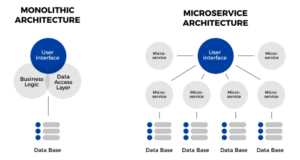
Transitioning from monolithic applications, which consolidate all business functionality into a single process, we find that change cycles of various functions become intertwined. A minor alteration to one function might necessitate rebuilding and redeploying the entire application.
Contrastingly, with microservices architecture, application functionality is divided into numerous independently deployable services. This approach gives you power to build, deploy, and manage each service separately.
Closure
Transitioning from monolithic architectures to microservices offers benefits like enhanced flexibility and scalability. By breaking down applications into independently deployable services, microservices architecture streamlines development and improves resilience. This blog demonstrated creating a microservice in ASP.NET Core and outlined the advantages of microservices.