



With its high performance and scalability, Scala has emerged as a popular language for developing web servers. The latest release of the language, Scala 3, comes with several new features and improvements that make it even easier to develop web applications. In this blog, we’ll be building a web server using Scala 3 and Akka HTTP – a powerful toolkit for developing web servers and clients in Scala. We’ll also use sbt (Scala Build Tool) to manage our project’s dependencies and build process.
Setting Up the Project
To get started, create a new directory for your project and navigate to it in your terminal. Then create a build.sbt file with the following directives:
ThisBuild / scalaVersion := "3.3.3"
lazy val root = (project in file("."))
  .settings(
    name := "scala-web-server",
    version := "0.1.0-SNAPSHOT",
    libraryDependencies ++= Seq(
      "com.typesafe.akka" %% "akka-http" % "10.5.3",
      "com.typesafe.akka" %% "akka-actor" % "2.7.0",
      "com.typesafe.akka" %% "akka-stream" % "2.7.0",
      )
  )
This file specifies the project settings, such as the Scala version and the required dependencies (including Akka HTTP).
Writing the Web Server Code
Let’s create the main Scala source file for our web server. In the src/main/scala directory, create a new file named Main.scala, and add the following code:
import akka.actor.ActorSystem
import akka.http.scaladsl.Http
import akka.http.scaladsl.server.Directives._
import scala.concurrent.ExecutionContextExecutor

object Main extends App {
  given system: ActorSystem = ActorSystem("scala-web-server")
  given executionContext: ExecutionContextExecutor = system.dispatcher

  def greetRoute(name: String) =
    path("greet" / Segment) { username =>
     get {
       complete(s"Hello, $username!")
     }
  }
  val route = concat(
    path("hello") {
      get {
        complete("Hello, World!")
      }
    },
    greetRoute("greet")
  )
  val bindingFuture = Http().newServerAt("localhost", 8080).bind(route)

  println(s"Server online at http://localhost:8080/\nPress RETURN to stop...")
  scala.io.StdIn.readLine()

  bindingFuture
    .flatMap(_.unbind())
    .onComplete(_ => system.terminate())
}
In this code, we’ve imported the necessary classes from Akka HTTP and have utilized the given keyword, a feature introduced in Scala 3, to declare implicit values for ActorSystem and ExecutionContext. We incorporated a greetRoute function that dynamically greets a user based on the provided username. This leverages Scala 3’s improved syntax for method implementations and overall code expressiveness. We’ve then defined a simple route that responds with “Hello, World!” when the /hello endpoint is accessed. Binded the route to the server running on localhost and port 8080. Finally, we’ve printed a message indicating that the server is running and waiting for user input to shut it down.
Running the Server
To run our web server, navigate to the project directory in your terminal and execute the following command:
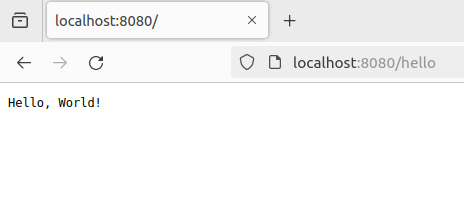
sbt runThen open your web browser and go to http://localhost:8080/hello. You should see the message “Hello, World!” displayed on the page like this:
OR
navigate to http://localhost:8080/greet/yourname to experience the functionality in action.
Benefits of Using Scala 3 for Web Servers
The adoption of Scala 3 brings several benefits when building web servers, such as:
- Better Syntax: With improved syntax and language features, Scala 3 promotes more expressive and readable code, enhancing the development experience.
- Enhanced Tooling: Scala 3 is accompanied by enhanced tooling support, aiding in the development, testing, and maintenance of web server applications.
- Simplified Concurrency: The integration of Scala 3 with Akka HTTP allows for simplified and efficient concurrency management, enabling high-performance web server applications.
Conclusion
In conclusion, we’ve shown you how to create a simple web server using Scala 3 and Akka HTTP. With the help of sbt, it’s easy to set up a project and manage its dependencies. Our exploration has showcased the utilization of Scala 3 features and the benefits they bring to the development of web servers. Scala’s expressive syntax and Akka HTTP’s versatility make it a great choice for building robust web applications. You can extend this project further by adding different endpoints, integrating a database, or exploring other features of Akka HTTP.
References
Core Server API • Akka HTTP
Introduction | Scala 3 — Book | Scala Documentation (scala-lang.org)