



In the ever-evolving landscape of Java programming, asynchronous programming has become increasingly essential, especially for building responsive and scalable applications. Among the various tools available for asynchronous programming in Java, CompletableFuture stands out as a powerful and versatile option introduced in Java 8. In this blog post, we’ll delve into the intricacies of CompletableFuture, exploring its features, usage, and best practices.
Synchronous Vs Asynchronous programming
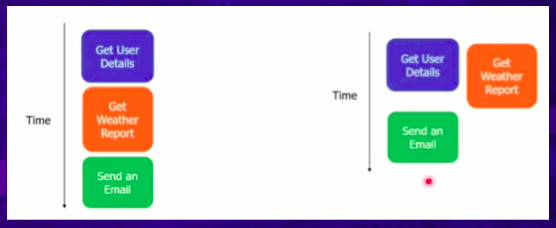
In synchronous operations, tasks are done one after the other. You have to wait for one task to finish before moving on to the next one. On the other hand, asynchronous operations let you switch to another task before the current one is done. This means you can handle multiple tasks at the same time, which helps you finish more things quickly. Asynchronous programming is often linked with parallelization, which is all about doing separate tasks simultaneously.
Java support for concurrency
- Runnable and threads.
- Java.util.concurrent package in 2004, java 5.
1. ExcecutorService – Decoupled task submission from thread execution.
2. Callable<T> and Future<T>– Which gave higher-level and result-returning variants of generics also introduced in java 5. - Java.util.concurrent.RecursiveTask to support fork/join in java 7.
1. Implementation of divide-and-conquer algorithms. - Streams and parallel Streams in java 8.
1.CompletableFuture. - Reactive programming in java 9. Bases on the publish-subscribe protocol.
- Support in java 9 via java.util.concurrent.Flow interface.
What is Future?
Main thread:
When a Java program starts up, one thread begins running immediately. This is usually called the main thread of our program because it is the one that is executed when our program begins.
Callable:
Callable (wrap the task and pass to thread)-the call() method needs to be implemented which returns a result on completion while runnable not.
Future:
Once the call() method finishes, the result needs to be saved in an object that the main thread knows about. This way, the main thread can access the result returned by the thread. mean use to represent the result of async computation. Java 1.5. Methods isDone() & get() get the result of computation for async task.
ExecutorService:
is interface that is most common in java Future. manage and control the execution of threads. It produces Future( from some of the methods as submit) objects for tracing progress of one or more async task.
Disadvantages of future: –
- It cannot be manually completed. // no force full completion of task
- Multiple Futures cannot be chained together. // after completion can’t revisit and can’t past execution to another thread.
- We cannot combine multiple Futures together.
- No Proper Exception Handling.
Future has so many limitations, that’s why we have CompletableFuture. CompletableFuture provides a broad set of methods for creating multiple Futures, chaining, and combining. It also has comprehensive exception handling support.
Other java8 features that concreate Future are- CountedCompleter ,ForkJoinTask ,FutureTask.
Understanding CompletableFuture
At its core, CompletableFuture represents a promise of a result that may be made available in the future. It enables developers to express and compose asynchronous computations in a concise and expressive manner. Unlike traditional Future objects, which are read-only placeholders for a result that may or may not be available, CompletableFuture offers a rich set of methods for composing, chaining, and combining asynchronous tasks.
- A new era of async programming. Introduced in 1.8
- It Implements Future and CompletionStage interface.
- Do some tasks in a way that doesn’t block other activities, meaning they can happen simultaneously. Then, once one task is done, start the next task, which might also happen asynchronously.
- Using Asynchnous programing you can write non-blocking code where concurrently you can run N no. Of task in separate thread without blocking main thread
- When the task is complete, it notifies to the main thread whether task was completed or failed)
- Provide a huge set convenience method for creating, chaining and combining multiple Futures.
- It also has a very comprehensive exception handling support.
Creating CompletableFuture Instances
You can create a CompletableFuture instance in several ways:
Supplying a Result Asynchronously: Use CompletableFuture.supplyAsync() to asynchronously execute a Supplier and obtain a result.
CompletableFuture<String> future = CompletableFuture.supplyAsync(() -> "Hello, CompletableFuture!");Completing Exceptionally: If an asynchronous task encounters an exception, you can complete the future exceptionally using. CompletableFuture.completeExceptionally().
CompletableFuture<String> future = new CompletableFuture<>(); future.completeExceptionally(new RuntimeException("Task failed"));Composing Asynchronous Computations
Once you have created CompletableFuture instances, you can compose them using various methods:
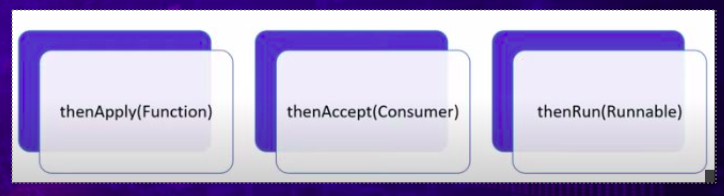
Chaining: Use thenApply, thenAccept, or thenRun to chain a function, consumer, or runnable to the future’s completion.
CompletableFuture<String> future = CompletableFuture.supplyAsync(() -> “Hello”);
CompletableFuture<String> chainedFuture = future.thenApply(result -> result + “, World!”);
Combining: Combine multiple futures using methods like thenCombine, thenCompose, or allOf.
CompletableFuture<String> future1 = CompletableFuture.supplyAsync(() -> "Hello");
CompletableFuture<String> future2 = CompletableFuture.supplyAsync(() -> "World");
CompletableFuture<String> combinedFuture = future1.thenCombine(future2, (result1, result2) -> result1 + ", " + result2);
Exception Handling: Handle exceptions using exceptionally or handle.
CompletableFuture<String> future = CompletableFuture.supplyAsync(() -> {
// Simulate an exception
throw new RuntimeException("Task failed");
});
CompletableFuture<String> exceptionHandledFuture = future.exceptionally(ex -> "Handled exception: " + ex.getMessage());
Asynchronous Execution Control
You can control the execution of asynchronous tasks using methods like thenApplyAsync, thenAcceptAsync, or thenRunAsync, which allow you to specify an Executor for executing the subsequent stage.
CompletableFuture<String> future = CompletableFuture.supplyAsync(() -> "Hello");
CompletableFuture<Void> asyncExecutionFuture = future.thenAcceptAsync(result -> System.out.println("Result: " + result), executor);
Best Practices
When working with CompletableFuture, keep the following best practices in mind:
- Error Handling: Always handle exceptions gracefully using methods like
exceptionallyorhandle. - Avoid Blocking: Minimize blocking operations within asynchronous tasks to maintain responsiveness.
- Resource Management: Ensure proper resource management, especially when dealing with I/O operations or external resources.
- Performance Considerations: Be mindful of performance implications, such as thread usage and contention, when composing complex asynchronous pipelines.
Conclusion
In conclusion, CompletableFuture is a powerful tool for asynchronous programming in Java, offering a rich set of features for composing, chaining, and combining asynchronous tasks. By mastering CompletableFuture, developers can build responsive and scalable applications that harness the full potential of asynchronous computing.
In this blog post, we’ve only scratched the surface of what CompletableFuture has to offer. As you delve deeper into asynchronous programming in Java, keep exploring its advanced features and experimenting with different usage patterns to unlock its full potential in your projects.
For more: look into below.
https://docs.oracle.com/javase/8/docs/api/java/util/concurrent/CompletableFuture.html
For further insights, please visit this blog.