



Introduction
Databases hold a pivotal role in modern applications, serving as vital repositories for managing, organizing, and retrieving extensive datasets efficiently. Their significance spans various crucial aspects:
- Data Storage: Databases furnish a structured and systematic means of data storage, ensuring integrity, security, and consistency irrespective of data volume or complexity.
- Data Retrieval: They empower users with potent querying capabilities, facilitating swift and precise data retrieval essential for real-time data manipulation.
- Data Integrity and Security: Databases uphold data integrity through constraints and validations, alongside offering robust security measures like authentication, access control, and encryption to safeguard sensitive information.
- Scalability: Adapting to burgeoning data needs, modern databases boast scalable architectures that seamlessly accommodate increased workload without compromising performance.
- Concurrency Control: In multi-user environments, databases manage concurrent data access to avert conflicts, preserving data integrity via techniques such as locking, transactions, and isolation levels.
- Data Analytics and Insights: Databases enable extraction of valuable insights through advanced analytics and reporting, supporting sophisticated querying, aggregation, and analysis techniques to drive data-driven decision-making.
- Support for Different Data Models: With compatibility for various data models like relational, document-oriented, graph, and key-value stores, databases offer flexibility for developers to choose the most suitable model for their application needs.
- High Availability and Disaster Recovery: Implementing features such as replication, clustering, and automated backups, databases ensure high availability and disaster recovery, minimizing downtime and data loss for uninterrupted business continuity.
Azure as a cloud platform for hosting databases
Azure, Microsoft’s cloud computing platform, presents a versatile suite of services for hosting databases, delivering scalable, secure, and adaptable solutions for data management. Here’s an overview of Azure’s role as a cloud platform for hosting databases, highlighting its key features and benefits:
Diverse Database Options
Azure supports various database types, including relational (like Azure SQL Database), NoSQL (such as Azure Cosmos DB), and in-memory databases (like Azure Cache for Redis), offering organizations flexibility to choose the best-fit solution for their needs.
Dynamic Scalability and Performance
Azure enables databases to scale seamlessly to meet evolving workloads and performance requirements. Features like auto-scaling ensure resources adapt in real-time to demand spikes, maintaining consistent performance without unnecessary resource allocation.
Reliable High Availability and Disaster Recovery
Azure’s global network of data centres ensures built-in redundancy and fault tolerance, ensuring databases remain available even in the face of disruptions. Features like geo-replication and automated backups bolster disaster recovery capabilities, minimizing data loss and downtime.
Robust Security and Compliance
Azure prioritizes data security and compliance, offering encryption, role-based access control, network isolation, and compliance certifications to safeguard sensitive data and meet regulatory requirements effectively.
Seamless Integration with Azure Services
Azure databases seamlessly integrate with other Azure services, facilitating automation, application development, and identity management. This integration streamlines workflows and enhances productivity by leveraging the broader Azure ecosystem.
Flexible Cost Management
Azure’s flexible pricing models, including pay-as-you-go and reserved instances, allow organizations to optimize costs based on usage patterns and budget constraints. Features like serverless computing enable cost savings by dynamically scaling resources based on workload demands.
Advanced Analytics Capabilities
Azure provides robust analytics capabilities, enabling organizations to derive valuable insights from their data. Services like Azure Synapse Analytics and Azure Databricks empower organizations to harness the power of big data processing and machine learning for informed decision-making.
Global Reach and Scalability
With data centres spanning the globe, Azure ensures low latency, high performance, and compliance with data sovereignty requirements, catering to organizations operating in local or global markets.
Overview of the types of databases available in Azure
Azure offers a diverse range of database services catering to various data storage and management needs. Here are the types as following:
1. Azure SQL Database
Azure SQL Database is a fully managed relational database service based on Microsoft SQL Server. It offers high availability, security, and scalability, with features such as automated backups, built-in intelligence, and advanced security capabilities.
Key Features
- Fully Managed: Microsoft takes care of maintenance tasks.
- Scalability: Supports horizontal and vertical scaling.
- High Availability: Provides automatic failover and geo-replication.
- Security: Includes encryption, RBAC, and threat detection.
- Compatibility: Supports T-SQL and SQL Server features.
- Built-in Intelligence: Offers automatic tuning and query performance insights.
- Integration: Seamlessly blends with other Azure services.
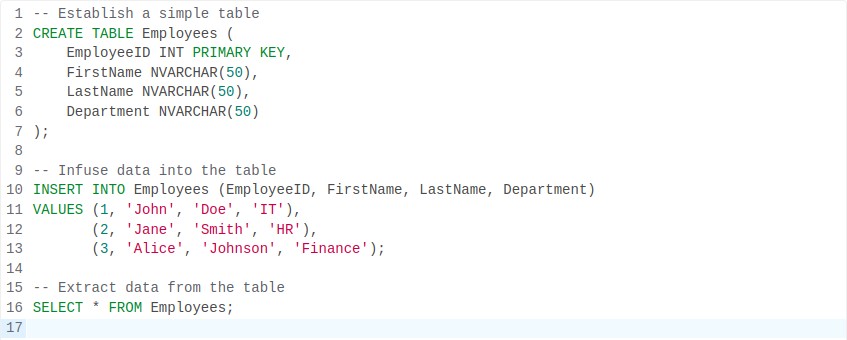
This example illustrates creating a table called “Employees” with columns for employee details, adding data into the table, and retrieving the data. Azure SQL Database supports standard SQL syntax, facilitating easy interaction with existing SQL code.
2. Azure Cosmos DB
Azure Cosmos DB is a globally distributed, multi-model database service designed for building highly responsive and scalable applications. It supports multiple data models including document, key-value, graph, and column-family, and offers guaranteed low latency, high availability, and elastic scalability.
Key Features
- Global Distribution: Replicates data across multiple Azure regions.
- Multi-Model: Supports document, key-value, graph, and column-family data models.
- Horizontal Scalability: Scales out to handle any workload without downtime.
- High Availability and Low Latency: Offers industry-leading SLAs for availability and latency.
- Turnkey Global Distribution: Easily add or remove regions without downtime or data migration.
- Multi-API Support: Offers support for SQL, MongoDB, Cassandra, Gremlin, and Table APIs.
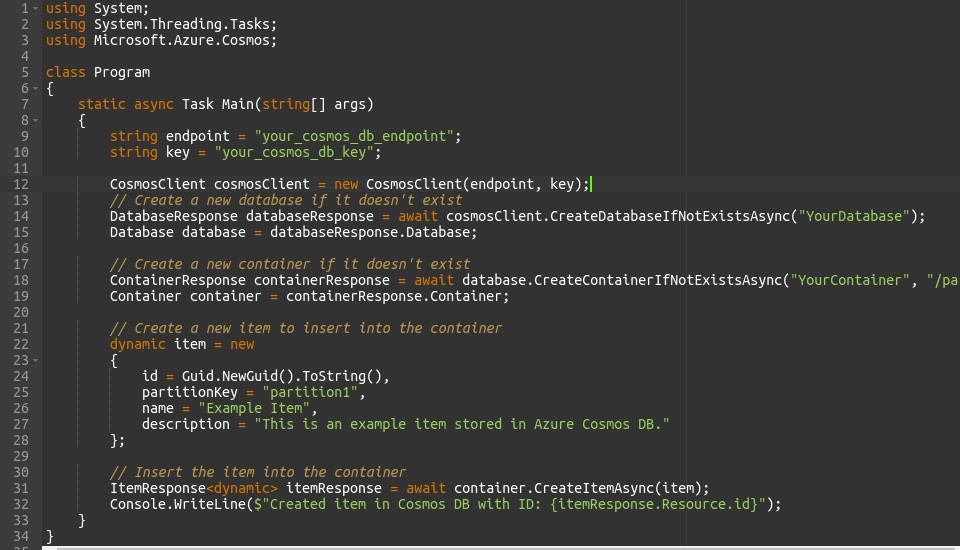
This code connects to your Azure Cosmos DB account, creates a database if it doesn’t exist, creates a container within that database if it doesn’t exist, and then inserts a document (item) into the container. Make sure to replace `”your_cosmos_db_endpoint”` and `”your_cosmos_db_key”` with your actual Cosmos DB endpoint and key.
3. Azure Database for MySQL
Azure Database for MySQL is a fully managed MySQL database service, offering high availability, security, and scalability for MySQL-based applications. It provides features like automated backups, built-in monitoring, and performance optimization tools.
Key Features
- Fully Managed: Microsoft attends to maintenance tasks.
- MySQL-Compatible: Works seamlessly with existing MySQL applications and tools.
- High Availability and Security: Incorporates built-in backups, encryption, and RBAC.
- Scalability: Allows for scaling resources up or down without causing downtime.
- Performance: Offers monitoring and tuning capabilities.
- Integration with Azure Services: Seamlessly merges with other Azure services.
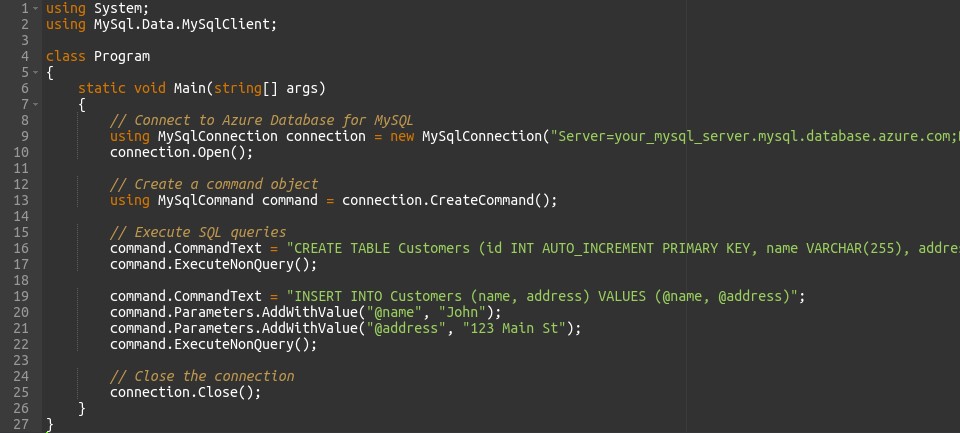
This example establishes a connection to an Azure MySQL server, creates a table named “Customers”, inserts a record into the table, and closes the connection. Adjust the connection parameters and SQL queries to match your Azure MySQL server configuration and database schema.
4. Azure Database for PostgreSQL
Azure Database for PostgreSQL is a fully managed PostgreSQL database service, providing high availability, security, and scalability for PostgreSQL-based applications. It offers features such as automated backups, point-in-time restore, and advanced security capabilities.
Key Features
- Fully Managed: Microsoft handles maintenance tasks.
- PostgreSQL-Compatible: Supports existing PostgreSQL applications and tools.
- High Availability and Security: Built-in backups, encryption, and RBAC.
- Scalability: Allows scaling resources without downtime.
- Performance: Monitoring and tuning capabilities.
- Integration with Azure Services: Seamless integration with other Azure services.
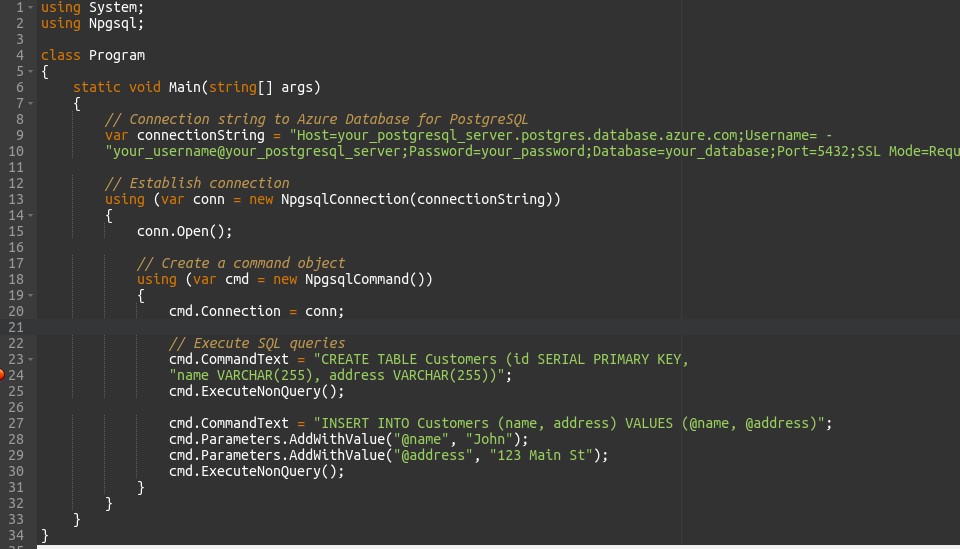
This code establishes a connection to an Azure PostgreSQL server, creates a table named “Customers”, inserts a record into it, and then closes the connection. Adjust the connection parameters and SQL queries to match your Azure PostgreSQL server configuration and database schema.
5. Azure Database for MariaDB
Azure Database for MariaDB is a fully managed MariaDB database service, offering high availability, security, and scalability for MariaDB-based applications. It provides features like automated backups, monitoring, and performance tuning.
Azure Database for MariaDB is a fully managed relational database service provided by Microsoft Azure, offering compatibility with MariaDB. It allows you to deploy, manage, and scale MariaDB databases in the cloud without the overhead of managing infrastructure. Here’s a brief overview:
Key Features
- Fully Managed: Microsoft handles maintenance tasks.
- MariaDB-Compatible: Supports existing MariaDB applications and tools.
- High Availability and Security: Built-in backups, encryption, and RBAC.
- Scalability: Allows scaling resources without downtime.
- Performance: Monitoring and tuning capabilities.
- Integration with Azure Services: Seamless integration with other Azure services.
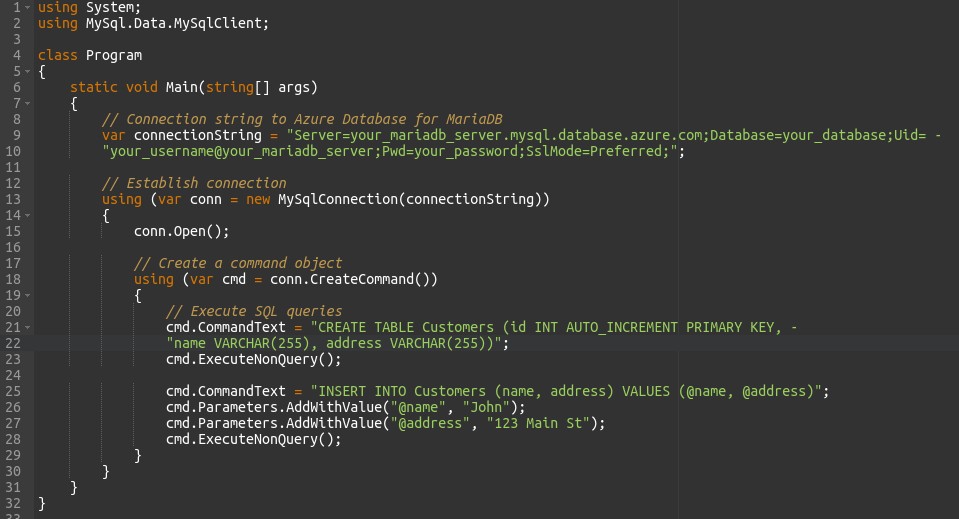
This code establishes a connection to an Azure MariaDB server, creates a table named “Customers”, inserts a record into it, and then closes the connection. Adjust the connection parameters and SQL queries to match your Azure MariaDB server configuration and database schema.
6. Azure Cache for Redis
Azure Cache for Redis is a fully managed, in-memory data store service provided by Microsoft Azure, based on the open-source Redis database engine. It enables you to build highly scalable and responsive applications by caching frequently accessed data in memory. Here’s a brief overview:
Key Features
- Fully Managed: Microsoft handles infrastructure maintenance tasks.
- In-Memory Data Store: Stores data in memory for fast access.
- High Performance: Provides low-latency access to cached data.
- Scalability: Scales out to handle increasing workloads.
- Data Persistence: Supports both in-memory and persistent data storage options.
- Security: Offers data encryption, access control, and network isolation features.
- Integration with Azure Services: Seamlessly integrates with other Azure services such as Azure App Service, Azure Functions, and Azure Kubernetes Service.
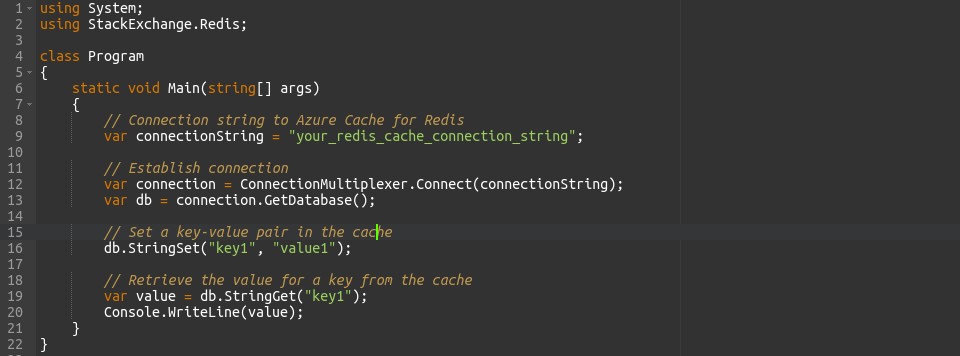
This code establishes a connection to an Azure Cache for Redis instance, sets a key-value pair in the cache, retrieves the value for a key, and then closes the connection. Replace “your_redis_cache_connection_string” with your Azure Cache for Redis connection string. Adjust the key-value pair and operations as needed for your application.
7. Azure Synapse Analytics
Azure Synapse Analytics, formerly Azure SQL Data Warehouse, serves as a cloud-based analytics solution provided by Microsoft Azure. It enables organizations to handle extensive data warehousing and analytics tasks, empowering them to analyze vast datasets for business intelligence and reporting purposes. Here’s a succinct rundown:
Key Features
- Integrated Analytics Platform: Merges big data and data warehousing functionalities into one service.
- Massively Parallel Processing (MPP): Distributes and parallelizes queries across multiple nodes to ensure high performance.
- Scalability: Allows independent scaling of compute and storage resources to accommodate growing workloads.
- T-SQL Compatibility: Supports T-SQL queries and tools for seamless integration with existing SQL Server environments.
- Built-in Data Integration: Integrates with Azure Data Factory to ingest and transform data from diverse sources.
- Advanced Analytics: Provides native support for machine learning, business intelligence, and advanced analytics tasks.
- Security and Compliance: Offers robust security features like encryption, RBAC, and auditing, alongside compliance certifications.
- Integration with Azure Services: Seamlessly meshes with other Azure services such as Azure Data Lake Storage, Azure Blob Storage, and Azure Active Directory.
Example Use Cases
- Analyzing vast datasets to extract actionable business insights.
- Constructing data warehouses for reporting, dashboards, and on-the-fly analysis.
- Implementing sophisticated analytics solutions including predictive modeling and recommendation systems.
- Conducting near-real-time analytics on streaming data sources.
Overall, Azure Synapse Analytics furnishes a comprehensive platform for organizations to conduct extensive data analysis and glean insights at scale, thereby fostering data-driven decision-making and innovation.
8. Azure Table Storage
Azure Table Storage is a cloud-based NoSQL data storage service provided by Microsoft Azure. It is designed to store semi-structured data at scale, making it suitable for applications that require flexible schema and horizontal scalability. Here’s a brief overview: