


Introduction:
As software developers, we’re constantly seeking ways to streamline our development processes, enhance scalability, and optimize costs. Enter Azure Functions, a serverless compute service that allows you to run code on-demand without having to manage infrastructure. In this comprehensive guide, we’ll explore Azure Functions, their key features, use cases, and how they can be seamlessly integrated into .NET applications.
Understanding Azure Functions
Azure Functions is a serverless computing platform offered by Microsoft Azure, designed to simplify the process of building event-driven, scalable applications. With Azure Functions, you can focus on writing code to handle specific tasks or respond to events, without worrying about the underlying infrastructure. Functions can be triggered by various events such as HTTP requests, timers, message queues, database changes, or external webhooks.
Key Features of Azure Functions
Azure Functions offers several key features that make it an attractive choice for developers:
- Scalability: Azure Functions automatically scales to meet demand, ensuring that your code runs efficiently regardless of the workload. You only pay for the resources consumed during execution, making it cost-effective for both small-scale and large-scale applications.
- Event-Driven: Azure Functions can be triggered by various events, allowing you to respond to changes in real-time. Whether it’s processing incoming messages, reacting to database updates, or handling HTTP requests, Azure Functions provides a flexible and responsive compute environment.
- Integration: Azure Functions seamlessly integrates with other Azure services such as Azure Storage, Azure Cosmos DB, Azure Event Hubs, and more. This enables you to build complex workflows and leverage the rich ecosystem of Azure services to enhance your applications.
- Programming Language Support: Azure Functions supports multiple programming languages including C#, JavaScript, Python, PowerShell, and TypeScript. This allows you to write functions using your preferred language and leverage existing skills and libraries.
Use Cases for Azure Functions
Azure Functions are well-suited for a wide range of use cases, including:
- APIs and Webhooks: Create lightweight APIs and webhooks to handle HTTP requests and respond to external events.
- Data Processing: Process and transform data in real-time, such as parsing incoming messages, aggregating telemetry data, or performing batch processing tasks.
- Integration: Integrate with external systems and services to automate workflows, synchronize data, or trigger actions based on external events.
- IoT and Event Processing: Handle events generated by IoT devices, sensors, or external systems, and take appropriate actions based on event data.
Implementing Azure Functions in .NET Applications
Let’s dive into an example of how Azure Functions can be implemented in a .NET application:
Scenario: Building a Serverless API using Azure Functions and .NET Core
- Create a New Azure Functions Project: Open Visual Studio and create a new Azure Functions project using the Azure Functions template.
- Add a New Function: Add a new Azure Function to the project. Choose the HTTP trigger template to create an HTTP-triggered function.
- Write Function Code: Write the code for your function. In this example, we’ll create a simple HTTP-triggered function that returns a greeting message.
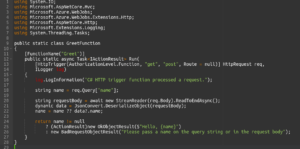
- Deploy the Function: Deploy your Azure Function to Azure using Visual Studio or Azure CLI. Once deployed, you’ll receive a URL that you can use to invoke your function.
- Test the Function: Test your Azure Function by sending HTTP requests to the function URL. You can use tools like Postman or curl to test the API endpoints.
Conclusion
Azure Functions offer a powerful and flexible way to build serverless applications that can scale with your business needs. Whether you’re building APIs, processing data, or integrating with external services, Azure Functions provide a serverless compute platform that simplifies development and reduces operational overhead. By leveraging Azure Functions in your .NET applications, you can focus on writing code that adds value to your business, while Azure takes care of the underlying infrastructure.