


Introduction
GitOps is a contemporary method for automating infrastructure and application deployment using Git as the primary repository for both code and configuration. It extends Infrastructure as Code (IaC) by relying on Git repositories to store not just application code but also infrastructure configurations and deployment instructions.
Principles of GitOps
1. Declarative Configuration
GitOps operates on a declarative model where the desired state of infrastructure and applications is defined in configuration files stored in Git repositories. This ensures an immutable representation of the desired state, easily auditable and rollback-ready.
2. Version Control as Source of Truth
Git serves as the sole source of truth for infrastructure and application configurations. All changes are made through pull requests, promoting transparency and collaboration. Version control enables change tracking, rollback capabilities, and audit trails.
3. Continuous Deployment and Automation
GitOps advocates for continuous deployment through automated processes triggered by changes in the Git repository. CI/CD pipelines monitor the repository for changes and deploy updates automatically, ensuring swift and reliable deployments.
4. GitOps Operators
Specialized controllers or operators within Kubernetes clusters continuously reconcile the cluster’s actual state with the desired state defined in the Git repository. Any discrepancies trigger automatic adjustments to align the cluster with the desired state.
5. Observability and Monitoring
GitOps emphasizes observability and monitoring of both infrastructure and applications. Metrics, logs, and events are collected and analyzed to provide insights into system health and performance, facilitating proactive issue detection and resolution.
6. Security and Compliance
GitOps integrates security and compliance measures into the deployment process. Access controls, encryption, and other security measures are enforced throughout the deployment pipeline. Compliance requirements are encoded as code, enabling automated enforcement and auditing.
Understanding GitOps for .NET:
1. Git as the Single Source of Truth
Git serves as the central repository for all code and configuration changes in a GitOps workflow. It provides version control, allowing developers to track changes, collaborate effectively, and manage code history. In GitOps, both infrastructure and application code are stored in Git repositories, ensuring that all changes to the system are traceable and auditable.
In a GitOps workflow, all code and configuration changes are managed through Git repositories. Here’s an example of how infrastructure and application code changes are tracked in a Git repository:

- git add .: This command stages all changes in the current directory for commit.
- git commit -m “Added Azure ARM template for provisioning VM”: Commits the staged changes with a descriptive message.
- git push origin main: Pushes the committed changes to the remote Git repository named “origin” in the “main” branch.
2. Infrastructure as Code (IaC) with .NET
Infrastructure as Code (IaC) is the practice of managing infrastructure using code rather than manual processes. In the context of .NET development, developers can use tools like Azure Resource Manager (ARM) templates or Terraform to define infrastructure components such as virtual machines, databases, and networking configurations in a declarative manner. These code-based definitions enable consistent, repeatable deployments and simplify infrastructure management.
Using Azure Resource Manager (ARM) templates as an example of IaC in .NET:
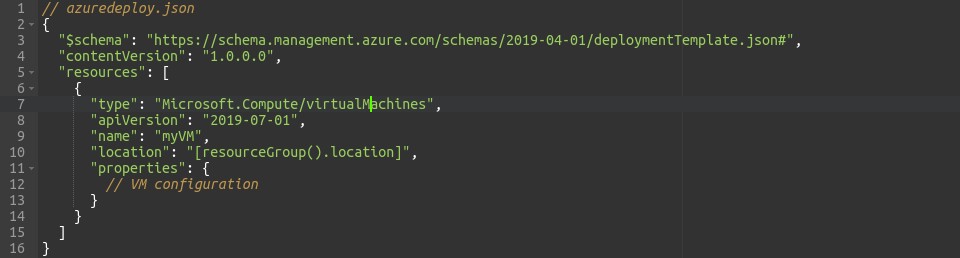
- azuredeploy.json: This is an Azure Resource Manager (ARM) template written in JSON format.
- Microsoft.Compute/virtualMachines: Specifies the type of Azure resource being provisioned (in this case, a virtual machine).
- name: Defines the name of the virtual machine resource.
- location: Specifies the Azure region where the resource will be deployed.
- properties: Contains the configuration details for the virtual machine, such as its size, OS image, and network settings.
3. Application Code in GitOps Pipelines
GitOps pipelines automate the process of building, testing, and deploying application code using CI/CD practices. Continuous Integration (CI) involves automatically building and testing the application whenever changes are pushed to the Git repository. Continuous Deployment (CD) automates the deployment of the application to target environments, ensuring rapid and reliable delivery of updates. Within a GitOps workflow, these processes are orchestrated based on triggers from Git repositories, enabling seamless integration of application changes.
Example of a CI/CD pipeline using Azure DevOps YAML pipeline for .NET application:
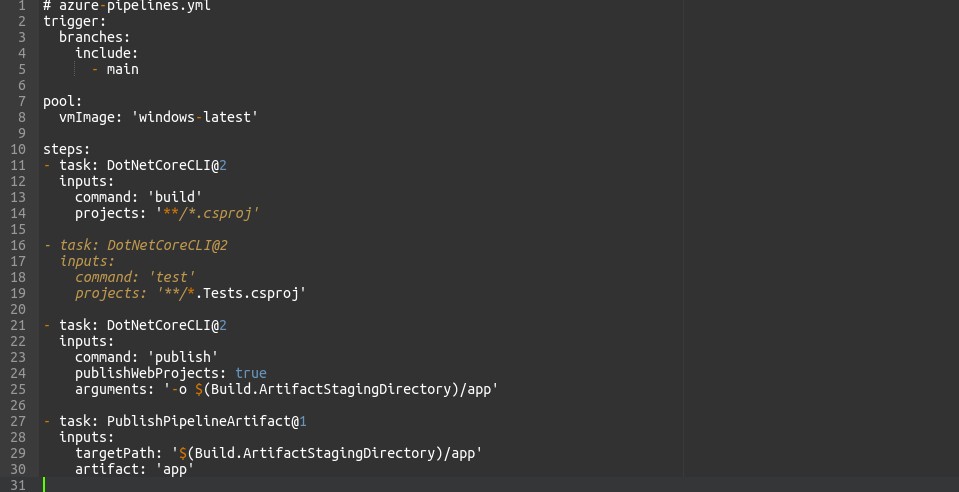
- azure-pipelines.yml: This is a YAML file defining a CI/CD pipeline using Azure DevOps.
- trigger: Specifies the conditions under which the pipeline will be triggered (in this case, on commits to the “main” branch).
- steps: Defines the sequence of tasks to be executed in the pipeline.
- DotNetCoreCLI@2: This task invokes the .NET Core CLI to perform various actions such as building, testing, and publishing the application.
- publishWebProjects: Indicates whether to publish web projects during the build process.
- PublishPipelineArtifact@1: Publishes the build artifacts (in this case, the published application) as a pipeline artifact for later stages.
4. Declarative Configuration Management
Declarative configuration management involves defining the desired state of both application and infrastructure components using configuration files. These files specify the configuration parameters and dependencies required for the system to function correctly. In GitOps, configuration files are stored alongside code in Git repositories, allowing changes to be tracked and applied consistently across environments. This approach ensures that the system’s configuration remains in sync with the desired state defined in the repository.
Example of declarative configuration for a .NET application in Kubernetes:
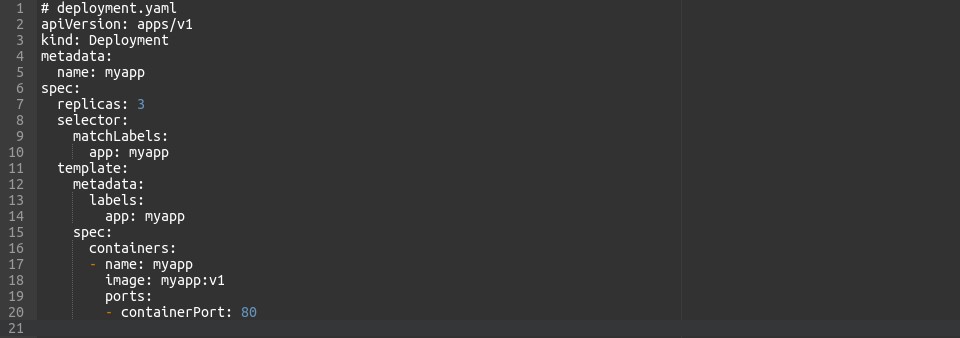
- deployment.yaml: This is a Kubernetes deployment manifest written in YAML format.
- apiVersion: Specifies the Kubernetes API version being used.
- kind: Indicates the type of Kubernetes resource being defined (in this case, a Deployment).
- spec: Contains the desired state configuration for the deployment, including the number of replicas, pod template specifications, and container configurations.
Implementing GitOps Practices
1. GitOps Tools and Frameworks for .NET
GitOps tools like Flux and Argo CD provide automation and orchestration capabilities for .NET development. These tools integrate with Git repositories and Kubernetes clusters to automate the deployment and synchronization of application and infrastructure changes. They enable developers to define deployment pipelines, manage configurations, and ensure the consistency of the system across environments.
Example of Flux configuration for GitOps deployments:
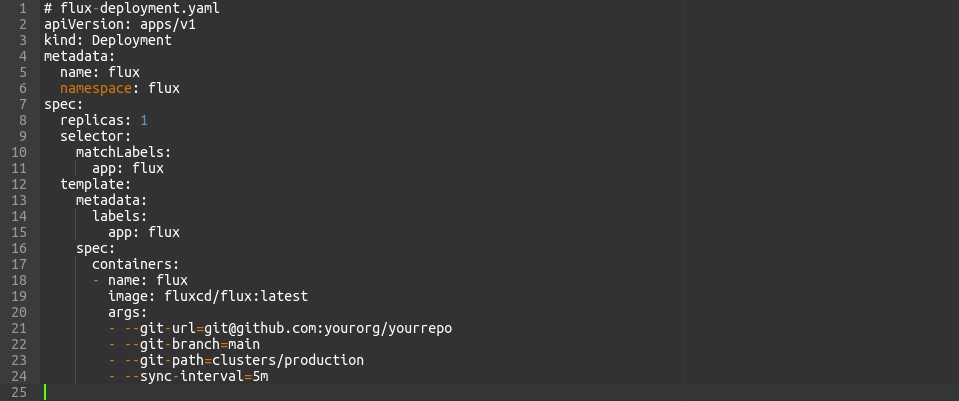
- flux-deployment.yaml: This YAML file defines a Kubernetes Deployment resource for Flux, a GitOps tool.
- apiVersion: Specifies the Kubernetes API version.
- kind: Indicates the type of Kubernetes resource (Deployment).
- spec: Contains the configuration for the Flux deployment, including the number of replicas and container specifications.
- args: Specifies the arguments passed to the Flux container, such as the Git repository URL, branch, path, and synchronization interval.
2. GitOps Pipelines for .NET Applications
Setting up GitOps pipelines for .NET applications involves configuring CI/CD workflows to automate the build, test, and deployment processes. CI pipelines compile the application code, run tests, and produce artifacts for deployment. CD pipelines deploy these artifacts to target environments, applying configuration changes as needed. GitOps tools orchestrate these pipelines based on triggers from Git repositories, ensuring that changes are propagated automatically and consistently.
Configuration of Argo CD for deploying .NET applications:
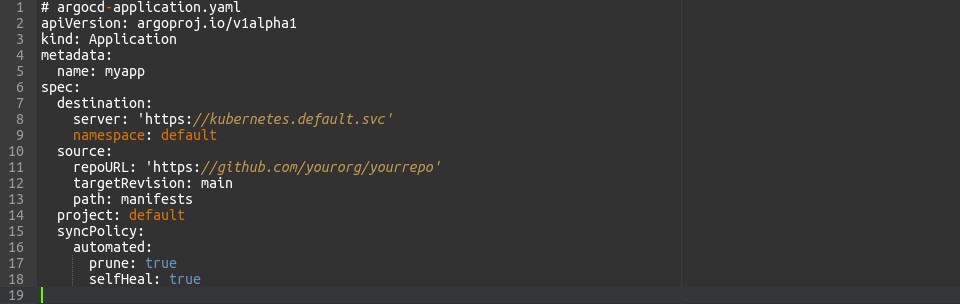
- argo-cd-application.yaml: This YAML file defines an Argo CD Application resource for deploying a .NET application.
- apiVersion: Specifies the Argo CD API version.
- kind: Indicates the type of Argo CD resource (Application).
- spec: Contains the configuration for the application deployment, including the source repository URL, target revision, path, destination namespace, and sync policy.
3. Managing Environments with GitOps
GitOps practices extend to managing multiple environments, such as development, staging, and production. Configuration files and deployment manifests are versioned and stored in Git repositories, allowing environment-specific configurations to be managed alongside code. GitOps tools facilitate the promotion of changes across environments, ensuring that updates are applied consistently and reliably.
Advantages and Best Practices
Embracing GitOps practices in .NET development offers several advantages, including improved collaboration, consistency, and traceability. By storing all code and configuration changes in Git repositories, teams can collaborate effectively and track the history of changes over time. Automation and declarative configuration management ensure that deployments are consistent and repeatable across environments. Best practices for structuring Git repositories, defining workflows, and managing changes help ensure the success of GitOps implementations.
Conclusion:
In conclusion, GitOps provides a robust framework for managing infrastructure and application code together in .NET development projects. By leveraging Git as the single source of truth and adopting automation and declarative configuration management practices, .NET developers can streamline their development workflows and deliver software updates more efficiently. Embracing GitOps principles is a valuable step towards achieving greater reliability and scalability in .NET projects.