


This blog offers insights into Seamless Integration: Report Portal in CI/CD Pipelines.
In the world of software development, where agility is paramount, Continuous Integration and Continuous Deployment (CI/CD) pipelines have become indispensable. These pipelines automate the entire process, from coding to testing to deploying the final product.
However, managing testing results can be daunting. Enter Report Portal, Seamless Integration: Report Portal in CI/CD Pipelines. With its intuitive interface and powerful analytics, Report Portal ensures clear insights into every testing stage, enabling quick issue spotting and resolution without disrupting workflow. This integration streamlines testing, enhances visibility, and drives continuous improvement in software quality.
Benefits of Integration with CI/CD Pipelines
Integrating Report Portal into CI/CD pipelines offers several benefits:
1. Real-time Visibility:
Integrating Report Portal into GitHub Actions brings real-time visibility to test execution results within your automated CI/CD pipeline. This means stakeholders can swiftly spot issues, monitor progress, and use data to guide decisions, ensuring top-notch software quality.
2. Centralized Reporting:
Report Portal acts as the central repository for all test results, offering a single source of truth for all testing endeavours. With integration into GitHub Actions, test results are seamlessly captured and stored in Report Portal, removing the necessity for manual reporting and data collection.
3. Streamlined Workflow:
Seamless integration allows teams to streamline their testing workflow by automating both reporting and analysis. This not only reduces manual effort but also minimizes errors and speeds up the feedback loop. Consequently, teams can deliver high-quality software more efficiently.
4. Continuous Improvement:
By leveraging Report Portal’s powerful analytics capabilities, teams can identify trends, patterns, and areas for improvement in the testing process. This enables teams to drive continuous improvement in software quality by optimizing testing practices and addressing issues proactively.
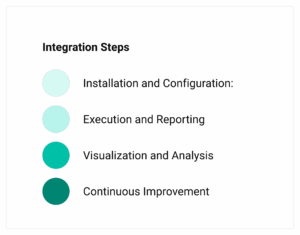
Integration Steps
-
Installation and Configuration:
- Set up and configure Report Portal instance according to your organization’s requirements.
- Define projects, users, and access permissions within Report Portal for proper data management and security.
- Configure authentication credentials and endpoints in your CI/CD pipeline scripts to enable communication with Report Portal.
-
Execution and Reporting:
- Define test suites and scenarios in your CI/CD pipeline scripts using preferred testing frameworks and tools.
- Execute tests as part of your CI/CD pipeline, capturing results in real-time.
- Report test results to Report Portal automatically upon test execution using dedicated plugins or integrations.
-
Visualization and Analysis:
- Utilize Report Portal’s visualization and analysis capabilities to gain insights into testing efforts.
- Customize dashboards to display key metrics, trends, and performance indicators relevant to your project.
- Use widgets, charts, and graphs to visualize test pass rates, failure distributions, and execution timelines.
- Implement filtering and grouping mechanisms to categorize test results based on attributes like test suites, types, or environments.
-
Continuous Improvement:
- Foster a culture of continuous improvement by making test reports and insights accessible to all team members.
- Utilize Report Portal’s collaborative features to facilitate discussions and action items based on test results.
- Regularly review and refine CI/CD pipeline scripts and Report Portal configurations to adapt to changing project requirements and best practices.
Below is an example YAML file that you can use to configure a GitHub Actions workflow for running tests and reporting results to Report Portal.
name: Run Tests and Report Results to Report Portal
on: [push]
jobs:
test-and-report:
runs-on: ubuntu-lateststeps:
– name: Checkout code
uses: actions/checkout@v2– name: Set up JDK
uses: actions/setup-java@v2
with:
java-version: ’11’– name: Build with Maven
run: mvn -B clean package– name: Run Tests
run: mvn -B test– name: Report Test Results to Report Portal
uses: reportportal/reportportal/github-action@v3
with:
endpoint: ${{ secrets.REPORT_PORTAL_ENDPOINT }}
uuid: ${{ secrets.REPORT_PORTAL_UUID }}
project: ‘YourProjectName’
launch-name: ‘YourLaunchName’
tags: ‘YourTags’
- The workflow is triggered on every push event to the repository (on: [push]).
- It defines a job named test-and-report that runs on the latest version of Ubuntu.
- The job consists of several steps:
- Checkout code from the repository.
- Set up Java JDK version 11.
- Build the project using Maven.
- Run tests using Maven.
- Report test results to Report Portal using the Report Portal GitHub Action. Ensure you replace ‘YourProjectName’, ‘YourLaunchName’, and ‘YourTags’ with appropriate values for your Report Portal configuration.
- The Report Portal GitHub Action requires the REPORT_PORTAL_ENDPOINT and REPORT_PORTAL_UUID secrets to be defined in your GitHub repository settings. These secrets should contain the Report Portal endpoint URL and your Report Portal UUID, respectively.
Make sure to customize the YAML file according to your specific project requirements, such as adjusting the build and test commands, specifying the Report Portal project name, launch name, and tags, and configuring additional workflow steps as needed.
Benefits of Integration
- Real-time Visibility: Get instant insight into test execution results during automated deployment.
- Centralized Reporting: Consolidate test reporting and analysis, eliminating manual data collection.
- Streamlined Workflows: Simplify testing processes for quicker feedback and more efficient software delivery.
- Continuous Improvement: Enhance software quality by spotting trends and areas for optimization in testing.
Conclusion:
Integrating Report Portal seamlessly into CI/CD pipelines empowers development teams to enhance visibility, streamline workflows, and drive continuous improvement in software quality. By leveraging the capabilities of both tools, teams can automate test reporting and analysis, gain real-time insights into test execution results, and make data-driven decisions to ensure software quality. With Report Portal serving as a central hub for test reporting and analysis, teams can optimize their testing efforts, accelerate release cycles, and deliver high-quality software with confidence.