Serverless Test Automation
Serverless test automation, as the name suggests, involves running automated tests without the need to manage servers or infrastructure. Instead of setting up and maintaining test environments, teams can focus on writing test scripts and executing them on a serverless platform. This approach offers greater scalability, flexibility, and cost-efficiency compared to traditional automation methods.
Users prepurchase units of capacity under a conventional Infrastructure-as-a-Service (IaaS) cloud computing architecture, which means you pay a public cloud provider for always-on server components to operate your apps. With serverless architecture, by contrast, apps are launched only as needed. When an event triggers app code to run, the public cloud provider dynamically allocates resources for that code.
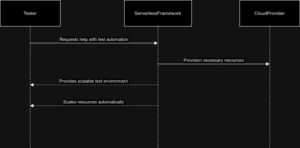
Routine duties including operating system and file system maintenance, capacity management, load balancing, scaling, logging, and monitoring are all delegated to a cloud services provider when using serverless computing.
Pros and Cons of Serverless Test Automation
Pros
- Serverless orchestration ensures the correct sequence of execution for serverless functions within an application.
- Automation tools streamline deployment, scaling, and management of serverless functions, enhancing efficiency.
- Any distributed system that responds to events or handles workloads flexibly on demand can benefit from serverless design.
Cons
- Serverless architecture may not be suitable for applications that require continuous or long-running tasks, as serverless functions have execution time limits.
- Dependency on cloud providers for server management may lead to vendor lock-in and limited control over underlying infrastructure.
- Monitoring and debugging serverless applications can be challenging due to the complex nature of distributed systems and event-driven architectures.
Cloud Provider role in Serverless Computing
A cloud provider using a serverless paradigm manages actual servers and dynamically distributes their resources on behalf of customers who can push code directly into production. Serverless computing offerings typically fall into two groups, Backend-as-a-Service (BaaS) and Function-as-a-Service (FaaS). BaaS gives developers access to a variety of third-party services and apps.
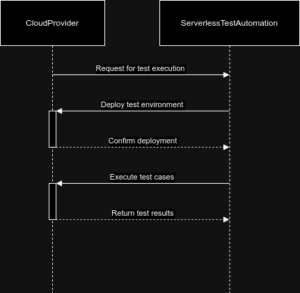
For instance, a cloud-provider may offer authentication services, extra encryption, cloud-accessible databases, and high-fidelity usage data. With BaaS, serverless functions are usually called through application programming interfaces (APIs). Every major public cloud provider offers at least one FaaS product. These comprise, among others, Google Cloud with various services, Microsoft Azure with Azure Functions, IBM Cloud with IBM Cloud Functions, and Amazon Web Services with AWS Lambda.
Approaches to Testing Serverless Applications
- Identify the challenges in testing serverless applications based on the provided information. These include difficulties in replicating a backend environment in the local environment, as well as challenges in implementing integration tests due to the dependency on infrastructure services from the vendor.
- Propose potential solutions to address the challenges. For replicating a backend environment in the local environment, consider utilizing tools or services that allow for better simulation of serverless architecture. For integration testing, explore ways to mock or simulate the vendor’s infrastructure services to create a controlled testing environment.
- Discuss the importance of testing in the context of serverless applications. Highlight how thorough testing, including unit testing and integration testing, is crucial for ensuring the reliability, performance, and security of serverless applications, despite the challenges posed by their architecture.
- Consider the implications of testing approaches on the overall development and deployment process of serverless applications. Emphasize the need for a robust testing strategy and the integration of testing processes into the development lifecycle to mitigate potential issues associated with serverless architecture.
- Conclude by emphasizing the significance of overcoming testing challenges in serverless applications to ensure the successful deployment and operation of cloud-based applications in a serverless environment. Suggest continuous improvement and adaptation of testing practices to align with the unique characteristics of serverless architecture.
Test Automation for Different Types of Serverless Functions
Test automation plays a crucial role in verifying the functionality, scalability, and resilience of serverless applications. In this section, we will explore test automation strategies tailored for different types of serverless functions, including HTTP-triggered functions, event-driven functions, and scheduled functions.
HTTP-Triggered Functions
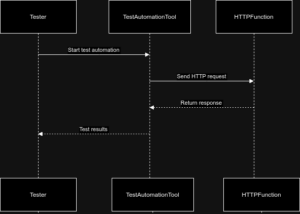
- HTTP-triggered functions are invoked by HTTP requests, making them suitable for building API endpoints and handling webhooks. Testing these functions requires validating their behaviour in response to various HTTP methods, headers, query parameters, and payloads.
- Unit Testing: Write unit tests to verify the logic and functionality of individual functions. Tools like Jest, Mocha, or Pytest can be utilized for writing and executing unit tests.
//Sample Implementation using Jest
const { handler } = require('./index');
const { expect, test } = require('@jest/globals');

test('returns greeting with provided name', async () => {
const event = { queryStringParameters: { name: 'Alice' } };
const result = await handler(event);
expect(result.statusCode).toBe(200);
expect(JSON.parse(result.body).message).toBe('Hello, Alice!');
});

test('returns greeting with default name', async () => {
const event = { queryStringParameters: {} };
const result = await handler(event);
expect(result.statusCode).toBe(200);
expect(JSON.parse(result.body).message).toBe('Hello, World!');
});
-
- Integration Testing: Perform integration tests to validate the interaction between the HTTP endpoint and its dependencies, such as databases or external services. Tools like Postman can automate the execution of API requests and assertions.
- Load Testing: Simulate realistic loads on the HTTP endpoint to assess its scalability and performance under different levels of traffic. Tools like Apache JMeter or Gatling can be used to automate load tests and analyze the system’s response times and throughput.
//Sample Implementation using K6
import http from 'k6/http';
import { check, sleep } from 'k6';
import { Counter, Rate } from 'k6/metrics';

// Custom metrics
let ErrorRate = new Rate('errors');
let RequestCount = new Counter('request_count');

export let options = {
vus: 10, // Number of virtual users
duration: '30s', // Duration of the test
thresholds: {
errors: ['rate<0.01'], // Error rate should be less than 1%
http_req_duration: ['p(95)<500'], // 95% of requests should be below 500ms
},
};

export default function () {
let res = http.get('https://<your-api-endpoint>?name=Alice');
RequestCount.add(1);

let checkRes = check(res, {
'is status 200': (r) => r.status === 200,
'body contains Hello': (r) => r.body.indexOf('Hello') !== -1,
});

// Track failures
if (!checkRes) {
ErrorRate.add(1);
}

sleep(1);
}
-
- Security Testing: Conduct security tests to identify vulnerabilities such as injection attacks, XSS, CSRF, or unauthorized access. Tools like OWASP ZAP or Burp Suite can automate security scans and penetration tests against the HTTP endpoint.
//Sample Implementation using OWASP ZAP API
const ZAPv2 = require('zaproxy');

const zapOptions = {
apiKey: '<your-api-key>',
proxy: 'http://localhost:8080'
};

const zap = new ZAPv2(zapOptions);

const target = 'https://<your-api-endpoint>?name=Alice';

async function runZapScan() {
try {
// Spider the target
console.log(`Spidering target ${target}`);
const spiderId = await zap.spider.scan(target);
console.log(`Started spider with ID ${spiderId}`);

let spiderStatus;
do {
spiderStatus = await zap.spider.status(spiderId);
console.log(`Spider progress: ${spiderStatus}%`);
await new Promise(resolve => setTimeout(resolve, 2000));
} while (spiderStatus < 100);
console.log('Spider completed');

// Active scan the target
console.log(`Scanning target ${target}`);
const scanId = await zap.ascan.scan(target);
console.log(`Started scan with ID ${scanId}`);

let scanStatus;
do {
scanStatus = await zap.ascan.status(scanId);
console.log(`Scan progress: ${scanStatus}%`);
await new Promise(resolve => setTimeout(resolve, 5000));
} while (scanStatus < 100);
console.log('Scan completed');

// Print alerts
const alerts = await zap.core.alerts();
alerts.forEach(alert => {
console.log(`Alert: ${alert.alert}, Risk: ${alert.risk}`);
});
} catch (error) {
console.error('Error running ZAP scan:', error);
}
}

runZapScan();
Event-Driven Functions
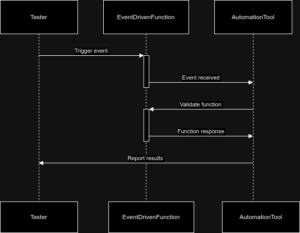
- Event-driven functions are triggered by events from various sources such as cloud storage, message queues, or streaming platforms. Testing these functions involves validating their behaviour in response to different types of events and payloads.
- Event Simulation: Simulate events from the trigger source to test the function’s behaviour under different scenarios. Cloud providers offer tools like AWS EventBridge or Google Cloud Pub/Sub for simulating events and triggering functions.
- Mocking Dependencies: Mock external dependencies such as cloud storage or message queues to isolate the function under test and control the input data. Libraries like moto for AWS or gcloud-node-tester for Google Cloud Platform can be used to mock services during testing.
- End-to-End Testing: Perform end-to-end tests to validate the entire workflow from event generation to function invocation and downstream processing. Frameworks like AWS Step Functions or Google Cloud Workflows can orchestrate and automate end-to-end tests across multiple serverless components.
- Chaos Testing: Introduce chaos engineering principles to test the resilience of event-driven functions against failures and unexpected conditions. Tools like Chaos Monkey or Gremlin can automate chaos experiments by injecting faults and measuring system resilience.
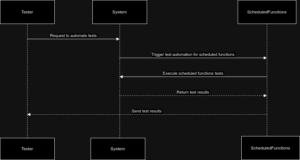
Scheduled Functions
- Scheduled functions are executed at predefined intervals using crone expressions or similar scheduling mechanisms. Testing these functions involves verifying their execution logic, handling of time-sensitive operations, and error handling.
- Time-Based Testing: Test the function’s behaviour at different points in time to ensure correctness and predictability. Libraries like sinon.js can mock the system clock and control the passage of time during tests.
- Error Handling Testing: Validate the function’s error handling mechanisms by simulating failures and edge cases during scheduled executions. Tools like AWS CloudWatch Events or Google Cloud Scheduler can trigger scheduled executions with custom payloads for error injection.
- Resource Cleanup Testing: Ensure that scheduled functions release resources and clean up after execution to prevent resource leaks and maintain system stability. Test automation frameworks like Terraform or AWS CDK can provision and manage test environments for scheduled function testing.
- Resilience Testing: Assess the resilience of scheduled functions against failures such as network issues, resource constraints, or temporary outages. Tools like Chaos Toolkit or Pulumi can automate resilience tests by introducing failures and evaluating system recovery mechanisms.