



Introduction:
Kubernetes has become the standard for container orchestration, enabling teams to deploy, scale, and manage containerized applications efficiently. Jenkins, on the other hand, is a popular automation server that helps automate the software development process, including building, testing, and deploying applications. In this blog post, we will explore how to integrate Jenkins with Minikube to streamline Kubernetes deployment, allowing for faster and more reliable application delivery.
Why Jenkins and Minikube?
Jenkins provides powerful automation capabilities, allowing you to create CI/CD pipelines to automate the entire software delivery process. Minikube, on the other hand, is a tool that allows you to set up a local Kubernetes cluster, making it easy to develop and test Kubernetes applications locally. Integrating Jenkins with Minikube allows you to container orchestration and automate the deployment of your Kubernetes applications, from building Docker images to deploying them to your local Kubernetes cluster.
Prerequisites:
- Jenkins installed and configured
- Minikube installed
- Basic understanding of Jenkins and Kubernetes
Step 1: Configure Jenkins with Minikube:
- Install the Kubernetes plugin in Jenkins:
- Go to Jenkins dashboard.
- Click on “Manage Jenkins” > “Manage Plugins”.
- Search for “Kubernetes” and install the plugin.
- Configure Kubernetes cloud in Jenkins:
- Go to Jenkins dashboard.
- Click on “Manage Jenkins” > “Configure System”.
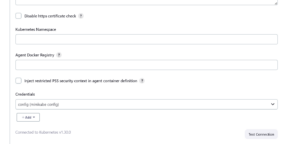
- Scroll down to the “Cloud” section and click on “Add a new cloud” > “Kubernetes”.
- Enter a name for the Kubernetes cloud.
- Click on Add under Credentials
- Select “Secret File” in kind and choose your config file.
- Set an ID for the credential
- Click on “Test Connection” to verify the connection to Minikube.
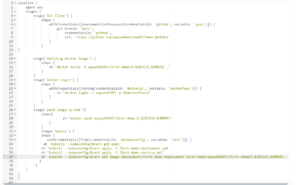
Step 2: Create a Jenkins Pipeline for Kubernetes Deployment:
Now, let’s create a Jenkins pipeline to deploy a sample application to Minikube.
Conclusion:
Integrating Jenkins with Minikube streamlines the deployment of Kubernetes applications, allowing for faster and more reliable application delivery. By automating the deployment process with Jenkins pipelines, you can ensure consistent and repeatable deployments to your local Kubernetes cluster. This integration empowers development teams to iterate quickly and deliver high-quality applications with confidence.