

Introduction:
In the dynamic world of containerized applications, ensuring the health and availability of your services is crucial. Kubernetes, the leading container orchestration platform, provides a robust mechanism for this through probes. Probes are essentially diagnostic tools used by Kubernetes to determine the health and availability of a container. Among the different types of probes, the most commonly used ones are Liveness, Readiness, and Startup probes. Let’s delve deeper into each of these probes, understand their purpose, and explore how they differ from each other.
What are Probes in Kubernetes?
Probes in Kubernetes are mechanisms used to perform health checks on containers running within pods. They help Kubernetes determine whether a container is ready to serve traffic, needs to be restarted, or needs to be removed from service. By defining probes, you provide Kubernetes with the necessary information to manage the lifecycle of your containers effectively.
Liveness Probe:
The Liveness Probe is used to determine if a container is still running as expected. It checks whether the application within the container is responsive and functioning properly. If the Liveness Probe fails, Kubernetes restarts the container to try and restore it to a healthy state. This probe ensures that unhealthy containers are terminated and replaced with new, healthy instances.
Liveness probes can be configured to use one of the following mechanisms:
- HTTP GET Probe: Kubernetes sends an HTTP GET request to the specified path on the container. If the response has a status code greater than or equal to 200 and less than 400, the probe is considered successful.
- TCP Socket Probe: Kubernetes attempts to establish a TCP connection to the specified port on the container. If the connection is successful, the probe is considered successful.
- Exec Probe: Kubernetes executes a command inside the container, and if the command exits with a status code of 0, the probe is considered successful.
Readiness Probe:
While the Liveness Probe checks if a container is running, the Readiness Probe checks if a container is ready to serve requests. It indicates whether the container is prepared to accept traffic. If the Readiness Probe fails, Kubernetes stops sending traffic to the container until it passes the probe again. The readiness probe is used to determine if a container is ready to start receiving traffic. Kubernetes uses this probe to control which Pods are added to the Service load balancer. If a container is not ready, it is removed from the Service load balancer until it becomes ready.
Readiness probes use the same mechanisms as liveness probes (HTTP GET, TCP Socket, or Exec). However, the readiness probe is designed to catch situations where the container is running but not yet ready to serve traffic, such as when the application is still initializing or loading data.
Startup Probe:
Startup Probe is a relatively new addition to Kubernetes, introduced in version 1.16. Unlike Liveness and Readiness Probes, which run periodically after the container is up and running, the Startup Probe is used to determine when a container is ready to receive traffic during its initial startup phase. It helps delay the startup of other containers in the pod until the specified conditions are met, ensuring that only fully initialized containers serve traffic. The startup probe works similarly to the liveness probe, but it has a different failure policy. If the startup probe fails, Kubernetes will not restart the container, but it will keep executing the probe until it succeeds or the container crashes.
Comparison:
| Probe | Purpose | Behavior on Failure |
|---|---|---|
| Liveness Probe | Checks if the container is still alive | Restarts the container |
| Readiness Probe | Checks if the container is ready to serve traffic | Stops sending traffic to the container |
| Startup Probe | Checks if the container is ready during its initial startup phase | Delays startup of other containers in the pod |
Demo: Getting Started Using probes in Kubernetes
Here’s how we can define each probe in a Kubernetes Pod YAML configuration:
apiVersion: v1
kind: Pod
metadata:
name: myapp
spec:
containers:
- name: container01
image: nginx:latest
livenessProbe:
httpGet:
path: /healthz
port: 8080
initialDelaySeconds: 15
periodSeconds: 10
readinessProbe:
httpGet:
path: /ready
port: 8080
initialDelaySeconds: 5
periodSeconds: 10
startupProbe:
httpGet:
path: /startup
port: 8080
initialDelaySeconds: 10
periodSeconds: 30
initialDelaySeconds: This parameter defines the number of seconds Kubernetes should wait after the container starts before performing the first probe. It allows time for the application within the container to initialize fully before health checks begin.periodSeconds: This parameter specifies the frequency at which Kubernetes should perform the probe after the initial delay. It indicates how often Kubernetes should check the health of the container.
Now apply this yaml file using kubectl apply command. This command tells Kubernetes to create or update the resources defined in the YAML file. Kubernetes will start performing the Liveness, Readiness, and Startup probes as configured in the YAML file. You can monitor the probe results using kubectl describe pod or kubectl logs commands to see if the probes are succeeding or failing.
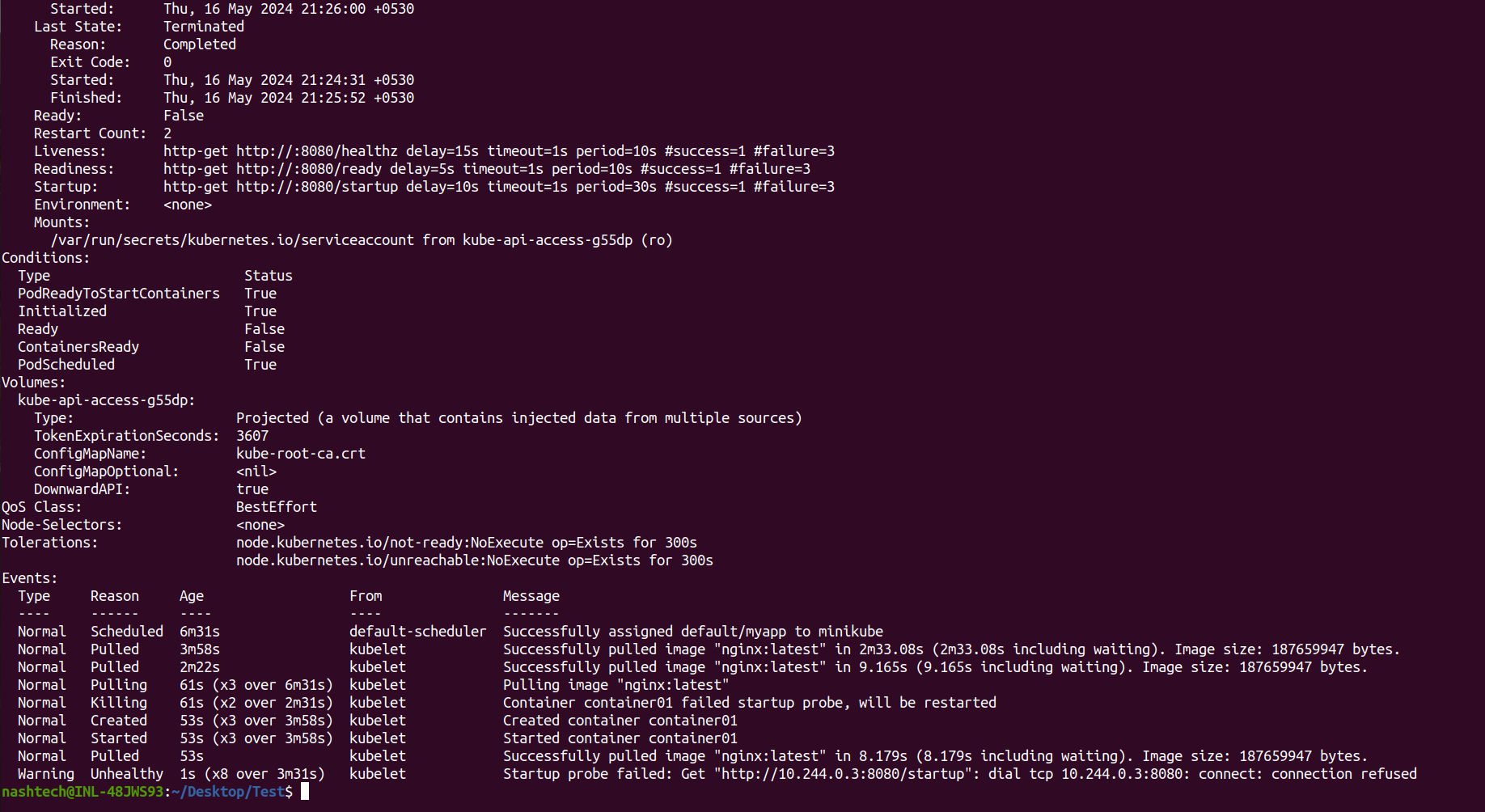
So This indicates that the container was unable to start up and serve the /startup endpoint on port 8080 within the configured startup probe period. The startup probe is used to check if a container has started successfully, especially for containers that take a long time to initialize. In this case, Kubernetes kept restarting the container until it eventually passed the startup probe and started successfully. The warning suggests there may be an issue with the application or its configuration that prevents it from serving the /startup endpoint initially, even though it eventually starts up correctly after retries.
Conclusion:
Kubernetes liveness, readiness, and startup probes are essential for ensuring application health and reliability. Liveness probes restart unhealthy containers, readiness probes control traffic routing, and startup probes prevent premature restarts during long startups. Properly configuring these probes improves resilience and availability. However, careful design and testing are crucial to avoid issues like incorrect health assessments or missing traffic. Leveraging probes effectively can create robust, self-healing applications in Kubernetes clusters.
